
1. Okwu mmalite
Thank you for choosing the Marada M75 Racing Wheel Monitor Stand. This stand is designed to provide a stable and immersive display solution for your racing simulator cockpit. It is compatible with various racing setups and supports monitors up to 60 inches. This manual provides essential information for proper assembly, operation, and maintenance to ensure a safe and enjoyable experience.
2. Ozi nchekwa
- Read all instructions carefully before attempting assembly or use.
- Debe ihe nkwakọ ngwaahịa niile n'ebe ụmụaka nọ ka ọ ghara igbochi ihe egwu egwu.
- Ensure all fasteners, bolts, and connections are securely tightened before placing a monitor on the stand and before each use.
- Agafela ikike ịdị arọ kacha nke 65 lbs (29.5 n'arọ) for the monitor.
- Use this monitor stand only with compatible racing simulator cockpits as specified by Marada.
- Place the stand on a flat, stable, and level surface to prevent tipping.
- Avoid placing the stand in high-traffic areas where it could be accidentally bumped.
3. Ihe ngwugwu
Biko hụ na ihe niile dị tupu ịmalite njikọta. Ngwugwu ahụ gụnyere:
- Main monitor stand frame (vertical support bars, horizontal monitor mounting bars)
- Monitor mounting brackets (VESA compatible)
- Base feet for stability
- Adjustable bolts, nuts, and washers for assembly and securing the monitor
- Rubber feet for enhanced grip

Image: The Marada M75 Monitor Stand shown as a standalone unit, illustrating the main components included. This product includes only the monitor stand; racing seats, game stands, joysticks, pedals, shifters, and displays are sold separately.
4. Ntọala na Mgbakọ
Follow these steps to assemble your Marada M75 Racing Wheel Monitor Stand:
- Wepu akụrụngwa: Carefully remove all parts from the packaging. Refer to the package contents list to ensure all items are present.
- Attach Base Feet: Securely attach the base feet to the bottom of the vertical support bars using the provided bolts and nuts. Ensure they are oriented correctly for maximum stability.
- Connect Vertical and Horizontal Bars: Assemble the vertical support bars and connect them to the horizontal monitor mounting bars. The design allows for adjustment of height and width.
- Adjust VESA Brackets: Adjust the position of the monitor mounting brackets (VESA plates) on the horizontal bars to match your monitor's VESA hole pattern. The stand supports various VESA patterns (e.g., 100x100mm to 500x400mm).

Image: Diagram illustrating VESA compatibility ranges (W x H) and how the monitor mounting brackets can be adjusted horizontally and vertically to fit different monitor sizes and VESA patterns.
- Nlebaanya Ugwu: Carefully attach your monitor to the VESA mounting brackets using the appropriate screws provided with your monitor or the stand. Ensure the monitor is centered and securely fastened.
- Ọnọdụ ọnọdụ: Place the assembled monitor stand in front of your racing simulator cockpit.
- Secure to Cockpit: Use the adjustable bolts to fix the monitor stand to your racing cockpit. This step is crucial for improving overall stability and preventing movement during intense gaming sessions.
- Nyocha ikpeazụ: Double-check all connections, bolts, and nuts to ensure they are tight and secure. Confirm the stand is stable and the monitor is firmly mounted before use.

Image: The Marada M75 Monitor Stand shown integrated with a racing simulator cockpit, demonstrating its intended use and how it complements a full setup.
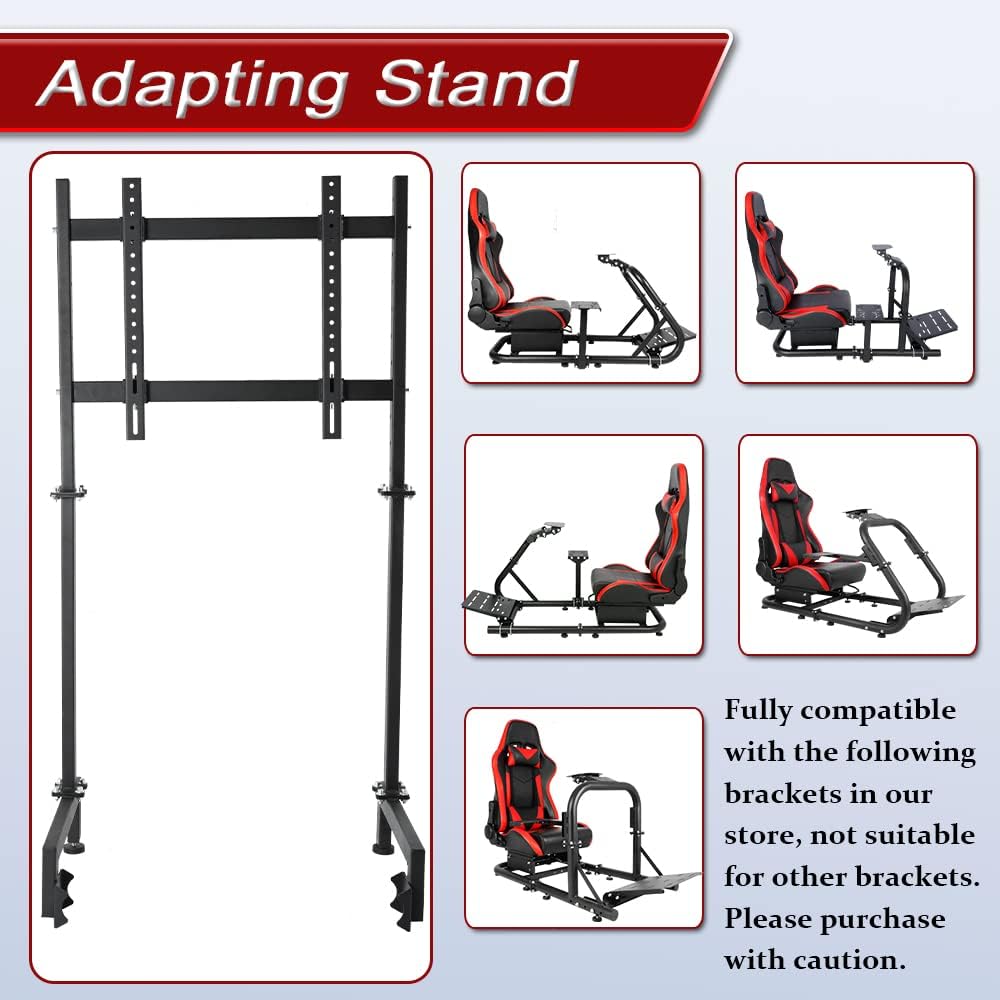
Image: The Marada M75 Monitor Stand displayed alongside various Marada racing simulator cockpits, highlighting its compatibility with other Marada brand products. This stand is designed for Marada round tube racing steering wheel brackets.
5. Ntuziaka ọrụ
Once the Marada M75 Monitor Stand is fully assembled and securely attached to your racing cockpit, it provides a fixed and stable platform for your display. No specific operational steps are required beyond ensuring the monitor is properly mounted and powered on. The stand's primary function is to hold your monitor in an optimal viewing position for an immersive racing experience.
6. Nlekọta
- Nlele anya mgbe niile: Periodically inspect all bolts, nuts, and connections to ensure they remain tight. Vibrations from gaming can sometimes loosen fasteners.
- Nhicha: Clean the stand with a soft, dry cloth. For stubborn dirt, a slightly damp cloth can be used, followed by drying. Avoid using abrasive cleaners, solvents, or harsh chemicals, as these can damage the finish.
- Nyocha mmebi: Regularly check the stand for any signs of wear, bending, cracks, or other damage. If any damage is found, discontinue use immediately and contact customer support for assistance.
7. Nchọpụta nsogbu
| Okwu | Ihe kpatara/ Ngwọta nwere ike ime |
|---|---|
| Stand is unstable or wobbles. |
|
| Monitor does not fit the mounting brackets. |
|
| Akụkụ ndị na-efu efu n'oge ịkụ ọkpọ. |
|
8. Nkọwapụta
| Njirimara | Nkọwa |
|---|---|
| Ụdị | Marada |
| Nọmba nlereanya | M75 |
| Ibu Ibu | 23.2 pound (10.5 n'arọ) |
| Akụkụ ngwaahịa | 23.7 x 10 x 5.99 sentimita (60.2 x 25.4 x 15.2 cm) |
| Ihe onwunwe | Ọla (Alloy Steel) |
| Agba | Nwa |
| Ụdị nkwụnye | Ala Ugwu |
| Ụdị mmegharị | Edoziri |
| Atụmatụ pụrụ iche | Adjustable height and width |
| Ngwa dakọtara | Nyochaa, Television |
| Max Monitor Size Supported | Ruo 60 sentimita asatọ |
| Oke oke ibu | 65 lbs (29.5 n'arọ) |
| Ndakọrịta VESA | 100x100mm, 200x100mm, 200x200mm, 300x200mm, 300x300mm, 400x200mm, 400x300mm, 400x400mm, 500x200mm, 500x300mm, 500x400mm |

Image: Detailed diagram showing the product dimensions, including overall height (46"), horizontal bar width (19.6"), and tube diameters (vertical 0.9", horizontal 1.5").
9. Akwụkwọ ikike na nkwado
For warranty information, technical assistance, or to inquire about replacement parts, please contact Marada customer service directly through their official website or the retailer from whom you purchased this product. Please retain your purchase receipt as proof of purchase for any warranty claims.