
Okwu mmalite
Thank you for choosing the NOKLEAD Indoor Digital Hygrometer Thermometer. This device is designed to provide accurate and reliable measurements of indoor temperature and humidity, helping you maintain a comfortable and healthy living environment. Please read this manual carefully before use to ensure proper operation and to maximize the product's lifespan.
Ihe ngwugwu
- 1 x NOKLEAD Digital Hygrometer Thermometer (Model NK5275)
- 2 x AAA batrị
- 1 x Akwụkwọ ntuziaka onye ọrụ
Ngwaahịa gafereview
The NOKLEAD Digital Hygrometer Thermometer features a large, easy-to-read LCD display and intuitive controls. It provides real-time temperature and humidity readings, along with MAX/MIN records, time, and date.

Foto: Diagram illustrating key features of the NOKLEAD digital monitor: Temperature, Humidity, Switchable °C/°F, Backlight, Comfort Indicator, MAX/MIN Record, 10s Update, AAA Batteries, Large Digits.

Foto: Close-up of the large, easy-to-read digits on the thermometer's LCD screen, highlighting its clarity.
Melite
1. Ntinye batrị
- Mepee mkpuchi mkpuchi batrị n'azụ ngwaọrụ.
- Fanye batrị AAA abụọ, na-ahụ polarity ziri ezi (+/-).
- Close the battery compartment cover. The device will power on automatically.
2. Ịtọ oge na ụbọchị
- Press the 'SET' button (usually located on the side or back) to enter time/date setting mode.
- Use the '+' or '-' buttons to adjust the values (e.g., hour, minute, year, month, day).
- Press 'SET' again to confirm each setting and move to the next.
- The device supports 12-hour and 24-hour time formats.
3. Mgbanwe Okpomọkụ Ngbanwe (°C/°F)
Press the '°C/°F' button (usually located on the side or back) to toggle between Celsius and Fahrenheit temperature displays.
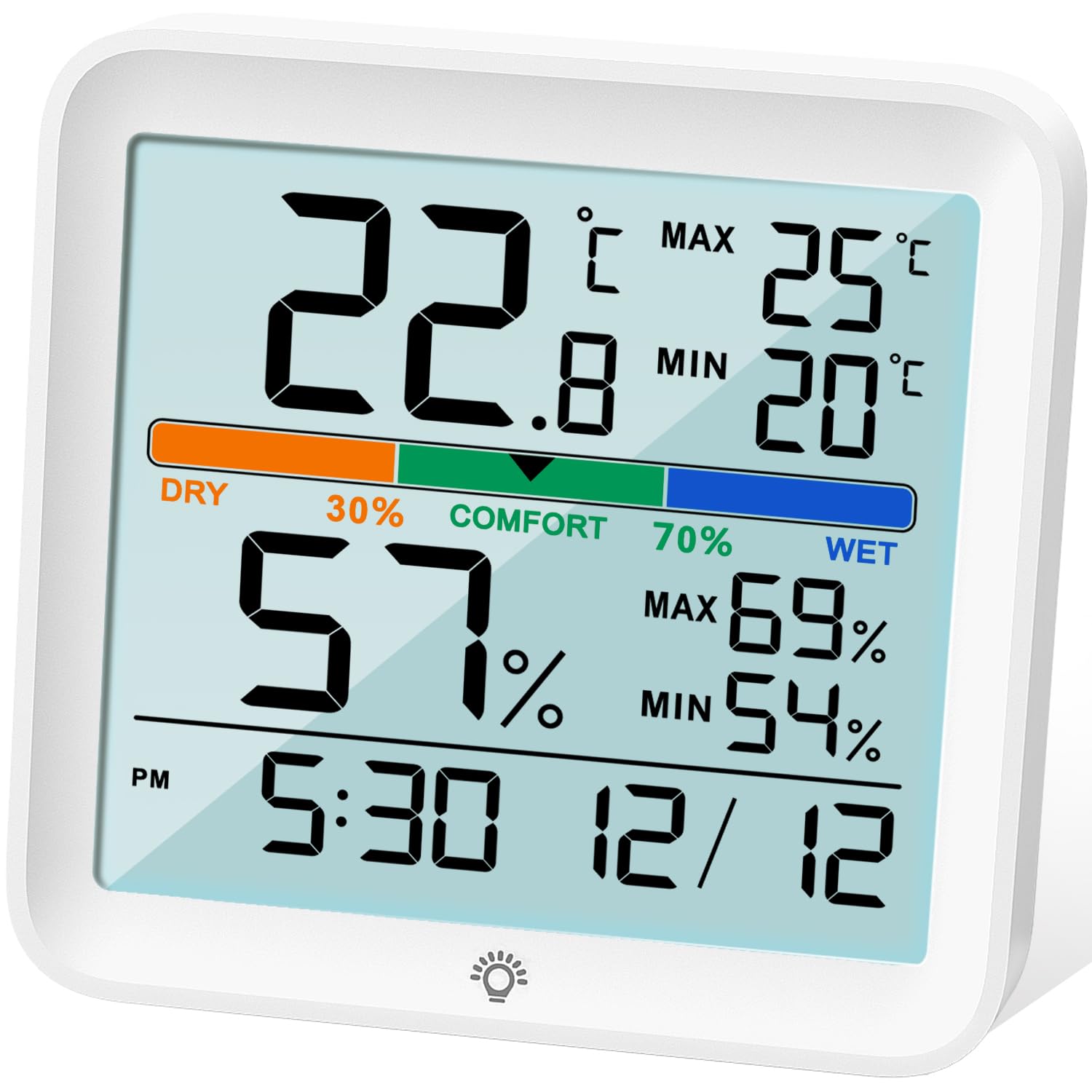
Foto: N'ihu view of the NOKLEAD Indoor Digital Hygrometer Thermometer, showing the backlit LCD display and touch button for illumination.
Ntuziaka ọrụ
1. Real-time Readings
The device continuously displays the current indoor temperature and humidity. Readings are updated approximately every 10 seconds for accurate monitoring.
2. MAX/MIN Records
The thermometer automatically records the maximum and minimum temperature and humidity values over the last 24 hours. These values are displayed on the screen.
- To reset the MAX/MIN records, long press the '°F/°C' button.

Foto: Diagram illustrating the MAX/MIN temperature and humidity records displayed on the screen and how to reset them using the °F/°C button.
3. Ihe ngosi ọkwa nkasi obi
The device features a comfort level indicator with three levels: DRY, COMFORT, and WET. This indicator helps you understand the current air quality based on humidity levels.
- Akọrọ: Iru mmiri n'okpuru 30%
- Nkasi obi: Iru mmiri dị n'etiti 30% na 70%
- Mmiri: iru mmiri karịrị 70%

Foto: The display showing the comfort level indicator (DRY, COMFORT, WET) with associated humidity ranges, and visual cues for potential health impacts of extreme conditions.
4. Ọrụ ọkụ azụ
The LCD screen has a white backlight for easy reading in low-light conditions. Touch the backlight icon on the screen once to activate it. The backlight will automatically turn off after 15 seconds.
nhazi nhazi
The device includes an enhanced calibration function to ensure accuracy. If you suspect the readings are inaccurate due to placement or environmental factors, you can calibrate the sensors.
- Nhazi ọnọdụ okpomọkụ: Adjusts temperature readings by up to ±5°C (±41°F).
- Nhazi iru mmiri: Adjusts humidity readings by up to ±10% RH.
Refer to the detailed instructions in the included paper manual for the specific steps to perform calibration, as this process typically involves a sequence of button presses.
Nhọrọ nkwụnye
The NOKLEAD Hygrometer Thermometer offers versatile placement options:
- Durable Stand: Use the integrated foldable stand to place the device on any flat surface, such as a desk, shelf, or countertop.
- oghere nghọta: Utilize the hanging hole on the back to mount the device on a wall or hook.

Foto: The thermometer displayed with its two mounting options: a durable stand for tabletop use and a hanging hole for wall mounting.
Nlekọta
- Clean the device with a soft, dry cloth. Do not use abrasive cleaners or immerse in water.
- Zere ikpughe ngwaọrụ ahụ na oke okpomọkụ, ìhè anyanwụ kpọmkwem, ma ọ bụ oke iru mmiri.
- Wepu batrị ma ọ bụrụ na agaghị eji ngwaọrụ ahụ ogologo oge iji gbochie ntapu.
- Dochie batrị mgbe ihe ngosi batrị dị ala pụtara na ngosipụta ahụ.
Nchọpụta nsogbu
| Nsogbu | Ihe nwere ike ime | Ngwọta |
|---|---|---|
| Enweghị ngosipụta ma ọ bụ obere ngosipụta | Low batteries or incorrect battery installation. | Jiri batrị AAA ọhụrụ dochie batrị ndị ahụ, hụ na ha nwere ike ịhazi polarity nke ọma. |
| Ọgụgụ na-ezighi ezi | Device placed near heat/cold sources, or sensor needs calibration. | Relocate the device to a stable environment. Perform calibration as per the manual. |
| Ìhè azụ anaghị arụ ọrụ | Low batteries or touch sensor issue. | Replace batteries. Ensure the touch area is clean and dry. |
Nkọwapụta
| Njirimara | Nkọwa |
|---|---|
| Nlereanya | NK5275 |
| Ụdị | NOKLEAD |
| Agba | Ọcha |
| Akụkụ ngwaahịa | 9.1L x 8.6H cm (3.6L x 3.4H inches) |
| Oke okpomọkụ | -9.9°C ruo 60°C (14.18°F ruo 140°F) |
| Okpomọkụ ziri ezi | ±1C |
| Oke iru mmiri | 10% RH ruo 95% RH |
| Ikike iru mmiri | ± 3% RH |
| Ọnụego mmelite | Kwa sekọnd 10 ọ bụla |
| Isi Iyi Ike | 2 x AAA Batteries (3 Volts) |
| Ụdị nkwụnye | Tabletop (stand) or Wall-mount (hanging hole) |
Akwụkwọ ikike na nkwado
NOKLEAD provides a Akwụkwọ ikike ọnwa 24 enweghị nchekasị for this product, covering manufacturing defects and malfunctions under normal use. For technical support, warranty claims, or any questions regarding your device, please contact NOKLEAD customer service through the retailer where you purchased the product or visit the official NOKLEAD websaịtị maka ozi kọntaktị.
Biko dowe ihe akaebe nke ịzụrụ ihe maka ebumnuche ikike.
Ihe ngosi ojiji
The NOKLEAD Indoor Digital Hygrometer Thermometer is suitable for a variety of indoor environments to help you monitor and maintain optimal conditions.

Foto: A collage of images demonstrating the thermometer's versatility in different indoor settings, including an office, bedroom, baby room, greenhouse, warehouse, and wine cellar.