
Roseland GE015877
Roseland Over-Ear Bluetooth Headphones User Manual
Ụdị: GE015877
Okwu mmalite
Thank you for choosing Roseland Over-Ear Bluetooth Headphones. These wireless headphones are designed to provide an optimal audio experience with comfort and convenience. Featuring soft ear cushions and an integrated microphone, they are perfect for listening to music and making calls on the go. This manual provides essential information on setting up, operating, maintaining, and troubleshooting your headphones.
Ngwaahịa gafereview

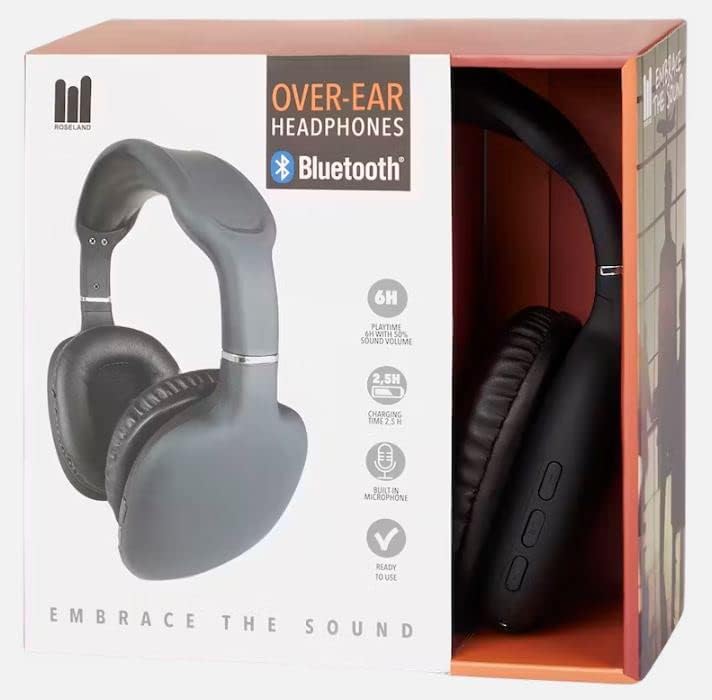
Melite
1. Ịchaji ekweisi
Before first use, fully charge your headphones. Connect the included charging cable to the charging port on the headphones and the other end to a USB power source (e.g., computer USB port, wall adapter). The charging indicator light will show the charging status. A full charge takes approximately awa 2.5.
2. Ịgbanye / gbanyụọ
- To power on: Press and hold the Power button until the indicator light flashes.
- Iji gbanyụọ ọkụ: Pịa ma jide bọtịnụ Ike ruo mgbe ọkụ ihe ngosi ahụ gbanyụrụ.
3. Njikọ Bluetooth
The Roseland headphones use Bluetooth 5.0 for stable and efficient connection.
- Gbaa mbọ hụ na agbanyụrụ ekweisi.
- Pịa ma jide bọtịnụ Ike ahụ ihe dị ka sekọnd 5-7 ruo mgbe ìhè ihe ngosi ahụ na-acha uhie uhie na acha anụnụ anụnụ n'otu aka ahụ, na-egosi ụdị njikọta.
- Na ekwentị gị ma ọ bụ ngwaọrụ ọzọ nwere Bluetooth, gaa na ntọala Bluetooth.
- Chọọ maka "Roseland Casque Bluetooth" or a similar name in the list of available devices.
- Select the headphones to connect. Once connected, the indicator light will turn solid blue or flash slowly.
- Ọ bụrụ na a kpaliri maka paswọọdụ, tinye "0000".
Note: The headphones will automatically try to reconnect to the last paired device when powered on.
Ntuziaka ọrụ
Basic Controls (Buttons on the side)
- Bọtịnụ ike: Power on/off, Play/Pause music, Answer/End calls.
- Elu elu (+): Mee ka olu dịkwuo elu, egwu na-esote (pịa ogologo).
- Mpịakọta ọnụ (-): Belata olu, Egwu gara aga (pịa ogologo).
Egwu Egwu
- Gwuo/kwụsịtụ: Pịa bọtịnụ ike otu ugboro.
- Track na-esote: Pịa bọtịnụ olu elu (+) ogologo.
- Gara aga Track: Ogologo oge pịa bọtịnụ ụda ala (-).
- Gbanwee olu: Pịa obere bọtịnụ Mpịakọta Elu (+) ma ọ bụ Mpịakọta Elu (-).
Oku ekwentị
Igwe okwu agbakwunyere na-enye ohere maka oku na-enweghị aka.
- Oku azaa: Press the Power button once when a call comes in.
- Oku ngwụcha: Press the Power button once during a call.
- Jụ oku: Long press the Power button when a call comes in.
- Nọmba Ikpeazụ emegharịgharịrị: Double-press the Power button.
Ndụ batrị
The headphones provide approximately Oge awa 6 nke egwuregwu on a single charge, depending on volume level and usage.
Yiri Nkasi Obi
The soft, memory foam earcups are designed for superior comfort during extended listening sessions. They provide a circum-aural fit, enveloping your ears for an immersive sound experience. For optimal comfort and ear health, it is recommended to remove the headphones every 2 ruo 3 awa to allow your ears to rest.
Nlekọta
- Nhicha: Jiri akwa dị nro dị nro hichaa ekweisi. Ejila ihe nchacha abrasive ma ọ bụ ihe mgbaze.
- Nchekwa: Chekwaa ekweisi n'ebe dị jụụ, kpọrọ nkụ na-adịghị na ìhè anyanwụ kpọmkwem na oke okpomọkụ.
- Nguzogide mmiri: Igwe ekweisi ndị a bụ ọ bụghị waterproof. Avoid exposure to water, rain, or excessive moisture. While they are sweat-resistant, prolonged exposure to heavy sweat should be avoided.
- Ịchaji: Always use the provided charging cable or a certified equivalent.
Nchọpụta nsogbu
- Headphones won't turn on: Gbaa mbọ hụ na chajịrị ekweisi nke ọma.
- Enweghị ike ijikọ na ngwaọrụ:
- Gbaa mbọ hụ na agbanyere Bluetooth na ngwaọrụ gị.
- Hụ na ekweisi ndị ahụ dị n'ụdị njikọta (na-acha uhie uhie na acha anụnụ anụnụ).
- Bugharịa ekweisi nso na ngwaọrụ gị.
- Gbanyụọ ma gbanye ekweisi na ngwaọrụ gị.
- Clear previous Bluetooth connections on your device if too many are stored.
- Enweghị ụda ma ọ bụ obere olu:
- Lelee ọkwa olu dị na ekweisi na ngwaọrụ ejikọrọ gị.
- Ensure the headphones are properly paired.
- Gbalịa ịkpọ ụda sitere na ngwa ma ọ bụ isi mmalite dị iche.
- Ogo ụda adịghị mma:
- Gaa nso na ngwaọrụ ejikọrọ ka ịzenarị nnyonye anya.
- Ensure there are no physical obstructions between the headphones and the device.
- Check if the audio source quality is good.
- Nsogbu ịchaji:
- Gbaa mbọ hụ na ejikọrọ eriri nchaji ahụ nke ọma.
- Gbalịa ọdụ ụgbọ USB ma ọ bụ ihe nkwụnye ọkụ dị iche.
Nkọwapụta
| Ụdị | Roseland |
| Nọmba nlereanya | GE015877 |
| Teknụzụ Njikọta | Ikuku (Bluetooth 5.0) |
| Ụdị | Ntị n'elu (Circum-Aural) |
| Ntinye ntị | Supra-Aural |
| Agba | Nwa |
| Ihe onwunwe | Plastic |
| Ndụ Batrị (Oge Egwuregwu) | Ihe ruru. awa 6 |
| Oge Nchaji | Ihe ruru. awa 2.5 |
| Oke ugboro ugboro | 20 Hz - 20,000 Hz |
| Ụdị njikwa | Njikwa olu |
| Atụmatụ pụrụ iche | Lightweight, Sweat-resistant, Built-in Microphone |
| Ọkwa Nguzogide mmiri | Ọ bụghị ihe mgbochi mmiri |
| Ngwa dakọtara | Smartphones |
| Eji akwadoro | Sport, Running, Calls, Music Listening |
| Ngwa gụnyere | Ịchaji eriri |
Akwụkwọ ikike na nkwado
Specific warranty information for the Roseland Over-Ear Bluetooth Headphones (Model: GE015877) is not available in the provided product details. Please refer to the product packaging or the retailer's website for any applicable warranty terms.
For technical support or further assistance, please contact the manufacturer, ZD Trading, or your point of purchase. Contact details are typically found on the product packaging or the manufacturer's official websaịtị.
Ask a question about this manual
Ask about setup, troubleshooting, compatibility, parts, safety, or missing instructions. Manuals+ will review the question and use this page’s manual context to help answer it.