
1. Okwu mmalite
Daalụ maka ịzụrụasing the CANYON BSP-8 Bluetooth Speaker. This manual provides essential information for the safe and efficient use of your device. Please read it thoroughly before operation and retain it for future reference.
Akụkụ ndị bụ isi:
- 10W Audio Output: Na-enye ụda doro anya ma dị ike.
- Bluetooth Bluetooth: For stable and energy-efficient wireless connection up to 10 meters.
- Ọkụ azụ RGB: Integrated lighting for enhanced ambiance.
- Ezi stereo ikuku ikuku (TWS): Connect two BSP-8 speakers for a full stereo sound experience.
- Otutu Nhọrọ Nweghachi: Supports Bluetooth, AUX, USB, and MicroSD card inputs.
- Enwere ike ibugharị: Compact size with a convenient hanger for easy transport.
- Ogologo ndụ batrị: Ruo awa iri na abụọ nke oge egwuregwu n'otu ụgwọ.
2. Ozi nchekwa
- Ewepụla ọkà okwu na oke okpomọkụ, ìhè anyanwụ kpọmkwem, ma ọ bụ oke iru mmiri.
- Zere idobe ma ọ bụ idobe ọkà okwu na mmetụta siri ike.
- Do not disassemble or attempt to repair the speaker yourself. Contact qualified service personnel.
- Debe ọkà okwu ahụ ka ọ ghara ịbanye na mmiri na mmiri ndị ọzọ. Ọ naghị egbochi mmiri.
- Jiri naanị eriri chaja enyere maọbụ eriri Type-C nke akwadoro maka chaja.
- Tụfuo batrị na igwe okwu dịka iwu obodo si dị.
3. Ihe ngwugwu
- CANYON BSP-8 Bluetooth Speaker
- USB Type-C Nchaji USB
- Akwụkwọ ntuziaka onye ọrụ
4. Ngwaahịa gafereview
Mara onwe gị na akụkụ na njikwa ọkà okwu.
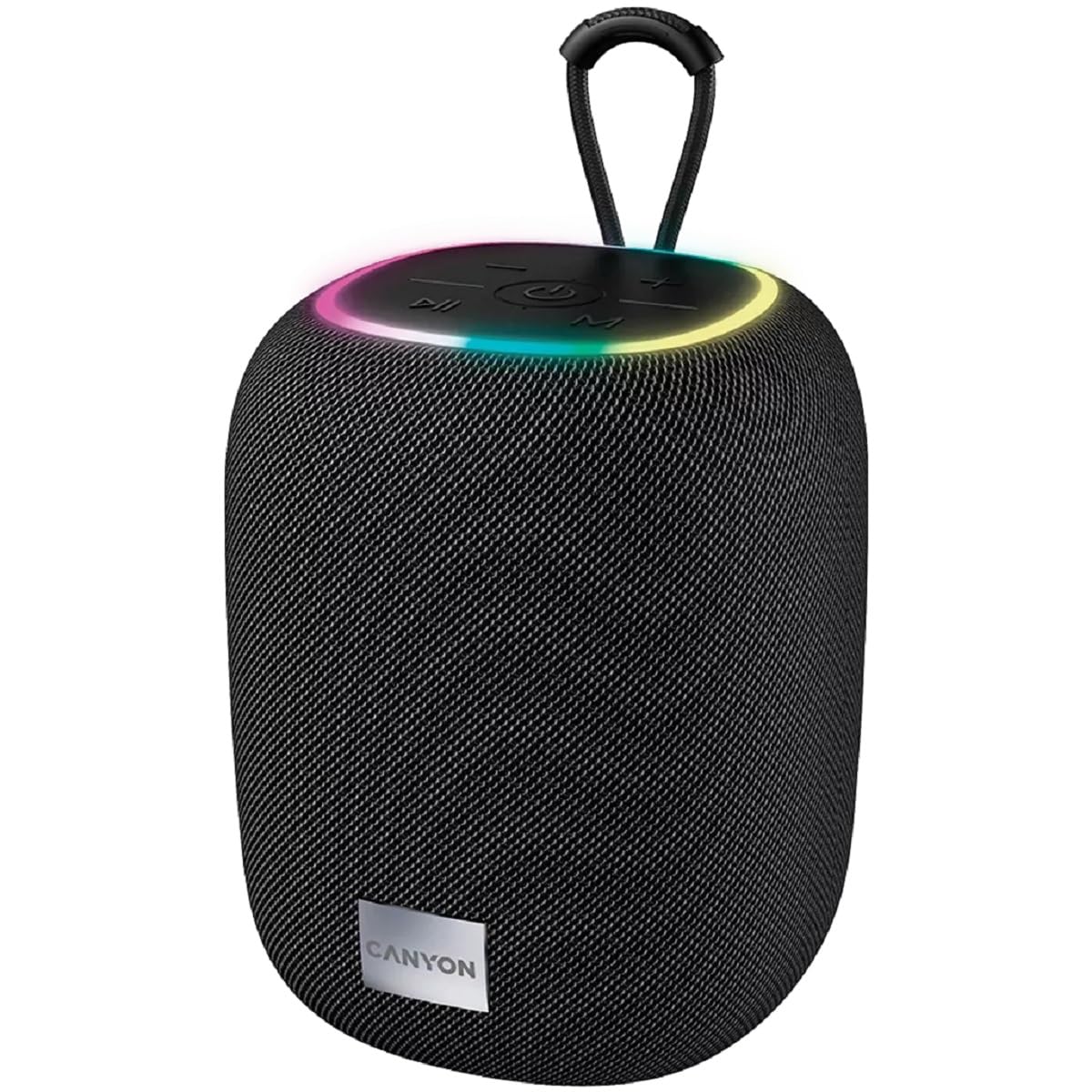
Foto 1: Elu view of the CANYON BSP-8 speaker, showing the control buttons, RGB backlight, and integrated hanger.
Control Buttons (Top Panel):
- Bọtịnụ ike: Press and hold to turn on/off. Short press to play/pause.
- Mpịakọta nke ala / bọtịnụ egwu gara aga: Pịa obere oge maka mbelata olu. Pịa ogologo oge maka egwu gara aga.
- Bọtịnụ egwu na-esote: Pịa obere oge maka elu olu. Pịa ogologo oge maka egwu na-esote.
- Bọtịnụ Ụdị (M): Short press to switch between Bluetooth, AUX, USB, and MicroSD modes.

Foto 2: N'azụ view of the CANYON BSP-8 speaker, illustrating the various input ports including AUX, USB, TF (MicroSD) card slot, and DC5V Type-C charging port.
Input Ports (Rear Panel):
- Ọdụ ụgbọ mmiri AUX: Maka ijikọ ngwaọrụ ọdịyo mpụga site na eriri ọdịyo 3.5mm.
- Ọdụ ụgbọ mmiri USB: Maka ịkpọ ụda site na draịvụ USB.
- TF Card Slot (MicroSD): For playing audio from a MicroSD card.
- DC5V (Type-C) Port: Maka ịchaji ọkà okwu.
5. Nhazi
5.1 Ịchaji ọkà okwu
- Connect the provided USB Type-C cable to the DC5V port on the speaker.
- Jikọọ nsọtụ nke ọzọ nke eriri ahụ na ihe nkwụnye ike USB (a na-atụ aro 5V/1A) ma ọ bụ ọdụ USB nke kọmputa.
- Ọkụ ihe ngosi chaja ga-enwu. Ọ ga-agbanyụ ma ọ bụ gbanwee agba ozugbo chajịchara ya nke ọma.
Note: For optimal battery life, fully charge the speaker before first use.

Image 3: Illustration showing the 1800 mAh battery capacity and up to 3 hours of playtime for the CANYON BSP-8 speaker.
5.2 Gbanyụọ/ gbanyụọ
- Iji gbanye: Press and hold the Power button for approximately 3 seconds. You will hear an audible prompt.
- Iji gbanyụọ: Press and hold the Power button for approximately 3 seconds. You will hear an audible prompt.
5.3 Njikọ Bluetooth
- Gbanwuo ọkà okwu. Ọ ga-abanye na ọnọdụ njikọta Bluetooth na-akpaghị aka, nke ọkụ ikanam na-egbuke egbuke gosipụtara.
- Mee ka Bluetooth rụọ ọrụ na ekwentị mkpanaaka gị (ama, mbadamba, kọmputa).
- Chọọ maka available Bluetooth devices and select "CANYON BSP-8" from the list.
- Once paired, the LED light will stop flashing, and you will hear a confirmation sound.
Note: The speaker will automatically reconnect to the last paired device if it is within range and Bluetooth is enabled.

Image 4: Illustration highlighting the stable and energy-efficient Bluetooth 5.2 connection with an operating range of up to 10 meters.
5.4 Ezi ikuku stereo (TWS) ijikọ
To connect two CANYON BSP-8 speakers for a stereo sound experience:
- Ensure both BSP-8 speakers are powered on and not connected to any Bluetooth device.
- On one speaker (this will be the primary speaker), double-press the Power button. It will enter TWS pairing mode.
- Ndị ọkà okwu abụọ ahụ ga-achọ ma jikọọ onwe ha na akpaghị aka. Ị ga-anụ ụda nkwenye ozugbo ejikọtara.
- Once TWS is established, connect your mobile device to the primary speaker via Bluetooth as described in section 5.3.
Note: TWS mode only works with two identical CANYON BSP-8 speakers.
6. Ntuziaka ọrụ
6.1 Na-akpọ Audio
- Ọnọdụ Bluetooth: Mgbe ijikọ gachara nke ọma, ọdịyo sitere na ngwaọrụ ejikọrọ gị ga-esi na ọkà okwu kpọọ.
- Ọnọdụ AUX: Connect a 3.5mm audio cable from your external audio device to the AUX port on the speaker. Press the 'M' button to switch to AUX mode.
- Ọnọdụ USB: Insert a USB flash drive into the USB port. The speaker will automatically switch to USB mode and begin playing audio files. If not, press the 'M' button.
- Ụdị kaadị MicroSD: Insert a MicroSD card into the TF card slot. The speaker will automatically switch to MicroSD mode and begin playing audio files. If not, press the 'M' button.
6.2 Njikwa ọkpụkpọ
- Gwuo/kwụsịtụ: Obere pịa bọtịnụ Ike.
- Olu elu: Pịa bọtịnụ olu elu (+).
- Olu ala: Mkpirisi pịa bọtịnụ olu ala (-).
- Track na-esote: Pịa bọtịnụ olu elu (+) ogologo.
- Gara aga Track: Ogologo oge pịa bọtịnụ ụda ala (-).
Ọkụ azụ 6.3 RGB
The speaker features an integrated RGB backlight on the top panel. The backlight activates automatically when the speaker is powered on. There are no specific controls for changing the RGB pattern or turning it off/on independently of the speaker's power state.