
1. Okwu mmalite
This manual provides instructions for the proper use and care of your Docooler Portable USB Cassette Player. This device allows you to play audio cassettes and convert their content into digital MP3 files via a USB connection to a computer. Please read this manual thoroughly before operating the device to ensure optimal performance and longevity.
2. Ngwaahịa gafereview
The Docooler Portable USB Cassette Player is a compact, handheld device designed for playing and digitizing audio cassettes. It features a transparent casing, allowing visibility of the internal mechanism.
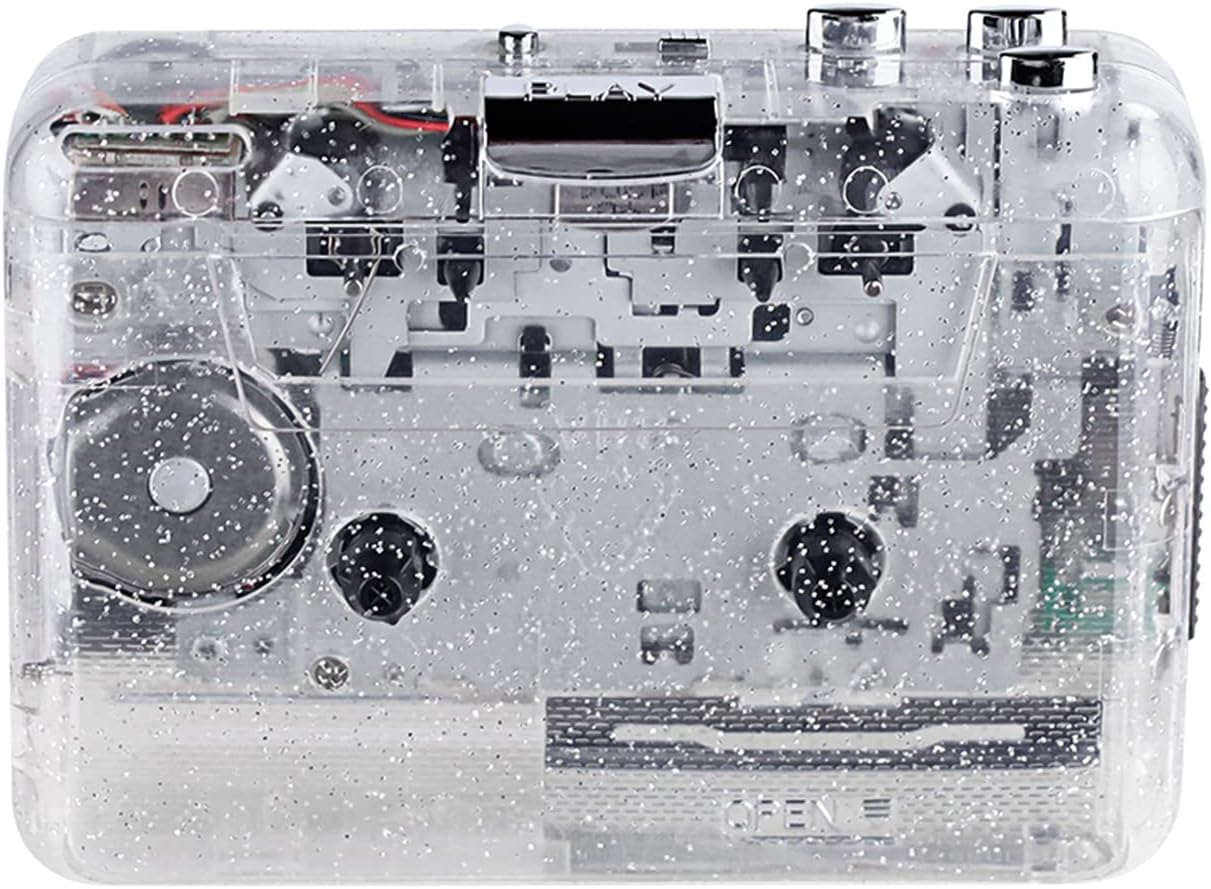
Foto 1: N'ihu view of the Docooler Portable USB Cassette Player, showcasing its transparent design.

Figure 2: Various angles of the cassette player, including top, side, and open views.
Ọdịnaya ngwugwu:
- Docooler Portable USB Cassette Player
- eriri USB
- Akwụkwọ ntuziaka (akwụkwọ a)
- Headphones (may vary by package)
3. Nhazi
3.1 Ike inye
The cassette player can be powered by either batteries or a USB connection.
Nwụnye batrị:
- Chọta ebe batrị dị na ngwaọrụ ahụ.
- Mepee mkpuchi nke batrị batrị.
- Insert 2 x AA batteries (not included), ensuring correct polarity (+/-).
- Mechie mkpuchi nke batrị batrị nke ọma.
Ike USB:
Connect the provided USB cable to the player's USB port and the other end to a powered USB port on your computer or a USB wall adapter. The device will draw power from the USB connection.
4. Ntuziaka ọrụ
4.1 Playing a Cassette Tape
- Open the cassette compartment cover.
- Insert an audio cassette tape with the open edge facing upwards.
- Close the cassette compartment cover firmly.
- Connect headphones or external speakers to the 3.5mm audio output jack.
- Pịa KWURU bọtịnụ ka ịmalite ịkpọghachi.
- Jiri ihe KWỤSỊ bọtịnụ iji kwụsị ịkpọ egwu.
- Jiri ihe FF (Ọganihu Ngwa ngwa) na REW (Ijighachi) bọtịnụ iji kwọgharịa site na teepu ahụ.
- Adjust the volume using the volume control dial.
- The "DIR" button allows you to quickly flip the tape direction. The "play mode" button can be used to reverse playback once or an unlimited number of times.

Figure 3: The cassette player in use, demonstrating tape insertion and playback setup.

Figure 4: Users listening to audio through headphones connected to the cassette player.
4.2 Converting Tapes to MP3 Files
The Docooler Portable USB Cassette Player can convert your analog cassette audio into digital MP3 files. This process requires a computer and compatible audio recording software (not included).
- Ensure the cassette player is powered (via batteries or USB).
- Connect the cassette player to your computer using the provided USB cable.
- Install and open your preferred audio recording software on your computer. Software such as Audacity (free and open-source) is commonly used for this purpose.
- Configure your recording software to recognize the cassette player as an audio input device.
- Insert the cassette tape you wish to convert into the player.
- Start recording in your software, then press the KWURU button on the cassette player.
- Monitor the recording process. Once the tape has finished playing, stop the recording in your software.
- Save the recorded audio as an MP3 file na kọmputa gị.

Figure 5: Illustration of the process to convert cassette audio to MP3 files using the player and a computer.
5. Nlekọta
5.1 Na-ehicha ngwaọrụ
- Jiri ákwà dị nro ma kpọọ nkụ hichaa mpụta nke onye ọkpụkpọ ahụ.
- Do not use liquid cleaners or abrasive materials, as they may damage the surface.
- Periodically clean the tape heads and pinch rollers using a cotton swab lightly dampA na-eji isopropyl alcohol eme ihe iji hụ na ụda ya dị mma ma gbochie mmebi teepu ahụ.
5.2 Nchekwa
- When not in use for extended periods, remove batteries to prevent leakage.
- Debe onye ọkpụkpọ ahụ n'ebe dị jụụ ma kpọọ nkụ, ebe anwụ na-anaghị anwụ kpọmkwem na oke okpomọkụ dị oke njọ.
6. Nchọpụta nsogbu
| Nsogbu | Ihe nwere ike ime | Ngwọta |
|---|---|---|
| Enweghị ike | Dead batteries; USB cable not connected properly. | Replace batteries; ensure USB cable is securely connected. |
| Enweghị ụda | Headphones/speakers not connected; volume too low; dirty tape heads. | Connect audio output device; increase volume; clean tape heads. |
| Poor sound quality (hissing, muffled) | Dirty tape heads; worn-out tape; low battery. | Clean tape heads; try a different tape; replace batteries. |
| Tape not playing or moving | Tape jammed; mechanism issue; low battery. | Check tape for damage; replace batteries. |
| Cannot convert to MP3 | USB connection issue; software not configured correctly; no recording software. | Ensure USB is connected; check software settings; install compatible recording software. |
7. Nkọwapụta
- Ụdị: B0C69FDZF6
- Ịnye ọkụ: 2 x AA Batteries or USB 5V DC
- Ihuenyo: USB 2.0
- Mmepụta ọdịyo: 3.5mm stereo Jack
- Akụkụ: 7.2 x 5.91 x 1.54 inch (ihe dị ka)
- Arọ: 9.6 ounces (ihe dị ka)
- Onye nrụpụta: Docooler
8. Ozi nchekwa
- Ewepụla ngwaọrụ ahụ na mmiri ma ọ bụ oke mmiri.
- Zere idobe ma ọ bụ idobe ngwaọrụ ahụ na mmetụta siri ike.
- Anwala ịkwasa ma ọ bụ rụkwaa ngwaọrụ n'onwe gị. Rụtụ aka na ndị ọrụ ruru eru.
- Debe ebe ụmụaka na-apụghị iru.
- Tụfuo batrị dịka iwu mpaghara siri dị.
9. Akwụkwọ ikike & Nkwado
For warranty information or technical support, please refer to the documentation included with your purchase or contact Docooler customer service through their official website or the retailer where the product was purchased. Please have your model number (B0C69FDZF6) and purchase date available when contacting support.