
1. Okwu mmalite
The MOBI CONNECT Smart DualScan Bluetooth Thermometer (Model 700026) is designed for accurate and versatile temperature measurement. It offers multiple reading methods including ear, forehead, room, and object temperature. This device features a backlit screen, LED fever indicators, and memory recall for up to 20 previous readings. It supports both Fahrenheit and Celsius modes and can connect via Bluetooth to the MOBI Smart App for enhanced tracking and management capabilities.

Image: The MOBI CONNECT Smart DualScan Bluetooth Thermometer, its packaging, and a smartphone displaying the companion app.
2. Ihe ngwugwu
Chọpụta na ihe niile dị na ngwugwu:
- 1 x MOBI CONNECT Smart DualScan Bluetooth Thermometer
- 1 x Protective Cap (for forehead mode)
- 1 x Akpa nchekwa
- 1 x Akwụkwọ ntuziaka onye ọrụ
- 1 x Ntuziaka mmalite ngwa ngwa
- 2 x AAA batrị

Foto: Zuru ezu view of the thermometer with its components labeled for easy identification.
3. Nhazi
3.1. Ntinye batrị
- Open the battery compartment cover located on the back of the thermometer.
- Fanye batrị AAA abụọ, na-ahụ polarity ziri ezi (+/-).
- Mechie mkpuchi nke batrị batrị nke ọma.
3.2. Ịgbanye / gbanyụọ
- Iji gbanye, pịa SCAN/Power button. The device will perform a self-test and display the last reading.
- The thermometer will automatically power off after approximately 30 seconds of inactivity to conserve battery life.
3.3. Switching Temperature Units (Fahrenheit/Celsius)
With the device powered on, press and hold the MODE button for 3 seconds to switch between Fahrenheit (°F) and Celsius (°C).
4. Ụdị arụ ọrụ
4.1. Forehead Measurement
- Ensure the protective cap is on the probe.
- Pịa SCAN/Power bọtịnụ iji gbanye temometa.
- Position the thermometer approximately 0.5 to 1 inch (1-2.5 cm) from the center of the forehead.
- Pịa ma jide Nyochaa button. A beep will sound, and the temperature will be displayed on the LCD screen.

Image: Demonstrating forehead temperature measurement.
4.2. Ear Measurement
- Gently remove the protective cap from the probe.
- Pịa SCAN/Power bọtịnụ iji gbanye temometa.
- Carefully insert the probe into the ear canal. For children under 1 year, gently pull the ear straight back. For children over 1 year and adults, gently pull the ear up and back.
- Pịa ma jide Nyochaa button. A beep will sound, and the temperature will be displayed on the LCD screen.

Image: Removing the protective cap for ear measurement.

Image: Demonstrating ear temperature measurement.
4.3. Room and Object Temperature Measurement
The thermometer can also measure ambient room temperature and the temperature of objects (e.g., liquids, surfaces). To switch to these modes, press the MODE button repeatedly until the desired icon (room or object) appears on the display. Then, point the thermometer at the object or area and press Nyochaa.
4.4. Ihe ngosi ọkụ
The LCD display changes color to indicate temperature status:
- Green Backlight: Indicates a normal body temperature.
- Ọkụ azụ uhie: Indicates a high body temperature (fever warning).
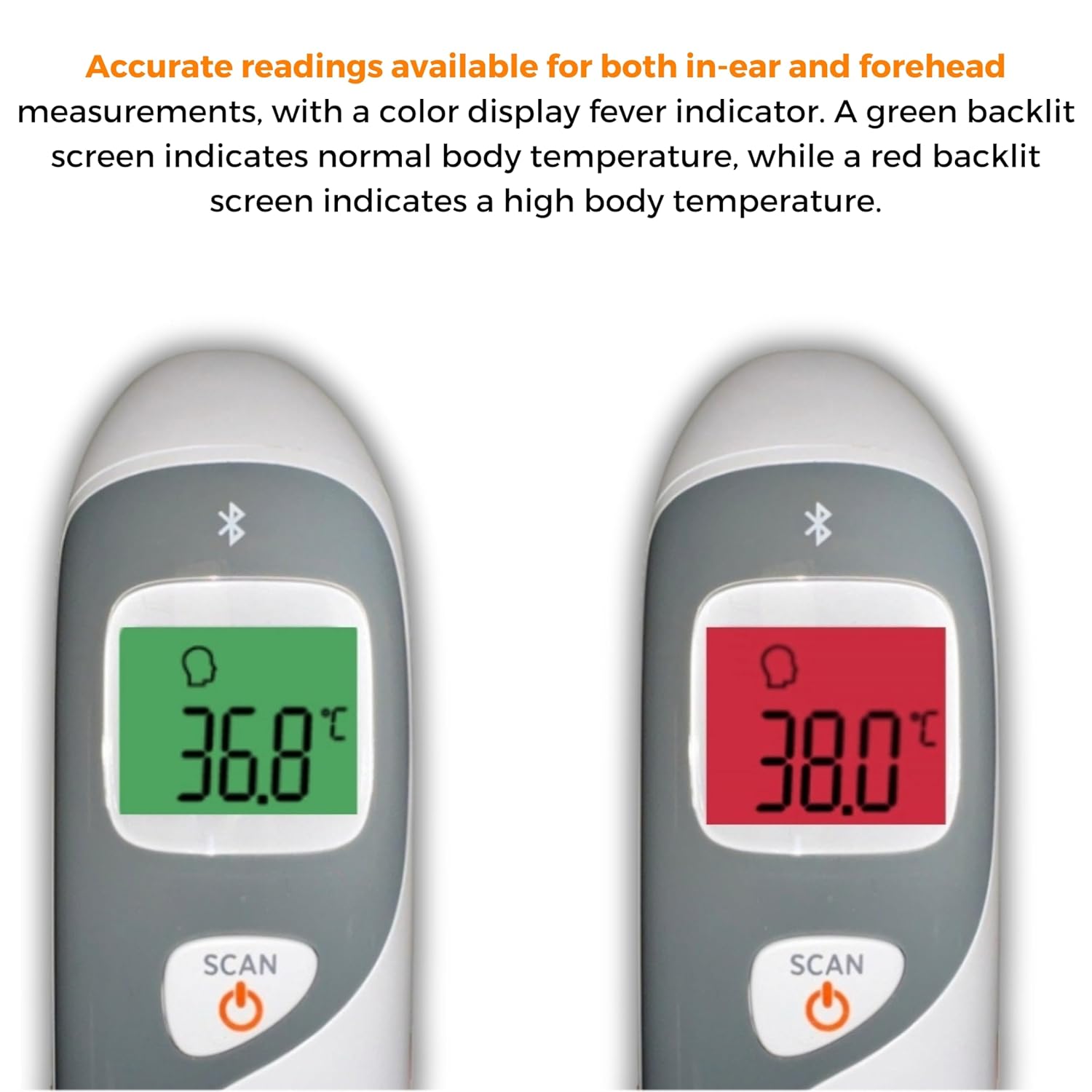
Image: The thermometer's color-changing LCD display indicating normal (green) and high (red) temperatures.
4.5. Ncheta Ncheta
The thermometer stores the last 20 temperature readings. To access these readings, press the MEM/MUTE button while the device is on. Each press will cycle through the stored readings.
5. Bluetooth Connectivity and MOBI Smart App
The MOBI CONNECT Smart DualScan Thermometer can be used independently or paired with your smartphone via Bluetooth for enhanced tracking and features through the MOBI Smart App.
5.1. Nbudata ngwa na ijikọ
- Download the "MOBI Smart" app from your device's app store (available on iOS and Android).
- Gbaa mbọ hụ na agbanyere Bluetooth na ekwentị gị.
- Open the MOBI Smart App and follow the on-screen instructions to pair your thermometer.
5.2. Ngwa atụmatụ
- Automatic Tracking: Automatically records temperature readings from the thermometer.
- Otutu onye ọrụ Profiles: Mepụta ma jikwaa ọkachamarafiles for each family member to track their health data independently.
- Ndekọ data: Add comments to each reading for context.
- Reporting & Graphs: View powerful reports and graphs for daily, weekly, monthly, or yearly temperature trends.
- Nhọrọ mbupu: Export data for sharing with healthcare professionals.
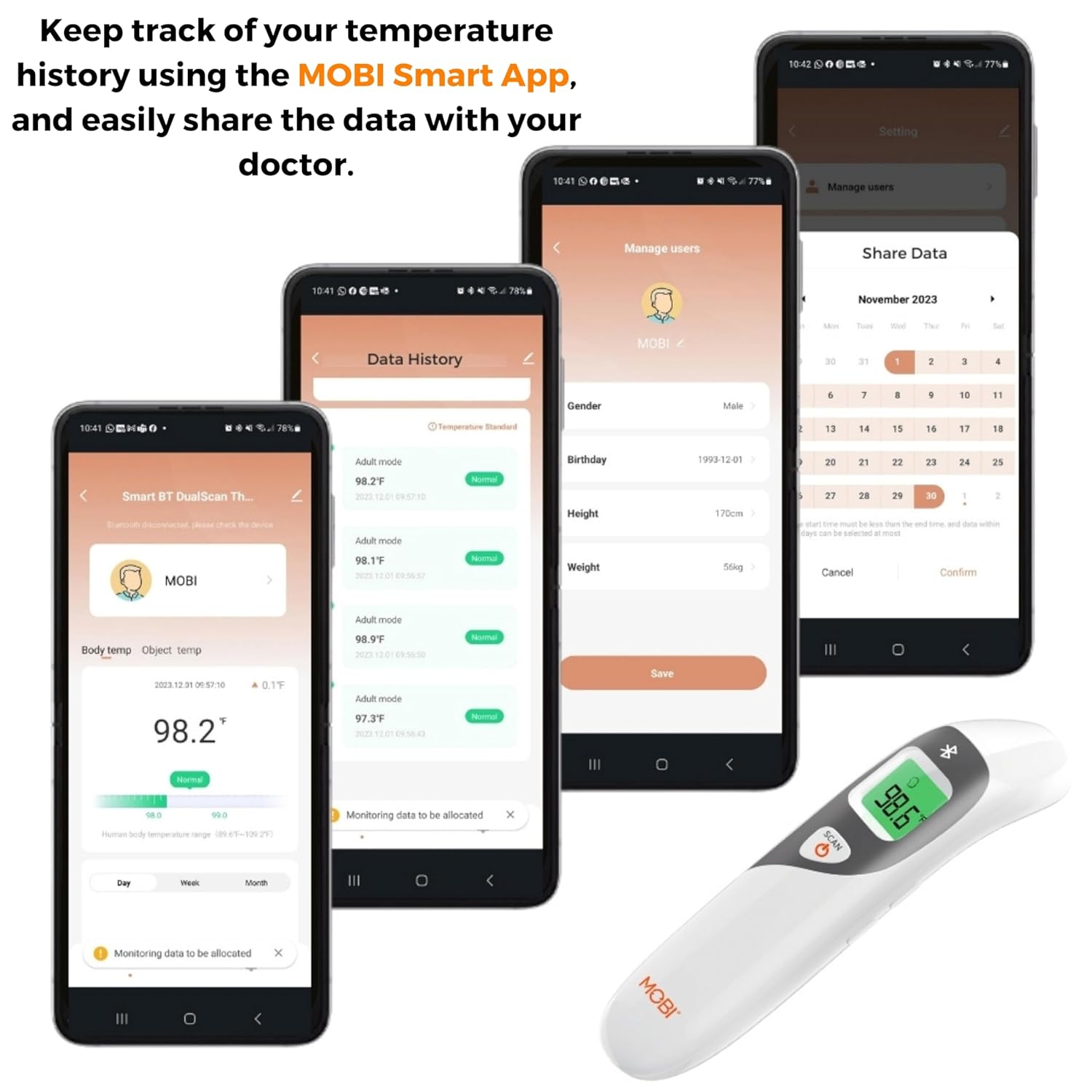
Image: Screenshots of the MOBI Smart App interface, showing data tracking and user management.
5.3. Official Product Video
Vidiyo: Onye ọrụ gọọmentị gafereview of the MOBI Smart DualScan Bluetooth Ear & Forehead Thermometer, demonstrating its features and usage.
6. Nlekọta
6.1. Nhicha
To clean the thermometer, wipe it with a soft, damp cloth. Do not immerse the device in water or use abrasive cleaners. Ensure the probe is clean before each use, especially for ear measurements.
6.2. Nchekwa
Store the thermometer in its protective pouch in a cool, dry place, away from direct sunlight and extreme temperatures. Remove batteries if the device will not be used for an extended period.
7. Nchọpụta nsogbu
- "Lo" or "Hi" Reading: Indicates a temperature outside the measurable range. Ensure proper placement and try again.
- Ọgụgụ na-ezighi ezi:
- Check for proper probe placement (ear or forehead).
- Ensure the probe is clean.
- Verify the correct mode (Adult/Child/Object) is selected if applicable.
- Allow the thermometer to acclimate to room temperature for 30 minutes if it has been in a significantly different environment.
- Okwu njikọ Bluetooth:
- Gbaa mbọ hụ na agbanyere Bluetooth na ekwentị gị.
- Restart the thermometer and the MOBI Smart App.
- Ensure the thermometer is within range of your smartphone.
- Enweghị Ngosipụta: Lelee nrụnye batrị ma dochie batrị ma ọ bụrụ na ọ dị mkpa.
8. Nkọwapụta
| Nọmba nlereanya | 700026 |
| Isi Iyi Ike | Akwanyere batrị (2 x AAA) |
| Ụdị ngosi | LCD na azụ azụ |
| Njikọta | Bluetooth |
| Ụdị nha | Ear, Forehead, Room, Object |
| Nkeji okpomọkụ | Fahrenheit (°F) / Celsius (°C) |
| Ncheta Ncheta | Ọgụgụ 20 ikpeazụ |
| Nlekọta ngwaahịa | Hichapụ Ọcha |
| Ihe onwunwe | Plastic |
| Onye nrụpụta | Mobi Technologies Inc. |
9. Akwụkwọ ikike na nkwado
For warranty information or technical support, please contact Mobi Technologies Inc. directly. Refer to the product packaging or the official MOBI websaịtị maka nkọwa kọntaktị kachasị ugbu a.