
Okwu mmalite
The TAXNELE THC30A is a digital programmable timer switch designed for automatic control of various electrical equipment. It features daily and weekly programming capabilities with up to 20 ON/OFF settings, a manual override function, and a built-in lithium battery for power-off memory. This manual provides detailed instructions for installation, operation, and maintenance to ensure safe and efficient use of your timer switch.
Ozi nchekwa
- Gbaa mbọ hụ na agbapụrụ ọkụ ọkụ tupu echichi ma ọ bụ mmezi.
- Ọ bụ ọkachamara ọkụ eletrik ma ọ bụ onye maara ihe kwesịrị ịrụnye ya.
- Ekwela ka ikike ibu kachasị elu nke 30A / 5000W gafere.
- Debe ngwaọrụ ahụ na mmiri na oke okpomọkụ.
- Verify correct wiring connections to prevent damage to the device or connected appliances.
Njirimara ngwaahịa
- Programmable Control: Up to 20 ON/OFF settings per day or week.
- Ebe nchekwa gbanyụọ: Built-in 3V lithium battery maintains timing, display, and data storage for up to 3 years during power interruptions.
- Nke kacha mma: Industrial-grade chip for accurate timing.
- Ntugharị akwụkwọ ntuziaka: Allows temporary or permanent manual control.
- Ngosipụta LCD: Clear digital display for easy programming and monitoring.
- Din Rail Mount: Designed for easy installation on a standard DIN rail.
- Ngwa sara mbara: Suitable for street lights, neon lamps, advertising signs, production equipment, and home appliances.

Figure 1: The THC30A timer switch highlighting its power-off memory function, which retains data for up to 3 years using a built-in CR2032 lithium battery.

Figure 2: The THC30A timer switch featuring a 30A big load relay for stable and safe operation with various electrical loads.
Product Components and Display
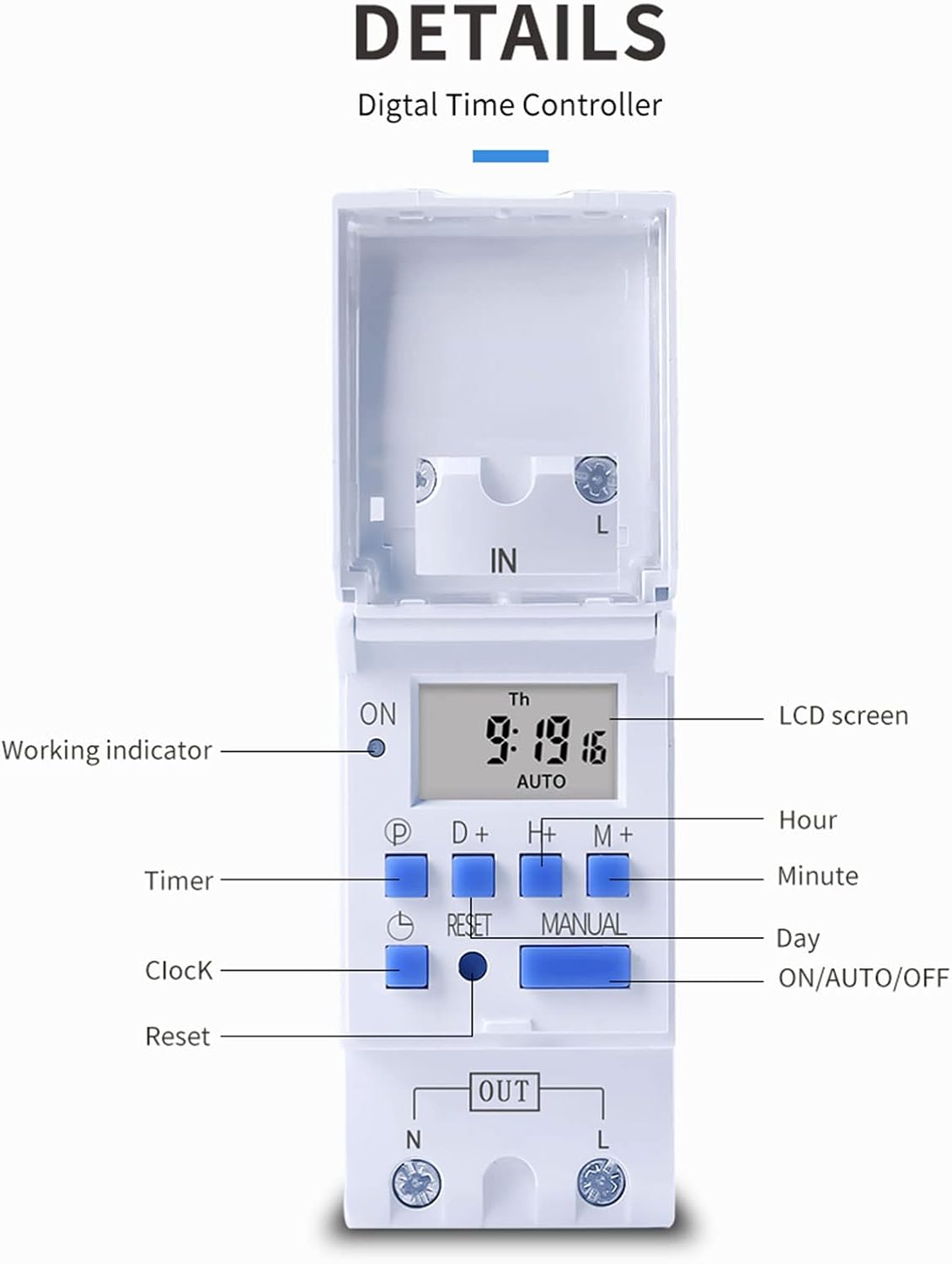
Ọgụgụ 3: Zuru ezu view of the THC30A timer switch's LCD screen and control buttons. Labels include Working indicator, Timer, Clock, Reset, P (Program), D+ (Day), H+ (Hour), M+ (Minute), Manual, and ON/AUTO/OFF status.
- Ihuenyo LCD: Displays current time, day, and ON/OFF status.
- Ihe ngosi na-arụ ọrụ: LED light indicating operation status.
- P bọtịnụ: Abanye na ọnọdụ mmemme.
- D+ Button: Adjusts day in clock setting or program.
- H+ Button: Adjusts hour in clock setting or program.
- M+ Button: Adjusts minute in clock setting or program.
- Bọtịnụ elekere: Returns to clock display or exits programming mode.
- Tọgharịa bọtịnụ: Clears all settings and resets the timer.
- Bọtịnụ akwụkwọ ntuziaka: Toggles between ON, AUTO, and OFF modes.
Nkọwapụta
| Oke | Uru |
|---|---|
| Nlereanya | THC30A |
| Ogo dị ugbu a | 30A |
| Ogo ike | 5000W |
| Voltage Nhọrọ | 12V DC AC, 24V DC AC, 48V DC AC, 110V AC, 220V AC |
| Oge mperi | ≤2 seconds/day |
| Ngosipụta | LCD |
| Ogologo oge | 1 minute to 168 hours (7 days) |
| NKWUO/ Gbanyụọ Ntọala | Otu narị ise |
| Okpomọkụ na-arụ ọrụ | -20 ℃ ruo 50 ℃ |
| Akụkụ | 86 x 36 x 65mm (3.38 x 1.41 x 2.56 sentimita) |
| Ike Reserve | 3V Lithium battery (CR2032 type) for 3 years data retention |

Figure 4: Dimensions of the THC30A timer switch, showing measurements for height, width, and depth for proper installation planning.
Ntọala na nwụnye
1. Ịkwanye
The THC30A timer switch is designed for DIN rail mounting. Securely attach the device to a standard 35mm DIN rail in an appropriate electrical enclosure.
2. Ihe nkedo
Ịdọ aka ná ntị: Ensure all power is disconnected before performing any wiring.
Connect the input power supply to the "IN" terminals (N for Neutral, L for Live). Connect the load (e.g., light, appliance) to the "OUT" terminals (N for Neutral, L for Live). The timer acts as a switch for the live wire. Refer to the wiring diagram below for correct connections.

Figure 5: Simplified wiring diagram for the THC30A timer switch. The new version offers direct power output, simplifying connections compared to older models.
- Ntinye (IN): Connect your main power supply (e.g., AC 12V, 24V, 48V, 110V, 220V) to these terminals.
- Mpụta (Mpụpụ): Connect your electrical load (e.g., light, motor) to these terminals. The timer controls the power flow to this output.
Ntuziaka ọrụ
1. Initial Setup / Reset
Upon first use or after a prolonged power outage, the display may be blank. Press the Tọgharia button (located in a small hole, use a pointed object) to clear all settings and initialize the timer. The LCD will display "0:00" and "AUTO".
2. Setting Current Time and Day
- Pịa ma jide Elekere bọtịnụ.
- Mgbe ijide Elekere, pịa D+ to set the current day (Monday to Sunday).
- Mgbe ijide Elekere, pịa H+ to set the current hour (0-23).
- Mgbe ijide Elekere, pịa M+ to set the current minute (0-59).
- Hapụ ya Elekere bọtịnụ. Oge edobela ugbu a.
3. Programming ON/OFF Cycles
The timer supports up to 20 ON/OFF programs. Each program consists of an ON time and an OFF time.
- Pịa P button once. The display will show "1 ON". This is for the first ON setting.
- Pịa D+ to select the day(s) for this ON event. You can choose a single day, specific days, or blocks of days (e.g., Mon-Fri, Sat-Sun, Mon-Sun).
- Pịa H+ to set the hour for the first ON event.
- Pịa M+ to set the minute for the first ON event.
- Pịa P button again. The display will show "1 OFF". This is for the first OFF setting.
- Repeat steps 2-4 to set the day(s), hour, and minute for the first OFF event.
- Gaa n'ihu ịpị P to cycle through "2 ON", "2 OFF", up to "20 ON", "20 OFF" and set additional programs as needed.
- Mgbe ịtọchara mmemme niile achọrọ, pịa Elekere button to exit programming mode and return to the current time display.
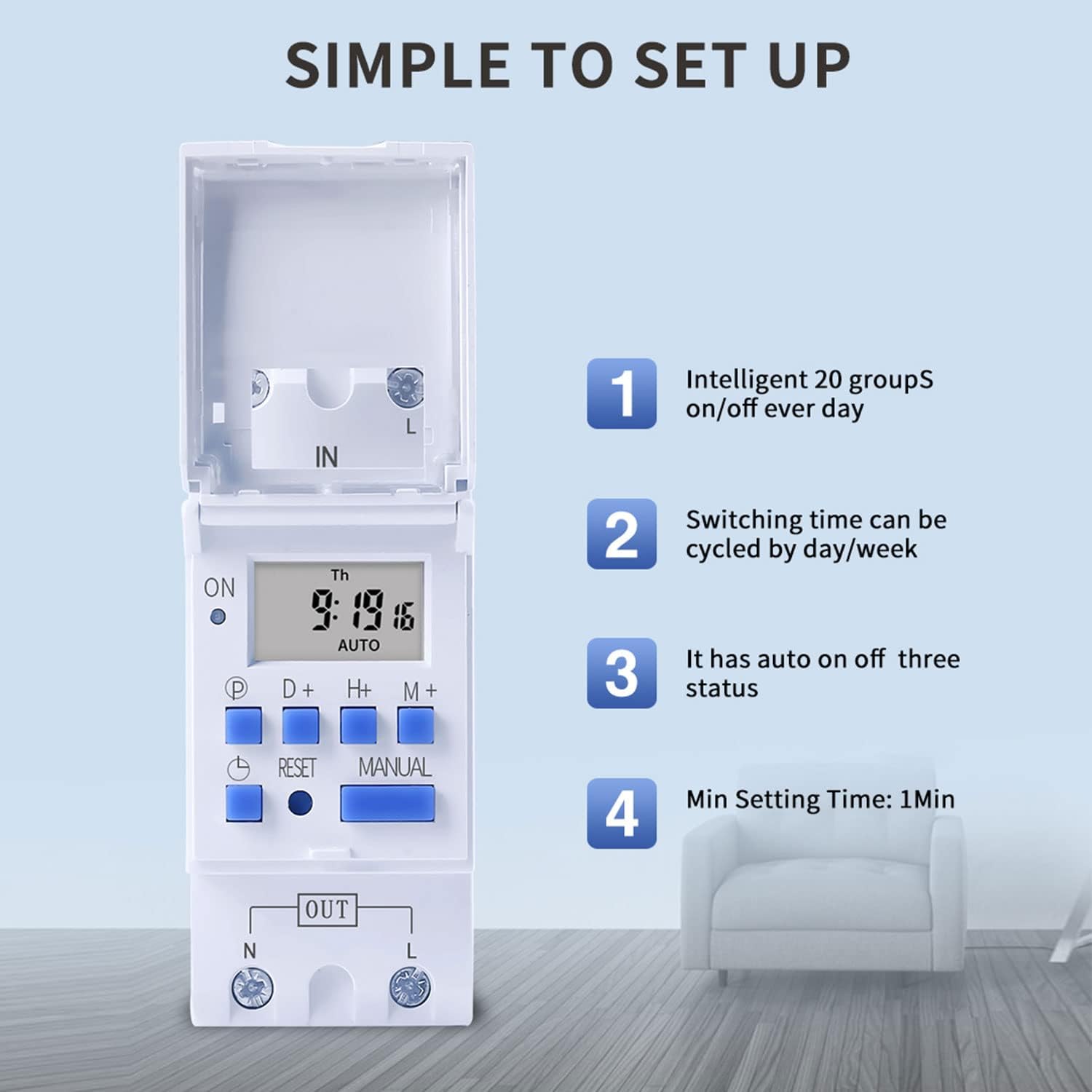
Figure 6: Visual guide to the simple setup of the THC30A timer, highlighting its 20 ON/OFF groups, daily/weekly cycling, auto ON/OFF status, and minimum 1-minute setting time.
4. Ntugharị akwụkwọ ntuziaka
Pịa Akwụkwọ ntuziaka button to cycle through the output modes:
- NA: The output is continuously ON, overriding all programs.
- UTgbọala: The output operates according to the programmed ON/OFF cycles. This is the standard operating mode.
- Gbanyụọ: The output is continuously OFF, overriding all programs.
Gbaa mbọ hụ na ihe nhazi oge dị na ya AUTO mode for programmed operations to function.
Nlekọta
- Debe ihe na-egosi oge dị ọcha ma ghara ịta uzuzu. Jiri ákwà kpọrọ nkụ ma dị nro hichaa ya.
- Ejila ihe nchacha abrasive ma ọ bụ ihe mgbaze.
- The internal lithium battery (CR2032) has a long lifespan (up to 3 years). If the display consistently goes blank after power outages, the battery may need replacement. This should be done by a qualified technician.
Nchọpụta nsogbu
| Nsogbu | Ihe nwere ike ime | Ngwọta |
|---|---|---|
| Ngosipụta bụ oghere. | No power supply; internal battery depleted. | Check power connections. Press the Reset button. If problem persists, internal battery may need replacement. |
| Timer does not switch ON/OFF as programmed. | Timer is not in AUTO mode; incorrect program settings; current time/day is wrong. | Pịa Akwụkwọ ntuziaka until "AUTO" is displayed. Verify program settings (ON/OFF times, days). Check and correct current time and day. |
| Output is always ON or always OFF. | Timer is in manual ON or OFF mode. | Pịa Akwụkwọ ntuziaka until "AUTO" is displayed. |
| Programs are lost after power outage. | Internal backup battery is depleted. | The internal CR2032 battery may need replacement. Contact support if necessary. |
Ngwa
The TAXNELE THC30A timer switch is versatile and can be used in various applications to automate electrical devices:

Ọgụgụ 7: Ọpụamples of common applications for the THC30A timer switch, including street light control, home appliance control, battery charging control, and advertising light control.
- Street Light Control: Automate the turning ON/OFF of street lights based on time.
- Home Appliance Control: Schedule operation of water heaters, fans, or other household devices.
- Battery Charging Control: Manage charging cycles for batteries to prevent overcharging.
- Advertising Light Control: Program display times for neon signs and advertising boards.
- Ngwa mmepụta: Control machinery operation in industrial settings.
Akwụkwọ ikike na nkwado
For warranty information or technical support, please refer to the contact details provided with your purchase or visit the official TAXNELE websaịtị. Debe nnata nzụta gị ka ihe akaebe nke ịzụrụ.