
1. Okwu mmalite
The SHIDU M500 is a compact and portable wired voice amplifier designed to project your voice clearly and powerfully. It is an ideal tool for teachers, presenters, tour guides, and anyone who needs to amplify their voice in various settings. This device also supports music playback from multiple sources.

Image 1.1: SHIDU M500 Wired Voice Amplifier. This image shows the front view of the compact, black and white voice ampna -emegharị ihe.
2. Ngwaahịa gafereview
2.1. Ngwa na njikwa
Familiarize yourself with the various parts and controls of your SHIDU M500 ampntughari:

Image 2.1: SHIDU M500 Controls and Ports Diagram. This diagram illustrates the top panel controls including Play/Pause, Recording, Previous, Next, Mode Switch, LED Screen, and the Switch/Volume knob. It also shows the side ports: USB, TF card socket, DC 5V charging port, AUX-IN, and MIC-IN.
- Switch/Vol Knob: Tụgharịa ka gbanye/ gbanyụọ wee mezie olu.
- Ikanam ihuenyo: Displays current mode, battery level, and track information.
- Bọtịnụ Kwụsị/Kwụsị: Starts or pauses audio playback.
- Bọtịnụ ndekọ: Initiates or stops audio recording.
- Bọtịnụ gara aga: Skips to the previous track or navigates menus.
- Bọtịnụ na-esote: Skips to the next track or navigates menus.
- Bọtịnụ Mgbanwe Ụdị: Toggles between different input modes (e.g., USB, TF card, AUX).
- Ọdụ ụgbọ mmiri USB: For connecting USB flash drives for music playback.
- oghere kaadị TF: For inserting a TF (MicroSD) card for music playback.
- DC 5V ọdụ ụgbọ mmiri: Power input for charging the ampna -emegharị ihe.
- Ọdụ ụgbọ mmiri AUX-IN Maka ijikọ ngwaọrụ ọdịyo mpụga site na eriri ọdịyo 3.5mm.
- MIC-IN Port: Maka ijikọ igwe okwu ejiri waya.
3. Nhazi
3.1. Ịchaji Ampna -emegharị ihe
- Connect the provided charging cable to the DC 5V ọdụ ụgbọ mmiri na ampna -emegharị ihe.
- Connect the other end of the cable to a standard USB power adapter (not included) or a computer's USB port.
- Ihuenyo LED ga-egosi ọkwa chajị. Chajị zuru oke na-ewekarị awa 3-5.
- Gbaa mbọ hụ na amplifier is fully charged before first use for optimal battery life.
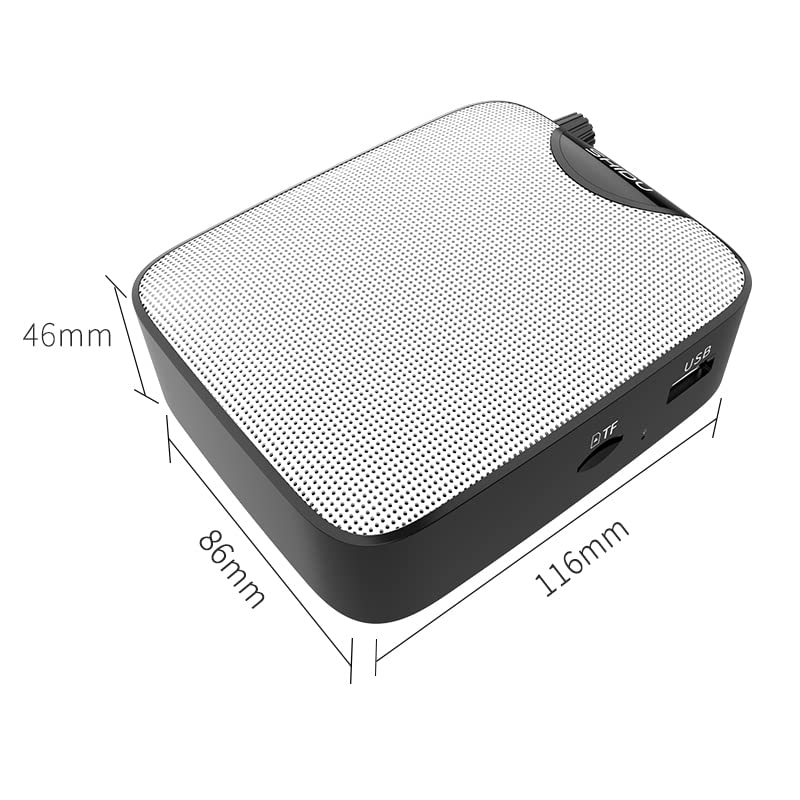
Image 3.1: SHIDU M500 Built-in 1800mAh Battery. This image highlights the amplifier's internal 1800mAh high-quality lithium battery, indicating long standby time and extended battery life.
3.2. Ijikọ igweokwu
- Insert the 3.5mm plug of the wired microphone into the MIC-IN ọdụ ụgbọ mmiri na ampna -emegharị ihe.
- Position the microphone headset comfortably on your head, ensuring the microphone is close to your mouth for best voice pickup.
3.3. Powering On/Off and Volume Adjustment
- Iji gbanye, tụgharịa Switch/Vol Knob clockwise until you hear a click and the LED screen illuminates.
- Continue rotating the knob clockwise to increase the volume. Rotate counter-clockwise to decrease the volume.
- Ka ịgbanyụ, tụgharịa Switch/Vol Knob counter-clockwise until you hear a click and the LED screen turns off.
4. Ntuziaka ọrụ
4.1. Olu Ampntughari
- Ensure the microphone is connected and the ampa na-agbanye ọkụ.
- Hazie nke Switch/Vol Knob ka ị chọrọ ampọkwa ọkwa.
- Speak clearly into the microphone. Avoid placing the microphone too close to the amplifier to prevent feedback (a high-pitched squeal).
4.2. Music Playback (USB/TF Card/AUX-IN)
- Kaadị USB/TF: Fanye USB flash mbanye n'ime Ọdụ ụgbọ mmiri USB or a TF card into the TF kaadị oghere. Nke amplifier will automatically switch to the corresponding mode and begin playback. If not, press the Bọtịnụ Mgbanwe ọnọdụ.
- MGBE-IN: Jikọọ ngwaọrụ ọdịyo dị n'èzí (dịka ọmụmaatụ, ekwentị mkpanaaka, ihe ọkpụkpọ MP3) na Ọdụ ụgbọ mmiri jiri eriri ọdịyo 3.5mm. Pịa ya. Bọtịnụ Mgbanwe ọnọdụ until 'AUX' is displayed on the LED screen.
- Jiri ihe Gwuo/kwụsịtụ, Nke gara aga, na Osote buttons to control music playback.
- Gbanwee olu site na iji Switch/Vol Knob.
4.3. Ọrụ ndekọ
- Ensure a USB flash drive or TF card is inserted to save recordings.
- Pịa Bọtịnụ ndekọ to start recording. The LED screen will indicate recording status.
- Kwuo okwu n'ime igwe okwu.
- Pịa Bọtịnụ ndekọ again to stop recording. The recording will be saved to the inserted storage device.
5. Nlekọta
5.1. Nhicha
- Hichapụ amplifier's exterior with a soft, dry cloth.
- Ejila kemịkalụ siri ike, ihe mgbaze, ma ọ bụ ihe nchacha.
- Debe ọdụ ụgbọ mmiri ndị ahụ ka ha ghara ịta uzuzu na ihe ndị na-emebi ihe.
5.2. Nlekọta batrị
- Chọọ ndị amplifier regularly, even if not in frequent use, to maintain battery health.
- Zere ka batrị ahụ wụpụ kpamkpam tupu ị chajie ya ọzọ.
- Ekpughela ihe ndị ahụ amplifier na oke okpomọkụ.
5.3. Nchekwa
- Chekwaa amplifier in a cool, dry place away from direct sunlight and moisture.
- When storing for extended periods, ensure the battery is partially charged (around 50%).
6. Nchọpụta nsogbu
| Nsogbu | Ihe nwere ike ime | Ngwọta |
|---|---|---|
| Enweghị ụda si ampna -emegharị ihe | Amplifier is off; Volume is too low; Microphone not connected properly; Incorrect mode selected. | Ike na amplifier and increase volume; Ensure microphone is fully plugged into MIC-IN; Press Mode Switch to select correct input. |
| Ụda agbagọ ma ọ bụ nzaghachi | Volume too high; Microphone too close to amplifier; Microphone damaged. | Decrease volume; Increase distance between microphone and amplifier; Try a different microphone if available. |
| Batrị anaghị achaji | Charging cable not connected properly; Faulty cable or adapter; Amplifier not powered off during charging. | Ensure cable is securely connected to DC 5V port and power source; Try a different USB cable or adapter; Power off the amplifier while charging. |
| Ngwugharị egwu anaghị arụ ọrụ | USB/TF card not inserted correctly; Incorrect mode selected; Corrupt audio files. | Reinsert USB/TF card; Press Mode Switch to select USB/TF mode; Ensure audio files dị n'ụdị dakọtara. |
7. Nkọwapụta
- Ụdị: SHIDU M500
- Akụkụ (L x W x H): 8.6 x 2.8 x 10.4 centimita
- Arọ: 280 grams
- Teknụzụ Njikọta: Ekwenyere
- Mpụta ike: 10W
- Batrị: Built-in 1800mAh High Quality Lithium Battery
- Ngwa dakọtara: Laptop, MP3 Player, Smartphone (via AUX-IN)
- Ọdụ mbata: MIC-IN (3.5mm), AUX-IN (3.5mm), USB, TF Card Slot, DC 5V (Charging)
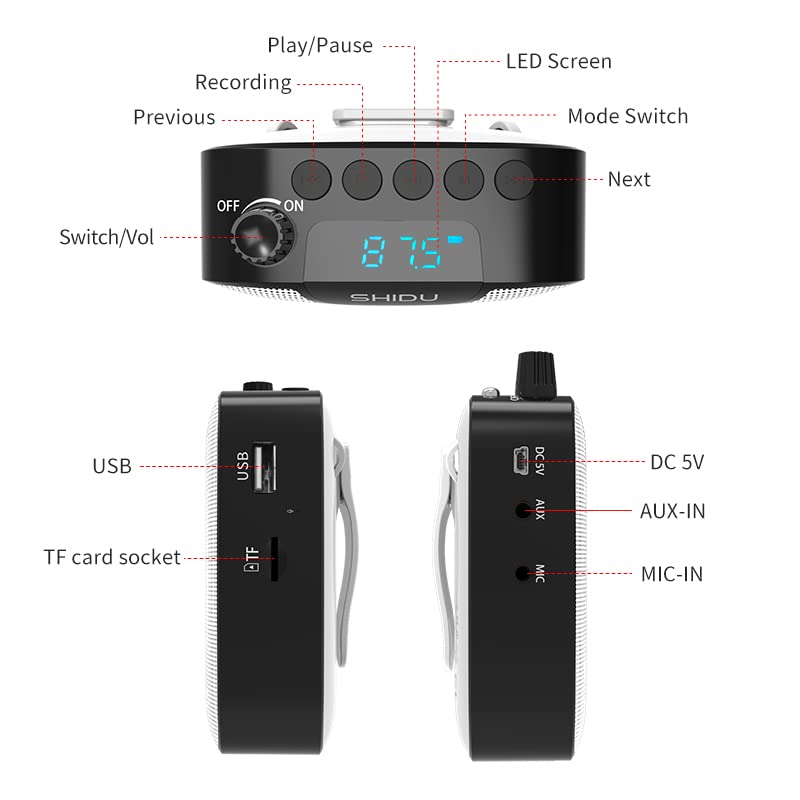
Image 7.1: SHIDU M500 Dimensions Diagram. This image shows the amplifier's dimensions: 116mm length, 86mm width, and 46mm height.

Image 7.2: SHIDU M500 10W High Power Acoustic Amplifier. This image illustrates the amplifier's 10W power output, capable of providing loud and clear sound in a standard 500m² space.

Image 7.3: SHIDU M500 Mini and Portable. This image emphasizes the amplifier's compact size and light weight of only 282g, comparable to the size of a mobile phone.

Image 7.4: SHIDU M500 High-Fidelity Dual Magnetic Speaker. This image highlights the advanced speaker technology for realistic vocal reproduction and powerful bass and treble.
8. Akwụkwọ ikike Ozi
SHIDU warrants its voice amplifier hardware products against defects in materials and workmanship for a period of otu afọ from the date of original purchase, provided the purchase was made from an authorized SHIDU dealer. This warranty is void if the equipment is altered, misused, mishandled, suffers excessive wear, or is serviced by any parties not authorized by SHIDU.
9. Nkwado
For further assistance, technical support, or warranty claims, please refer to the contact information provided with your purchase or visit the official SHIDU website. Ensure you have your product model number (M500) and proof of purchase ready when contacting support.