
Okwu mmalite
This manual provides instructions for the VINABTY MBE741 replacement remote control. This remote is designed to be compatible with various AKAI LCD/LED TV models, including ATE-48N1104K, ATE-55N1104K, and ATE-55D1044K. It offers a direct replacement for your original remote without requiring complex programming.
Melite
Ntinye batrị
The VINABTY MBE741 remote control requires two AAA batteries for operation. No programming or setup is needed; simply insert the batteries, and the remote will be ready to use.
- Chọta ebe batrị dị n'azụ nke njikwa anya.
- Mikpuo mkpuchi nke batrị ahụ n'ala ma ọ bụ n'èzí iji mepee ya.
- Fanye batrị AAA abụọ, na-ahụ na njedebe dị mma (+) na nke na-adịghị mma (-) dabara nke ọma na akara ndị dị n'ime ụlọ ahụ.
- Weghachite mkpuchi nke batrị batrị n'ime ebe ruo mgbe ọ pịrị na nchekwa.
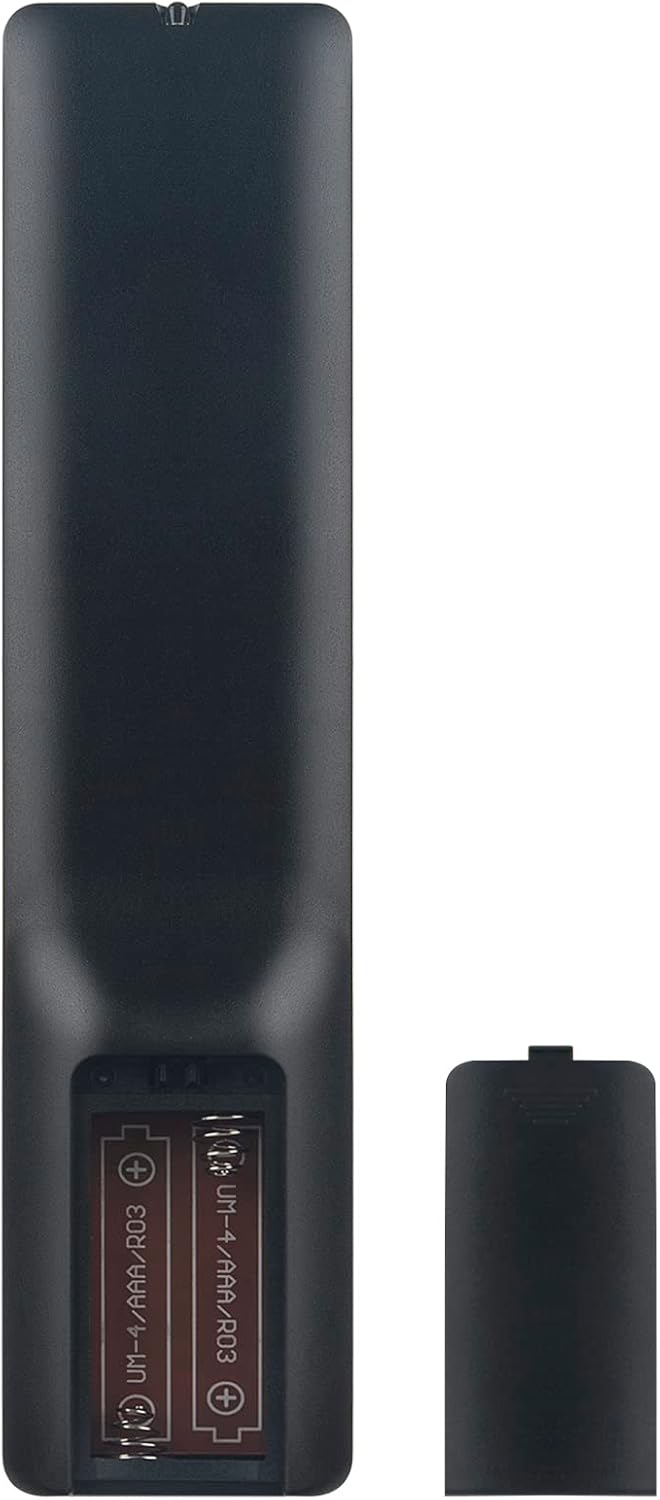
Image: Back of the remote control with the battery compartment open, illustrating correct battery placement.
Ntuziaka ọrụ
Once batteries are installed, the remote control is ready for immediate use with compatible AKAI LCD/LED TVs. Point the remote directly at your television's infrared receiver.
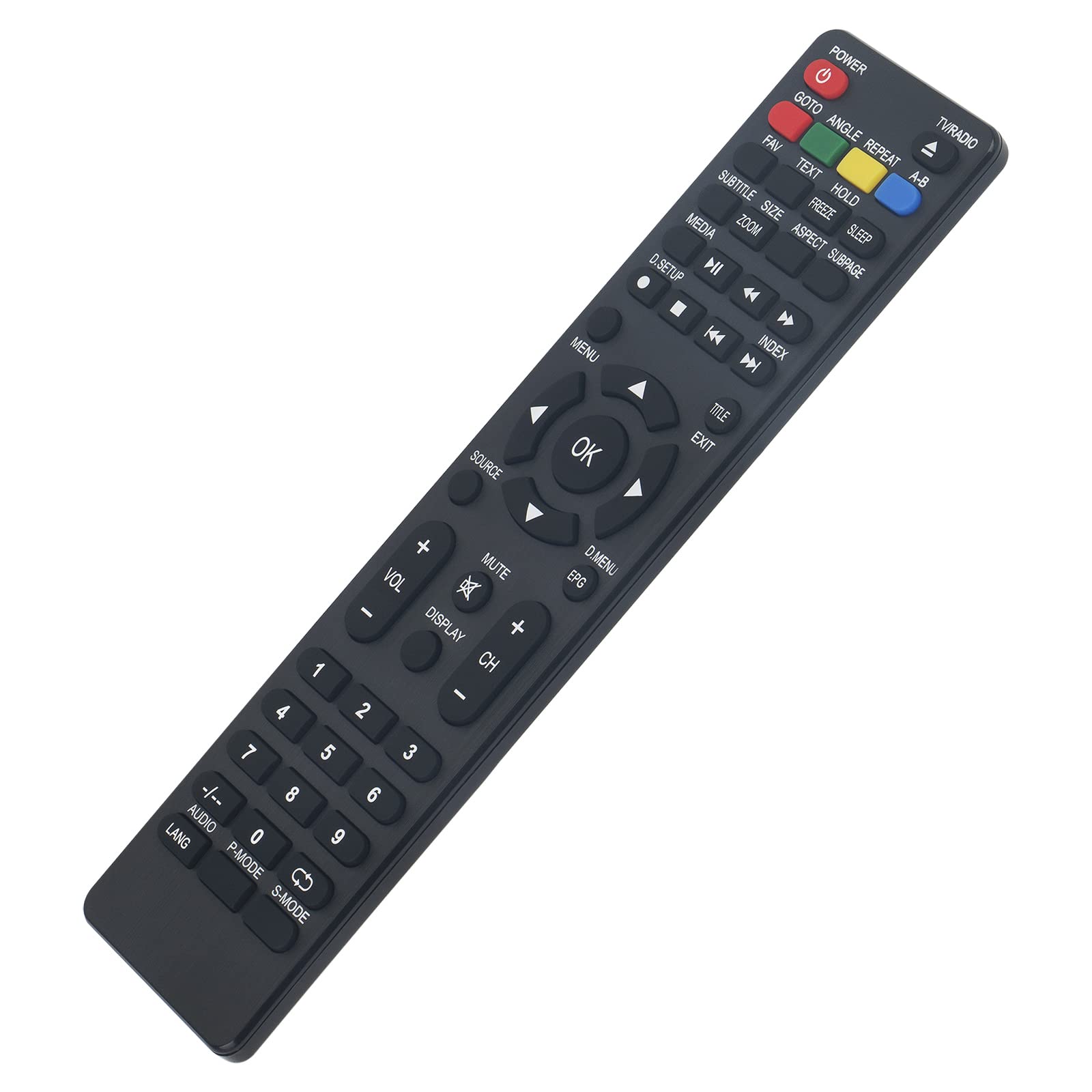
Foto: N'ihu view of the remote control, displaying all function buttons.
Ọrụ ndị dị mkpa gafereview
- IKE: Gbanyụọ ma ọ bụ gbanyụọ TV.
- TV / redio: Switches between TV and Radio modes.
- Igodo ọnụọgụ (0-9): Nhọrọ ọwa ozugbo.
- Vol +/-: Na-edozi ọkwa olu.
- CH +/-: Na-agbanwe ọwa elu ma ọ bụ ala.
- IHE: Mebie ma ọ bụ mebie ụda TV.
- NchNhr: Na-abanye na menu isi nke TV.
- Ọ DỊ MMA: Na-akwado nhọrọ dị na menu.
- Akụ Nsoroụzọ (Elu, Ala, Aka ekpe, Aka nri): Na-agagharị na nhọrọ menu.
- ỤZỌ ỌPỤPỤ: Wepụ menu ma ọ bụ ọrụ dị ugbu a.
- Isi mmalite: Na-ahọrọ isi mmalite ntinye (HDMI, AV, wdg).
- MEDIA Controls (Play, Pause, Stop, Rewind, Fast Forward, Skip): Na -ejikwa ọkpụkpọ mgbasa ozi.
- EPG: Na-egosiputa ntuziaka mmemme eletrọnịkị.
- Isiokwu: Toggles subtitles on or off.
- LANG / AUDIO: Changes audio language or track.
- P-MODE: Selects picture modes.
- S-MODE: Selects sound modes.
- Ngosi: Shows on-screen information.
- Other Function Buttons (GOTO, ANGLE, REPEAT, A-B, FAV, TEXT, HOLD, FREEZE, SLEEP, SIZE, ZOOM, ASPECT, SUBPAGE, D.SETUP, INDEX, TITLE, D.MENU): Provide access to specific TV features as labeled.
Nlekọta
Nhicha
Iji hichaa njikwa dịpụrụ adịpụ, jiri akwa dị nro ma kpọọ nkụ. Maka unyi isi ike, ntakịrị dampen the cloth with water or a mild cleaning solution. Avoid using abrasive cleaners, alcohol, or solvents, as these can damage the remote's surface or internal components.
Ngbanwe batrị
Replace batteries when the remote control's response becomes sluggish or stops working. Always replace both batteries at the same time with new AAA alkaline batteries. Do not mix old and new batteries, or different types of batteries, as this can lead to leakage or malfunction.
Nchọpụta nsogbu
- Remote control is not responding:
- Lelee batrị: Ensure batteries are inserted correctly with the correct polarity (+/-). Replace old batteries with new AAA alkaline batteries.
- Ahịrị nke anya: Make sure there are no obstructions between the remote control and the TV's infrared sensor. Point the remote directly at the TV.
- Ihe mmetụta dị anya: Ensure the TV's infrared sensor is clean and not covered.
- Some buttons do not work:
- While this remote is designed for broad compatibility, some specific TV models might have unique functions not directly mapped to a button. Refer to your TV's original manual for specific feature access.
- Ensure the remote is in the correct mode (e.g., TV mode if applicable, though this remote is generally universal for the listed models).
Nkọwapụta
| Ụdị | VINABTY |
| Nọmba nlereanya | MBE741 |
| Ngwa dakọtara | AKAI ATE-48N1104K, ATE-55N1104K, ATE-55D1044K, Linsar LED LCD HDTV TV LS50UHD LS32CHD LS40CFHD LS24CFHD12V |
| Teknụzụ Njikọta | Infrared |
| Oke kacha | 10 mita |
| Ụdị batrị | 2 x AAA (Aka na-atụ aro) |
| Ihe onwunwe | ABS |
| Njirimara Pụrụ Iche | Ergonomic imewe |
Akwụkwọ ikike na nkwado
VINABTY is committed to customer satisfaction. If you encounter any issues with your product or require assistance, please contact our customer support. We aim to provide a satisfactory response within 24 hours.
For support inquiries, please refer to the contact information provided with your purchase or on the VINABTY official websaịtị.