
Okwu mmalite
This manual provides essential information for the safe and efficient use of your ADEQWAT Magnetic Wall Charger with USB-C Cable. Please read these instructions carefully before using the product and retain them for future reference.
Ozi nchekwa
- Ewepụla chaja na mmiri, mmiri, ma ọ bụ oke okpomọkụ.
- Do not attempt to disassemble, repair, or modify the charger. This may void the warranty and pose safety risks.
- Debe ebe ụmụaka na-apụghị iru.
- Ensure the charger is plugged into a compatible power outlet.
- Disconnect the charger from the power outlet when not in use or during electrical storms.
- Zere idobe ma ọ bụ idobe chaja na mmetụta siri ike.
Ihe ngwugwu
Chọpụta na ihe niile dị na ngwugwu:
- ADEQWAT Magnetic Wall Charger
- Igwe USB-C agbakwunyere
- Additional Metallic Plate (for magnetic attachment)
Melite
- Unfold the Plug: Gently pull out the retractable plug from the back of the charger until it locks into place.

Foto: Azụ view of the charger with the retractable plug extended.
- Jikọọ na nkwụnye ọkụ: Insert the charger's plug into a standard wall power outlet.

Image: The charger plugged into a wall outlet, demonstrating its use with a smartphone and tablet.
- Optional: Attach Metallic Plate: If you wish to use the magnetic feature with a device that is not inherently magnetic, attach the provided metallic plate to the back of your smartphone or its case. Ensure the plate is securely positioned.
Na-arụ ọrụ
- Charging with USB-C Cable: Connect the integrated USB-C cable to your compatible device's USB-C port. Charging will begin automatically.
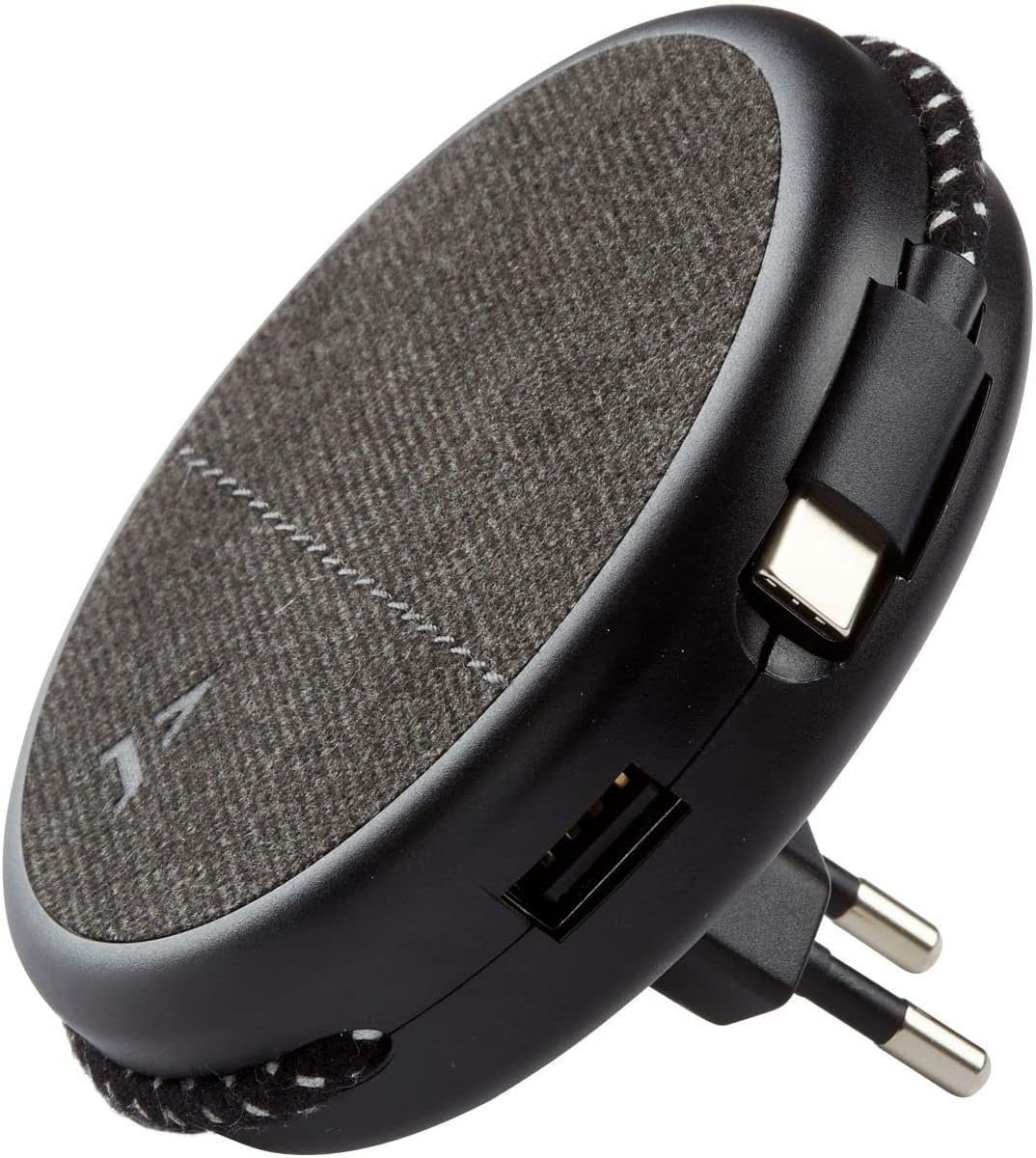
Image: Close-up of the charger, highlighting the integrated USB-C cable and an additional USB-A port.
- Charging with USB-A Port: For devices requiring a USB-A connection, use your own USB-A cable and plug it into the USB-A port on the charger.
- Iji njirimara magnetik: Once the charger is plugged into a wall outlet, you can magnetically attach your smartphone (with or without the metallic plate) to the charger's surface for convenient holding while charging.
Nlekọta
- Nhicha: Disconnect the charger from the power outlet before cleaning. Use a soft, dry cloth to wipe the surface. Do not use liquid cleaners or abrasive materials.
- Nchekwa: When not in use, store the charger in a cool, dry place, away from direct sunlight and extreme temperatures. The retractable plug can be folded back into the charger for compact storage.
Nchọpụta nsogbu
| Nsogbu | Ihe nwere ike ime | Ngwọta |
|---|---|---|
| Ngwaọrụ anaghị akwụ ụgwọ. | E tinyeghị chaja nke ọma. Eriri ngwaọrụ ahụ nwere nsogbu. Device incompatible. | Ensure the charger is fully inserted into the wall outlet. Nwaa eriri dị iche. Verify device compatibility with USB charging standards. |
| Njikọta magnetik adịghị ike. | Device not magnetic. Metallic plate not properly attached. | Ensure your device has a magnetic back or use the provided metallic plate. Re-position or re-attach the metallic plate securely. |
| Chaja na-adị ọkụ. | Arụ ọrụ nkịtị. Ibu ibu. | A slight warmth during charging is normal. If it becomes excessively hot, disconnect immediately and contact support. Avoid charging multiple high-power devices simultaneously if it causes overheating. |
Nkọwapụta
| Ụdị | ADEQWAT |
| Nọmba nlereanya | 8005668 |
| Agba | Nwa |
| Njikọ | USB (Integrated USB-C Cable, 1x USB-A Port) |
| Njirimara Pụrụ Iche | Magnetik |
| Mgbakọta ọdụ ụgbọ mmiri USB | 1 (USB-A) + 1 (Integrated USB-C) |
| Ngwa dakọtara | Cellular Phones, Tablets |
| Mpụta ike | 17 Watt |
| Ọnụọgụ nke ihe | 2 (Charger + Metallic Plate) |
| Isi Iyi Ike | Igwe ọkụ eletrik |
| Enwere ike ibugharị | Ee |
Akwụkwọ ikike na nkwado
For warranty information or technical support, please refer to the documentation provided with your purchase or visit the official ADEQWAT websaịtị. Debe ihe akaebe nke ịzụrụ maka akwụkwọ ikike.