
TEEHO TE002L
TEEHO TE002L Fingerprint Door Lock with 2 Lever Handles Instruction Manual
Model: TE002L | Brand: TEEHO
Okwu mmalite
This manual provides comprehensive instructions for the installation, setup, operation, maintenance, and troubleshooting of your TEEHO TE002L Fingerprint Door Lock. Please read this manual carefully before installation and retain it for future reference.
Vidiyo: Efereview of the TEEHO TE002L Fingerprint Door Lock, highlighting its key features and functionality.
Kedu ihe gụnyere
The TEEHO TE002L Fingerprint Door Lock package includes the following components:
- Mgbakọ ahụ igodo mpụta
- Mgbakọ ime ụlọ
- 2 Akara aka
- Deadbolt Latch
- Efere arịọnụ
- Efere efere
- Screws and Installation Hardware
- Igodo ndabere (2)
- Tọgharịa Ngwá Ọrụ
- Ntuziaka nwụnye

Image: All components included in the TEEHO TE002L Fingerprint Door Lock package, laid out for easy identification.
Ntuziaka nwụnye
Follow these steps to properly install your TEEHO TE002L Fingerprint Door Lock. Ensure your door is compatible with the lock's dimensions (1-3/8" to 2" thick, 2-3/8" or 2-3/4" backset).
1. Kwadebe Ọnụ ụzọ
- Remove any existing lock hardware from your door.
- Verify door dimensions and drill holes if necessary, according to the provided template (not included in this manual).

Image: Diagram illustrating door thickness and backset measurements for compatibility with the TEEHO TE002L lock, suitable for both left-handed and right-handed doors.
2. Wụnye Latch
- Insert the deadbolt latch into the door edge. Ensure the "TOP" indicator on the latch is facing upwards.
- Secure the latch with the provided screws.
3. Wụnye Mgbakọ Mpụga
- Feed the cable from the exterior keypad assembly through the door hole and under the latch.
- Align the tailpiece with the center hole of the latch.
- Press the exterior assembly firmly against the door.
4. Wụnye efere nrịgo
- Place the mounting plate on the interior side of the door, aligning it with the exterior assembly.
- Secure the mounting plate using the long screws, ensuring the cable is not pinched.
5. Wụnye Mgbakọ ime ụlọ
- Jikọọ eriri site na mgbakọ dị n'èzí na mgbakọ n'ime ime.
- Ensure the thumbturn on the interior assembly is in the vertical (unlocked) position.
- Attach the interior assembly to the mounting plate and secure it with screws.
- Test the thumbturn to ensure smooth operation.
6. Install the Lever Handles
- Insert the spindle of the exterior lever handle through the latch mechanism.
- Attach the interior lever handle, ensuring it engages correctly with the spindle.
- Secure both lever handles with the provided screws.
7. Wụnye efere Strike
- Dozie efere a na-akụtu ya na eriri n'akụkụ ọnụ ụzọ.
- Secure the strike plate with the provided screws.
Video: Detailed installation guide for the TEEHO TE002L Fingerprint Door Lock, demonstrating each step from preparing the door to securing the components.
Ntọlite na Mmemme
After installation, you need to set up and program your lock. The default master code is 12345678. It is required that you change it to a code of your own before programming any other features.
1. Restore to Factory Settings (Initial Setup)
- Install 3 AA batteries into the interior assembly.
- Using the reset tool (or a similar pointed object), press and hold the reset button located inside the battery compartment.
- While holding the reset button, insert the 4th AA battery.
- Continue holding the reset button for 5 seconds until you hear a long "Beep". This indicates a successful reset.
2. Gbanwee koodu nchịkwa
- Press the "TEEHO" button twice.
- Enter the current Master Code (default: 12345678).
- Press the "TEEHO" button.
- Press "1".
- Enter your new Master Code (4-10 digits).
- Press the "TEEHO" button.
- Re-enter your new Master Code.
- Press the "TEEHO" button. (A green light flash indicates success).
3. Add User Code
- Press the "TEEHO" button twice.
- Tinye koodu Nna-ukwu gị.
- Press the "TEEHO" button.
- Press "2".
- Enter a new User Code (4-10 digits).
- Press the "TEEHO" button.
- Tinyegharịa Koodu Onye Ọrụ ọhụrụ ahụ.
- Press the "TEEHO" button. (A green light flash indicates success).
4. Add User Fingerprints
- Press the "TEEHO" button twice.
- Tinye koodu Nna-ukwu gị.
- Press the "TEEHO" button.
- Press "4".
- Scan the user's fingerprint 8 times, each time succeeding with a short beep. (A green light flash indicates success).

Image: A hand demonstrating the fingerprint unlock feature on the TEEHO TE002L lock, highlighting its biometric identification capabilities.
5. Njirimara Mkpọchi Akpaaka
- To enable/disable Auto-Lock: Press the "TEEHO" button twice, enter Master Code, press "TEEHO", then press "7". Press "1" to enable or "2" to disable.
- To set Auto-Lock time delay (10-99 seconds): Press the "TEEHO" button twice, enter Master Code, press "TEEHO", then press "0". Enter the desired duration (e.g., 30 for 30 seconds), then press "TEEHO".

Image: A woman carrying a baby and groceries, illustrating the convenience of the auto-lock feature of the TEEHO TE002L lock, which can be set to lock automatically after 10-99 seconds.
6. One-Touch Locking
- To activate one-touch locking, press and hold any key on the keypad for 2 seconds. The door will lock immediately.
7. One-Time PIN Code
- To add a one-time PIN code: Press the "TEEHO" button twice, enter Master Code, press "TEEHO", then press "9". Enter the new one-time user code, press "TEEHO", re-enter the code, then press "TEEHO". This code will be automatically deleted after one use.
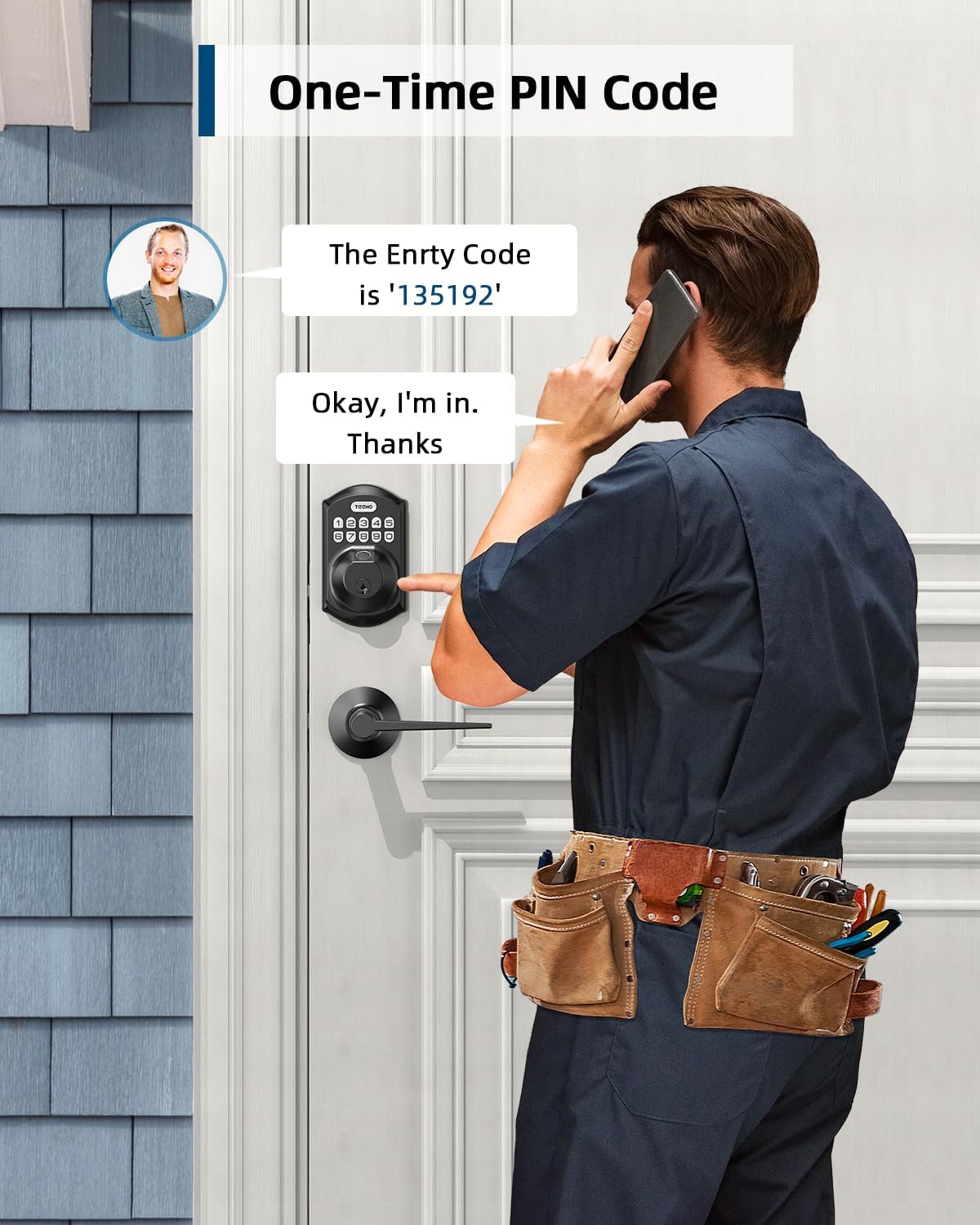
Image: A man receiving a one-time PIN code via phone, demonstrating the temporary access feature of the TEEHO TE002L lock for visitors or service providers.
8. Anti-Peeping PIN Code
- To prevent others from seeing your code, you can enter random digits before or after your actual PIN code. The lock will still recognize the correct sequence within the longer entry.

Image: A hand entering an anti-peeping PIN code on the TEEHO TE002L keypad, showing how random digits can be added before or after the actual code for privacy.
9. Oge ezumike
- To enable/disable Vacation Mode: Press the "TEEHO" button twice, enter Master Code, press "TEEHO", then press "8". (A green light flash indicates Vacation Mode is enabled). In this mode, all user codes and fingerprints are temporarily disabled, and only the Master Code or physical key can unlock the door.
10. Ọnọdụ jụụ
- To enable/disable Silent Mode: Press the "TEEHO" button twice, enter Master Code, press "TEEHO", then press "6". Press "1" to enable or "2" to disable. This mutes all beeps and sounds from the lock.
Video: Programming guide for the TEEHO TE002L Smart Lock, detailing steps for changing the master code, adding user codes, adding fingerprints, and setting various modes.
Atụmatụ na Ọrụ
- 3D Fingerprint Unlock: 99.99% biometric fingerprint recognition rate, unlocks in 0.3 seconds.
- Ntinye enweghị igodo: Supports up to 20 access codes (4-10 digits) and fingerprints. One-time PIN codes can be set for temporary access.
- Mkpọchi onwe: Can be set to lock automatically in 10-99 seconds.
- Mkpọchi Otu-Mkpịsị Aka: Press and hold any key on the keypad for 2 seconds to lock the door.
- Oke ntinye koodu na-ezighi ezi: Keypad deactivates for 3 minutes after 10 unsuccessful attempts with an invalid password.
- Nchekwa Deadbolt: ANSI Grade 3 rated, made with sturdy lock cylinder and alloy.
- Ike: Powered by 4 AA batteries, providing over 1 year of battery life. Features a low battery indicator.
- Nguzogide ihu igwe: IP54 rating, operates well in temperatures from -22°F to 158°F.

Foto: Ofeview of the TEEHO TE002L lock's key features, including support for multiple fingerprints and user codes, auto-lock, IP54 weather resistance, one-time PIN codes, one-touch locking, and a low battery indicator.
Nlekọta
- Ngbanwe batrị: Replace all four AA batteries when the low battery indicator appears. Use alkaline batteries for optimal performance.
- Nhicha: Wipe the keypad and lock body with a soft, dry cloth. Avoid abrasive cleaners or solvents.
- mmanu mmanu: Periodically lubricate the latch mechanism with a silicone-based lubricant to ensure smooth operation.
- Mmelite femụwe: Check the TEEHO website or app (if applicable) for any available firmware updates to ensure optimal performance and security.
Nchọpụta nsogbu
| Nsogbu | Ihe nwere ike ime | Ngwọta |
|---|---|---|
| Lock not responding / No power | Batrị nwụrụ anwụ. | Dochie batrị AA anọ niile. |
| Keypad deactivated | 10 incorrect code entries. | Wait 3 minutes for the keypad to reactivate. |
| Achọpụtaghị akara mkpịsị aka | Finger is dirty, wet, or improperly placed. Fingerprint not registered. | Ensure finger is clean and dry. Place finger flat on the sensor. Re-register fingerprint if necessary. |
| Auto-lock not working | Auto-lock feature is disabled or time delay is too long. | Enable Auto-Lock and set the desired time delay in programming. |
| Lock does not lock/unlock smoothly | Nhazi nke ihe mkpọchi ma ọ bụ etiti ọnụ ụzọ adịghị mma. | Lelee ntinye maka nhazi kwesịrị ekwesị. Hụ na e debere efere ọnụ ụzọ ahụ nke ọma. |
Nkọwapụta
- Akara: TEEHO
- Aha nlereanya: Fingerprint Door Lock with 2 Lever Handles
- Nọmba Nlereanya ihe: TE002L
- Ụdị mkpọchi: Biometric
- Njirimara Pụrụ Iche: Fingerprint, Keypad, Auto-Lock, One-Touch Lock, One-Time PIN Code, Anti-Peeping Code, Silent Mode, Vacation Mode
- Ihe: Alloy Steel
- Agba: Matte Black
- Akụkụ ihe (L x W x H): 1 x 1 x 1 sentimita asatọ
- Ibu ihe: 3.7 pound (1.68 Kilogram)
- Isi mmalite ike: Batrị 4 AA (anaghị etinye ya)
- Ndụ batrị: Ihe karịrị otu afọ
- Nguzogide ihu igwe: IP54
- Okpomọkụ arụ ọrụ: -22°F ruo 158°F
- Security Rating: ANSI ọkwa 3
- Protocol Njikọta: Enweghị njikọ
Akwụkwọ ikike na nkwado
TEEHO offers a 1-year warranty on all parts and lifetime customer service for the TE002L Fingerprint Door Lock. This includes online phone support from Monday to Friday, 9 AM to 5 PM PST, and 24/7 online email service.
For assistance, please contact TEEHO customer support:
- Nkwado ekwentị: Mọnde - Fraịde, 9 nke ụtụtụ - 5 nke mgbede PST
- Nkwado email: 24/7 online service
Ask a question about this manual
Ask about setup, troubleshooting, compatibility, parts, safety, or missing instructions. Manuals+ will review the question and use this page’s manual context to help answer it.