
1. Ngwaahịa gafereview
The ECLIPSE AVN-HS01F is a state-of-the-art car navigation system featuring a floating 10.1-inch HD display. Designed for compatibility with approximately 400 car models, this unit provides high-definition map displays and video content. Its low-reflection screen ensures clear visibility, making route guidance and multimedia viewing a superior experience. The system integrates seamlessly with smartphones via Apple CarPlay and HDMI, allowing access to a wide range of content for an enhanced driving experience.

Image: The ECLIPSE AVN-HS01F unit displaying a detailed navigation map.
2. Atụmatụ igodo
- Ngosipụta HD 10.1 inch: Features a low-reflection screen with 1280x720 resolution for crisp, clear visuals of maps and video content.
- Floating Structure: Enables installation in approximately 400 different car models, offering flexible positioning within the vehicle's dashboard.
- Apple CarPlay Support: Connect your iPhone to access navigation, music, messages, and more directly from the unit, with voice control via Siri.
- Ntinye/Mpụta HDMI: Allows connection of external devices like smartphones for high-definition video and game playback on the large screen.
- Ngwugharị mgbasa ozi: Supports various media formats including SD cards, CDs, and DVDs, in addition to Bluetooth audio streaming.
- VICS obosara: Provides advanced traffic information for optimized route guidance.

Image: The 10.1-inch large screen of the AVN-HS01F integrated into a car's dashboard.
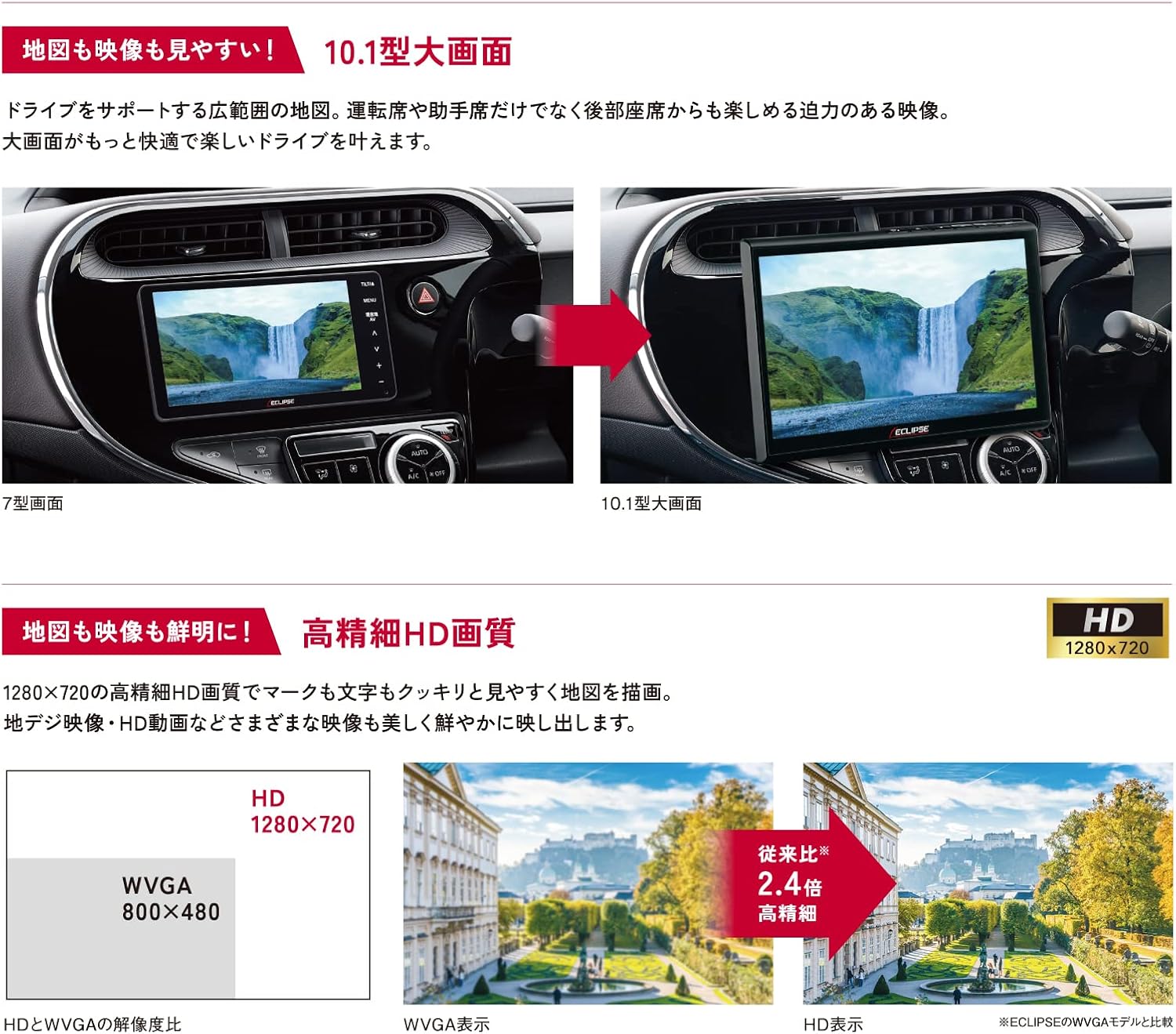
Image: Visual comparison demonstrating the superior HD quality (1280x720) of the AVN-HS01F compared to standard WVGA (800x480).
3. Ntọala na nwụnye
The AVN-HS01F utilizes a floating display structure, which allows for installation in a wide variety of vehicles. For detailed installation instructions, including wiring diagrams and mounting procedures, please refer to the dedicated Akwụkwọ ntuziaka nwụnye provided with your unit. Professional installation is recommended to ensure proper functionality and safety.

Foto: Ofeview of different ECLIPSE navigation series, highlighting the floating display and various features across models.
4. Ntuziaka ọrụ
4.1 Navigation Functions
- Ngosipụta map: View detailed maps in HD quality. Use pinch-to-zoom and swipe gestures for easy navigation.
- Ntuziaka ụzọ: Enter your destination to receive clear, turn-by-turn directions. The HD display ensures route information is highly visible.
- VICS obosara: Access real-time traffic information to avoid congestion and optimize your travel time.
4.2 Mgbasa ozi
- CD/DVD: Insert discs into the designated slot for audio and video playback.
- Kaadị SD: Fanye kaadị SD nke nwere ọdịyo ma ọ bụ vidiyo files into the slot.
- Bluetooth Audio: Pair your smartphone or other Bluetooth-enabled device to stream audio wirelessly.
4.3 Apple CarPlay
Connect your iPhone via USB to enable Apple CarPlay. This allows you to use compatible iPhone apps, make calls, send messages, and control music directly from the navigation screen. Use Siri for hands-free voice commands.
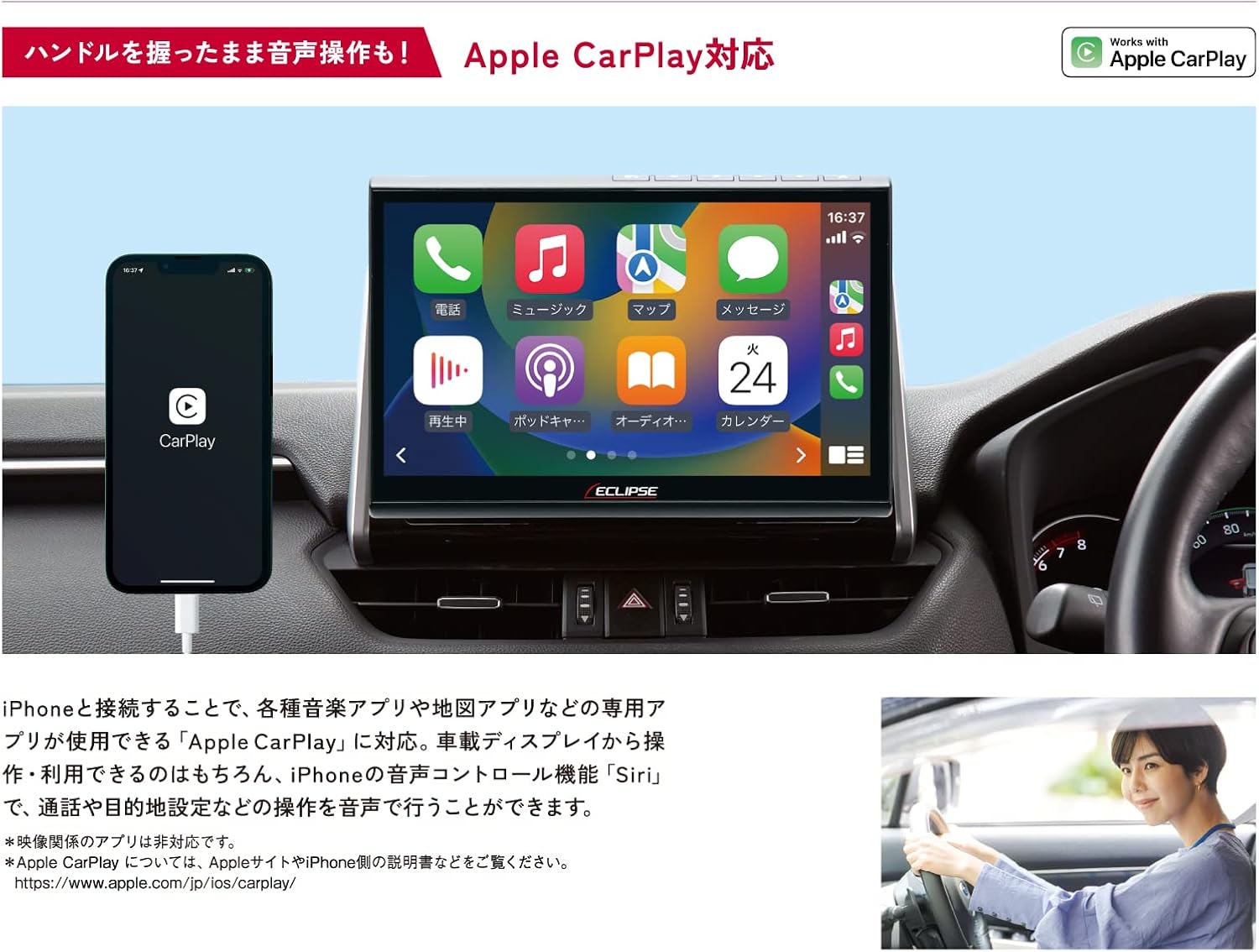
Image: The AVN-HS01F display showing the Apple CarPlay interface, with a connected iPhone.
Njikọta HDMI 4.4
Connect HDMI-compatible devices, such as smartphones or portable media players, to the unit to display their content on the large screen. Enjoy high-definition videos and games.

Image: The AVN-HS01F display showing content mirrored from a smartphone via HDMI connection.
4.5 Mgbanwe Ngosipụta
The floating display allows for flexible positioning to optimize viewing angles and minimize glare. Adjust the screen's tilt (front/back), swivel (left/right), and height (up/down) manually to suit your preference.

Image: Diagrams demonstrating the various adjustable angles and positions of the AVN-HS01F display for optimal viewing.
5. Nlekọta
To ensure the longevity and optimal performance of your ECLIPSE AVN-HS01F, follow these maintenance guidelines:
- Nchacha ihuenyo: Gently wipe the display with a soft, lint-free cloth. For stubborn smudges, slightly dampen akwa na mmiri ma ọ bụ ihe na-echebe ihuenyo. Zere ihe na-emebi emebi ma ọ bụ kemịkalụ siri ike.
- Nchacha otu: Use a dry, soft cloth to wipe the main unit and surrounding areas. Ensure no dust or debris accumulates in ports or vents.
- Nlekọta diski: Handle CDs and DVDs by their edges. Keep them clean and free of scratches to prevent playback issues.
- Mmelite ngwanrọ: Periodically check the official ECLIPSE website for any available software or map updates to ensure your system is running the latest version.
6. Nchọpụta nsogbu
If you encounter issues with your AVN-HS01F, try the following basic troubleshooting steps:
- Enweghị ike: Lelee njikọ ike niile. Gbaa mbọ hụ na mgbanye ụgbọ ala agbanyere.
- Enweghị ụda: Verify volume settings. Check audio source selection. Ensure speakers are properly connected.
- Enweghị akara GPS: Hụ na etinyere antenna GPS nke ọma ma nwee nkọwa doro anya view of the sky. Move the vehicle to an open area if in a covered location.
- Ihe ngosi: If the screen is blank or distorted, try restarting the vehicle's ignition. Check display cable connections if accessible.
- Ihuenyo mmetụ anaghị anabata: Perform a system reset if available (refer to the main instruction manual for specific reset procedures).
- Njehie Mkpọghachi Diski: Ensure the disc is clean and free of scratches. Try a different disc to confirm the issue is not with the media.
For persistent issues or problems not covered here, please contact ECLIPSE customer support or consult a qualified service technician.
7. Nkọwapụta
| Njirimara | Nkọwapụta |
|---|---|
| Ụdị | ECLIPSE |
| Aha Nlereanya | AVN HS01F |
| Nọmba Nlereanya Ngwaahịa | AVN-HS01F |
| Nha ihuenyo | 10.1 sentimita asatọ |
| Ngosipụta mkpebi | HD (1280x720) |
| Ike Nchekwa ebe nchekwa | 32 GB |
| Teknụzụ Njikọta | Bluetooth, HDMI |
| Atụmatụ pụrụ iche | VICS/VICS WIDE, Apple CarPlay Support |
| Ụdị nkwụnye | Dashboard Mount (Floating) |
| Ụdị ụgbọ ala dakọtara | Passenger Cars (approx. 400 models) |
| Ụdị map | Asia, Japan |
| Ibu Ibu | 5.26 kilogram |
| Akụkụ ngwugwu | 35.7 x 33.8 x 20.5 cm |
| Ngwa gụnyere | Navigation unit, TV antenna, power cord, relay cord, vehicle speed cord, microphone, instruction manual, installation manual |
8. Akwụkwọ ikike na nkwado
The ECLIPSE AVN-HS01F comes with a 1-afọ emeputa akwụkwọ ikike site na ụbọchị ịzụrụ. Akwụkwọ ikike a na-ekpuchi ntụpọ dị na ngwa na arụ ọrụ n'okpuru ojiji nkịtị.
For warranty claims, technical support, or further inquiries, please contact ECLIPSE customer service or visit the official ECLIPSE brand store:
Biko dowe ihe akaebe nke ịzụrụ ihe maka nkwado akwụkwọ ikike.