
Radtel RT-890 Dual-Band Amateur Radio Walkie Talkie User Manual
Ụdị: RT-890
1. Okwu mmalite
The Radtel RT-890 is a versatile dual-band amateur radio walkie talkie designed for reliable communication. It features a color LCD display, dual-band TX/RX capabilities, airband reception, FM radio, and VOX functionality. This manual provides essential information for the safe and efficient operation of your device.

N'ihu view of the Radtel RT-890 walkie talkie, showcasing its color LCD display and keypad.
2. Ihe ngwugwu
Biko lelee ihe dị n'ime ngwugwu ahụ mgbe ị na-emepe igbe ahụ. Ọ bụrụ na ihe ọ bụla efuola ma ọ bụ mebie, kpọtụrụ onye na-ere ahịa gị.
- Radtel RT-890 Walkie Talkie Unit
- Antenna
- 1 x batrị lithium-ion
- Desktọpụ chaja
- Mpempe eriri eriri
- Akwụkwọ ntuziaka onye ọrụ
3. Nhazi
3.1. Ntinye batrị na Nchaji
- Kwado batrị na oghere dị n'azụ redio.
- Malite batrị elu ruo mgbe ọ pịrị n'ime ebe.
- To charge, place the radio (with battery installed) into the desktop charger. Ensure the charging indicator light illuminates.
- Charge the battery fully before first use. A full charge typically takes several hours.
3.2. Mgbakwụnye antenna
- Gbanye antenna n'akụkụ elekere n'ime njikọ dị n'elu redio ruo mgbe ọ na-ejide mkpịsị aka. Akwụsịla elu.
4. Ntuziaka ọrụ
The Radtel RT-890 features dual band, dual display, and dual standby mode with a large, color LCD display for easy viewing of main functions.
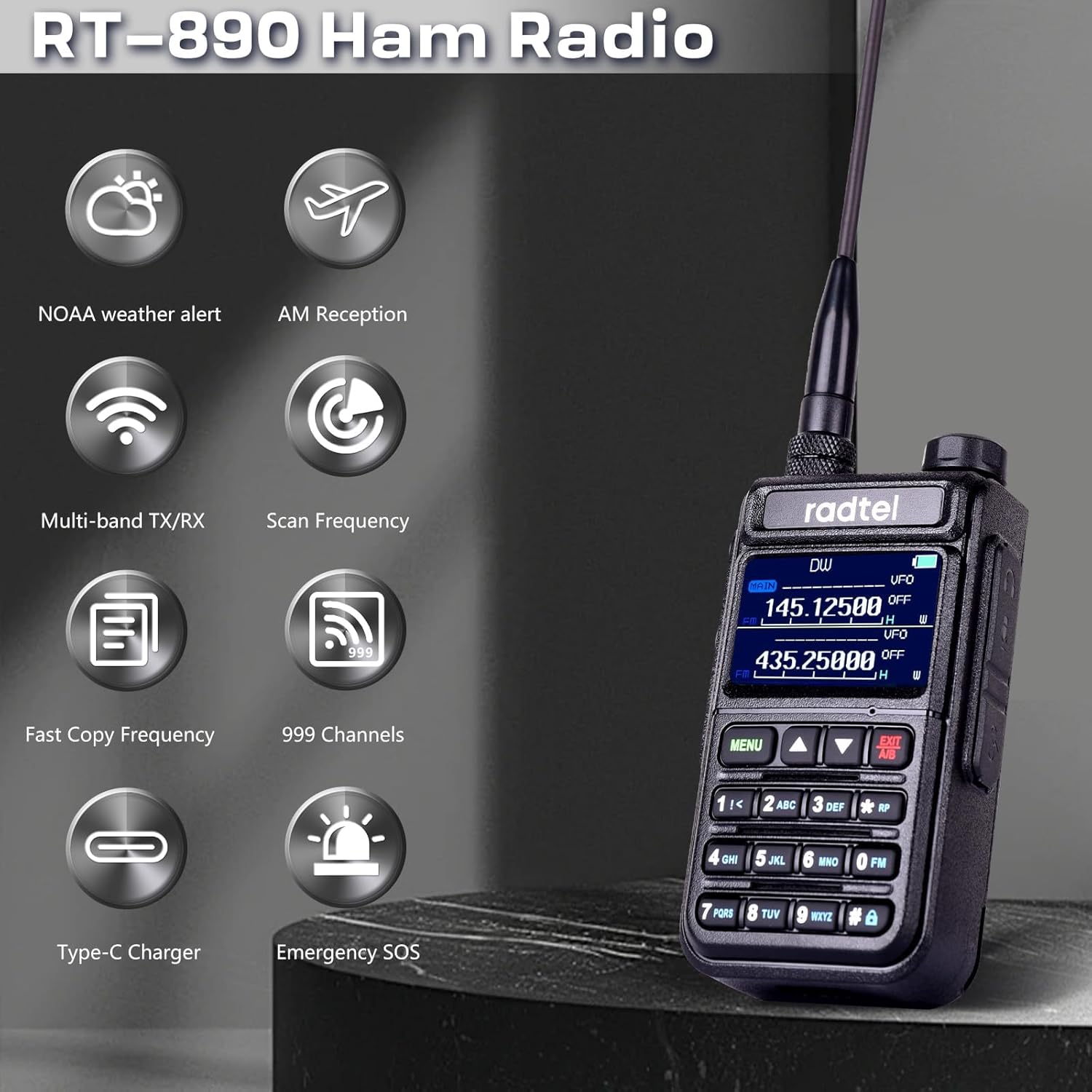
An illustration highlighting key features of the Radtel RT-890, such as NOAA weather alerts, AM reception, multi-band transmit/receive, frequency scanning, fast frequency copying, 999 channel capacity, Type-C charging, and emergency SOS.
4.1. Gbanyụọ/ Gbanyụọ na olu
- To power on, rotate the volume knob clockwise until you hear a click.
- To power off, rotate the volume knob counter-clockwise until you hear a click.
- Adjust the volume by rotating the same knob.
4.2. Frequency and Channel Selection
- The radio supports 999 channels. Use the keypad to directly input frequencies or navigate through channels.
- The RT-890 operates on dual-band TX/RX amateur frequencies (144-146 MHz and 430-440 MHz).
- It also supports reception on Airband (108-136 MHz) and FM Radio (64-108 MHz).
4.3. Atụmatụ Pụrụ Iche
- Ọrụ VOX: Voice-operated transmission allows hands-free operation. Activate via the menu.
- Igwe Redio: Tune into FM broadcast stations for entertainment.
- Airband Reception: Monitor aircraft communications within the 108-136 MHz range.
- Nleta ugboro ugboro: Utilize the built-in frequency measurement function for analysis.
- Wireless Copy Frequency: Quickly seek and copy frequencies and CTCSS tones from other radios.
- Mkpu ihu igwe NOAA: Receive alerts for severe weather conditions.
- Ihe mberede SOS: Activate the SOS function in emergency situations.

The Radtel RT-890 walkie talkie shown in an outdoor setting, emphasizing its NOAA Weather Alert capability for monitoring severe weather conditions.

Two Radtel RT-890 radios in a car, illustrating the wireless copy frequency feature for quickly seeking and replicating frequencies and CTCSS tones.
5. Nlekọta
5.1. Nlekọta batrị
- To maximize battery life, avoid overcharging or completely draining the battery.
- Debe batrị ahụ n'ebe dị jụụ ma kpọọ nkụ mgbe a naghị eji ya ruo ogologo oge.
- The typical battery life is 3 years under normal usage conditions.
5.2. Nhicha
- Jiri nwayọ hichaa redio, damp akwa . Ejila kemịkalụ siri ike ma ọ bụ ihe mkpocha abrasive.
- Hụ na redio ahụ kpọrọ nkụ tupu ejiri ya ma ọ bụ chajịa ya.
5.3. Waterproof Level
The Radtel RT-890 is designed to be waterproof. However, it is not intended for submersion. Avoid exposing the radio to extreme water pressure or prolonged immersion.
6. Nchọpụta nsogbu
If you encounter issues with your Radtel RT-890, please refer to the following common problems and solutions:
- Enweghị ike:
- Ensure the battery is properly installed and fully charged.
- Check if the volume knob is turned on. - Enweghị mgbama/ nnabata adịghị mma:
- Verify the antenna is securely attached.
- Check if you are within range of other compatible devices or repeaters.
- Ensure the correct frequency or channel is selected.
- Environmental factors (buildings, terrain) can affect signal strength. - Enweghị ọdịyo:
- Adjust the volume level.
- Check if an external earpiece/microphone is connected and functioning correctly.
- Ensure the squelch level is not set too high.
Maka okwu na-adịgide adịgide, biko kpọtụrụ nkwado ndị ahịa.

A collage showing the Radtel RT-890 being used in diverse environments, including a factory warehouse, an outdoor field, and during a 'secret mission', highlighting its versatility.
7. Nkọwapụta
| Njirimara | Nkọwapụta |
|---|---|
| Ụdị | Radtel |
| Nọmba nlereanya | RT-890 |
| Agba | Nwa |
| Ọnụọgụ nke ọwa | 999 |
| Oke ugboro ugboro | 144 MHz - 430 MHz (TX/RX), 108-136 MHz (Airband RX), 64-108 MHz (FM Radio RX) |
| Oke Okwu kacha | 10 Kilomita |
| Voltage | 7.4 volts |
| Ọkwa mgbochi mmiri | Waterproof |
| Ọnụọgụ nke batrị | 1 Lithium-Ion (included) |
| Ngwa gụnyere | 1 x batrị lithium-ion |
| Ndụ batrị | Afọ 3 |
| Nkà na ụzụ Tuner | AM/FM |
| Ngwa dakọtara | Other Radtel two-way radios on the same frequency band, Airband or FM Radio devices |
| Onye nrụpụta | Xiamen Radtel Electronics Co.,Ltd |
| UPC | 729162472882 |
| Nọmba akụkụ | rt890 |
8. Akwụkwọ ikike na nkwado
8.1. Akwụkwọ ikike Ozi
Biko kpọtụrụ onye ọrụ nke onye nrụpụta ahụ website or contact customer support for detailed warranty information regarding your Radtel RT-890.
8.2. Nkwado ndị ahịa
For technical assistance, troubleshooting, or any inquiries about your Radtel RT-890, please contact Xiamen Radtel Electronics Co.,Ltd customer support through their official channels.