
1. Ntuziaka nchekwa dị mkpa
Please read all instructions carefully before using the GEARSTONE GT-JT2 Under Desk Elliptical Stepper. Retain this manual for future reference.
- Kpọtụrụ dọkịta gị tupu ịmalite mmemme mmega ahụ ọ bụla.
- This equipment is intended for home or office use only.
- Hụ na e tinyere stepper ahụ n'elu ala dị larịị ma kwụsie ike.
- Debe ụmụaka na anụ ụlọ n'ebe akụrụngwa nọ n'oge eji.
- Afela oke onye ọrụ dị kilogram 110 (242 lbs).
- Wear appropriate footwear during exercise.
- Kwụsị ime mmega ahụ ozugbo ma ọ bụrụ na ị na-enwe ihe mgbu, isi ọwụwa, ma ọ bụ mkpụmkpụ ume.
- The LCD display requires batteries (not included). Ensure correct battery installation.
2. Ngwaahịa gafereview
The GEARSTONE GT-JT2 is a compact under-desk elliptical stepper designed for low-impact exercise. It features 'wing-style' steps for a smooth motion and an LCD display to track your workout progress. Its low-profile design allows for convenient use in various settings, including under a desk.
Akụkụ ndị bụ isi:
- Nhazi kọmpat: Ideal for use at home or in the office.
- Low-Impact Exercise: Engages lower body muscles with minimal joint strain.
- Ngosipụta LCD dijitalụ: Tracks time, distance, speed, step count, and calories burned.
- Ihe owuwu na-adịgide adịgide: Made from iron, ABS, and rubber for stability and longevity.
- Large Foot Pedals: Provides a secure and comfortable platform for various foot sizes.
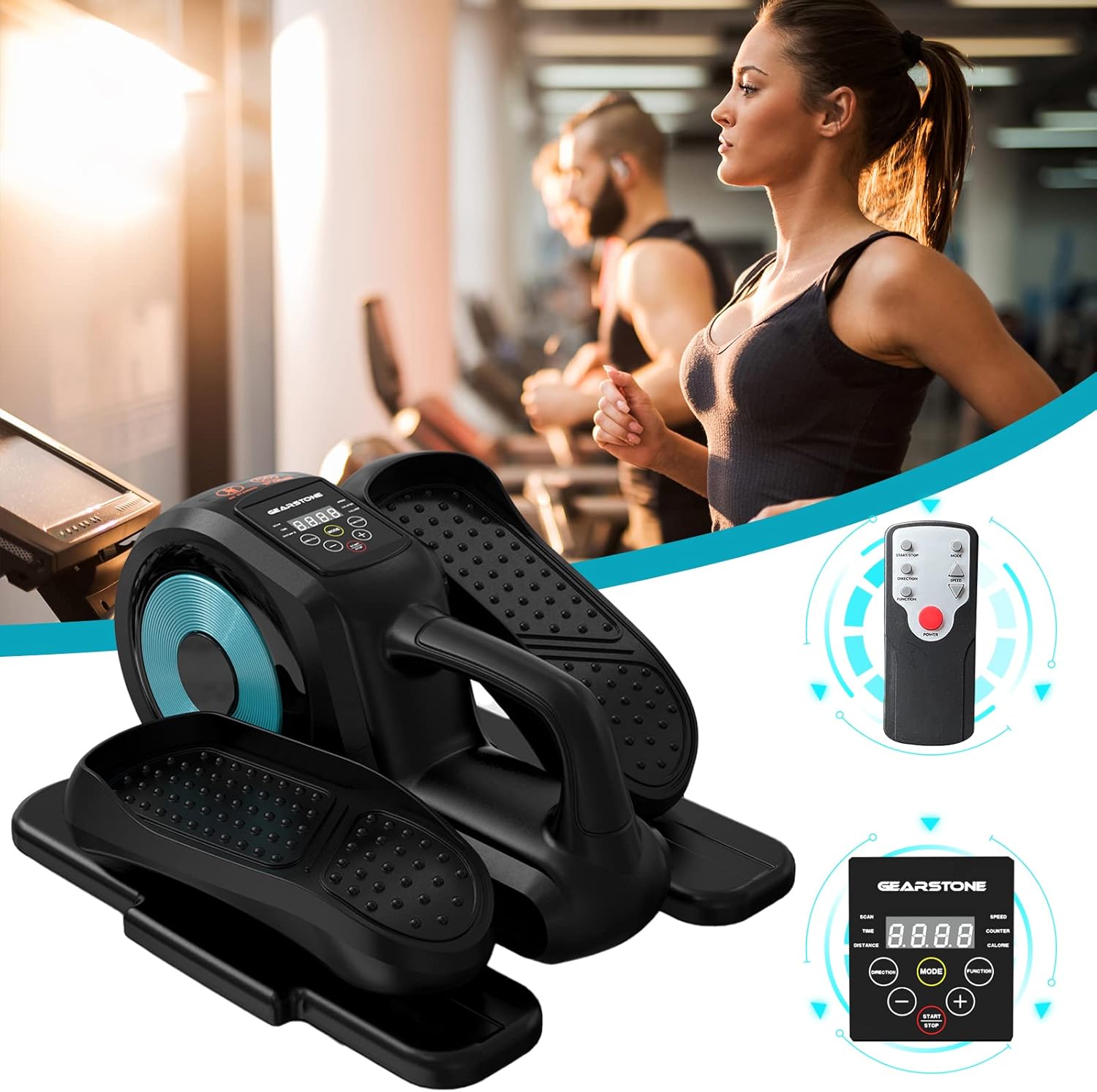
Image: The GEARSTONE GT-JT2 Under Desk Elliptical Stepper, shown with its remote control, ready for use in a home or office environment.
3. Ihe ngwugwu
Biko lelee ngwungwu ahụ ka hụ na ihe niile dị na emebighị emebi:
- GEARSTONE GT-JT2 Under Desk Elliptical Stepper Unit
- Remote Control (if included with your model)
- Akwụkwọ ntuziaka (akwụkwọ a)
Mara: Batteries for the LCD display are not included and must be provided separately.
4. Ntọala na Mgbakọ
The GEARSTONE GT-JT2 Stepper comes largely pre-assembled. Minimal setup is required.
- Ịkwapu: Carefully remove the stepper from its packaging.
- Nkwanye: Place the stepper on a flat, stable surface. Ensure there is enough clear space around the unit for safe operation.
- Battery Installation (for LCD Display):
- Locate the battery compartment on the back or underside of the LCD display unit.
- Mepee mkpuchi ụlọ.
- Insert the required batteries (typically AA or AAA, refer to the compartment label) ensuring correct polarity (+/-).
- Mechie mkpuchi nke batrị batrị nke ọma.
5. Ntuziaka ọrụ
Using your GEARSTONE GT-JT2 Stepper is straightforward. Follow these steps for an effective workout:
- Ndokwa: Sit comfortably in a chair with the stepper placed directly in front of you on the floor. Ensure your knees are at a comfortable angle and your feet can reach the pedals easily.
- Ndokwa ụkwụ: Place your feet firmly on the large, non-slip pedals. Ensure your entire foot is supported.
- Malite mmega ahụ: Begin pedaling in a smooth, continuous motion. The 'wing-style' steps are designed to provide a natural elliptical movement.
- Gbanwee Nguzogide (ọ bụrụ na ọdabara): This model typically offers fixed resistance. Focus on maintaining a consistent pace.
- Nyochaa ọganihu: Observe the LCD display to track your workout data (see Section 6 for details).
- Njikwa anya (ọ bụrụ na agụnyere): If your model includes a remote, you can use it to control the display functions (e.g., changing modes, starting/stopping the timer) without bending down.
- Ending Workout: Gradually slow down your pedaling until you come to a complete stop. Remove your feet from the pedals.

Image: A user demonstrating the GEARSTONE GT-JT2 Under Desk Elliptical Stepper in use, positioned beneath a desk for convenient exercise during work.
6. Ọrụ Ngosipụta LCD
The integrated LCD display provides real-time feedback on your workout. It is powered by user-provided batteries.

Foto: nkọwa zuru ezu view of the GEARSTONE GT-JT2's LCD display, illustrating the various metrics it tracks, such as time, distance, speed, step count, and calories.
Ụdị ngosi:
- Nyochaa: Automatically cycles through all data metrics every few seconds.
- OGE: Na-egosi oge mmega ahụ gị dị ugbu a.
- Dị anya: Shows the estimated distance covered during your workout.
- Ọsọ: Indicates your current pedaling speed.
- IHE: Displays the total number of steps or rotations.
- CalORIE: Na-eme atụmatụ kalori ndị ị gbara n'oge mmega ahụ.
Ọrụ bọtịnụ:
- Edị: Press to cycle through the different display modes (TIME, DISTANCE, SPEED, COUNTER, CALORIE, SCAN).
- Malite/Kwụsị: Initiates or pauses the tracking of your workout data.
- +/-: Used for adjusting settings or values if applicable (e.g., setting target goals, though this model typically has simpler functionality).
The display will automatically turn off after a period of inactivity to conserve battery life. It will resume tracking when movement is detected or a button is pressed.
7. Nlekọta na nlekọta
Nlekọta mgbe niile na-eme ka stepper gị dị ogologo ndụ na arụmọrụ kachasị mma.
- Nhicha: Jiri mgbasa ozi hichapụ otu ahụamp ákwà mgbe ejiri ya mee ihe ọ bụla iji wepụ ọsụsọ na uzuzu. Ejila ihe nhicha ma ọ bụ ihe mgbaze.
- Nchekwa: Store the stepper in a cool, dry place away from direct sunlight and extreme temperatures. Its compact size allows for easy storage under a bed or in a closet.
- Nyocha: Periodically check all bolts and moving parts to ensure they are secure and functioning correctly. Tighten any loose components.
- Ngbanwe batrị: Replace the LCD display batteries when the screen becomes dim or stops functioning.
8. Nchọpụta nsogbu
If you encounter any issues with your GEARSTONE GT-JT2 Stepper, refer to the following common problems and solutions:
| Nsogbu | Ihe nwere ike ime | Ngwọta |
|---|---|---|
| Ngosipụta LCD enweghị ihe ọ bụla ma ọ bụ ihe na-adịghị mma. | Batrị nwụrụ anwụ ma ọ bụ arụnyere na ezighi ezi. | Dochie batrị ọhụrụ, na-ahụ na polarity ziri ezi. |
| No data displayed during exercise. | Sensor not detecting movement; display in 'STOP' mode. | Ensure the stepper is in motion. Press the START/STOP button if applicable. Check battery status. |
| Stepper makes unusual noises. | Loose components; lack of lubrication. | Check and tighten all bolts and screws. Apply a small amount of silicone-based lubricant to moving joints if necessary. |
| Pedals feel stiff or uneven. | Internal mechanism issue; debris. | Inspect for any obstructions. If the problem persists, contact customer support. |
9. Nkọwapụta
| Njirimara | Nkọwa |
|---|---|
| Nlereanya | GT-JT2 |
| Ụdị | GE nkume |
| Akụkụ (L x W x H) | Ihe dị ka 446 x 392 x 247 mm (17.5 x 15.4 x 9.7 sentimita asatọ) |
| Ibu ngwaahịa | Ihe ruru. 8 n'arọ (17.6 lbs) |
| Ibu Onye ọrụ kacha | 110 n'arọ (242 lbs) |
| Ihe onwunwe | Iron, ABS, Rubber |
| Ngosipụta | LCD (Time, Distance, Speed, Counter, Calorie) |
| Isi Iyi Ike (Ngosipụta) | Batteries (Self-provided, not included) |
| Agba | Oji na Blue |
10. Akwụkwọ ikike na nkwado
For warranty information or technical support, please refer to the documentation provided at the time of purchase or contact GEARSTONE customer service through the retailer where the product was purchased.
Please have your model number (GT-JT2) and purchase details ready when contacting support.