
Roidmi XCQ06RM
Roidmi X20S XCQ06RM Cordless 2-in-1 Vacuum and Mop User Manual
Model: XCQ06RM
1. Okwu mmalite
Thank you for choosing the Roidmi X20S XCQ06RM Cordless 2-in-1 Vacuum and Mop. This appliance is designed to provide efficient and convenient cleaning for various floor types in your home. This manual contains important information regarding the safe use, operation, and maintenance of your device. Please read it thoroughly before first use and keep it for future reference.
2. Ntuziaka nchekwa
Iji belata ihe egwu nke ọkụ, ujo eletriki, ma ọ bụ mmerụ ahụ, biko lelee ihe ndị a na-eme iji chebe onwe gị:
- Gụọ ntuziaka niile tupu i jiri ngwa.
- Ejila n'èzí ma ọ bụ n'elu mmiri.
- Ekwela ka eji mee ihe egwuregwu ụmụaka. Nlebara anya dị mkpa mgbe ụmụaka na-eji ma ọ bụ nso.
- Jiri naanị dị ka akọwara n'akwụkwọ ntuziaka a. Jiri naanị mgbakwunye atụnyere ndị nrụpụta.
- Ejila eriri ma ọ bụ plọg mebiri emebi. Ọ bụrụ na ngwa anaghị arụ ọrụ ka ọ kwesịrị, atụbagoro, mebie, hapụ ya n'èzí, ma ọ bụ tụba ya na mmiri, weghachite ya na ebe ọrụ.
- Anaghachila ma ọ bụ were ụdọ buru, jiri eriri dị ka aka, mechie ọnụ ụzọ na eriri, ma ọ bụ dọpụta eriri n'akụkụ ọnụ ma ọ bụ nkuku dị nkọ. Ejila ngwa n'elu eriri. Debe eriri n'ebe dị ọkụ.
- Akwụpụla eriri site na ịdọrọ eriri. Iji kwụpụ, jide plọg, ọ bụghị eriri.
- Ejila aka mmiri were jide plọg ma ọ bụ ngwa.
- Etinyela ihe ọ bụla n'ime oghere. Ejila oghere ọ bụla akpọchiri; na-ezere uzuzu, lint, ntutu na ihe ọ bụla nwere ike ibelata ikuku.
- Debe ntutu isi, uwe na-adịghị mma, mkpịsị aka na akụkụ ahụ niile pụọ na oghere na akụkụ ndị na-akpụ akpụ.
- Gbanyụọ njikwa niile tupu ịtọpụ ya.
- Jiri nlezianya mee ihe mgbe ị na-ehicha ihe na steepụ.
- Ejila eburu mmiri ọkụ na-ere ọkụ ma ọ bụ ọkụ ọkụ, dị ka mmanụ ụgbọala, ma ọ bụ jiri n'ebe ha nwere ike ịnọ.
- Ewelitela ihe ọ bụla na-ere ọkụ ma ọ bụ ise siga, dị ka sịga, ọkụ, ma ọ bụ ntụ na-ekpo ọkụ.
- Ejikwala iko uzuzu na/ma ọ bụ nzacha n'ebe.
- Gbochie ịmalite n'amaghị ama. Gbaa mbọ hụ na ngbanwe ahụ nọ n'ọnọdụ agbanyụrụ tupu jikọọ na ngwugwu batrị, bulie ma ọ bụ iburu ngwa ahụ.
- Fanye naanị na chaja nke onye nrụpụta kwuru.
3. Ihe ngwugwu
Please check the package contents upon unpacking to ensure all items are present:
- Isi ihe dị ọcha Vacuum Cleaner
- Ahịhịa ọtụtụ ọrụ
- Mite removal brush
- Washing brush (mop attachment)
- Ahịhịa matraasi eletrik
- chaja ikuku
- Iyo
- Ngwá ọrụ Crevice
- Ebe nhicha
- Vacuum tube
- Mop heads x2
4. Ngwaahịa gafereview
The Roidmi X20S XCQ06RM is a powerful and versatile cleaning solution, combining vacuuming and mopping capabilities. Its lightweight design and advanced features make home cleaning efficient.

Foto 1: The Roidmi X20S XCQ06RM cordless vacuum cleaner in its upright configuration.
Akụkụ ndị bụ isi:
- Vacuum na Mop nke 2-n'ime-1: Easily switch between vacuuming and mopping functions by attaching the appropriate head. The mop brush rotates at approximately 200 RPM for deep cleaning.
- Mmanya dị ike: Features a new generation Engine-x brushless digital motor (up to 120,000 rpm) delivering 138 watts of suction power and 25,000 Pa air intake pressure. Air-x technology ensures consistent suction by separating dust from air.
- 6-Level Filtration System: A multi-level system effectively separates dust, filtering impurities as small as 0.3 µm with a 99% purification rate. The device includes a safety mechanism that prevents operation if filters are not correctly installed.
- Mobile Application Connectivity: Connects via Bluetooth to your smartphone. The app allows monitoring of remaining operating time, cleaning time, and provides notifications for dustbin full or filter replacement.
- Ndụ batrị agbatịkwuru: Optimized by the BMS-X system, the 8 LG/Samsung lithium batteries provide approximately 65 minutes of runtime. The app displays battery status and alerts.
- Nchaji ikuku magnetik: Convenient and cable-free charging.
- Ihe eji eme enyi: Operates at a reduced noise level of approximately 72 dB (A). The electric brush includes an LED light for improved visibility in dark areas. Weighing 1.5 kg, it is lightweight for easy handling.

Foto 2: The Roidmi X20S main unit shown with both the vacuum brush head and the mop attachment.

Foto 3: A user operating the Roidmi X20S to vacuum a rug in a living room setting.

Foto 4: The mop attachment of the Roidmi X20S cleaning a wet spill on a tiled kitchen floor.
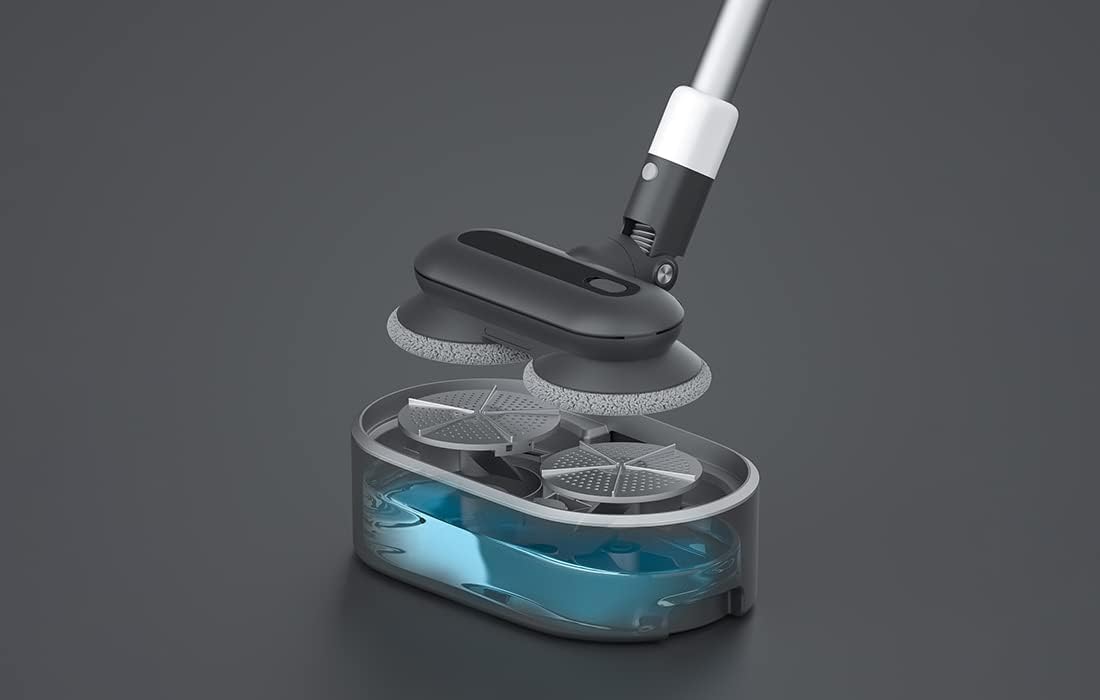
Foto 5: Ihe gbawara view showing the internal components of the Roidmi X20S mop attachment, including the water tank.
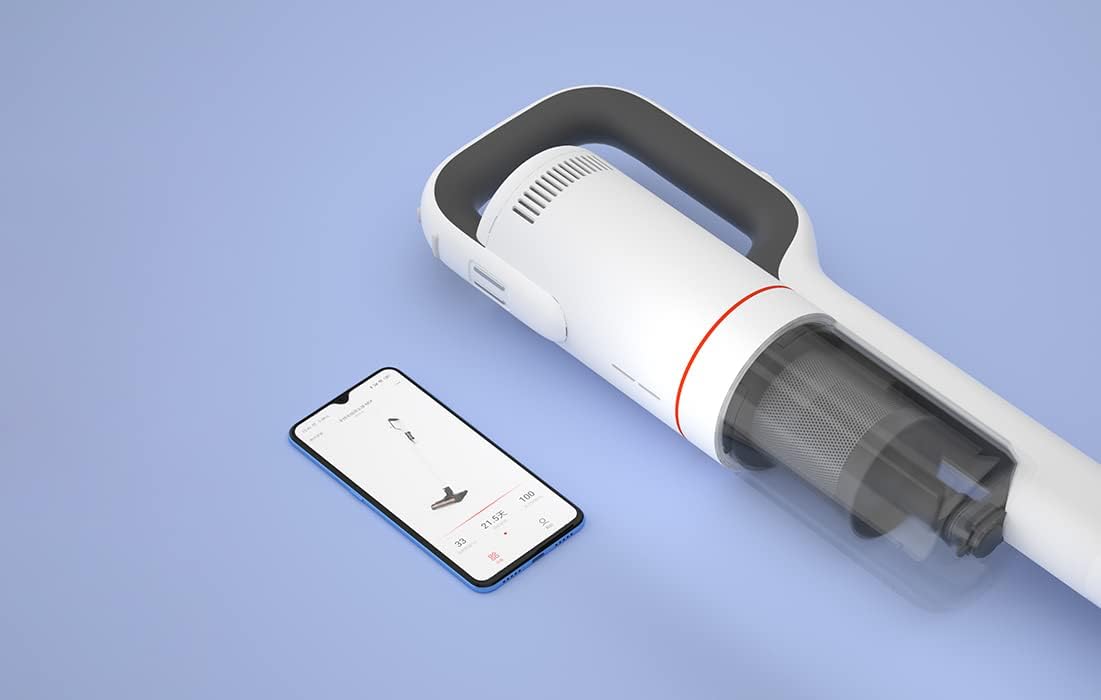
Foto 6: The Roidmi X20S main unit positioned next to a smartphone, illustrating its connectivity with the Roidmi mobile application.

Foto 7: A user demonstrating the Roidmi X20S in handheld mode, cleaning a sofa with an attachment.
5. Nhazi
5.1 Mgbakọ
- Connect the Vacuum Tube: Insert the vacuum tube into the main unit until it clicks into place.
- Tinye Isi Nhicha: Select the desired cleaning head (multi-function brush for vacuuming, or washing brush for mopping) and attach it to the end of the vacuum tube until it clicks.
- Install Mop Pads (for mopping): If using the washing brush, attach the mop pads to the bottom of the mop attachment.
5.2 Ịchaji
Before first use, fully charge the appliance. The Roidmi X20S uses magnetic wireless charging.
- Mount the cleaning station to a wall in a convenient location, ensuring it is near a power outlet.
- Connect the wireless charger to the cleaning station and plug it into a power outlet (220 Volts).
- Place the Roidmi X20S onto the cleaning station. The magnetic connection will secure it, and charging will begin automatically.
- Monitor the battery status via the indicator lights on the device or through the Roidmi mobile application.
6. Ntuziaka ọrụ
6.1 Vacuum
- Ensure the multi-function brush or appropriate vacuum attachment is securely installed.
- Pịa bọtịnụ ike ka ịgbanwuo oghere.
- Select the desired suction mode (if applicable) using the mode selection button.
- Begin vacuuming the desired surface. The LED light on the brush head will illuminate dark areas.
- After use, press the power button to turn off the vacuum.
6.2 Mgbochi
- Detach the vacuum brush head and attach the washing brush (mop attachment) with mop pads installed.
- Fill the water tank on the mop attachment with clean water. Do not use corrosive liquids or hot water.
- Press the power button to turn on the device. The mop pads will begin to rotate.
- Gently guide the mop attachment over the floor surface to clean.
- After use, press the power button to turn off the device. Empty any remaining water from the tank and clean the mop pads.
6.3 Mobile Application Usage
- Download the Roidmi app from your smartphone's app store (compatible with Android and iOS).
- Enable Bluetooth on your smartphone and open the Roidmi app.
- Follow the in-app instructions to pair your Roidmi X20S with your smartphone.
- Ozugbo ejikọrọ, ị nwere ike view battery status, remaining operating time, cleaning history, and receive notifications for dustbin full or filter replacement.
7. Nlekọta
Regular maintenance ensures optimal performance and extends the lifespan of your Roidmi X20S.
7.1 Na-ekpofu uzuzu uzuzu
- When the dustbin full notification appears on the app or when visibly full, detach the dustbin from the main unit.
- Mepee uzuzu uzuzu ma kpofuo ihe dị n'ime ya n'ime ebe a na-ekpofu ihe.
- Close the dustbin and reattach it to the main unit.
7.2 Nhicha/Ịdochi ihe nzacha
- The Roidmi X20S features a washable filter. When the app notifies you to clean or replace the filter, remove the filter from the dustbin.
- Rinse the filter under running water until clean. Ensure it is completely dry before reinserting.
- Replace the filter if it is damaged or excessively worn.
7.3 Cleaning Brushes and Mop Pads
- Regularly remove hair and debris from the multi-function brush and electric mattress brush. Use the crevice tool or scissors if necessary.
- After mopping, detach the mop pads from the washing brush and rinse them thoroughly. Allow them to air dry completely before storing or reusing.
8. Nchọpụta nsogbu
If you encounter issues with your Roidmi X20S, refer to the following common problems and solutions:
| Nsogbu | Ihe nwere ike ime | Ngwọta |
|---|---|---|
| Enweghị ike/anaghị agbanwu | Batrị agwụla Device not properly assembled | Chajie batrị zuru oke Ensure all parts are clicked into place |
| Ike mmiri dị ala | Dustbin juru eju Akpọchiela nzacha Akpọchiela isi ahịhịa | Wepụ ihe mkpofu ahụ Hichaa ma ọ bụ dochie nzacha Remove any obstructions from the brush head |
| Mop function not effective | Mmiri mmiri efu Mop pads are dirty or worn | Mejupụta tank mmiri ahụ Clean or replace mop pads |
| Ngwaọrụ kwụsịrị na mberede | Batrị dị ala Filtration system parts not installed correctly | Fanye batrị Check all filter components are securely in place |
| Nsogbu njikọ ngwa | Agbanyụrụ Bluetooth Ejikọtaghị ngwaọrụ | Ensure Bluetooth is enabled on your phone Follow app instructions to re-pair the device |
If the problem persists after attempting these solutions, please contact Roidmi customer support.
9. Nkọwapụta
| Njirimara | Nkọwapụta |
|---|---|
| Ụdị | ROIDMI |
| Nọmba nlereanya | XCQ06RM |
| Agba | Ọcha |
| Ike | 34.2 Watt |
| Voltage | 220 volts |
| Ọkwa mkpọtụ | 72 Decibels (A) |
| Ndụ batrị | Ihe ruru. Nkeji 65 |
| Ibu Ibu | 3.95 kilogram |
| Ụdị nzacha | Cartridge (Washable, HEPA) |
| Isi Iyi Ike | Battery Powered (1 Lithium-ion battery included) |
| Ndakọrịta | Android, iOS (via Roidmi App) |
| Atụmatụ pụrụ iche | Compact, Lightweight, Portable, Bagless, Wet/Dry (mop function) |
| Onye nrụpụta | Wuxi Roidmi Information Technology Co., Ltd. |
10. Akwụkwọ ikike na nkwado
For warranty information, please refer to the warranty card included with your product or contact Roidmi customer service directly. Information regarding the availability of spare parts is not provided in the product details.
For technical support or service inquiries, please visit the official Roidmi websaịtị ma ọ bụ kpọtụrụ ọwa nkwado ndị ahịa ha.
Ask a question about this manual
Ask about setup, troubleshooting, compatibility, parts, safety, or missing instructions. Manuals+ will review the question and use this page’s manual context to help answer it.