
1. Okwu mmalite
Nkọwa ngwaahịa
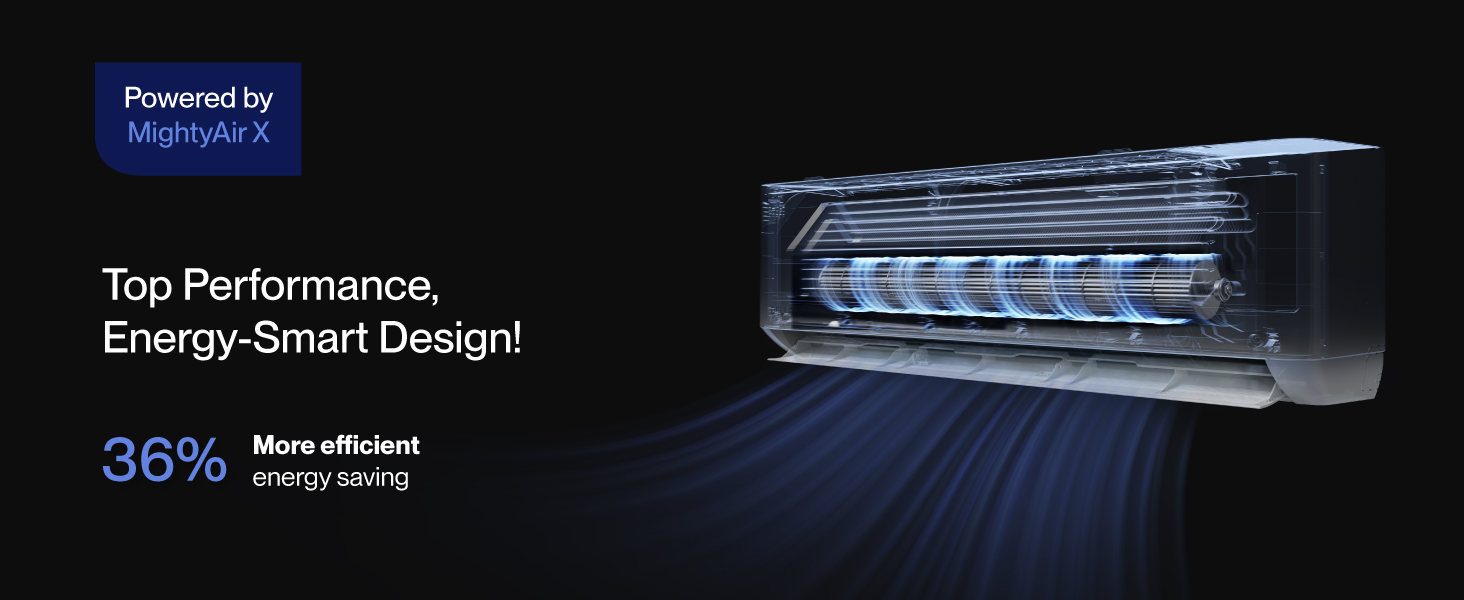
The Della 35K BTU Quad 4 Zone 19 SEER2 Multi-Zone Mini Split AC Heat Pump System is an energy-efficient solution for cooling and heating multiple rooms. This 208-230V unit features a mini split inverter plus system with a heat pump capable of operating in temperatures as low as -13°F (-25°C) and DC Inverter technology for up to 30% power savings. It provides ample coverage for up to 1600 sq. ft. with four independent 9000 BTU indoor air handlers, each with separate controls. The system is designed for quiet operation at only 29 dBa and includes smart functions like 4D airflow, 'I Feel' mode, 24-hour timer, sleep mode, ECO energy-saving mode, multiple fan speeds, turbo function, and dry mode for dehumidifying. It is also compatible with Alexa and WiFi for smart control.
Ozi nchekwa
Ihe dị mkpa: This system mandates professional installation. It is not a DIY mini split AC. Any alteration of line-set length requires adjusting freon levels. Line-set vacuuming is required during installation. Always ensure all power sources are turned off before connecting any wires or performing maintenance. Consult a qualified HVAC professional for installation and complex maintenance tasks to ensure safe and correct operation.
2. Ngwaahịa gafereview
Atụmatụ igodo
- Ike dị irè: 19 SEER2 na teknụzụ DC Inverter maka nchekwa ike ruo 30%.
- Nkasi Obi Ọtụtụ Mpaghara: Four 9000 BTU indoor air handlers for individual temperature control in up to 4 rooms (400 sq. ft. per unit).
- Ogologo ọrụ sara mbara: Provides cooling and heating in environments from -13°F (-25°C) to 131°F (55°C).
- Njikwa smart: Works with Alexa and WiFi, controllable via the Della+ app for advanced features like Geo Location, schedules, and various modes.
- Ọrụ dị jụụ: Ultra-silent at only 29 dBa.
- Ọrụ dị elu: Includes 4D airflow, 'I Feel' mode, 24-hour timer, sleep mode, ECO energy-saving mode, multiple fan speeds, turbo function, and dry mode.
- Nhazi na-adịgide adịgide: Gold-plated fins prevent rust corrosion for long-lasting performance.
Ngwa
The Della Mini Split AC system includes the following main components and installation accessories:
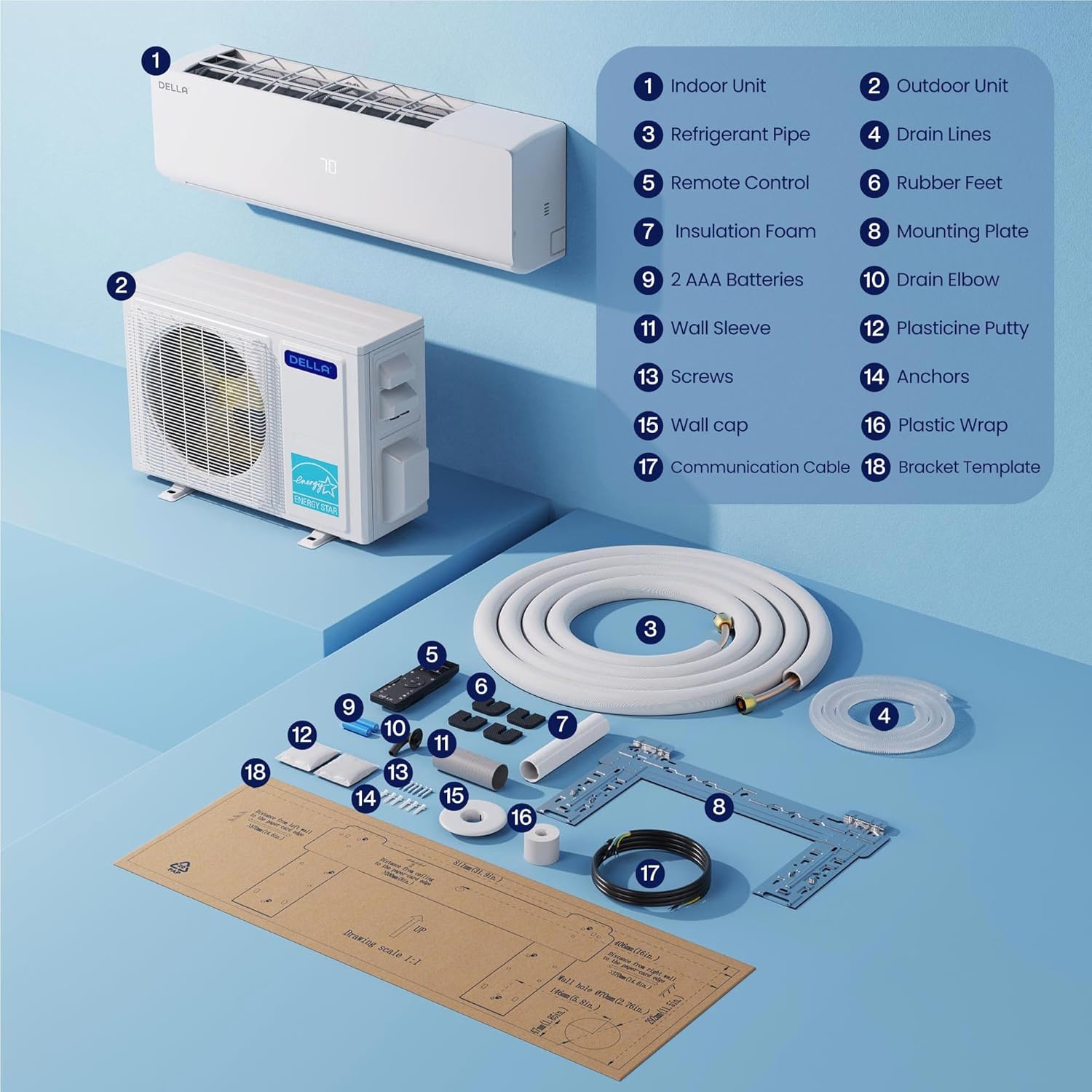
This image displays an exploded view of the Della Mini Split AC system, highlighting its various components. Key parts include the Indoor Unit, Outdoor Unit, Refrigerant Pipe, Drain Lines, Remote Control, Rubber Feet, Insulation Foam, Mounting Plate, Drain Elbow, Wall Sleeve, Plasticine Putty, Screws, Anchors, Wall Cap, Plastic Wrap, Communication Cable, and Bracket Template.
3. Ntọala na nwụnye
Proper installation is crucial for the optimal performance and longevity of your Della Mini Split AC system. It is highly recommended that installation be performed by a qualified professional.
Important Pre-Installation Steps
Tupu ịmalite nrụnye, review these critical steps to ensure a smooth and efficient setup:
Video 1: 5 Urgent Steps Need to Know Before Installing Della Mini Split
This video highlights five critical considerations for proper installation of a Della Mini Split system, including optimal location, careful handling of refrigerant pipes, correct line set bundling, the necessity of vacuum pumping, and ensuring safe electrical connections.
Usoro ntinye
Follow this step-by-step guide for the physical installation of your Della Mini Split unit:
Video 2: Install Your DELLA Mini Split Unit
This detailed video provides a step-by-step guide on installing the Della Mini Split AC unit. It covers marking locations using a template, securing the bracket, routing line sets and electricals through the wall, mounting the indoor unit, connecting line sets to the condenser, and performing vacuuming and refrigerant release.
Igwe ọkụ eletrik
Ensure all electrical connections are made correctly and safely. Always turn off power at the breaker before starting any wiring work.
Video 3: How to wire your Della unit
This video provides clear instructions on correctly wiring the Della Mini Split unit. It details how to connect the ground wire first, followed by numbered wires (black, white, and yellow) to their corresponding terminals on both the indoor and outdoor electrical blocks, ensuring proper and safe electrical setup.
4. Ntuziaka ọrụ
Your Della Mini Split AC system offers various ways to control your indoor climate for maximum comfort and efficiency.
Ọrụ njikwa anya
The included remote control provides full functionality to manage your unit. Familiarize yourself with its buttons and their corresponding actions:
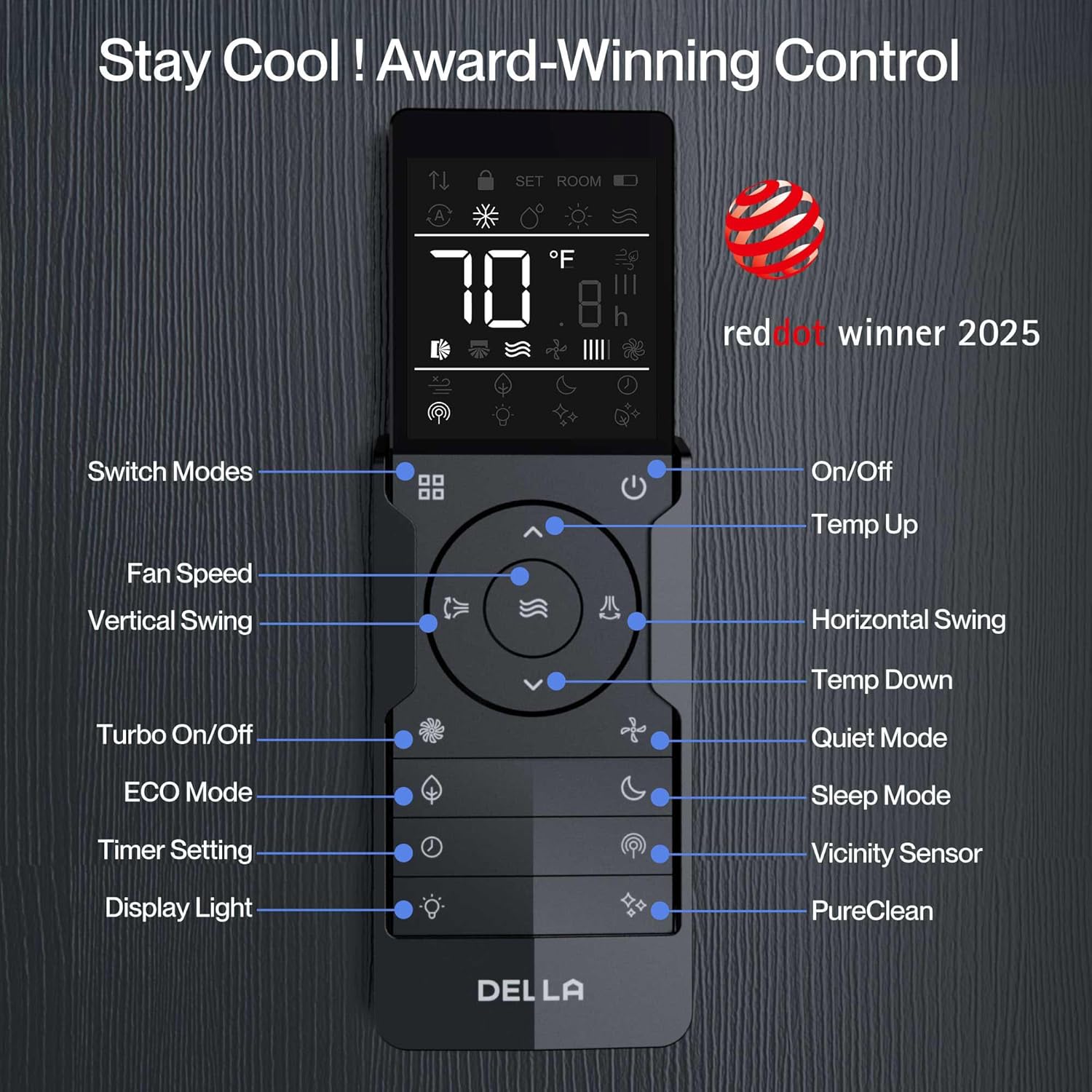
This image illustrates the remote control for the Della Mini Split AC, detailing the functions of each button. Key controls include: Switch Modes, Fan Speed, Vertical Swing, Turbo On/Off, ECO Mode, Timer Setting, Display Light, On/Off, Temp Up, Horizontal Swing, Temp Down, Quiet Mode, Sleep Mode, Vicinity Sensor, and PureClean.
Smart App Control (Della+ App)
Control your Della unit effortlessly from anywhere using the free Della+ app, available for download from your app store. The app offers a sleek, user-friendly interface and integrates with Google Assistant and Alexa.
Video 4: Della Mini Split App 3.0
This video demonstrates the features and user interface of the Della+ mobile application. It showcases how to control temperature settings, select various operating modes, adjust fan speed, manage airflow, set sleep modes, and utilize scheduling and timer functions for personalized comfort.

Three smartphone screens displaying the Della+ app interface for controlling the unit, including temperature settings, modes, fan speed, and timer.

Smartphone screens showing how to set schedules and timers within the Della+ app for automated temperature control, allowing users to plan their week in advance or set custom countdown timers.
Smartphone screens illustrating various operating modes available in the Della+ app, such as Auto, Cool, Heat, Dehumidify, Fan Only, and ECO mode, allowing users to choose their perfect home climate.
Smart Geo Location
The Della+ app features a Smart Geo Location function that automatically adjusts your AC unit based on your location, ensuring comfort when you arrive home and saving energy when you leave.
Video 5: Geo Location Function
This video explains how to set up and customize the Geo Location feature in the Della+ app. It demonstrates how the AC unit can automatically turn on or off based on your proximity to a set location, providing hands-free control and energy efficiency.

A person driving a car with a smartphone displaying a map and a notification from the Della+ app about automatic AC control based on location, enabling hands-free operation.
Ndakọrịta njikwa olu
The Della Mini Split AC seamlessly integrates with voice control platforms like Alexa and Google Assistant, allowing you to manage your climate settings with simple voice commands.

An Amazon Echo device on a table in a living room, illustrating voice control compatibility with the Della AC unit, allowing users to adjust settings using voice commands.
Ụdị arụ ọrụ
- Ọnọdụ Cool: Provides efficient cooling to your desired temperature.
- Ụdị okpomọkụ: Offers powerful heating for colder conditions.
- Ụdị Akọrọ (Ịme ka mmiri ghara ịdị ọcha): Reduces excess moisture in the air.
- Ụdị naanị onye ofufe: Na-ekesa ikuku na-enweghị kpo oku ma ọ bụ jụrụ oyi.
- Nchekwa onwe na ọnọdụ: Automatically selects the appropriate mode based on ambient temperature.
- Ọnọdụ Nchekwa Ike ECO: Na-ebuli ọrụ maka obere ike oriri.
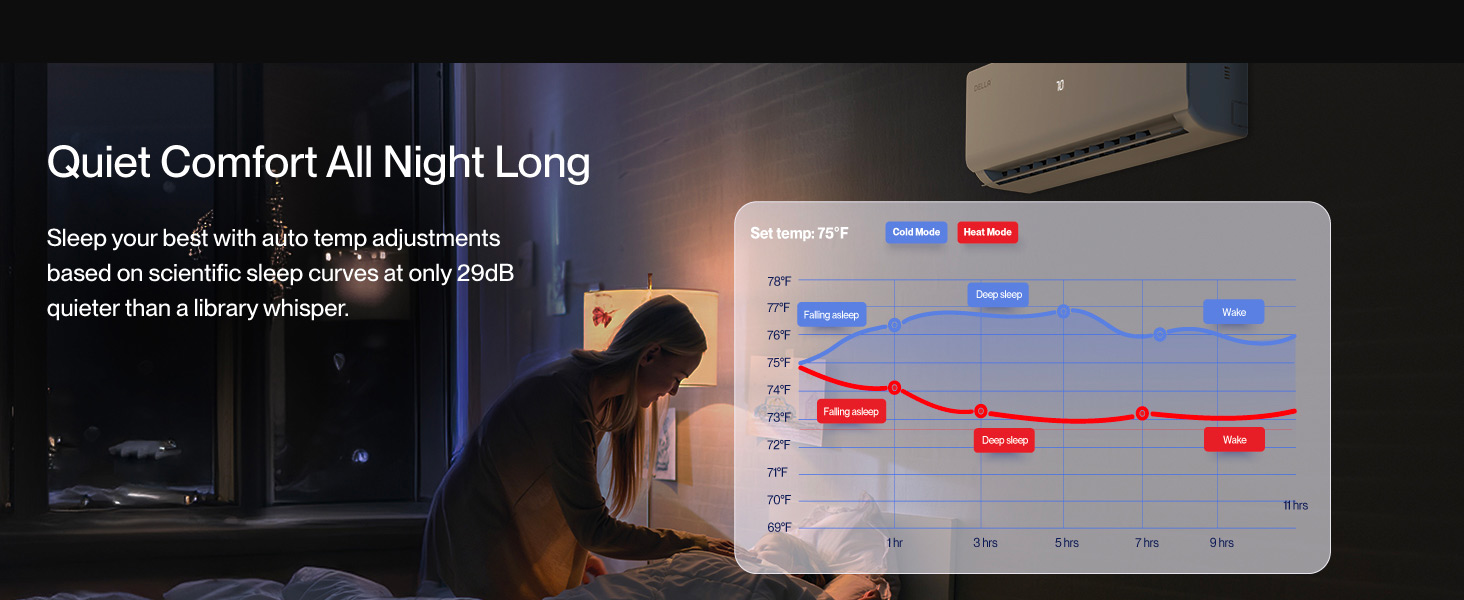
- Modera Modera: Na-agbanwe okpomọkụ na ọsọ fan maka ụra dị jụụ na nke dị mma.
- Ọrụ Turbo: Na-enye oyi ma ọ bụ kpo oku ngwa ngwa.
5. Nlekọta
Regular maintenance ensures the longevity and efficient operation of your Della Mini Split AC system. Always disconnect power before performing any maintenance.
Nchacha nzacha
Clean the air filters regularly (every 2-4 weeks, depending on usage) to maintain optimal airflow and efficiency. Refer to your specific indoor unit manual for instructions on how to remove and clean the filters.
Outdoor Unit Care
Keep the outdoor condenser unit clear of debris, leaves, and other obstructions to ensure proper airflow. Periodically check the refrigerant lines and electrical connections for any signs of wear or damage.
Ọrụ ọkachamara
It is recommended to have your system professionally serviced at least once a year by a qualified HVAC technician. This includes checking refrigerant levels, cleaning coils, and inspecting all components for proper function.
6. Nchọpụta nsogbu
If you encounter issues with your Della Mini Split AC system, refer to the following common troubleshooting tips. For persistent problems, contact Della customer support or a qualified technician.
Nkeji anaghị agbanwuo
- Lelee ma ọ bụrụ na ike eletrik ahụ ejikọtala, ebe ihe mgbawa sekit ahụ emeghị ka ọ daa.
- Gbaa mbọ hụ na batrị anaghị emebi emebi.
- Verify that the unit is not in a timed-off state.
Insufficient Cooling/Heating
- Clean or replace dirty air filters.
- Ensure no obstructions are blocking the indoor or outdoor unit's airflow.
- Check if windows and doors are properly closed.
- Verify that the correct operating mode and temperature settings are selected.
Mkpọtụ na-adịghị ahụkebe
- A slight gurgling sound is normal due to refrigerant flow.
- If loud or persistent, check for loose parts or contact support.
Mgbapu mmiri
- Ensure the drain hose is not blocked or kinked.
- Verify the indoor unit is properly leveled to allow for drainage.
7. Nkọwapụta
| Njirimara | Nkọwapụta |
|---|---|
| Ụdị | Della |
| Nọmba nlereanya | 1D4-TL+Q9999 |
| Ike | 3 Tons (35000 BTU/h Outdoor Unit, Four 9000 BTU Indoor Units) |
| Ike jụrụ oyi | 9000 British Thermal Units (per indoor unit) |
| Oke arụmọrụ ike nke oge (SEER2) | 19 |
| Voltage | 208-230 volts |
| Ọkwa mkpọtụ | 29 dBa (Indoor Unit) / 36 Decibels (Outdoor Unit) |
| Igwe nju oyi | R-454B (Pre-Charged) |
| Ụdị ntụgharị | Has Inverter |
| Ụdị nwụnye | Gbasaa Sistem |
| Ụdị Compressor | Rotary |
| Mpaghara mkpuchi | Up to 1600 Sq.Ft (400 Sq.Ft per indoor unit recommended) |
| Oke okpomoku na-arụ ọrụ | -13°F (-25°C) ruo 131°F (55°C) |
| Usoro njikwa | App, Remote, Voice (Alexa, Google Assistant) |
| Akụkụ ngwaahịa (Ngalaba ime ụlọ) | 8.07"D x 31.92"W x 11.49"H |
| Ogo Fuse kacha | 35A |
| Ogologo Tọọ Line | 4 pcs 16ft copper pipes lineset (Standard size 1/4" & 3/8" outer dimension) |
| Drain Pipe Length | 4 pcs 6.56ft outlet drain pipe (inner/outer diameter size: 15.5mm/16.9mm) |
| Ụdị akwụkwọ ikike | Oge ndụ |
8. Akwụkwọ ikike na nkwado
Della is committed to providing best-in-class support and peace of mind for your purchase.
Lifetime Coverage
Your Della Mini Split AC system comes with a Lifetime Warranty, offering unmatched support and no additional costs for eligible issues.
This graphic highlights Della's commitment to customer satisfaction with a shield icon representing Lifetime Coverage, emphasizing best-in-class support and no additional costs.
Nkwado ndị ahịa
For any questions, technical assistance, or warranty claims, Della provides comprehensive customer support:
- Nkwado ekwentị: Available Monday to Friday, 6 AM - 4 PM PST.
- Mkparịta ụka dị ndụ: Available 24/7 for product support.

A hand holding a smartphone with call and chat icons, indicating available phone support (6 AM - 4 PM PST) and live chat (24/7) for customer assistance.
Ị nwekwara ike ịga na Ụlọ Ahịa Della dị na Amazon maka ozi ngwaahịa na akụrụngwa ndị ọzọ.