
1. Okwu mmalite na gafereview
The EGO POWER+ PAD5000 Nexus Escape 400W Inverter provides high-quality, clean power for sensitive electronics. This portable inverter delivers 400 watts of continuous power and 800 watts of peak power, making it suitable for a wide range of devices. It is fully compatible with all EGO 56V ARC Lithium batteries, offering a versatile and reliable power solution for various situations, including home use, camping, na ike gịtages.

Figure 1: EGO POWER+ PAD5000 Portable Inverter with a 56V ARC Lithium battery attached.
2. Atụmatụ igodo
- 400W Continuous Power / 800W Peak Power: Provides reliable power for various devices, with extra capacity for startup surges.
- Mpụta Sine Wave dị ọcha: Delivers clean and stable electricity, safe for sensitive electronics.
- Otutu ọdụ ụgbọ mmiri: Features one 120V AC power outlet, one USB-C port, one USB-C PD (100W) port, and one USB-A (18W) port for simultaneous device charging.
- Ngafe-Site na Nchaji: Allows an EGO 56V ARC Lithium battery to charge via the 100W USB-C PD port while simultaneously powering devices.
- Ọkụ LED arụnyere n'ime ya: Provides ambient lighting during power outages or in low-light conditions.
- EGO 56V ARC Lithium Battery Compatibility: Utilizes the same interchangeable batteries as other EGO POWER+ tools.

Figure 2: The EGO POWER+ Portable Inverter leverages advanced 56V ARC Lithium battery technology for efficient power delivery.
3. Ntọala na Ntinye Batrị
The PAD5000 inverter is designed for easy battery installation and removal. It can accommodate up to four EGO 56V ARC Lithium batteries simultaneously, allowing for increased power capacity.
Nwụnye batrị:
- Align the battery with the battery slot on the inverter.
- Slide the battery firmly into the slot until it clicks into place.
- Repeat for additional batteries (up to four).
Mwepụ batrị:
- Press the battery release button (usually located on the battery itself or near the slot).
- Slide the battery out of the slot.

Figure 3: The inverter can hold up to four EGO 56V ARC Lithium batteries, providing substantial power capacity.
The total battery capacity will depend on the size (Amp-hour) of the individual batteries inserted. For example, with four 5.0Ah batteries, the total capacity is approximately 1120Wh. Using larger 9.6Ah batteries can increase the total capacity to around 1600Wh.
4. Ntuziaka ọrụ
Ịgbanyụ/ Gbanyụọ:
Press and hold the main power button on the inverter's front panel to turn the unit on or off. The indicator light around the button will illuminate when the unit is active.
Activating Outlets and Ports:
Once the inverter is powered on, individual buttons are available to activate the AC outlets and USB ports. Press the respective button for the desired output (e.g., AC outlet button, USB button). The indicator light for each port will turn green when active.

Figure 4: Front panel showing the 120V AC outlet, USB-C, USB-C PD, and USB-A ports.
Ọkụ LED arụnyere n'ime ya:
The inverter features built-in LED lights for ambient illumination. Press the light button to cycle through different brightness settings or activate an SOS mode for emergencies. The lights are located on the sides of the battery housing.
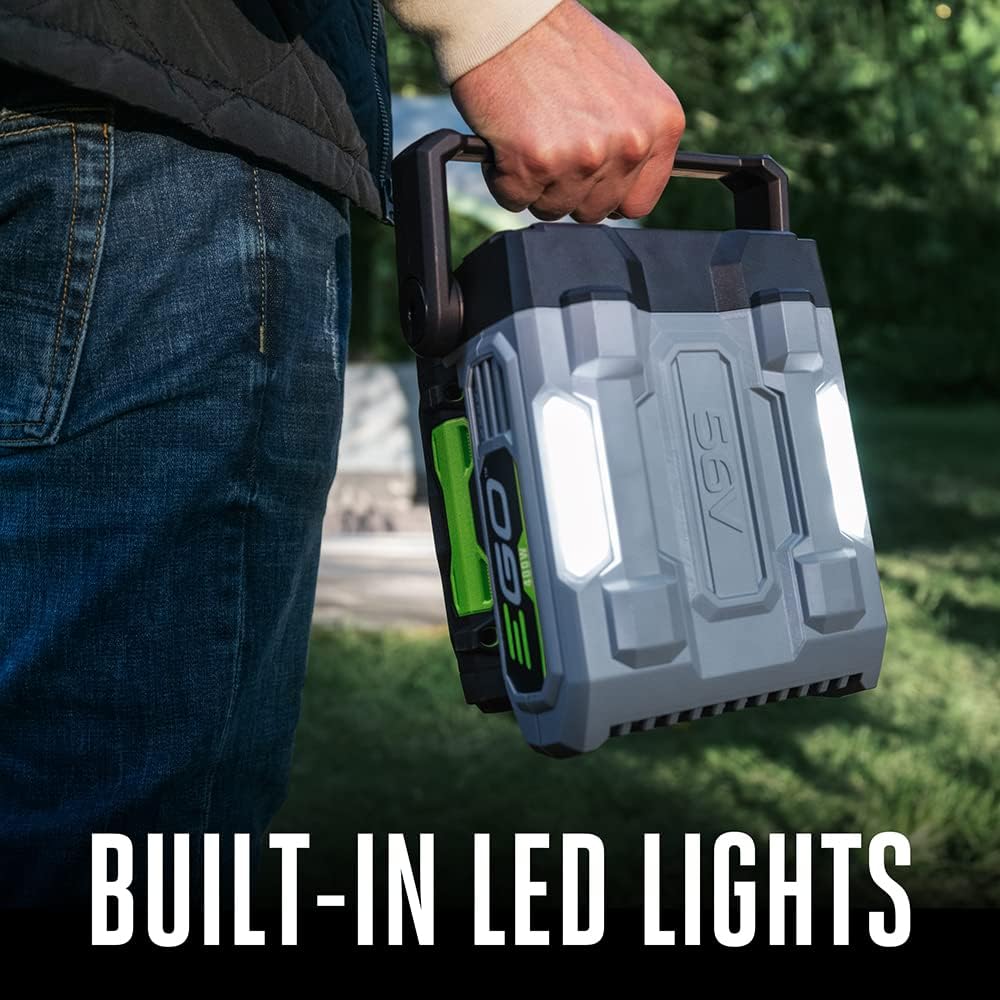
Figure 5: Built-in LED lights provide convenient illumination.
5. Ịchaji batrị
The PAD5000 inverter includes a charging adapter that allows you to charge the inserted EGO 56V ARC Lithium batteries by plugging the inverter into a wall outlet. However, this method is relatively slow, taking approximately 8-10 hours to fully charge four batteries.
Ụzọ nchaji akwadoro:
For faster charging, it is recommended to use dedicated EGO POWER+ fast chargers (sold separately). These chargers can charge individual batteries or two at a time much more quickly, allowing for continuous power by swapping out depleted batteries with fully charged ones.
The inverter also supports pass-through charging via the 100W USB-C PD port, allowing an EGO 56V ARC Lithium battery to charge while simultaneously powering other devices.
6. Portable Power Options
EGO also offers smaller, more portable inverter options for lighter power needs:
- EGO POWER+ 400W Portable Inverter: Features one 120V AC outlet, one 100W USB-C PD port, one 18W USB-C port, and one 18W USB-A port. Ideal for charging laptops, phones, and other small devices.
- EGO POWER+ 150W Portable Inverter: Features one 120V AC outlet and two USB-A ports. This is the most compact option for minimal power requirements.
These smaller units are convenient for situations where the full capacity of the PAD5000 is not needed, or when greater portability is desired for activities like hiking.
7. Performance Tests
The EGO POWER+ PAD5000 Portable Inverter has been tested with various household appliances to demonstrate its capability:
- Panini Maker (approx. 1000W) & Toaster (approx. 800W): The inverter successfully powered both a panini maker and a toaster simultaneously, drawing approximately 1800W. This demonstrates its ability to handle high-wattage appliances continuously.
- Blender (approx. 400W): The inverter powered a blender without issues, confirming its 400W continuous output capability.
The inverter's overload protection feature ensures that it will safely shut off if the power draw exceeds its continuous or peak limits, preventing damage to the unit or connected devices.
Video 1: Official EGO POWER+ Nexus Escape 400W Inverter product overview, demonstrating features and usage scenarios.
8. Nkọwapụta
| Njirimara | Nkọwapụta |
|---|---|
| Ụdị | Ike EGO + |
| Aha Nlereanya | Nexus Escape 400W Inverter (PAD5000) |
| Ike na-aga n'ihu | 400W |
| Ike kacha elu | 800W |
| Mmepụta Waveform | Okpokoro nke Sine |
| Ntinye AC | 1 x 120v |
| ọdụ ụgbọ mmiri USB | 1 x USB-C, 1 x USB-C PD (100W), 1 x USB-A (18W) |
| Ntinye Voltage | 120 volts |
| Mmepụta Voltage | 120 volts |
| Ugboro ugboro | 60 Hz |
| Akụkụ (L x W x H) | 7.7" x 4.72" x 8.2" |
| Ibu Ibu | 3.3 pound |
| Ndakọrịta batrị | All EGO 56V ARC Lithium batteries |
9. Nlekọta
To ensure optimal performance and longevity of your EGO POWER+ PAD5000 Portable Inverter, follow these maintenance guidelines:
- Nhicha: Keep the inverter clean and free from dust and debris. Use a dry cloth to wipe down the exterior. Do not use harsh chemicals or abrasive cleaners.
- Nchekwa: Store the inverter and batteries in a cool, dry place away from direct sunlight and extreme temperatures.
- Nlekọta batrị: For long-term storage, ensure batteries are partially charged (around 30-50%) to prevent over-discharge. EGO 56V ARC Lithium batteries have a self-discharge feature that drains them to 30% after a month of inactivity to preserve battery health.
- Nyocha: Regularly inspect the inverter and cables for any signs of damage or wear. Do not use if damaged.
10. Nchọpụta nsogbu
If you encounter issues with your EGO POWER+ PAD5000 Portable Inverter, refer to the following common troubleshooting tips:
- Inverter Anaghị agbanyụ: Ensure batteries are properly inserted and fully charged. Check battery indicator lights.
- No Output from Ports/Outlets: Verify that the inverter is powered on and the specific port/outlet is activated (indicator light should be green).
- Overload Protection Activated: If the inverter shuts off or shows a red flashing light, it indicates an overload. Disconnect the device drawing excessive power, reset the inverter by turning it off and on, and then reconnect devices with lower power requirements.
- Nchaji nwayọ: Charging batteries directly through the inverter is slow. Use a dedicated EGO POWER+ fast charger for quicker results.
11. Akwụkwọ ikike na nkwado
The EGO POWER+ PAD5000 Portable Inverter comes with a 5-year tool warranty. For warranty claims, technical support, or additional information, please refer to the official EGO Power+ websaịtị ma ọ bụ kpọtụrụ ndị ahịa ha ọrụ.