
Okwu mmalite
The DIZO Earphones with HD Mic (Model DA2106) are designed to provide a clear audio experience for music listening and calls. Featuring an 11.2mm dynamic driver for enhanced bass and a built-in HD microphone for clear communication, these wired in-ear earphones are equipped with a tangle-free cable and a 90-degree angle audio jack for durability and ease of use.
Ihe ngwugwu
Biko chọpụta na ihe niile dị na ngwugwu:
- DIZO Earphones (Model DA2106)
- Akwụkwọ ntuziaka (akwụkwọ a)
Ngwaahịa gafereview
Familiarize yourself with the components of your DIZO Earphones.

Foto nke 1: gafereview of DIZO Earphones, illustrating the earbuds, in-line remote control, and 3.5mm audio jack.
- Akpa ntị: Designed for in-ear comfort and sound delivery.
- In-line Remote Control: Integrated into the cable for easy access to functions.
- Igwe okwu HD: Located on the in-line remote for clear voice capture during calls.
- Cable na-enweghị Tangle: Durable cable designed to resist tangling.
- 90-Degree Angle Audio Jack: A 3.5mm connector designed for reduced strain and enhanced durability when plugged into devices.

Foto nke 2: Zuru ezu view of the in-line remote control and the 90-degree 3.5mm audio jack.

Foto nke 3: Focus on the 90-degree angle audio jack, highlighting its design for durability.
Melite
Connecting your DIZO Earphones is a straightforward process:
- Chọpụta Ọdụ Ọdịyo: Locate the 3.5mm audio jack on your device (e.g., smartphone, laptop, tablet). This port is typically marked with a headphone icon.
- Tinye Jack ahụ: Gently insert the 3.5mm audio jack of the DIZO Earphones into your device's audio port until it is fully seated. The 90-degree angle design helps reduce stress on the cable.
- Adjust Earphones: Place the earbuds comfortably into your ears. Ensure a snug fit for optimal sound quality and bass response.
- Nwalee ọdịyo: Play some audio from your device to confirm that the earphones are working correctly. Adjust the volume on your device as needed.
Ntuziaka ọrụ
The in-line remote control allows for easy management of audio playback and calls.

Foto nke 4: Various angles of the earphones, highlighting the in-line remote for control.
- Kpọọ/Kwụsị Egwu: Press the multi-function button on the in-line remote once to play or pause the current audio track.
- Track na-esote: Press the multi-function button twice quickly to skip to the next track.
- Gara aga Track: Press the multi-function button three times quickly to go back to the previous track.
- Azịza/Kwụsị Oku: Press the multi-function button once to answer an incoming call or end an active call.
- Jụ oku: Press and hold the multi-function button for approximately 2 seconds to reject an incoming call.
- Mee ka onye enyemaka olu rụọ ọrụ: Press and hold the multi-function button for approximately 2 seconds (when not on a call) to activate your device's voice assistant (e.g., Google Assistant, Siri).
Mara: Volume control is managed directly through your connected device.
Nlekọta
Proper care ensures the longevity and performance of your earphones.
- Nhicha:
- Gently wipe the earbuds and cable with a soft, dry, lint-free cloth.
- For ear tips, remove them and clean with a mild soap solution if necessary, then rinse thoroughly and ensure they are completely dry before reattaching.
- Ejila kemịkalụ siri ike, ihe nhicha ihe na-eme ka ihe dị nro, ma ọ bụ ihe mgbaze.
- Nchekwa:
- Chekwaa ekwe ntị n'ebe dị ọcha, kpọrọ nkụ mgbe anaghị eji ya.
- Zere oke okpomọkụ yana ìhè anyanwụ kpọmkwem.
- Do not wrap the cable too tightly to prevent damage. The tangle-free design helps with neat storage.
- Ijikwa:
- Avoid pulling the cable forcefully when disconnecting from a device; always grasp the 3.5mm jack.
- Do not expose the earphones to water or excessive moisture. While they have some water repellency, they are not waterproof.
Nchọpụta nsogbu
Ọ bụrụ na ị na-enwe nsogbu, rụtụ aka na nsogbu ndị a na-ahụkarị na ngwọta ndị a:
| Nsogbu | Ngwọta |
|---|---|
| Enweghị ụda sitere na ekwe ntị. |
|
| Igwe okwu anaghị arụ ọrụ n'oge oku. |
|
| Ọdịmma ụda adịghị mma ma ọ bụ gbagọrọ agbagọ. |
|
Nkọwapụta
Key technical specifications for the DIZO Earphones (Model DA2106):
| Njirimara | Nkọwa |
|---|---|
| Nọmba nlereanya | DA2106 |
| Nha ọkwọ ụgbọ ala | 11.2mm Dynamic ọkwọ ụgbọ ala |
| Ntinye ntị | Na Ntị |
| Njikọta | Waya (Jak 3.5mm) |
| Mgbochi | 28 ohms |
| Nzaghachi ugboro ugboro | 20000 kHz |
| Mmetụta | 106 dB |
| Igwe okwu | HD Microphone Included |
| Atụmatụ USB | Tangle efu |
| Audio Jack Angle | 90-ogo |
| Ibu | 14 grams |
| Ihe onwunwe | Plastic |
| Ngwa dakọtara | Cellphones, Laptops, Telephones |
| Ọkwa Nguzogide mmiri | Mmiri na-egbochi mmiri |
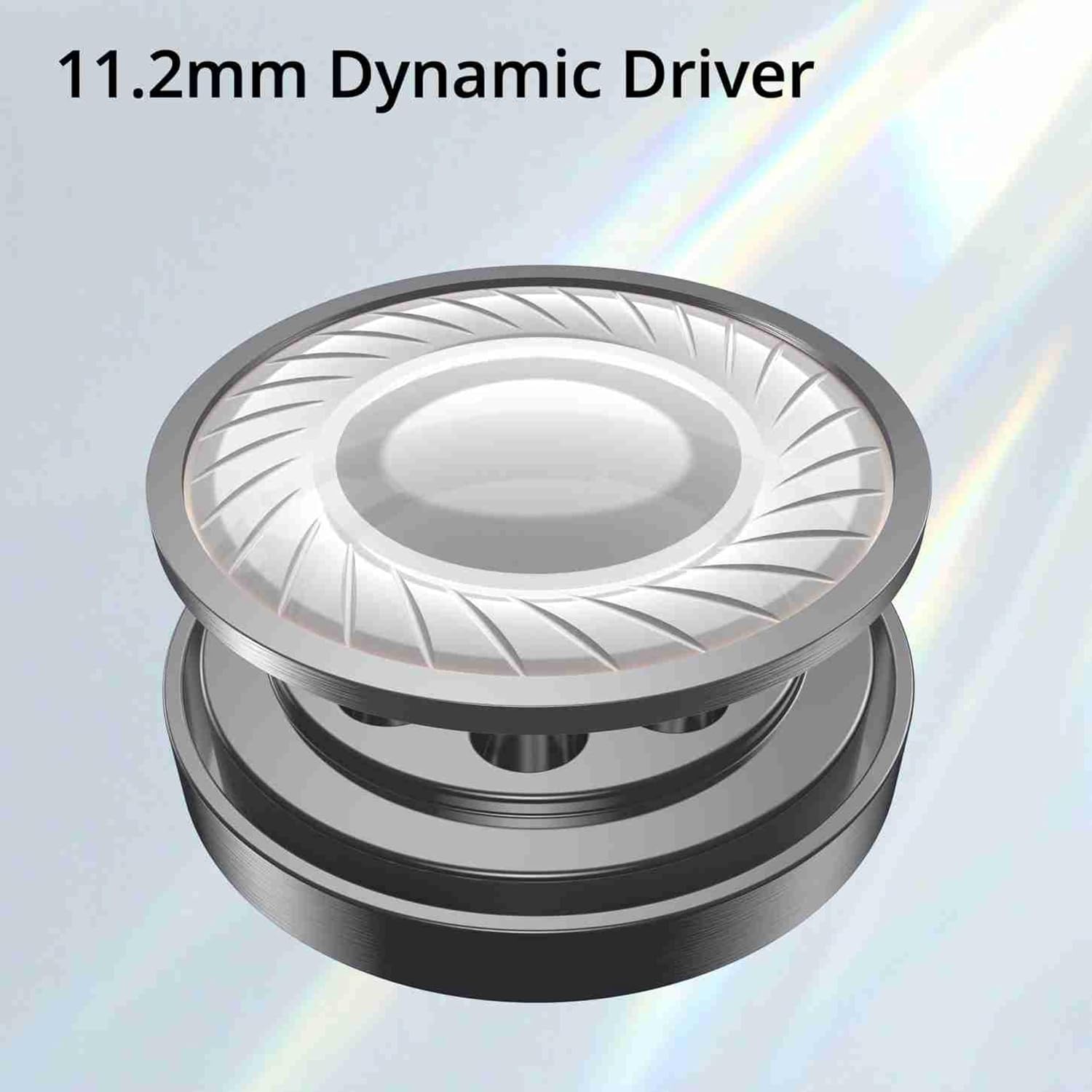
Foto nke 5: Illustration of the 11.2mm Dynamic Driver, responsible for audio output.

Foto nke 6: Visual representation of the earphones' capability for excellent bass performance.

Foto nke 7: Detail of the tangle-free cable, designed for durability and ease of use.
Akwụkwọ ikike na nkwado
DIZO provides a limited warranty for this product.
- Oge ikike: Ọnwa iri na abụọ site na ụbọchị ịzụrụ.
- Ọrụ ikike: For warranty claims or technical support, please carry the product to an authorized service center.
- Ozi mkpọtụrụ:
- Email: service.in@dizo.net
- Nọmba na-anaghị akwụ ụgwọ: 1800 843 3030
Biko dowe ihe akaebe nke ịzụrụ ihe maka nkwado akwụkwọ ikike.