
1. Okwu mmalite
Thank you for choosing the ZGCINE S200 V-Mount Battery. This high-capacity 199Wh/14.8V battery is designed to provide reliable power for professional video cameras, camcorders, and other compatible devices. It features multiple output ports, including Dual DC, USB-C PD, Dual D-TAP, and a BP Interface, allowing simultaneous power delivery to various equipment. This manual provides essential information for safe and efficient operation, setup, maintenance, and troubleshooting.
2. Ozi nchekwa
- Achịkọtala, mepee, ma ọ bụ kụrie mkpọ batrị.
- Ewepụla batrị ahụ ọkụ ma ọ bụ ọkụ. Zere nchekwa na ìhè anyanwụ.
- Emekwala batrị nkenke.
- Ewepụla batrị ka ọ bụrụ ujo igwe.
- In case of a battery leak, do not allow the liquid to come into contact with skin or eyes. If contact has been made, wash the affected area with copious amounts of water and seek medical advice.
- Debe batrị ahụ ka ọ dị ọcha ma kpọọ nkụ.
- Ejila chaja ọ bụla na-abụghị nke enyere maka iji ya na akụrụngwa.
- Tụfuo batrị nke ọma dịka iwu mpaghara siri dị.

Image: The ZGCINE S200 V-Mount Battery highlighting its built-in protection features including overcurrent, overpower, overvoltage, overcharge, short circuit, temperature, reset, and circuit protection.
3. Ngwaahịa gafereview
The ZGCINE S200 V-Mount Battery is designed with a compact form factor and robust construction, featuring an aluminum alloy V-lock mount and an ABS cover for durability. It includes various input and output ports to meet diverse power requirements.
3.1 Port Layout and Indicators

Image: Top and side views of the ZGCINE S200 V-Mount Battery, clearly labeling all input and output ports including D-Tap, DC (8.4V/12V), USB-C PD, and the V-mount interface. Input/Output specifications are also shown.
- D-Tap Ports: Two D-Tap ports for input and output (Input: 16.8V/3A Max, Output: 14.8V/13A Max).
- Ọdụ ụgbọ mmiri mmepụta DC: Two DC output ports (8.4V/3A and 12V/3A).
- Ọdụ ụgbọ mmiri USB-C PD: Bi-directional USB-C Power Delivery port for both input and output (Input: 5V/3A, 9V/3A, 12V/3A, 15V/3A, 20V/5A Max; Output: 5V/3A, 9V/3A, 12V/3A, 15V/3A, 20V/3.25A Max).
- Interface BP: For additional power output.
- Bọtịnụ ike: Activates the battery and checks charge status.
- Ihe ngosi LED: Five LED lights indicate the remaining battery capacity (20%, 40%, 60%, 80%, 100%).

Foto: A nso nso view of the ZGCINE S200 V-Mount Battery's top panel, showing the LED power indicators and the various output ports with their respective voltage na ampọkwa erage.
4. Nhazi
4.1 Nchaji izizi
Before first use, fully charge the ZGCINE S200 battery. Charging can be done via the USB-C PD port or a D-Tap charger. A 100W USB-C PD charger can fully charge the battery in approximately 3.5 hours.

Image: The ZGCINE S200 V-Mount Battery connected to a wall charger via its USB-C PD port, illustrating the fast-charging capability.
4.2 Ịtinye batrị
To mount the battery, align the V-mount plate on your camera rig or accessory with the V-lock mechanism on the battery. Slide the battery onto the plate until it clicks securely into place. To release, press the release button on the V-mount plate and slide the battery off.
5. Ntuziaka ọrụ
5.1 Nyochaa ọnọdụ batrị
Press the power button on the side of the battery. The five LED indicators will illuminate to show the current charge level:
- 1 LED: 0-20%
- 2 LED: 20-40%
- 3 LED: 40-60%
- 4 LED: 60-80%
- 5 LED: 80-100%
5.2 Ngwaọrụ Ike
Connect your camera, camcorder, LED light, monitor, or other compatible devices to the appropriate output port on the ZGCINE S200 battery. The battery supports simultaneous power delivery to multiple devices.
- USB-C PD: Use a USB-C to USB-C cable to power devices like the Sony FX3, BMPCC 4K/6K Pro, or charge smartphones/tablets.
- D-Tap: Connect D-Tap compatible accessories such as LED lights or monitors.
- Mpụta DC: Use the 8.4V or 12V DC outputs for devices requiring these specific voltages.

Image: A user holding a camera rig with the ZGCINE S200 V-Mount Battery attached, demonstrating its use in a portable setup.
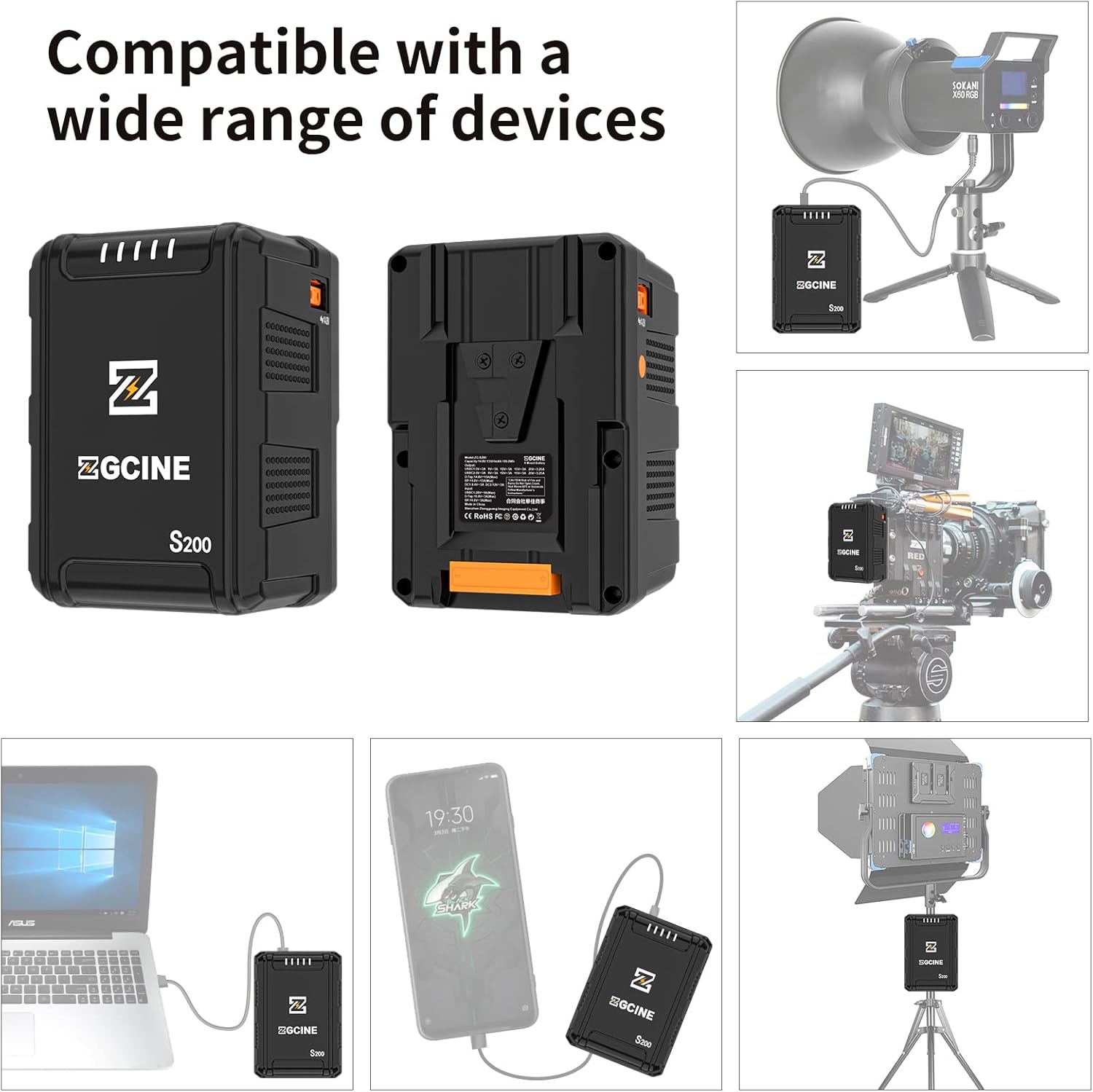
Image: Illustrations showing the ZGCINE S200 V-Mount Battery connected to a studio LED light, a camera rig, a laptop, and a smartphone, demonstrating its wide compatibility.
6. Nlekọta
6.1 Nchekwa
When storing the battery for extended periods, ensure it is charged to approximately 50-70% capacity. Store in a cool, dry place away from direct sunlight and extreme temperatures. Avoid storing fully charged or completely depleted batteries for long durations.
6.2 Nhicha
Clean the battery's exterior and contact points with a soft, dry cloth. Do not use liquid cleaners or solvents. Ensure all ports are free from dust and debris.
6.3 Atụmatụ nlekọta batrị
- Avoid deep discharges; recharge the battery before it is completely depleted.
- Do not expose the battery to extreme hot or cold environments.
- Regularly check the battery for any signs of damage or swelling. Discontinue use if any abnormalities are observed.
7. Nchọpụta nsogbu
- Batrị anaghị akwụ ụgwọ:
- Ensure the charging cable and adapter are securely connected and functional.
- Verify that the power source is active.
- Try a different charging port (USB-C PD or D-Tap) or charger.
- Battery not powering devices:
- Lelee ma batrị ahụ nwere ụgwọ zuru oke.
- Gbaa mbọ hụ na ngwaọrụ dakọtara na mmepụta voltage and current of the selected port.
- Verify that the connection cables are secure and undamaged.
- Press the power button to activate the battery's output.
- Ihe ngosi LED anaghị arụ ọrụ:
- Press the power button firmly. If indicators still do not light up, the battery may be completely depleted or require service.
If you encounter issues not covered here, please contact ZGCINE customer support.
8. Nkọwapụta
| Njirimara | Nkọwapụta |
|---|---|
| Nọmba nlereanya | S200 |
| Ike batrị | 199Wh / 14.8V |
| Ngwakọta cell batrị | Lithium ion |
| Akụkụ ngwaahịa | 3.5 x 3.1 x 5.1 sentimita (8.9 x 7.9 x 13 cm) |
| Ibu Ibu | 2.4 pound (1.09 n'arọ) |
| Ntinye/Mmepụta USB-C PD | Input: 5V/3A, 9V/3A, 12V/3A, 15V/3A, 20V/5A (Max 100W) Output: 5V/3A, 9V/3A, 12V/3A, 15V/3A, 20V/3.25A (Max 65W) |
| D-Tap Input/Output | Input: 16.8V/3A (Max) Mmepụta: 14.8V/13A (Max) |
| Mmepụta DC | 8.4V/3A, 12V/3A |
| Eji akwadoro | Camcorder, Camera, LED Light, Monitor, Smartphone, Tablet |
| Onye nrụpụta | ZGCINE |
9. Akwụkwọ ikike na nkwado
ZGCINE products are covered by a limited warranty. For specific warranty terms and conditions, please refer to the warranty card included with your product or visit the official ZGCINE website. For technical support, troubleshooting assistance, or warranty claims, please contact ZGCINE customer service through their official channels.
Ozi mkpọtụrụ: Please refer to the ZGCINE official website or product packaging for the most up-to-date customer support contact details.