
Boxlight P8 WX35NXT
Boxlight P8 WX35NXT DLP Projector User Manual
Model: P8 WX35NXT
Okwu mmalite
This manual provides essential information for the safe and efficient operation of your Boxlight P8 WX35NXT DLP Projector. Please read this manual thoroughly before using the projector and retain it for future reference. The Boxlight P8 WX35NXT is an Ultra Short Throw DLP projector designed for various applications, offering WXGA resolution and 3500 ANSI lumens brightness.
Ozi nchekwa dị mkpa
- Do not block ventilation openings: Ensure proper airflow around the projector to prevent overheating.
- Avoid direct eye exposure to the lens: The projector emits a bright light that can cause eye damage.
- Do not place near water or moisture: This can lead to electric shock or fire.
- Use only specified power supply: Refer to the product label for correct voltage na ugbu a chọrọ.
- Jiri nlezianya jikwaa: Avoid dropping or subjecting the projector to strong impacts.
- Ije ozi: Tụtụ aka n'aka ndị ọrụ ruru eru.
Ihe ngwugwu
Chọpụta na ihe niile dị na ngwugwu:
- Boxlight P8 WX35NXT DLP Projector
- Ụdọ ọkụ
- Njikwa anya (ya na batrị)
- USB VGA
- Akwụkwọ ntuziaka (akwụkwọ a)
Ngwaahịa gafereview
Ihe ndị na-emepụta ihe

Foto 1: N'elu view of the Boxlight P8 WX35NXT projector. This image displays the main lens assembly, the integrated control panel with navigation buttons, and the overall casing design. The projector features an ultra-short throw lens positioned at the top front, allowing for projection from a very short distance.
- Okirikiri anya: Located at the front-top, designed for ultra-short throw projection.
- Ogwe njikwa: Buttons for power, menu navigation, source selection, and keystone correction.
- Igwe ikuku ikuku: Located on the sides and front for heat dissipation.
- Mgbado aka mgbanaka: Manual adjustment for image sharpness.
Ọdụ ụgbọ mmiri Njikọta
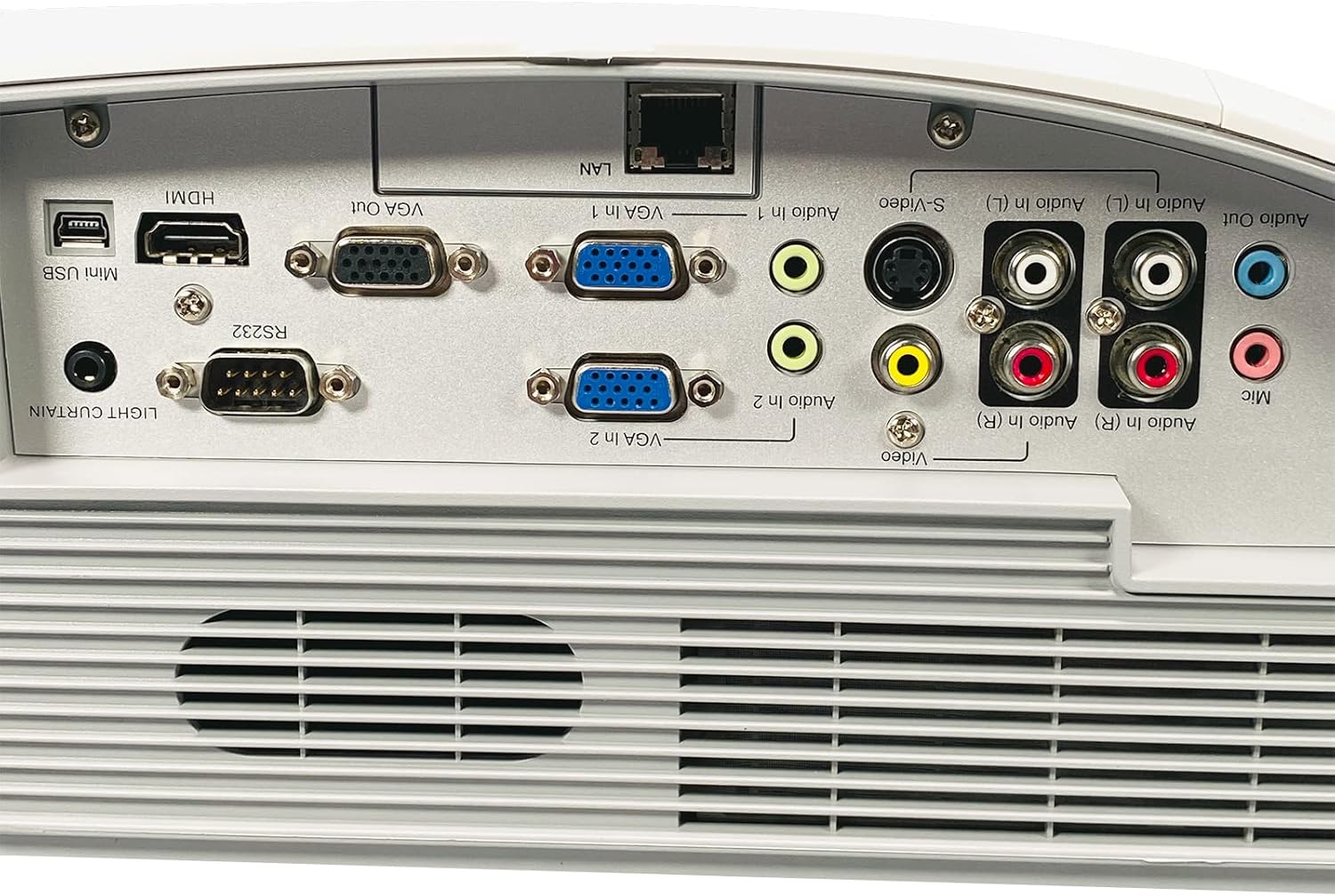
Foto 2: Rear panel of the Boxlight P8 WX35NXT projector, detailing the various input and output ports. From left to right, ports include Mini USB, HDMI, RS232, VGA Out, VGA In (x2), LAN, S-Video, Composite Video (RCA), Audio In (L/R), Audio Out, and Microphone input.
- HDMI: Digital video and audio input.
- VGA In (x2): Ntinye vidiyo analog maka kọmputa.
- VGA Out: Analog video output for a monitor.
- LAN (RJ-45): Network connection for control and monitoring.
- Obere-USB: For service or interactive features.
- RS232 (DB-9pin): Ọdụ ụgbọ mmiri maka njikwa ihe ngosi.
- S-Video: Ntinye vidiyo Analog.
- Vidiyo mejupụtara (RCA): Ntinye vidiyo Analog.
- Audio In (L/R): RCA audio inputs.
- Apụọ ọdịyo: Mmepụta ọdịyo.
- Maị: Ntinye igweokwu.
Ntuziaka nhazi
1. Ntinye ihe ngosi
As an ultra-short throw projector, the P8 WX35NXT is designed to be placed very close to the projection surface (screen or wall). Position the projector on a stable, flat surface directly in front of the screen. Ensure there are no obstructions to the projection path or ventilation openings.
2. Njikọ ike
- Jikọọ eriri ọkụ eletrik ahụ na ntinye ike nke ihe ngosi ahụ.
- Tinye nsọtụ nke ọzọ nke eriri ọkụ n'ime oghere eletrik gbadoro ụkwụ.
3. Ijikọ isi mmalite ntinye
Connect your video source (e.g., computer, Blu-ray player) to the appropriate input port on the projector's rear panel (refer to Figure 2).
- HDMI: For digital video and audio.
- VGA: For analog computer video. Connect an audio cable separately if needed.
- S-Vidio/Ihe mejupụtara: Maka isi mmalite vidiyo nkọwa ọkọlọtọ.
4. Ike izizi
- Pịa Ike button on the projector's control panel or remote control.
- The power indicator light will change, and the projector will begin its startup sequence.
5. Ndozi anya
Adjust the focus ring located near the lens until the projected image is clear and sharp.
Ntuziaka ọrụ
Gbanyụọ/ Gbanyụọ
- Iji gbanye: Pịa Ike bọtịnụ otu ugboro.
- Iji gbanyụọ: Pịa Ike button twice. The projector will display a shutdown confirmation. Confirm to power off.
Nhọrọ Isi mmalite ntinye
Pịa Isi mmalite button on the control panel or remote control to cycle through available input sources (HDMI, VGA1, VGA2, S-Video, Video).
Igodo NchNhr
Jiri ihe NchNhr button to open the On-Screen Display (OSD) menu. Use the arrow buttons to navigate and the Banye button to select options. Press NchNhr ọzọ ịpụ.
Ndozi onyonyo
- Icha ọkụ/ọdịiche: Adjust these settings in the OSD menu to optimize image quality for your viewgburugburu ebe obibi.
- Akụkụ akụkụ: Select the appropriate aspect ratio (e.g., 16:10, 4:3) from the OSD menu to match your content.
- Ndozi isi okwu: If the image appears trapezoidal, use the keystone correction function (often a dedicated button or in the OSD) to square the image.
Nlekọta
Na-ehicha ihe na-emepụta ihe
- Casing: Use a soft, dry cloth to wipe the projector casing. For stubborn stains, dampna akwa ahụ dị ntakịrị na mmiri na ncha dị nro, wee hichaa nkụ.
- oghere: Use a professional lens cleaning cloth and lens cleaning solution. Avoid abrasive materials or excessive pressure.
- Igwe ikuku: Periodically check and clean the ventilation grilles to ensure proper airflow. Use a soft brush or compressed air to remove dust.
Lamp Ndochi
The Boxlight P8 WX35NXT uses a DLP light source, which typically has a very long lifespan and does not require frequent lamp replacement like traditional projectors. If a light source issue occurs, contact technical support.
Nchọpụta nsogbu
| Nsogbu | Ihe nwere ike ime | Ngwọta |
|---|---|---|
| Ọnweghị onyonyo egosiri |
|
|
| Onyonyo na-agba agba |
|
|
| Foto a bụ trapezoidal |
|
|
| Enweghị ọdịyo |
|
|
Nkọwapụta
| Ụdị | Igbe igbe |
| Nlereanya | P8 WX35NXT |
| Ngosipụta teknụzụ | DLP |
| Mkpebi obodo | 1280x800 (WXGA) |
| Mkpebi kachasị | 1080p (FHD) |
| Icha ọkụ | 3500 ANSI Oghere |
| Ọnụọgụ ọdịiche | 3000:1 |
| Akụkụ akụkụ | 16:10 (Ụmụ amaala) |
| Tufu Ratio | Ultra-short Throw |
| Njikọta | HDMI, VGA In (x2), VGA Out, LAN (RJ-45), Mini USB, RS232, S-Video, Composite Video, Audio In (L/R), Audio Out, Mic |
| Ndị na-ekwu okwu arụrụ arụ | 10.0 watts Mono |
| Ibu Ibu | 17.7 lbs (8.03 n'arọ) |
| Ntinye ike | AC 100-240V~ 50/60 Hz 3.6A |
Akwụkwọ ikike na nkwado
For technical support or warranty inquiries, please contact Boxlight directly. Refer to the product label for specific contact information.

Foto 3: Product label on the underside of the projector. This label provides essential information including the manufacturer's address, technical support contact details, model number (P8 WX35NXT), input power specifications, and regulatory compliance marks (CE, UL, FC).
- Onye nrụpụta: Igbe igbe
- Nkwado ndị teknuzu: International +1 360-464-2119, USA and Canada 1-866-972-1549
- Websaịtị: www.boxlight.com
- Ụdị: P8 WX35NXT
- Nọmba Oghere Usoro: 330901135450075 (Ọpụample, actual serial number varies per unit)
Please register your product on the Boxlight website to activate your warranty and receive product updates.
Ask a question about this manual
Ask about setup, troubleshooting, compatibility, parts, safety, or missing instructions. Manuals+ will review the question and use this page’s manual context to help answer it.