
United LED24HS82A11
UNITED LED24HS82A11 24-inch HD Ready Smart Android TV User Manual
Model: LED24HS82A11
Okwu mmalite
This user manual provides comprehensive instructions for the setup, operation, maintenance, and troubleshooting of your UNITED LED24HS82A11 24-inch HD Ready Smart Android TV. Please read this manual thoroughly before using your television to ensure proper and safe operation.
The UNITED LED24HS82A11 is a versatile 24-inch HD Ready Smart TV powered by Android 11, offering a wide range of entertainment options. It features pre-installed applications, built-in Chromecast and Airplay for seamless content streaming, and full internet connectivity via Wi-Fi and Ethernet. It also supports DVB/T2/S2/C, MPEG-4, and HEVC Main 10 for various broadcasting standards.
Ozi nchekwa
Na-edebe ihe nchekwa nchekwa ndị a mgbe niile iji gbochie ọkụ, ujo eletrik, ma ọ bụ mmerụ ahụ:
- Ewepụla TV na mmiri ozuzo ma ọ bụ mmiri.
- Akwụsịla oghere ikuku.
- Gbaa mbọ hụ na ahapụghị eriri ọkụ ahụ ma ọ bụ gaa n'ihu.
- Kwụpụ TV n'oge oké ifufe ọkụ ma ọ bụ mgbe ejighi ya ogologo oge.
- Tụtụ aka n'aka ndị ọrụ ruru eru.
Melite
1. Unpacking and Stand Installation
Carefully remove the TV and all accessories from the packaging. Place the TV face down on a soft, clean surface to prevent screen damage.
Attach the two stand feet to the bottom of the TV using the provided screws. Ensure they are securely fastened.

Foto 1: Akụkụ view of the UNITED LED24HS82A11 TV, illustrating its slim profile and potential port locations.
2. Njikọ eriri
- Ike: Jikọọ eriri ọkụ na ntinye ike TV wee tinye ya na mgbidi.
- Antenna/Cable: Connect your antenna or cable TV coaxial cable to the "RF In" port.
- Ngwa HDMI: Connect external devices like Blu-ray players, game consoles, or set-top boxes to the HDMI ports.
- Ethernet (Optional): For a wired internet connection, connect an Ethernet cable from your router to the TV's LAN port.
3. Ọkachamara Mbido Mbido
Once powered on, the TV will guide you through the initial setup process. Follow the on-screen prompts to:
- Họrọ asụsụ ọkacha mmasị gị.
- Jikọọ na netwọk Wi-Fi gị (ọ bụrụ na ị naghị eji Ethernet).
- Sign in with your Google account (optional, but recommended for full Smart TV features).
- Scan for available TV channels (Antenna/Cable).
Na-arụ ọrụ
Njikwa Ime Imeview
Familiarize yourself with the buttons on the remote control for easy navigation and control of your TV's functions.
Ọrụ TV bụ isi
- Gbanyụọ/ Gbanyụọ: Pịa bọtịnụ ike na remote ma ọ bụ TV.
- Njikwa olu: Jiri bọtịnụ olu elu/ala.
- Nhọrọ ọwa: Jiri bọtịnụ Up/down Channel ma ọ bụ mpe mpe akwa.
- Isi mmalite ntinye: Press the "Source" or "Input" button to switch between HDMI, TV, and other inputs.
Smart TV Features (Android 11)
Your TV runs on Android 11, providing access to a vast ecosystem of apps and services.

Figure 2: The UNITED LED24HS82A11 TV showcasing its Android TV home screen, featuring popular streaming applications like YouTube, Prime Video, and Netflix.
- Ihuenyo ụlọ: Navigate the home screen to access pre-installed apps (Netflix, YouTube, Prime Video), recommended content, and settings.
- Ụlọ ahịa Google Play: Budata ngwa, egwuregwu, na ọdịnaya ndị ọzọ site na Google Play Store.
- Chromecast arụnyere: Cast content directly from your compatible smartphone, tablet, or computer to the TV. Look for the Cast icon in supported apps.
- Egwuregwu ikuku: For Apple devices, use Airplay to stream videos, photos, and music from your iPhone, iPad, or Mac to the TV.
- Njikọ Ịntanetị:
- Wi-Fi: Go to Settings > Network & Internet to connect to your wireless network.
- Ethernet: If an Ethernet cable is connected, the TV will automatically use the wired connection.
Nlekọta
Na-ehicha TV
- Kwupuo TV mgbe niile tupu ihicha ya.
- Use a soft, lint-free cloth to gently wipe the screen. For stubborn marks, dampen akwa ubé na mmiri ma ọ bụ a ihuenyo Cleaner kpọmkwem e mere maka ngwá electronic.
- Hichapụ TV casing na akwa dị nro, kpọrọ nkụ. Zere iji ihe nhicha ma ọ bụ ihe mgbaze.
Mmelite ngwanrọ
Your TV may receive software updates to improve performance and add new features. You can check for updates via Settings > Device Preferences > About > System update.
Nchọpụta nsogbu
Ọ bụrụ na ị na-enwe nsogbu na TV gị, rụtụ aka na nsogbu na ngwọta ndị a na-emekarị:
| Nsogbu | Ihe kpatara/ Ngwọta nwere ike ime |
|---|---|
| Enweghị ike | Lelee ma ọ bụrụ na etinyere eriri ike na TV na oghere mgbidi. Gbalịa ụzọ ọpụpụ dị iche. |
| Enweghị foto / Enweghị ụda | Ensure the correct input source is selected (e.g., HDMI 1, TV). Check cable connections. For TV channels, perform a channel scan. |
| Enweghị ike ijikọ na Wi-Fi | Lelee paswọọdụ Wi-Fi gị. Malitegharịa rawụta gị na TV gị. Hụ na TV dị n'ime ókèala nke akara Wi-Fi gị. |
| Njikwa Remote anaghị arụ ọrụ | Lelee ma dochie batrị. Gbaa mbọ hụ na onweghị ihe mgbochi n'etiti ime ime na ihe mmetụta IR nke TV. |
| Ngwa Ndị A Na-ebugo / Arụmọrụ Na-adịghị Nwayọ | Check your internet connection speed. Clear app cache (Settings > Apps > [App Name] > Clear cache). Restart the TV. |
Nkọwapụta
Below are the technical specifications for the UNITED LED24HS82A11 TV:
| Njirimara | Nkọwapụta |
|---|---|
| Ụdị | United |
| Nọmba nlereanya | LED24HS82A11 |
| Nha ihuenyo | 24 sentimita asatọ |
| Ngosipụta teknụzụ | Ikanam |
| Mkpebi | 768p (1366 x 768 pikselụ) |
| Ọnụego ume ọhụrụ | 60 Hz |
| Sistemụ nrụọrụ | Android 11 |
| Njikọta | Wi-Fi, Ethernet, HDMI, RF, USB |
| Atụmatụ pụrụ iche | Flat Screen, Chromecast Built-in, Airplay, Pre-installed Apps (Netflix, YouTube, Prime Video) |
| Akụkụ akụkụ | 16:9 |
| Akụkụ ngwaahịa (L x W x H) | 12D x 60.5W x 43.2H centimita |
| Ngwa gụnyere | 1 mini AV adapter cable, 1 remote control with 2 AAA 1.5V batteries |
| Klas arụmọrụ ike | F |
| Oriri Ike (SDR) | 21.0 W |
| Oriri Ike (HDR) | 21.0 W |
| Oriri ike (Njikere) | 0.3 W |

Figure 3: The energy efficiency label for the UNITED LED24HS82A11 TV, indicating an 'F' energy class rating and 21 kWh per 1000 hours of operation.
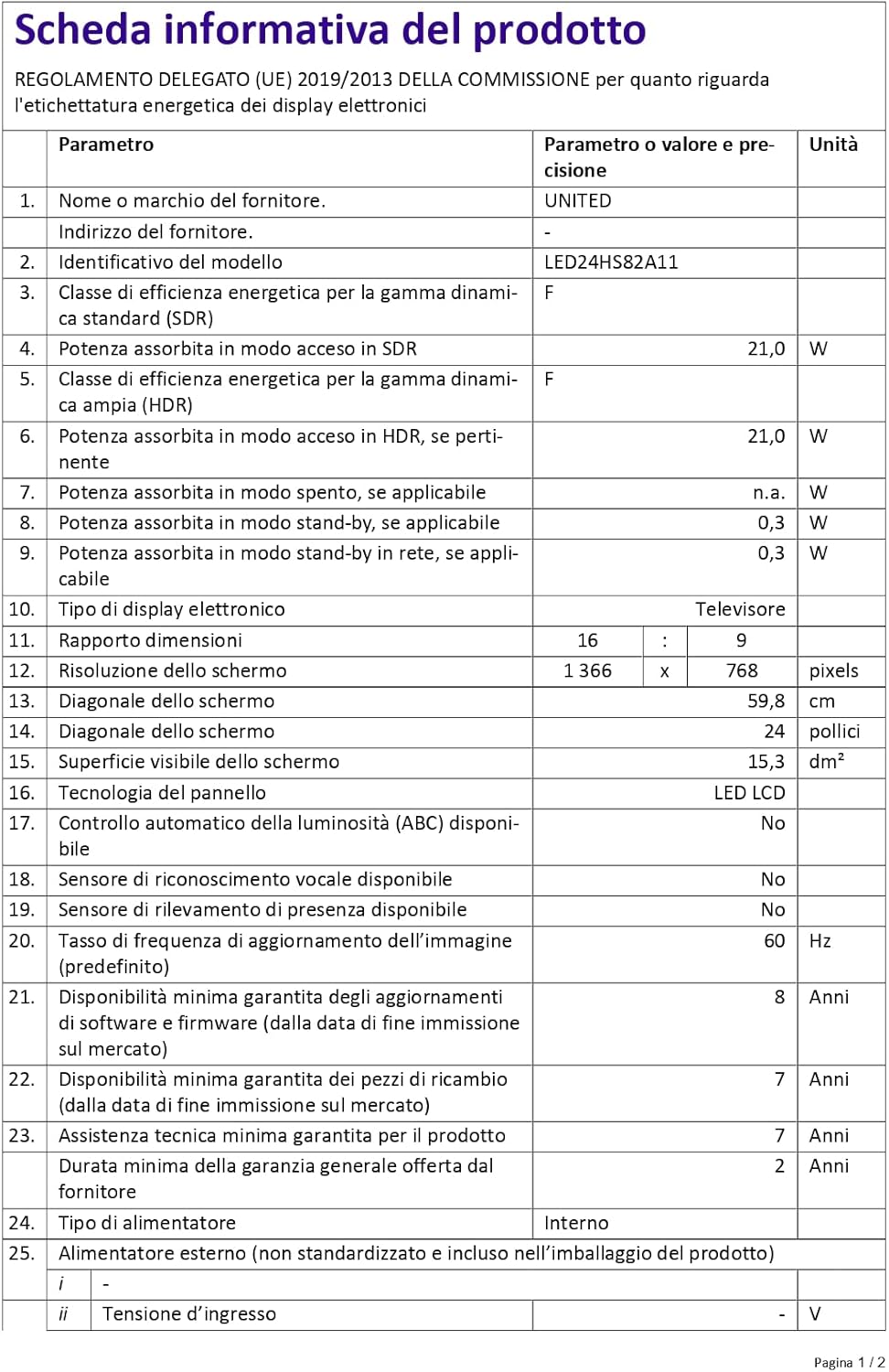
Figure 4: A detailed product information sheet for the UNITED LED24HS82A11 TV, providing comprehensive technical specifications and compliance details.
For more detailed information, please refer to the official EPREL database: https://eprel.ec.europa.eu/qr/1087921
Akwụkwọ ikike na nkwado
Your UNITED LED24HS82A11 TV comes with the following support and warranty provisions:
- Minimum General Warranty: Afọ 2
- Technical Assistance Availability: Afọ 7
- Mmelite Ngwanrọ A Na-ekwe Nkwa Ruo: 8 Years from market placement date
- Nnweta akụkụ mapụtara: 7 Years from market placement date
For technical support or warranty claims, please contact your retailer or the manufacturer's authorized service center. Keep your proof of purchase for warranty validation.
Ask a question about this manual
Ask about setup, troubleshooting, compatibility, parts, safety, or missing instructions. Manuals+ will review the question and use this page’s manual context to help answer it.