
1. Okwu mmalite
Thank you for choosing the Vetroo 1000W Black Power Supply. This power supply unit (PSU) is designed to provide stable and efficient power to your personal computer, especially for high-performance gaming and workstation builds. It features 80 Plus Gold certification for energy efficiency, full modular cabling for easy management, and is compliant with the latest ATX 3.1 and PCIe 5.1 standards. This manual provides essential information for safe installation, operation, and maintenance of your PSU.
2. Ozi nchekwa
Please read and understand all safety warnings before installing or operating this product. Failure to follow these instructions may result in electric shock, fire, or serious injury.
- Akwa Voltage: The PSU contains high voltage components. Do not open the PSU casing. Enweghị akụkụ ndị ọrụ ga-arụ ọrụ n'ime.
- Nwụnye ọkachamara: Installation should be performed by qualified personnel. Incorrect installation can damage your system or the PSU.
- Ịkwụsị ike: Always disconnect the AC power cord from the wall outlet before installing, removing, or cleaning the PSU or any other components in your computer.
- Nda ala: Ensure the PSU is properly grounded. Use only the provided power cord.
- gburugburu: Operate the PSU in a dry, well-ventilated environment. Avoid exposure to moisture, extreme temperatures, or direct sunlight.
- Igwe ikuku: Do not block the ventilation openings of the PSU. Ensure adequate airflow around the unit.
- Njikwa USB: Ensure all cables are securely connected and routed to prevent interference with cooling fans or other components.
3. Ihe ngwugwu
Chọpụta na ihe niile dị na ngwugwu gị:
- Vetroo 1000W Black Power Supply Unit
- Modular Cable Set (including 24-pin ATX, 8-pin CPU, PCIe 5.1 12+4-pin, PCIe 6+2-pin, SATA, Molex, FDD cables)
- Igwe ọkụ AC
- Ịkwanye kposara
- Njikọ eriri/Velcro
- Akwụkwọ ntuziaka (akwụkwọ a)


4. Akụrụngwa Ngwaahịa
- Agbanyere ọla edo 80 gbakwunyere: Ensures high energy efficiency, reducing power consumption and heat generation.
- Fully Compliant with ATX 3.1 Specifications: Designed to meet the latest power delivery standards for modern PC components.
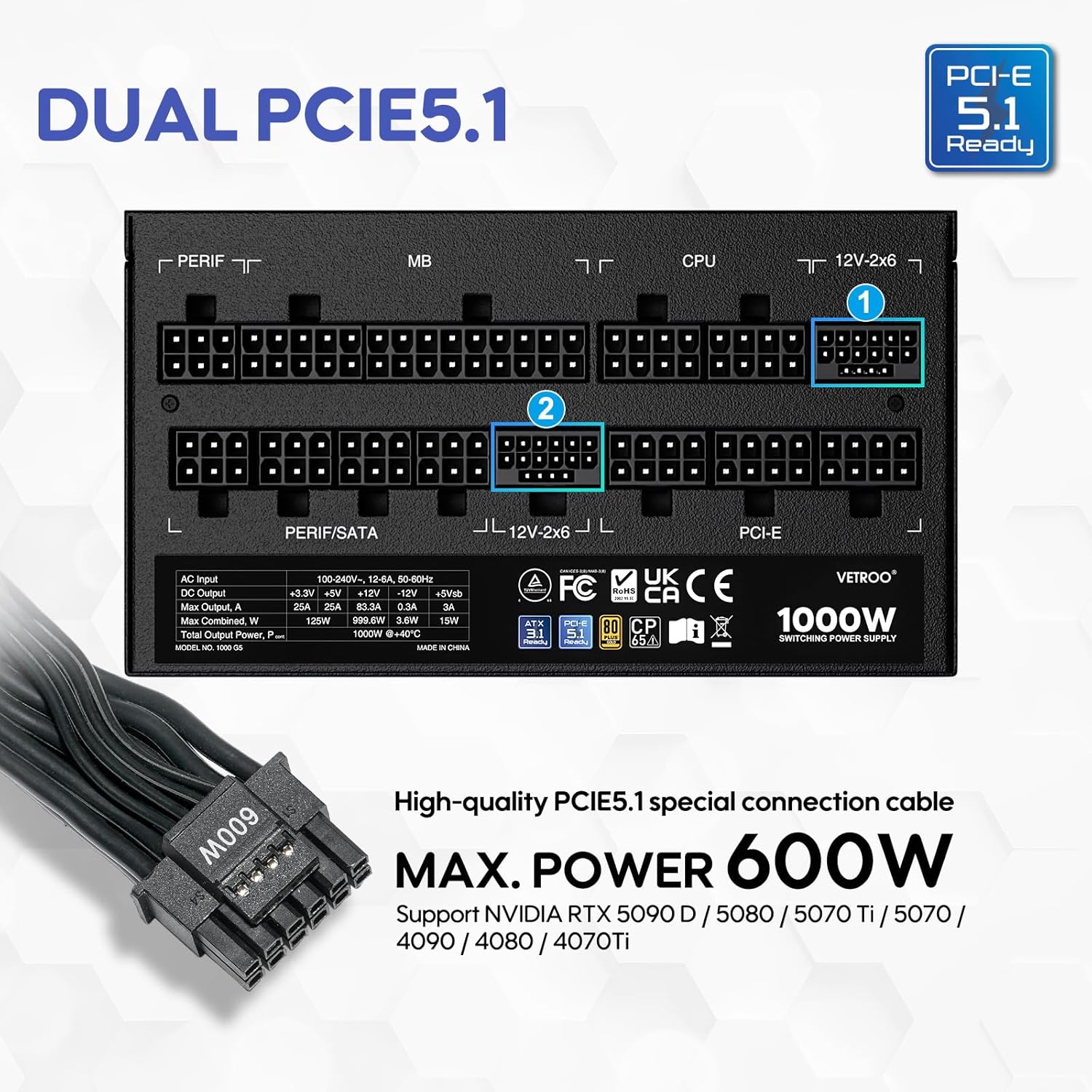
- PCIe Gen 5.1 Ready: Equipped with dedicated 12+4-pin connectors for the latest PCIe 5.1 graphics cards, offering up to 600W power delivery. Also backwards compatible with PCIe 4.0 and 3.0.
- Premium 105° C Capacitors: Utilizes high-quality Japanese capacitors for enhanced stability, reliability, and extended lifespan.
- Full Modular Design: Allows users to connect only the necessary cables, improving airflow and simplifying cable management within the PC case.
- Eco Mode with 120mm FDB Fan: Features a fluid dynamic bearing (FDB) fan that operates silently under low loads, with an Eco Mode switch to stop the fan entirely when power consumption is below 50%.
- Nha kọmpat: Designed to fit comfortably in various PC chassis types.
- Nchedo zuru oke: Na-agụnye ihe karịrị Voltage Protection (OVP), Over Current Protection (OCP), Over Power Protection (OPP), Short Circuit Protection (SCP), Under Voltage Protection (UVP), and Over Temperature Protection (OTP).

5. Nkọwapụta
| Njirimara | Nkọwa |
|---|---|
| Aha Nlereanya | 1000G5 |
| Mpụta Wattage | 1000 Watt |
| Ụdị Ihe | ATX |
| Nhazi ike inye ike | Modul zuru ezu |
| Asambodo arụmọrụ | 80 gbakwunyere ọla edo |
| Ọnụ ego nke ATX Standard | ATX 3.1 dị njikere |
| PCIe Standard | PCIe 5.1 Ready (Dual) |
| Usoro jụrụ oyi | Ikuku (120mm FDB Fan) |
| Akụkụ ngwaahịa (L x W x H) | 5.9 x 5.5 x 3.4 sentimita asatọ |
| Ibu Ibu | 5.83 pound |
| Ngwa dakọtara | Kọmputa nkeonwe |
| Ụdị njikọ | ATX & PCIE |

6. Ntọala na nwụnye
Follow these steps to install your Vetroo 1000W Power Supply:
- Kwadebe Sistemu gị: Gbaa mbọ hụ na agbanyụrụ kọmputa gị kpamkpam wee wepụ ya na oghere mgbidi. Mepee akpa PC gị ka ịnweta ebe mgbago PSU.
- Wepu Old PSU (ọ bụrụ na ọdabara): Kwupu eriri niile na ọkụ ọkụ ochie gị wee wepụ ya na chassis.
- Ugwu PSU ọhụrụ: Carefully slide the Vetroo 1000W PSU into the designated power supply bay in your PC case. Secure it with the provided mounting screws.
- Jikọọ eriri modular: Identify the necessary cables for your motherboard, CPU, graphics card(s), and storage devices. Connect these cables to the corresponding ports on the PSU first, then route them to your components.
- Motherboard: Jikọọ eriri ATX 24-pin na motherboard gị.
- CPU: Connect the 8-pin (or 4+4-pin) CPU power cable(s) to your motherboard.
- Kaadị eserese(ndị): For modern GPUs, use the PCIe 5.1 12+4-pin cable. For older or additional GPUs, use the PCIe 6+2-pin cables.
- Storage/Peripherals: Connect SATA power cables to SSDs/HDDs and Molex cables for other peripherals as needed.
- Njikwa USB: Use the included cable ties or Velcro straps to organize cables, ensuring optimal airflow and a tidy build.
- Njikọ ikpeazụ: Close your PC case. Connect the AC power cord to the PSU and then to a wall outlet or surge protector.

7. Ntuziaka ọrụ
- Gbanyụọ/ Gbanyụọ: After all connections are secure, flip the main power switch on the back of the PSU to the 'ON' position. Your computer can now be powered on via its front panel button. To power off, shut down your computer normally, then flip the PSU switch to 'OFF' for complete power disconnection.
- Ụkpụrụ Eco: The Vetroo 1000W PSU features an Eco Mode switch on the rear panel.
- Eco Mode ON: When the Eco Mode switch is in the 'ON' position, the PSU fan will remain off under low to moderate loads (typically below 50% load) for silent operation. The fan will automatically activate when the load increases or internal temperature rises.
- Eco Mode OFF: When the Eco Mode switch is in the 'OFF' position, the PSU fan will spin continuously regardless of the load, providing constant cooling.

8. Nlekọta
Mmezi kwesịrị ekwesị na-eme ka PSU gị dị ogologo ndụ na arụmọrụ kachasị mma:
- Nhicha uzuzu: Periodically clean the PSU fan and ventilation grilles to prevent dust buildup, which can hinder cooling performance. Use compressed air to gently blow dust away. Always disconnect power before cleaning.
- Nyocha USB: Regularly check all modular cable connections to ensure they are secure and free from damage.
- Ọnọdụ gburugburu: Maintain a clean, dry, and well-ventilated environment for your PC to prevent excessive heat and moisture exposure to the PSU.
9. Nchọpụta nsogbu
If you encounter issues with your Vetroo 1000W Power Supply, try the following steps:
- Enweghị ike:
- Gbaa mbọ hụ na etinyere eriri ike AC na nchekwa PSU na oghere mgbidi.
- Verify the main power switch on the PSU is in the 'ON' position.
- Check all modular cable connections, especially the 24-pin ATX and 8-pin CPU cables, to ensure they are fully seated.
- Jiri ngwaọrụ ọzọ nwalee oghere mgbidi ahụ iji gosi na o nwere ike.
- Sistemu anaghị akwụsi ike/Mgbochi enweghị usoro:
- Gbaa mbọ hụ na PSU gịtage is sufficient for all your components, especially high-power GPUs.
- Lelee maka ikuku ikuku dị mma n'ime akpa PC gị iji gbochie ikpo oke ọkụ.
- Verify that all PCIe power cables to your graphics card(s) are correctly connected.
- If Eco Mode is enabled, try disabling it to see if continuous fan operation resolves the issue.
- Mkpọtụ na-adịghị ahụkebe:
- If you hear a fan noise, ensure the PSU fan is not obstructed by cables or dust.
- If a 'coil whine' noise is present, it is often harmless but can sometimes indicate a component under stress. Ensure your system is not drawing excessive power.
If problems persist after performing these checks, please contact Vetroo customer support for further assistance.
10. Akwụkwọ ikike na nkwado
The Vetroo 1000W Black Power Supply comes with a Akwụkwọ ikike nke afọ 10 site na ụbọchị ịzụrụ. Akwụkwọ ikike a na-ekpuchi ntụpọ dị na ngwa na arụ ọrụ n'okpuru ojiji nkịtị.
Akwụkwọ ikike anaghị ekpuchi:
- Mmebi sitere na ihe mberede, mmetọ, ojiji, idei mmiri, ọkụ, ala ọma jijiji, ma ọ bụ ihe ndị ọzọ na-akpata mpụga.
- Damage caused by operating the product outside the permitted or intended uses described by Vetroo.
- Damage caused by service (including upgrades and expansions) performed by anyone who is not a representative of Vetroo.
- Products or parts that have been modified to alter functionality or capability without the written permission of Vetroo.
For warranty claims or technical support, please visit the official Vetroo website or contact their customer service department with your product model and proof of purchase.