
1. Ngwaahịa gafereview
The YiBiChin AN-MR21GC is a universal magic remote control designed for various 2021 LG Smart TV models. It features magic pointer and intelligent voice control functions, allowing for quick and intuitive navigation and command execution. This remote enhances your TV viewing experience with convenient access to features and content.
1.1 ndakọrịta
This remote control is compatible with the following 2021 LG TV series:
- LG OLED TVs: G1, C1, A1 series
- LG Mini-LED QNED TVs: QNED99, QNED90 series
- LG NanoCell TVs: NANO99, NANO90, NANO85, NANO80, NANO75 series
- LG UHD TVs: UP80, UP75 series
Note: This remote control does not feature NFC functionality.

Foto 1: Ihu, akụkụ, na azụ views of the YiBiChin AN-MR21GC Magic Remote.

Figure 2: The remote control highlighting its universal compatibility with 2021 LG Smart TVs.
2. Nhazi
2.1 Ntinye batrị
The remote control requires two AA batteries (not included) for operation. Follow these steps to install them:
- Chọta mkpuchi mkpuchi batrị n'azụ nke njikwa anya.
- Mia mkpuchi ala ka imeghe akụkụ ahụ.
- Insert two AA batteries, ensuring the positive (+) and negative (-) terminals align correctly with the indicators inside the compartment.
- Weghachite mkpuchi nke batrị batrị n'ime ebe ruo mgbe ọ pịrị na nchekwa.

Figure 3: Correct installation of AA batteries into the remote control.
2.2 Usoro njikọ
To enable the magic pointer and voice functions, the remote control must be paired with your LG Smart TV. Ensure your TV is connected to a WiFi network for these functions to work correctly. If you are replacing an original remote, it is recommended to disconnect it and remove its batteries before pairing the new remote, as only one smart remote can be paired at a TV at a time.
Follow these steps to pair your remote:
- Manually turn on your LG Smart TV using the power button on the TV itself.
- Point the YiBiChin AN-MR21GC remote control directly towards your TV from a close distance.
- Pịa ma jide Scroll Wheel (OK button) on the remote control for a few seconds until the pairing process is complete. A confirmation message should appear on your TV screen.
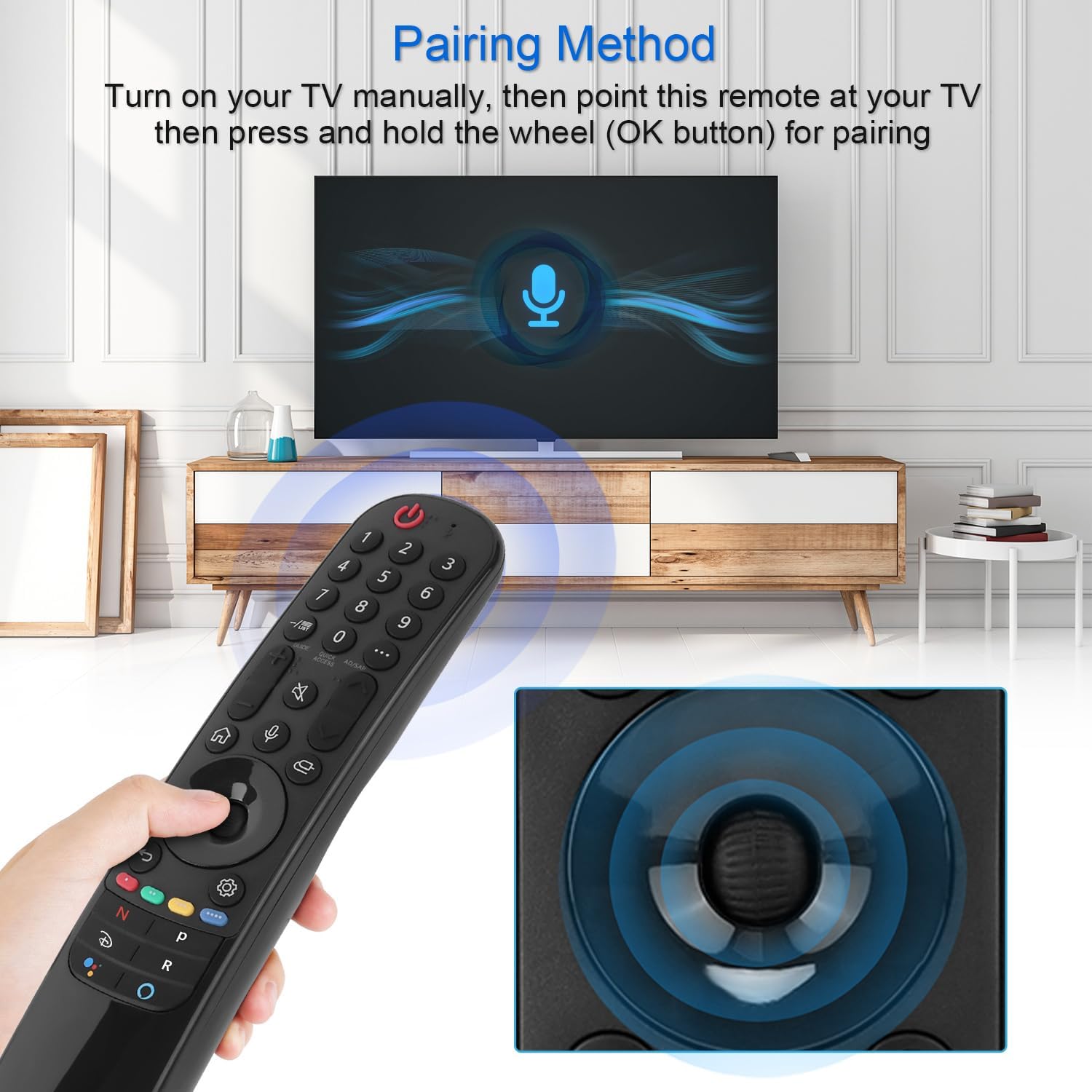
Figure 4: Demonstrating the pairing process by holding the OK button while pointing at the TV.
3. Ntuziaka ọrụ
The YiBiChin AN-MR21GC remote control offers multiple ways to interact with your LG Smart TV, including traditional button presses, a magic pointer, and voice commands.
3.1 Ọrụ ndị bụ isi
- Bọtịnụ ike: Gbanyụọ ma ọ bụ gbanyụọ TV.
- Igodo ọnụọgụ (0-9): Họrọ ọwa ozugbo.
- Elu elu/ala: Na-edozi olu TV.
- Ọwa elu/ala: Na-agbanwe ọwa TV.
- Oghere bọtịnụ: Mebie ma ọ bụ mebie ụda olu TV.
- Bọtịnụ ụlọ: Accesses the TV's main smart interface.
- Bọtịnụ azụ: Na-alaghachi na ihuenyo gara aga ma ọ bụ menu.
3.2 Magic Pointer Function
Once paired, the remote acts as a pointer, allowing you to move a cursor on the TV screen by simply moving the remote in the air. This provides an intuitive way to select items, scroll through menus, and interact with applications.
3.3 Njikwa olu
Pịa Bọtịnụ igwe okwu to activate voice control. Speak clearly into the remote to issue commands, search for content, or control smart home devices connected to your TV. Voice commands allow for rapid access to desired programs and videos, with a response time of approximately 0.2 seconds.
3.4 Quick Access Buttons
The remote includes dedicated shortcut buttons for popular streaming services, providing instant access to your favorite entertainment platforms.
3.5 Long-Distance Control
The remote utilizes stable infrared and Bluetooth signals, offering a control distance of up to 33 feet (10 meters), ensuring reliable operation from various positions within your room.

Figure 5: The remote's effective operating range and quick response time.
4. Nlekọta
4.1 nnọchi batrị
When the remote control's performance degrades (e.g., unresponsive buttons, weak signal), it is likely time to replace the batteries. Follow the battery installation steps in Section 2.1 to replace the two AA batteries.
4.2 Nhicha
Iji hichaa njikwa dịpụrụ adịpụ, jiri akwa dị nro ma kpọọ nkụ. Maka unyi isi ike, ntakịrị dampen the cloth with water or a mild, non-abrasive cleaner. Avoid using harsh chemicals or excessive moisture, as this can damage the remote's electronics.
5. Nchọpụta nsogbu
5.1 Remote anaghị aza
- Lelee batrị: Ensure batteries are correctly installed and not depleted. Replace them if necessary.
- Tinyegharịa igwe anya: If the remote becomes unresponsive, try re-pairing it with your TV by following the steps in Section 2.2.
- Ihe mgbochi: Hụ na enweghị ihe mgbochi ọ bụla n'etiti remote na ihe nnata IR nke TV.
5.2 Pointer or Voice Function Not Working
- Njikọ WiFi: Verify that your LG Smart TV is connected to a stable WiFi network. The pointer and voice functions rely on this connection.
- Tinyegharịa igwe anya: Re-pairing the remote (Section 2.2) can often resolve issues with these advanced functions.
- Original Remote Interference: Ensure no other smart remote is actively paired with the TV, or that the original remote's batteries have been removed.
6. Nkọwapụta
| Ụdị | YiBiChin |
| Aha Nlereanya | AN-MR21GC |
| Ngwa dakọtara | 2021 LG Smart TVs (OLED, QNED, NanoCell, UHD series) |
| Teknụzụ Njikọta | Wi-Fi, Infrared, Bluetooth |
| Ụdị njikwa | Voice Control, Pointer |
| Isi Iyi Ike | Akwanyere batrị |
| Ụdị batrị | 2 x AA (anaghị etinye ya) |
| Oke kacha | 10 mita (33 ụkwụ) |
| Oge nzaghachi | 0.2 seconds (for voice commands) |
| Akụkụ (L x W x H) | 19.2 x 5.7 x 3.1 cm (7.6 x 2.2 x 1.2 inch) |
| Ibu Ibu | 110g (3.88 ounces) |
| Agba | Nwa |

Figure 6: Product dimensions of the remote control.
7. Akwụkwọ ikike na nkwado
YiBiChin is committed to providing quality replacement remote controls and excellent customer service. While specific warranty details are not provided in this manual, we offer dedicated support for our products.
7.1 Nkwado ndị ahịa
If you have any questions, encounter issues, or require assistance with your YiBiChin AN-MR21GC Magic Remote, please do not hesitate to contact our customer support team. We aim to respond to all inquiries within 24 hours.
For support, please refer to the contact information provided with your purchase or visit the official YiBiChin store page on Amazon.
Thank you for choosing YiBiChin.