
1. Ngwaahịa gafereview
The Eureka Forbes Aquaguard Champ RO+UV is a 7-liter water purifier designed to provide safe drinking water through a multi-stage purification process. It combines Reverse Osmosis (RO) and Ultraviolet (UV) technologies to effectively remove impurities, bacteria, viruses, and protozoa, ensuring protection against waterborne diseases.

Image 1.1: Illustration of how the Aquaguard water purifier removes common contaminants like bacteria, protozoa, and viruses from water.
This appliance features a water level indicator for convenience and is suitable for various water sources.
2. Ntọala na nwụnye
Your Aquaguard Champ RO+UV water purifier comes with all necessary components for installation. It offers flexible placement options.
2.1 Nwepu
Carefully unpack the water purifier and check for all included components:
- Water Purifier Unit
- Akwụkwọ ikike kaadị
- Akwụkwọ ntuziaka (akwụkwọ a)
- Installation Kit (if applicable, check packaging for details)
2.2 Nhọrọ ntinye
The unit can be installed as a wall-mounted system or placed on a countertop, depending on your preference and kitchen layout.

Image 2.1: The water purifier can be placed on a counter or mounted on a wall.
2.3 Nwụnye ọkachamara
It is recommended to have the water purifier installed by a qualified service technician to ensure proper setup and optimal performance. Refer to the warranty card for details on installation services.
3. Ntuziaka ọrụ
Once installed, operating your Aquaguard Champ RO+UV is straightforward.
3.1 Powering On and Initial Flush
- Ensure all connections are secure and the water supply is open.
- Tinye eriri ọkụ n'ime ebe eletrik kwesịrị ekwesị.
- Allow the purifier to fill its internal tank. The purification process will begin automatically.
- For the first use, dispense and discard the first 2-3 liters of purified water to flush out any manufacturing residues.
3.2 Ihe ngosi ọkwa mmiri
The water purifier is equipped with a water level indicator, allowing you to monitor the amount of purified water available in the 7-liter storage tank.

Image 3.1: Detail of the water level indicator on the side of the unit.
3.3 Purification Process
The Aquaguard Champ RO+UV utilizes a 4-stage usoro nchacha:
- I-Filter: Removes fine suspended particles like dust, dirt, and sand.
- Chemi-Block: Reduces excess chlorine and organic impurities.
- RO Membrane: Filters out dissolved salts, heavy metals, pesticides, and other chemical contaminants.
- UV e-boiling™: Uses ultraviolet light to eliminate bacteria, viruses, and other microorganisms, ensuring water is as safe as if it were boiled.
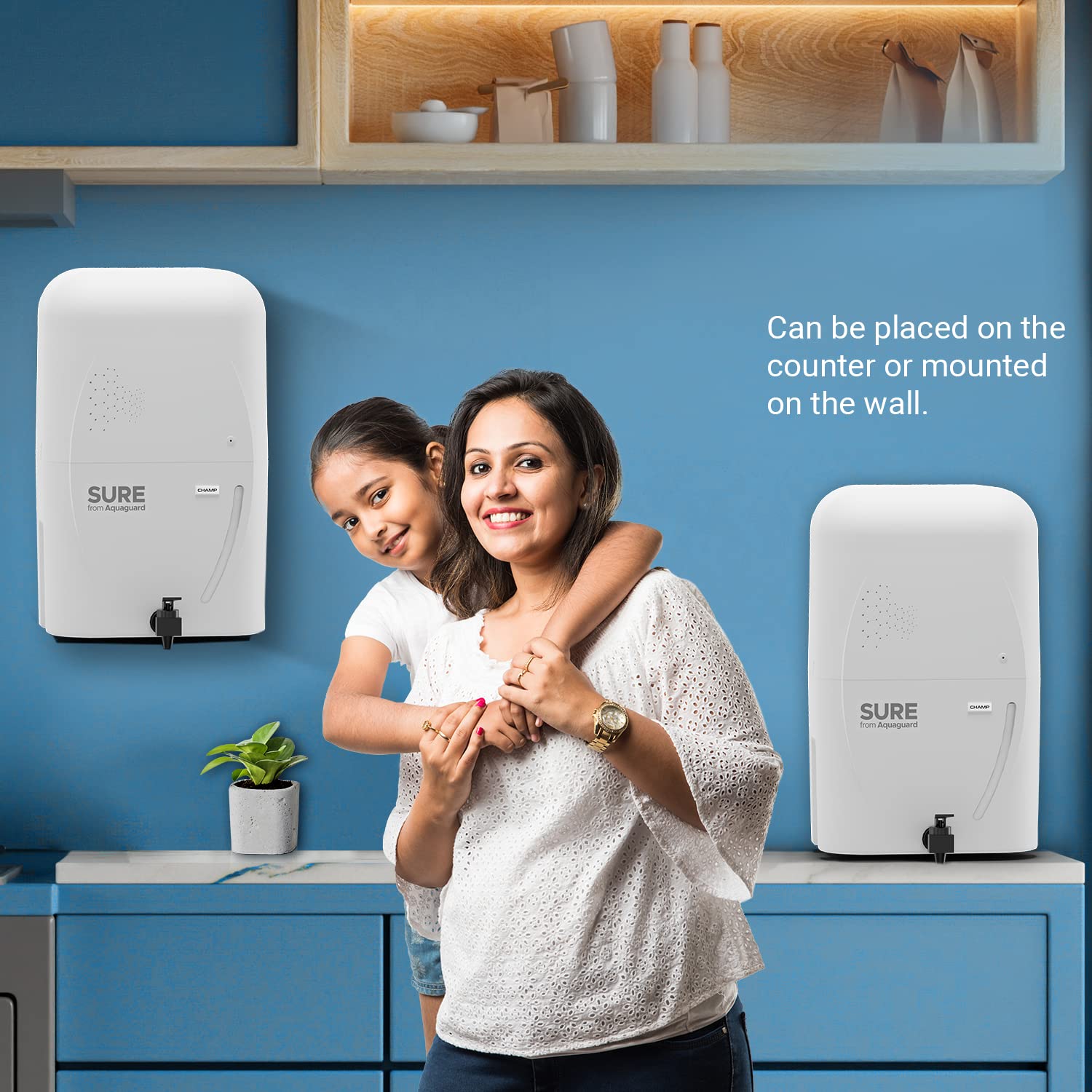
Image 3.2: Visual representation of the multi-stagusoro nhicha e.
4. Nlekọta
Regular maintenance ensures the longevity and efficiency of your water purifier.
4.1 Filter and Membrane Replacement
The RO membrane and other filters have a limited lifespan. The RO membrane typically lasts for 1 year or purifies 6000 liters of water, whichever comes first. Other filters may require replacement more frequently depending on water quality and usage.

Image 4.1: RO Membrane lifespan indication.
It is crucial to replace filters and membranes as recommended by Eureka Forbes to maintain purification effectiveness. Contact customer service for filter replacement schedules and genuine parts.
4.2 Na-ehicha ngalaba ahụ
- Jiri ihe dị nro hichaa mpụta nke ihe nhicha ahụ, damp akwa . Ejila kemịkalụ siri ike ma ọ bụ ihe mkpocha abrasive.
- Periodically clean the water dispensing tap.
- Ensure the area around the purifier is kept clean and dry.
5. Nchọpụta nsogbu
If you encounter any issues with your Aquaguard Champ RO+UV, refer to the following common problems and solutions. For complex issues, always contact authorized service personnel.
| Nsogbu | Ihe nwere ike ime | Ngwọta |
|---|---|---|
| Enweghị ikesa mmiri | No power, no water supply, or clogged filters. | Check power connection and water inlet. If filters are suspected, contact service. |
| Eji nwayọọ nwayọọ na-erugharị | Clogged filters or RO membrane. | Filters or membrane may need replacement. Contact service. |
| Unusual taste or odor | Expired filters or contamination. | Replace filters. If problem persists, contact service. |
| Unit anaghị agbanye | Power supply issue, internal electrical fault (e.g., PCB). | Check power outlet. If still unresponsive, contact service. |
Note: Do not attempt to repair the unit yourself. Always contact authorized Eureka Forbes service technicians for repairs.
6. Nkọwapụta
| Njirimara | Nkọwa |
|---|---|
| Ụdị | Eureka Forbes |
| Aha Nlereanya | Sure From Aquaguard Champ RO+UV |
| Nọmba nlereanya | GWPDCHARU00000 |
| Ike | 7 lita |
| Akụkụ ngwaahịa (L x W x H) | 24L x 18W x 24H centimita |
| Ụdị nwụnye | Ugwu mgbidi |
| Ụzọ nchacha | Reverse Osmosis (RO) + Ultraviolet (UV) |
| Ụdị isi iyi ike | Igwe ọkụ eletrik |
| Ọnụego nfe kacha | 0.65 lita kwa nkeji |
| Oke okpomoku na-arụ ọrụ | 10 ruo 40 Celsius |
| Njirimara Pụrụ Iche | Ihe ngosi ọkwa ọkwa mmiri |

Image 6.1: Product dimensions (L x W x H: 24L x 18W x 24H Centimeters).
7. Akwụkwọ ikike na nkwado
7.1 Ozi akwụkwọ ikike
The Eureka Forbes Aquaguard Champ RO+UV water purifier comes with a 1-year manufacturing warranty from the date of purchase. Please retain your purchase receipt and warranty card for any claims. The warranty covers manufacturing defects under normal operating conditions.
7.2 Nkwado ndị ahịa
For installation, service requests, filter replacements, or any other queries, please contact Eureka Forbes customer support. You can also book a service through the Eureka Forbes Service App.

Image 7.1: Book a service easily via the Eureka Forbes Service App.
Ozi kọntaktị onye nrụpụta: EUREKA FORBES LTD.
For the latest contact details, please refer to the official Eureka Forbes websaịtị ma ọ bụ kaadị akwụkwọ ikike gị.