
Okwu mmalite
Daalụ maka ịzụrụasing the Proscan PSP333 Portable Bluetooth Speaker. This manual provides important safety instructions, operational guidelines, and maintenance tips to ensure optimal performance and longevity of your device. Please read this manual thoroughly before using the product and retain it for future reference.
Ozi nchekwa
- Do not expose the unit to extreme temperatures, direct sunlight, or high humidity.
- Zere idobe ma ọ bụ idobe ọkà okwu na mmetụta siri ike.
- Emela ka ọ gbawaa ma ọ bụ gbalịa ịrụzi ya n'onwe gị. Nye ndị ọrụ ruru eru ọrụ niile.
- Debe ọkà okwu na mmiri na mmiri mmiri ndị ọzọ.
- Jiri naanị eriri chaja akọwapụtara.
- Hụ na ikuku na-abata nke ọma mgbe ị na-arụ ọrụ na ọkà okwu.
Ihe ngwugwu
Biko lelee na agụnyere ihe ndị a na ngwugwu gị:
- Proscan PSP333 Portable Bluetooth Speaker
- Igwe nchaji USB
- Akwụkwọ ntuziaka (akwụkwọ a)
Njirimara ngwaahịa
The Proscan PSP333 speaker offers a range of features for an enhanced audio experience:
- Wireless Bluetooth connectivity for streaming audio from compatible devices.
- Integrated LED lights for visual ambiance.
- Built-in FM radio for listening to local stations.
- Auxiliary (AUX) input for wired connection to non-Bluetooth devices.
- Adjustable Bass, Treble, and Volume controls.
- Batrị a na-eji eme ka ọ dị mfe ibugharị.
- Convenient carrying handles that also function as a built-in stand.
- Output Power: 2 x 3W (6-Watt-RMS total).
Njikwa na Njikọ
Familiarize yourself with the control panel and connection ports of your speaker.

Foto 1: N'ihu view of the Proscan PSP333 speaker, highlighting the speaker grilles and the central control interface.
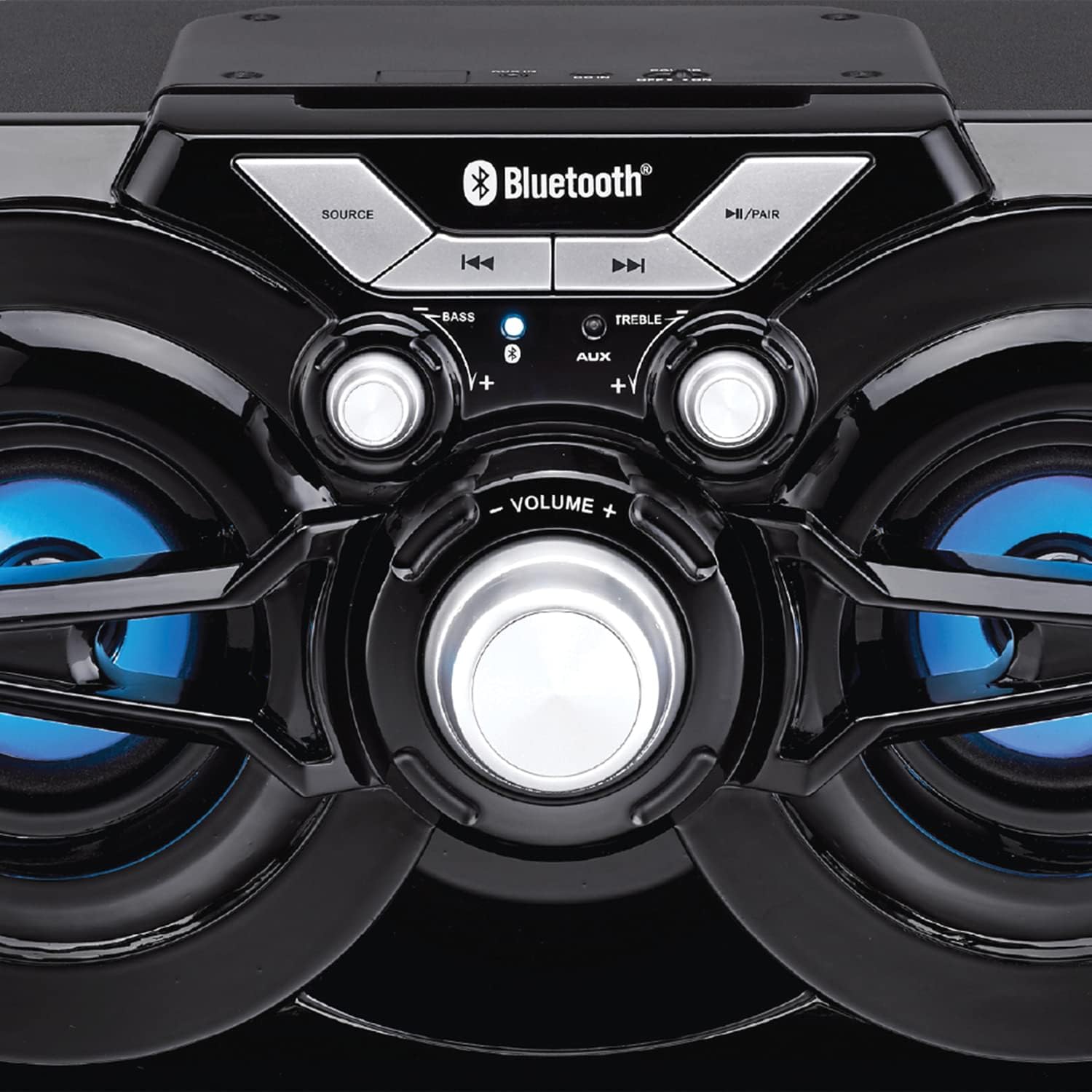
Foto 2: Zuru ezu view of the speaker's control panel, illustrating the various buttons and adjustment knobs.
Ọrụ Panel Control:
- Bọtịnụ isi mmalite: Press to switch between Bluetooth, FM Radio, and AUX input modes.
- ◀◀ (Previous Track/Tune Down) Button: In Bluetooth mode, press to go to the previous track. In FM mode, press to tune down the frequency.
- ▶▶ (Next Track/Tune Up) Button: In Bluetooth mode, press to go to the next track. In FM mode, press to tune up the frequency.
- ►/PAIR Button: Press to Play/Pause audio. Press and hold to initiate Bluetooth pairing mode. In FM mode, press and hold to auto-scan for stations.
- BASS Knob: Tụgharịa ka ịhazie ọkwa bass.
- KỌỌRỤ TRUB: Tụgharịa ka mezie treble larịị.
- Mpịakọta olu: Rotate to adjust the overall volume output.
- Ntinye AUX: 3.5mm jack for connecting external audio devices via an auxiliary cable (not included).
- Nchaji ọdụ ụgbọ mmiri: Maka ijikọ eriri USB chaja.
Melite
Nchaji mbụ:
- Before first use, fully charge the speaker. Connect the small end of the included USB charging cable to the charging port on the speaker.
- Jikọọ nnukwu njedebe nke eriri USB na nkwụnye ọkụ USB (anaghị etinye ya) ma ọ bụ ọdụ ụgbọ USB nke kọmputa.
- The charging indicator light will illuminate. Once fully charged, the light may change color or turn off (refer to specific indicator behavior if detailed in product).
- Ụgwọ zuru ezu na-ewekarị awa ole na ole.
Ịgbanyụ/ Gbanyụọ:
- To power on the speaker, locate the power switch (usually on the back or side) and slide it to the 'ON' position.
- Ka ịgbanyụ, gbanye mgba ọkụ ahụ gaa na ọnọdụ 'gbanyụọ'.
Ntuziaka ọrụ
Ọnọdụ Bluetooth:
- Power on the speaker. It will automatically enter Bluetooth pairing mode, indicated by a flashing LED light (e.g., blue LED).
- If the speaker is not in Bluetooth mode, press the Isi mmalite button until the Bluetooth indicator light flashes.
- Na ngwaọrụ mkpanaaka gị (smartphone, tabletị, wdg), gbanye Bluetooth wee chọọ ngwaọrụ dịnụ.
- Select "PSP333" or "Proscan Speaker" from the list of devices.
- Once paired, the Bluetooth indicator light will stop flashing and remain solid. You can now play audio from your device through the speaker.
- Use the ◀◀, ▶▶, and ►/PAIR buttons on the speaker or your device to control playback.
Ọnọdụ Ntinye AUX:
- Ike na ọkà okwu.
- Jikọọ otu njedebe nke eriri ọdịyo 3.5mm (anaghị etinye ya) na ọdụ ụgbọ mmiri AUX dị na ọkà okwu.
- Connect the other end of the 3.5mm audio cable to the headphone jack or audio output of your external device (e.g., MP3 player, computer).
- Pịa Isi mmalite button until the speaker is in AUX mode.
- Play audio from your external device. Volume can be controlled via the speaker's VOLUME knob and your external device.
Ụdị redio FM:
- Ike na ọkà okwu.
- Pịa Isi mmalite button until the speaker is in FM Radio mode.
- To auto-scan and save available stations, press and hold the ►/PAIR button. The speaker will scan and store stations automatically.
- Once scanning is complete, use the ◀◀ and ▶▶ buttons to navigate between the saved stations.
- For manual tuning, short press the ◀◀ or ▶▶ buttons to adjust the frequency incrementally.
Ọkụ LED:
The speaker features integrated LED lights that illuminate the speaker cones. These lights typically activate automatically when the speaker is powered on. There may be a dedicated button or a combination of button presses to cycle through light modes or turn them off/on. (Note: Specific control for LED lights is not detailed in product description, assume automatic or simple toggle if present.)
Ịchaji Ọkà Okwu
The Proscan PSP333 speaker is equipped with a built-in rechargeable Lithium Ion battery.
- When the battery is low, the speaker may emit an audible alert or an indicator light may flash.
- Connect the included USB charging cable to the speaker's charging port and to a suitable USB power source (e.g., 5V USB adapter, computer USB port).
- Ihe ngosi nchaji ga-egosi ọkwa nchaji.
- Disconnect the charging cable once the battery is fully charged to preserve battery life.
Nlekọta
- Nhicha: Jiri akwa dị nro dị nro hichaa mpụta nke ọkà okwu. Ejila ihe na-ehicha mmiri mmiri ma ọ bụ ihe abrasive.
- Nchekwa: Mgbe a naghị eji ya eme ihe ruo ogologo oge, chekwaa ọkà okwu n'ebe dị jụụ, nke kpọrọ nkụ, na-adịghị na ìhè anyanwụ kpọmkwem na oke okpomọkụ.
- Nlekọta batrị: To maintain battery health, avoid fully discharging the battery frequently. Charge the speaker regularly, even if not in use, to prevent deep discharge.
Nchọpụta nsogbu
| Nsogbu | Ngwọta enwere ike |
|---|---|
| Ọkà okwu anaghị agba ọkụ. | Ensure the battery is charged. Connect the speaker to a power source using the USB cable. Check the power switch is in the 'ON' position. |
| Enweghị ụda sitere na ọkà okwu. | Increase the volume on both the speaker and the connected device. Ensure the correct source mode (Bluetooth, AUX, FM) is selected. Check audio cable connection for AUX mode. |
| Enweghị ike ijikọ site na Bluetooth. | Ensure the speaker is in Bluetooth pairing mode (flashing LED). Make sure the speaker is within 30 ft (9 meters) of your device. Turn off and on Bluetooth on your device. Forget "PSP333" from your device's Bluetooth list and try pairing again. |
| Nnabata redio FM adịghị mma. | Relocate the speaker to an area with better signal. Ensure no large metallic objects are blocking the signal. |
| Ụda agbagọ. | Reduce the volume on both the speaker and the connected device. Check Bass and Treble settings. Ensure the audio source is not distorted. |
Nkọwapụta

Foto 3: Dimensions of the Proscan PSP333 speaker, showing its length, height, and depth.
| Njirimara | Nkọwa |
|---|---|
| Nọmba nlereanya | PSP333 |
| Ike mmepụta | 2 x 3W (6-Watt-RMS) |
| Njikọta | Bluetooth, Auxiliary (3.5mm Jack) |
| Nha ọkwọ ụgbọ ala | 3 sentimita asatọ |
| Ikuku iche | Ruo 30 ft (mita 9) |
| Isi Iyi Ike | Batrị Lithium ion nwere ike ibugharị |
| Akụkụ ngwaahịa (L x W x H) | 24.31 x 42.09 x 24.1 cm (ihe dịka 9.57 x 16.57 x 9.49 sentimita) |
| Ibu Ibu | 2.61 n'arọ (ihe dị ka 5.75 lbs) |
| Agba | Nwa |
Akwụkwọ ikike na nkwado
This product is covered by a limited manufacturer's warranty. For specific warranty terms and conditions, please refer to the documentation provided at the time of purchase or contact the retailer. For technical support or service inquiries, please contact the customer service department of PROSCAN or your authorized dealer.
Manufacturer: Curtis International
Place of Business: Mississauga, ON L5S 2A4