
1. Okwu mmalite
This manual provides essential information and instructions for the safe and efficient use of your Blackview BV7200 Rugged Smartphone. The BV7200 is designed for durability and performance in challenging environments, featuring advanced water and dust resistance, a powerful processor, and a high-capacity battery.
Atụmatụ gụnyere:
- IP68 & IP69K Certification: Advanced water and dust resistance for outdoor and demanding conditions.
- MediaTek Helio G85 Processor: Ensures smooth performance for gaming, multitasking, and general use.
- 50MP Dual Camera: Capture high-quality photos, even in low-light conditions.
- Batrị 5180mAh: Long-lasting power with 18W fast charging support.
- 6.1-inch HD+ Display: Durable screen with Corning Gorilla Glass 3, optimized for comfortable viewing.
- Ụdị uwe aka: Allows screen operation even when wearing gloves.

Foto: Ofeview nke ndị ojiiview BV7200 Rugged Smartphone, highlighting its MediaTek Helio G85 processor, 50MP camera, IP68/IP69K ratings, 5180mAh battery, 6.1-inch display, and Glove Mode.
2. Nhazi
2.1. Ntinye kaadị SIM na kaadị MicroSD
To install your SIM card(s) and/or MicroSD card:
- Chọta tray SIM n'akụkụ ngwaọrụ ahụ.
- Jiri ngwaọrụ ejector SIM enyere ka imepe traị.
- Carefully place your Nano-SIM card(s) and/or MicroSD card into the designated slots, ensuring correct orientation.
- Jiri nwayọọ tụgharịa traị ahụ azụ n'ime ngwaọrụ ahụ ruo mgbe ọ pịrị na ya.
2.2. Nchaji mbụ na ịgbanwuo
Tupu ojiji mbụ, a na-atụ aro ka ị chajịa ngwaọrụ gị nke ọma.
- Connect the USB Type-C cable to the charging port at the bottom of the phone. Ensure the port cap is securely opened before inserting the cable and closed after charging to maintain water resistance.
- Jikọọ nsọtụ nke ọzọ nke eriri na ihe nkwụnye ọkụ dakọtara ma tinye ya n'ime oghere mgbidi.
- Once sufficiently charged, press and hold the Power button (usually on the right side) for a few seconds until the Blackview akara ngosi pụtara.
- Soro mkpali na ihuenyo iji mechaa nhazi mbụ, gụnyere nhọrọ asụsụ, njikọ Wi-Fi, na nhazi akaụntụ Google.
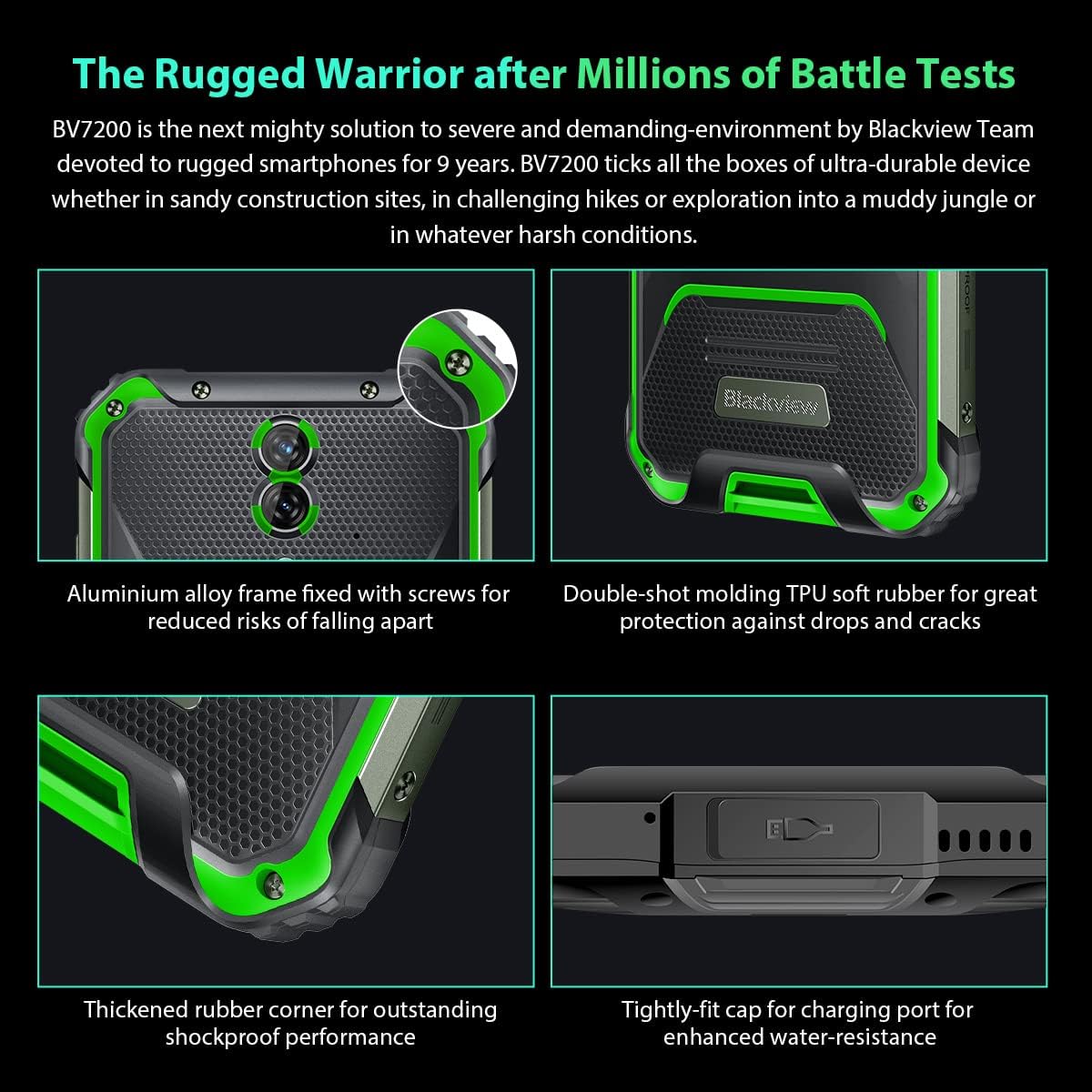
Foto: nso nso views of the Blackview BV7200's rugged construction, including aluminum alloy frame, double-shot molding TPU rubber, thickened rubber corners, and the tightly-fit cap for the charging port, emphasizing its durability and water resistance.
3. Ntuziaka ọrụ
3.1. Nsoro ụzọ
Nwa ojiiview BV7200 operates on Doke OS 3.0, based on Android 12. Use touch gestures for navigation:
- Kpatụ: Họrọ otu ihe ma ọ bụ mepee ngwa.
- Mịpụta: Pịgharịa gaa na ihuenyo ma ọ bụ ndepụta.
- Tuo: Bugharịa ma ọ bụ pụta na onyonyo na web ibe.
- Ogologo Pịa: Nweta menu onodu okirikiri ma ọ bụ bugharịa akara ngosi ngwa.
3.2. Ojiji igwefoto
The BV7200 features a 50MP main rear camera and an 8MP ultra-wide/macro rear camera.
- Mepee ngwa igwefoto site na ihuenyo ụlọ ma ọ bụ drawer ngwa gị.
- Họrọ ụdị ịchọrọ (Foto, Vidiyo, Foto, Pro, wdg).
- Tap the screen to focus on a specific area.
- Press the Shutter button to capture a photo or start/stop video recording.

Image: Diagram illustrating the Blackview BV7200's 50MP Samsung ISOCELL JN1 main rear camera, 8MP ultra-wide and ultra-macro rear camera, and rear flash, highlighting its photographic capabilities.
3.3. Glove Mode
The BV7200 supports Glove Mode, allowing you to operate the touchscreen while wearing gloves.
- To activate/deactivate Glove Mode, navigate to Settings > Smart Assistant > Glove Mode.
- Ensure this mode is enabled when using gloves for optimal touch responsiveness.

Image: Collage demonstrating the Blackview BV7200's Glove Mode in various scenarios, showing users operating the phone while wearing different types of gloves, emphasizing its utility in cold or industrial environments.
3.4. Water and Dust Resistance (IP68 & IP69K)
The BV7200 is certified IP68 and IP69K, making it resistant to water immersion and high-pressure water jets. This allows for use in aquatic sports or dusty environments.
- Always ensure all port caps (charging port, SIM tray) are securely closed before exposing the device to water or dust.
- Rinse the phone with clean water after exposure to saltwater or chemicals.
- Do not charge the phone if the charging port is wet. Allow it to dry completely.
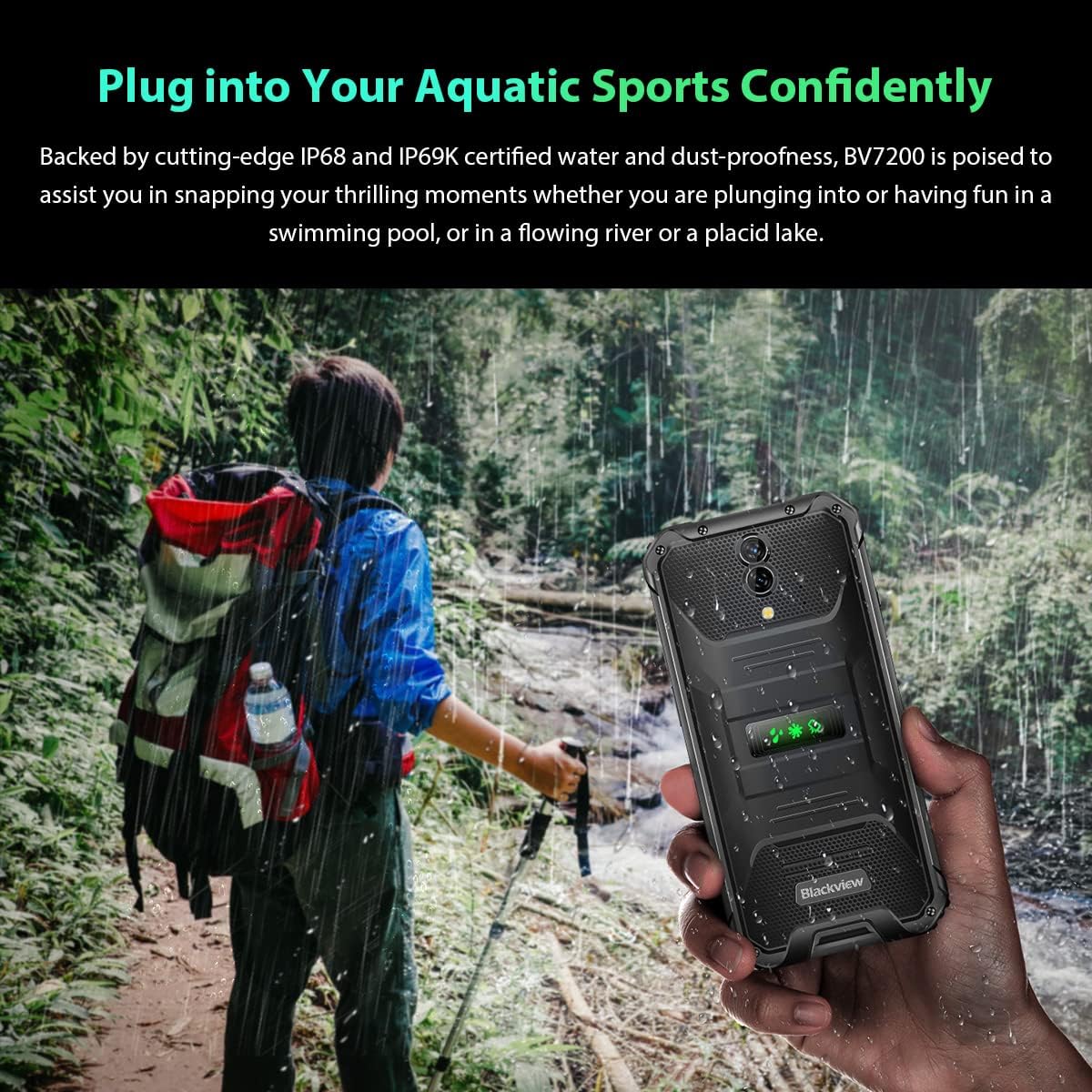
Image: A person holding the Blackview BV7200 near a stream or waterfall, illustrating its water resistance and suitability for outdoor and aquatic activities.
3.5. Njikwa batrị
The 5180mAh battery provides extended usage. The device supports 18W fast charging.
- Use the original charger and cable for optimal charging speed and safety.
- The battery is designed to withstand temperatures down to -10°C.
- To prolong battery life, avoid extreme temperatures and fully discharging the battery regularly.
3.6. Mgbasawanye ebe nchekwa
The BV7200 features 6GB of RAM with an additional 4GB virtual memory expansion, totaling 10GB, for enhanced multitasking and performance.

Image: Graphic illustrating the memory expansion feature of the Blackview BV7200, showing 6GB of physical RAM and an additional 4GB of virtual RAM, combining for a total of 10GB for improved performance.
4. Nlekọta
4.1. Na-ehicha ngwaọrụ gị
To clean your Blackview BV7200:
- Jiri akwa dị nro hichaa ihuenyo na ahụ.
- Maka unyi isi ike, jiri ntakịrị damp ákwà ahụ na ncha dị nro, wee hichaa ya.
- Ejila kemịkalụ siri ike, ihe mgbaze, ma ọ bụ ihe nchacha.
- Ensure all port caps are closed before cleaning with liquids.
4.2. Mmelite ngwanrọ
Lelee ma wụnye mmelite ngwanrọ mgbe niile iji hụ na arụmọrụ kacha mma, nchekwa na ịnweta njirimara ọhụrụ.
- Gaa na Ntọala> Sistemu> Mmelite sistemụ ka ịlele maka mmelite dị.
- Ensure your device has sufficient battery and a stable Wi-Fi connection before starting an update.
5. Nchọpụta nsogbu
5.1. Okwu nkịtị na Ngwọta
- Ngwaọrụ anaghị agbanwu: Gbaa mbọ hụ na agbagoro batrị. Jikọọ na chaja opekata mpe nkeji iri na ise, wee nwaa ịgbanye ọzọ.
- Ihuenyo anaghị anabata: Restart the device by holding the Power button for about 10-15 seconds. If the issue persists, try a factory reset (data will be lost).
- Connectivity issues (Wi-Fi/Bluetooth/Mobile Data):
- Gbanyụọ ma gbanye Wi-Fi/Bluetooth/Mobile data.
- Malitegharịa ngwaọrụ ahụ.
- Check router/network settings.
- For mobile data, ensure SIM card is correctly inserted and activated.
- Ngwa na-akụda: Hichapụ ebe nchekwa na data nke ngwa ahụ (Ntọala > Ngwa > [Aha Ngwa] > Nchekwa > Hichapụ Cache/Hichapụ Data). If the problem continues, uninstall and reinstall the app.
5.2. Ntọgharị ụlọ nrụpụta
Ntọgharị ụlọ ọrụ ga-ehichapụ data niile dị na ekwentị gị ma weghachi ya na ntọala ụlọ ọrụ mbụ ya. Kwadobe data dị mkpa tupu ị gaa n'ihu.
- Gaa na Ntọala> Sistemu> Nhọrọ Tọgharia> Hichapụ data niile (ntọgharị ụlọ ọrụ).
- Confirm your decision. The device will restart and perform the reset.
6. Nkọwapụta
Below are the technical specifications for the Blackview BV7200:
| Njirimara | Nkọwapụta |
|---|---|
| Ụdị | Nwaview |
| Ogo RAM | 6 GB (expandable to 10GB with virtual RAM) |
| Ụdị CPU | MediaTek Helio G85 |
| Ike nchekwa | 128 GB (enwere ike ịgbasa ruo 1TB site na iji kaadị TF) |
| Nha ihuenyo | 6.1 sentimita asatọ |
| Mkpebi | 720 x 1560 HD+ |
| Teknụzụ ekwentị | 4G |
| Teknụzụ Netwọk Ikuku | GSM, LTE, Wi-Fi |
| Ike batrị | 5180 mAh |
| Sistemụ nrụọrụ | Android 12 (Doke OS 3.0) |
| Mgbochi mmiri/Uzuzu | IP68, IP69K |

Foto: Zuru ezu view of the MediaTek Helio G85 processor, highlighting its specifications including RAM, ROM, GPU, and expandable storage, emphasizing its strong performance capabilities.

Image: Graphic detailing the Blackview BV7200's 6.1-inch HD+ display specifications, including resolution (720x1560), screen-to-body ratio (83%), brightness (380cd/cm2), and PPI (283), emphasizing its visual quality and durability with Corning Gorilla Glass 3.
7. Akwụkwọ ikike na nkwado
For warranty information and technical support, please refer to the warranty card included with your product or visit the official Blackview websaịtị. Debe ihe akaebe nke ịzụrụ maka akwụkwọ ikike.
For further assistance, you may contact Blackview ọrụ ndị ahịa site na ọwa gọọmentị ha.