
1. Okwu mmalite
The AIHOOR A4ANC Wireless Earbuds offer a premium audio experience with advanced features designed for daily use and active lifestyles. Key features include Hybrid Active Noise Cancelling, wireless charging capability, deep bass sound, and enhanced call clarity.

Figure 1: AIHOOR A4ANC Wireless Earbuds and Charging Case. The image shows the dark blue earbuds resting in their open charging case, highlighting their sleek design and compact form factor.
Akụkụ ndị bụ isi:
- Mkpọchi Mkpọtụ Ngwakọta (ANC): Long press for 2 seconds to activate ANC, canceling ambient noise by 30dB for an immersive listening experience.
- Nchaji ikuku: Conveniently charge your earbuds and case wirelessly.
- Shocking Deep Bass: Expertly tuned sound delivering high-quality stereo with extra bass, rounded vocals, and surprising highs.
- Enhanced Calls: Six microphones with Environmental Noise Cancellation (ENC) technology ensure clear voice pickup.
- Ndakọrịta Universal: Easily pair with iOS/Android phones, Mac or Windows laptops/desktops, or smart TVs via Bluetooth 5.1.
2. Kedu ihe dị na Igbe ahụ
- 1 x Pair of Bluetooth Earbuds (Left & Right)
- 1 x USB-C Charging Case
- 1 x USB-C Charging Cable (20cm/0.8in)
- 4 x Pairs of Eartips (L*2, M*2 (Installed), S*2, XS*2)
- 1 x Gift Carton Packaging
3. Nhazi
3.1 Ịchaji ntị na akpa
Before first use, fully charge the earbuds and charging case. The case can be charged via the included USB-C cable or wirelessly using a compatible wireless charging pad.
- Oge Nchaji Earbuds: Approximately 15 minutes for 5 hours of playtime (when placed in the charging case).
- Oge Nchaji Okwu: Ihe dị ka awa 2 maka ụgwọ zuru ezu.
- The charging case provides up to 3 full charges for the earbuds.

Figure 2: The AIHOOR A4ANC earbuds charging wirelessly on a charging pad, alongside a smartphone and smartwatch also charging. This illustrates the convenience of wireless charging for the earbuds.
Video 1: Experience Using AIHOOR A4 ANC Bluetooth Wireless Earbuds. This video demonstrates the charging process and general usage of the earbuds, including placing them in the charging case and observing the indicator lights.
3.2 Jikọọ na ngwaọrụ gị
The earbuds are designed for universal compatibility with various Bluetooth-enabled devices.
- Gbaa mbọ hụ na a na-akwụ ụgwọ ekwe ntị ma tinye ya n'ihe nchaji.
- Mepee igbe chaja. Ekwe ntị ndị a ga-abanye na ọnọdụ njikọta na akpaghị aka (nke ọkụ na-enwu na ekwe ntị na-egosi).
- On your device (smartphone, laptop, etc.), go to Bluetooth settings.
- Select "AIHOOR A4" from the list of available devices to connect.
- Once connected, you will hear an audio prompt, and the earbud lights will stop flashing.
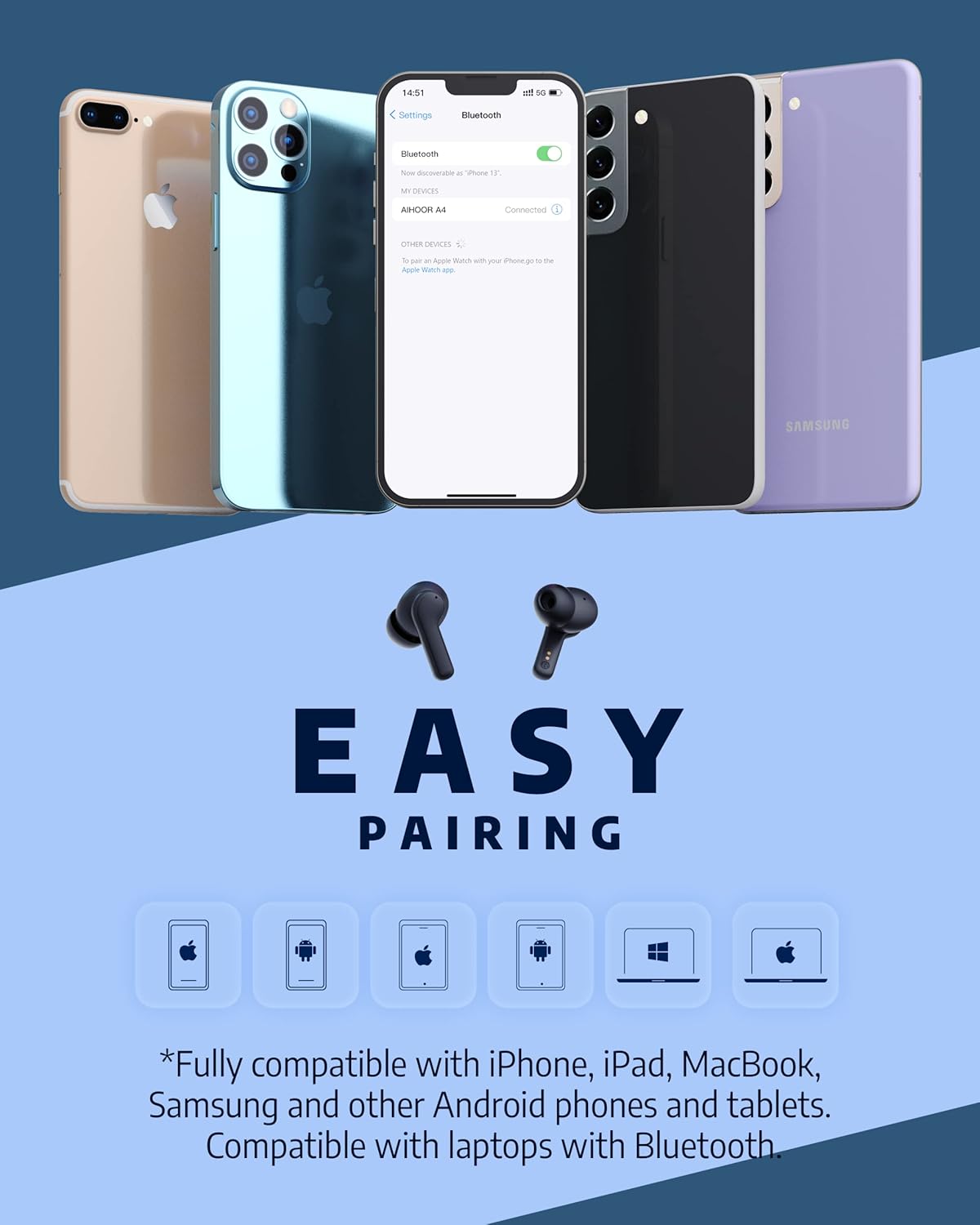
Figure 3: The AIHOOR A4ANC earbuds demonstrating easy pairing with various devices including iPhones, Android phones, and laptops. This image highlights the broad compatibility of the earbuds.
4. Ntuziaka ọrụ
4.1 Njikwa mmetụ
The AIHOOR A4ANC earbuds feature intuitive touch controls on each earbud for easy management of audio and calls.
- Gwuo/kwụsịtụ: Otu pịa ma ọ bụ ekwe ntị.
- Track na-esote: Kpatụ ntị ntị aka nri ugboro abụọ.
- Gara aga Track: Kpatụ ntị ntị aka ekpe ugboro abụọ.
- Olu elu: Pịa ogologo ntị ntị aka nri.
- Olu ala: Pịa ogologo ntị ntị aka ekpe.
- Mee ka onye enyemaka olu rụọ ọrụ (Siri/onye enyemaka Google): Pịa aka ntị nke ọ bụla ugboro atọ.
Video 2: Honest Review & Touch Control Demonstration. This video provides a clear demonstration of the touch controls for managing music playback, volume, and calls directly from the earbuds.
4.2 Njikwa oku
The earbuds are equipped with 6 microphones and Environmental Noise Cancellation (ENC) for clear hands-free calls.
- Azịza/Kwụsị Oku: Otu pịa ma ọ bụ ekwe ntị.
- Jụ oku: Ogologo pịa otu ntị ntị maka sekọnd 2.
4.3 Mkpọtụ Na-arụ Ọrụ (ANC)
Activate ANC to minimize ambient noise and enhance your listening experience.
- Mee ka ANC rụọ ọrụ: Long press either earbud for 2 seconds. You will hear an audio prompt confirming ANC activation.
- ANC reduces ambient noise by up to 30dB.

Figure 4: A visual representation of the earbuds' Active Noise Cancelling feature, showing a person enjoying quiet on an airplane. The image emphasizes the ability to reduce 35dB of ambient noise.
5. Nlekọta
Proper maintenance ensures the longevity and optimal performance of your AIHOOR A4ANC earbuds.
- Nhicha: Jiri ákwà dị nro, kpọrọ nkụ, na nke na-enweghị ihe e ji achaji ákwà hichaa ntị na ihe mkpuchi chaja mgbe niile. Zere iji kemịkalụ siri ike ma ọ bụ ihe ndị na-eme ka ọ dị nro.
- Atụmatụ: Wepụ ma hichaa isi ntị mgbe niile site na iji mmiri na ncha dị nro. Hụ na ha kpọrọ nkụ kpamkpam tupu ị tinyeghachi ha.
- Nguzogide mmiri: The earbuds have an IPX5 water resistance level, meaning they are protected against low-pressure water jets from any direction. They are not designed for submersion in water. Avoid exposing them to excessive moisture or liquids.
- Nchekwa: Mgbe ejighị ya, chekwaa earbuds n'ime akpa nchaji ha iji chebe ha ma debe ha ebubo.
6. Nchọpụta nsogbu
6.1 Okwu Njikọta
- Igwe ntị anaghị ejikọta: Ensure both earbuds are in the charging case, then open the lid to activate pairing mode. Check your device's Bluetooth settings to ensure "AIHOOR A4" is visible.
- Naanị otu ntị ntị na-ejikọ: Place both earbuds back into the charging case, close the lid, wait a few seconds, then open it again. This often resets the connection. If the issue persists, try forgetting the device on your phone's Bluetooth settings and re-pairing.
- Njikọ na-adịte aka: Ensure your device is within the Bluetooth range (10 meters/33 feet) and there are no significant obstacles between the earbuds and your device.
6.2 Nsogbu Nchaji
- Earbuds not charging in case: Ensure the charging contacts on both the earbuds and inside the case are clean and free of debris. Make sure the earbuds are properly seated in the case.
- Ikpe anaghị agba chaja: Verify the USB-C cable is securely connected to both the case and the power source. If using wireless charging, ensure the case is correctly positioned on the charging pad.
6.3 Okwu Ogo ụda
- Low volume or poor sound: Ensure the eartips are the correct size for a snug fit in your ear canal. Clean the earbud mesh to remove any wax or debris that might be obstructing sound. Adjust volume on both your device and the earbuds.
- ọdịyo agbagọ: Move closer to your connected device to avoid interference. Try disconnecting and reconnecting the earbuds.
7. Nkọwapụta
| Njirimara | Nkọwapụta |
|---|---|
| Aha Nlereanya | A4-FT001 |
| Teknụzụ Njikọta | Ikuku (Bluetooth 5.1) |
| Njikwa mkpọtụ | Nkagbu Noise nọchiri anya (ANC) |
| Igwe okwu | 6 (with ENC) |
| Ndụ batrị (Earbuds) | Ruo awa 5 kwa ụgwọ |
| ngụkọta oge egwuregwu (ya na ikpe) | Ruo awa iri abụọ |
| Oge Njikere (Ikpe) | Awa 2 |
| Nchaji ikuku | Akwadoro |
| Ọkwa Nguzogide mmiri | IPX5 |
| Usoro njikwa | Metụ aka |
| Ntinye ntị | Na Ntị |
| Akụkụ ngwaahịa | 2.28 x 1.93 x 1.18 sentimita asatọ |
| Ibu Ibu | 2.39 ounces |
8. Akwụkwọ ikike na nkwado
AIHOOR products are designed with quality and reliability in mind. For warranty information, technical support, or any inquiries regarding your AIHOOR A4ANC Wireless Earbuds, please refer to the contact information provided in your product packaging or visit the official AIHOOR websaịtị.
Note: Specific warranty terms and conditions may vary by region. Please retain your proof of purchase for warranty claims.