
Okwu mmalite
The Khadas Edge2 ARM PC Pro is a high-performance single board computer designed for a wide range of applications, from edge computing and AI to multimedia and general desktop use. Featuring the Rockchip RK3588S2 SoC, it offers robust processing power, advanced graphics capabilities, and extensive connectivity options in a compact form factor.
Ngwaahịa gafereview
The Edge2 ARM PC Pro is a compact and powerful mini PC. Below are images detailing its physical layout and ports.

N'elu view of the Khadas Edge2 ARM PC Pro, showing the sleek design and heat sink area.

N'okpuru view of the Khadas Edge2 ARM PC Pro, highlighting the mounting points and overall compact size.
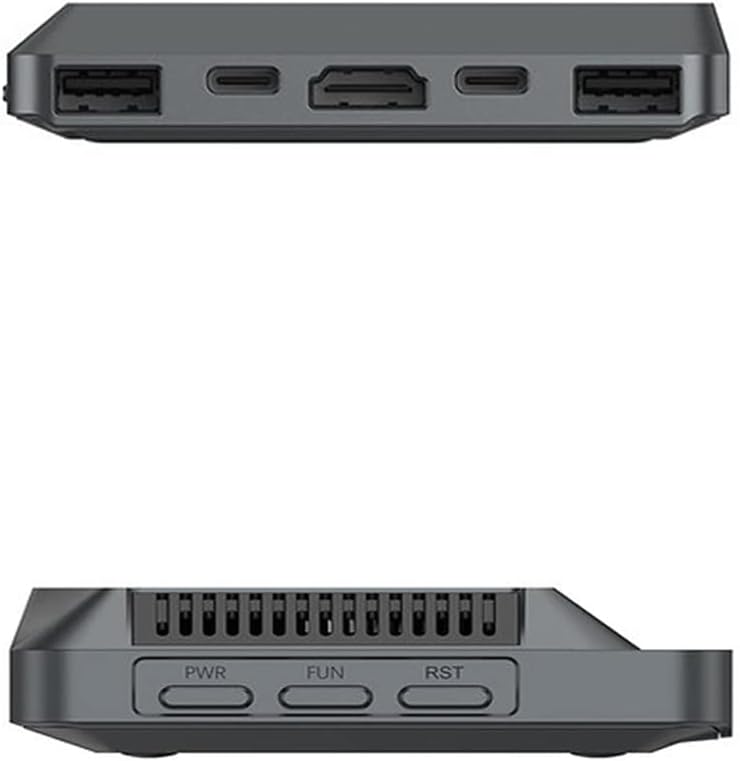
Akụkụ view of the Khadas Edge2 ARM PC Pro, displaying various ports including USB and HDMI.

Detailed diagram of the Khadas Edge2 ARM PC Pro's ports and buttons, including Power, Function, Reset, USB 3.1, USB-C (3.1 & DP & PD), USB-C (PD Only), HDMI Output, USB 2.0, and Pogo Pads.
Melite
Njikọ Peripherals
- Njikọ ike: Connect a compatible USB-C power adapter to the USB-C (PD Only) port.
- Ngosipụta njikọ: Connect your monitor to the HDMI output port or a compatible USB-C port with DisplayPort (DP) functionality. The Edge2 supports up to four independent displays via HDMI, USB-C (DP), and two DSI interfaces.
- Ngwa USB: Connect your keyboard, mouse, and other USB peripherals to the available USB 3.1 and USB 2.0 ports.
- Njikọ netwọk: For wired network access, connect an Ethernet cable (if an adapter is used, as the device itself doesn't list an Ethernet port directly in the main image, but Wi-Fi 6 is built-in). For wireless, ensure Wi-Fi is enabled and connect to your network.
Mbụ buut
After connecting all necessary peripherals, press the Power button to start the device. The Khadas Edge2 supports multiple operating systems, including Android, Ubuntu, and others, which can be installed via the built-in OOWOW system.

The Khadas Edge2 supports various operating systems like Ubuntu and Android, shown here on a display.
Ntuziaka ọrụ
Sistemu eji arụ ọrụ (OS)
The Khadas Edge2 ARM PC Pro supports Android 12, Linux 5.10, and Ubuntu 22.04. The specific operating instructions will vary depending on the OS installed. Refer to the respective OS documentation for detailed usage guides.
OOWOW System
The built-in OOWOW system simplifies OS installation and management. It allows for quick and easy installation of supported operating systems onto the onboard eMMC storage.

The OOWOW system interface, used for easy operating system installation and management.
Atụmatụ
- High-Performance SoC: Equipped with the Rockchip RK3588S2, an 8nm lithography process 8-core 64-bit CPU (2.25GHz Quad core ARM Cortex-A76 and 1.8GHz Quad core Cortex-A55) and an integrated ARM Mali-G610 MP4 quad-core GPU (up to 1GHz).
- Neural Processing Unit (NPU): Features a built-in NPU with up to 6 TOPS performance, supporting deep learning frameworks like TensorFlow, Pytorch, and MxNET for AI applications.
- Njikọ Wi-Fi 6: Utilizes the AP6275P Wi-Fi 6 PCIe module, supporting IEEE 802.11 ax/ac/a/b/g/n and 2T2R for stable and fast wireless data transmission.
- 8K Video Decoding & Encoding: Supports 8K, 60fps H.265/VP9 video decoding and 8K, 30fps H.265/H.264 video encoding. It can handle up to 32-channels of 1080P, 30fps decoding or 16-channels of 1080P, 30fps encoding simultaneously.
- Quad Display Interfaces: Hardware supports up to four independent displays via 1x HDMI, 1x USB-C (DP), and 2x DSI interfaces. The actual number of independent displays may be limited by the operating system.
- Maker Friendly: Includes multiple FPC connectors for accessories and extensions: 1x 30-pin 0.5mm MIPI-DSI, 1x 40-pin 0.5mm MIPI-DSI, 3x 30-pin 0.5mm MIPI-CSI, 2x 30-pin 0.5mm FPC, and 1x 7-pin Pogo Pad (USB, UART, 5V).

Close-up of the Rockchip RK3588S2 System-on-Chip, the core processor of the Edge2.

A bar chart illustrating the download and upload speeds of Edge2 compared to other models like Edge and VIM4.

Collage of images showing potential applications of the Khadas Edge2, including robotics, software development, VR/AR, and industrial automation.
Nkọwapụta
| Njirimara | Nkọwa |
|---|---|
| Nhazi | Rockchip RK3588S2 (8-core 64-bit, 2.25 GHz Quad core ARM Cortex-A76 + 1.8 GHz Quad core Cortex-A55) |
| GPU | ARM Mali-G610 MP4 (up to 1GHz) |
| NPU | Arụmọrụ 6 kachasị elu |
| RAM | 16 GB DDR4 |
| Nchekwa | Embedded MultiMediaCard (eMMC) - 64GB for Pro model |
| Njikọ ikuku | Wi-Fi 6 (802.11ax), Bluetooth 5.0 |
| Ndozi vidiyo | 8K@60fps H.265/VP9 |
| Ndekọ vidiyo | 8K@30fps H.265/H.264 |
| Ngosipụta ihu | 1x HDMI, 1x USB-C (DP), 2x DSI |
| ọdụ ụgbọ mmiri USB | 1x USB 3.0, 1x USB 2.0, 2x USB-C (one with DP & PD, one PD only) |
| Sistemu eji arụ ọrụ | Android 12, Linux 5.10, Ubuntu 22.04 |
| Akụkụ | 5.39 x 4.45 x 1.3 sentimita asatọ |
| Ibu | 8.1 ounces |
Kedu ihe dị na Igbe ahụ
The Khadas Edge2 ARM PC Pro package typically includes:
- Khadas Edge2 ARM PC Pro Single Board Computer
- Heatsink cooling kit (may be included depending on specific package)
- Note: Power adapter, cables, and other accessories are often sold separately. Please check your specific product packaging for exact contents.
Nlekọta
- Nhicha: Jiri ákwà dị nro ma kpọọ nkụ hichaa mpụta nke ngwaọrụ ahụ. Zere ihe nhicha mmiri ma ọ bụ ihe mgbaze.
- Igwe ikuku: Ensure the device has adequate ventilation to prevent overheating. Do not block the heatsink or air vents.
- Nchekwa: Store the device in a cool, dry environment away from direct sunlight and extreme temperatures.
- Mmelite ngwanrọ: Regularly check for and install operating system and firmware updates to ensure optimal performance and security.
Nchọpụta nsogbu
Okwu na ngwọta nkịtị
- Ngwaọrụ anaghị agbanye:
- Ensure the USB-C power adapter is correctly connected to the USB-C (PD Only) port and is providing sufficient power.
- Nyochaa na ntinye ọkụ na-arụ ọrụ.
- Enweghị ngosipụta mmepụta:
- Check HDMI or USB-C (DP) cable connections to both the Edge2 and the monitor.
- Hụ na enyocha ahụ agbanyere ma tinye ya na isi mmalite ntinye kwesịrị ekwesị.
- Nwaa eriri ngosi ma ọ bụ ihe nlele dị iche ma ọ bụrụ na ọ dị.
- Wi-Fi/Bluetooth connectivity issues:
- Verify that Wi-Fi/Bluetooth is enabled in the operating system settings.
- Ensure the device is within range of the wireless network/Bluetooth device.
- Restart the Edge2 and your router/Bluetooth device.
- Sistemụ arụmọrụ anaghị ebido:
- If the OS is corrupted, use the OOWOW system to reinstall the operating system. Refer to the OOWOW documentation for detailed steps.
Vidiyo ngwaahịa ngwaahịa
Official introduction video for the Khadas Edge2 Mini ARM PC, highlighting its features and applications.
Akwụkwọ ikike na nkwado
Maka ozi gbasara akwụkwọ ikike na nkwado teknụzụ, biko gaa na Khadas gọọmentị. websaịtị ma ọ bụ kpọtụrụ ndị ahịa ha ozugbo. Debe ihe akaebe nke ịzụrụ ihe maka akwụkwọ ikike.
Ị nwere ike ịga na Khadas Store on Amazon maka ozi ngwaahịa na akụrụngwa nkwado.