
1. Okwu mmalite
The WIWU P16 Max Wireless Speaker is designed to provide high-quality stereo sound for various occasions, including travel and parties. Engineered with premium components, it delivers powerful audio with 55 watts of output, ensuring clear sound without distortion even at maximum volume. Its impressive Bluetooth 5.0 connectivity offers a wireless range of up to 10 meters for uninterrupted music playback. The speaker also features IPX5 water resistance, making it suitable for outdoor use, such as beach trips or poolside gatherings. It includes an AUX input and memory card slots for versatile audio playback options.
2. Ngwaahịa gafereview
Familiarize yourself with the components and design of your WIWU P16 Max speaker.

The WIWU P16 Max speaker features a robust design with a green and black finish. It includes a durable, adjustable strap for easy portability. The front grille is perforated, indicating the speaker output, and the top panel has control buttons.
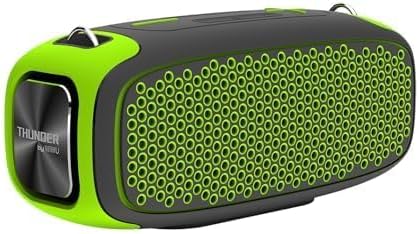
Akụkụ view of the WIWU P16 Max speaker, highlighting the 'THUNDER by WIWU' branding on the metallic end cap. The speaker's compact and ergonomic shape is visible.
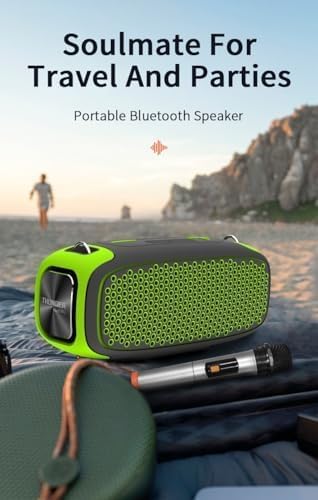
The WIWU P16 Max speaker shown in an outdoor setting, emphasizing its suitability for travel and parties. A wireless microphone is also visible, indicating its compatibility.
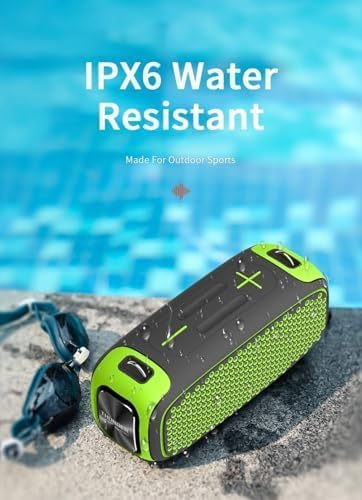
The WIWU P16 Max speaker positioned near a swimming pool, illustrating its IPX5 water-resistant capability, making it suitable for use in damp gburugburu.
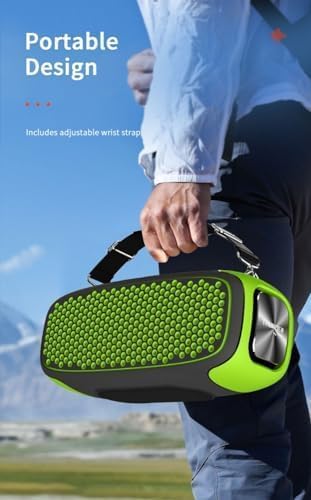
A person carrying the WIWU P16 Max speaker using its adjustable strap, showcasing its portable design for on-the-go use.
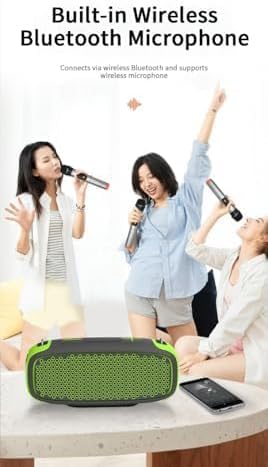
The WIWU P16 Max speaker with people singing using wireless microphones, demonstrating its built-in wireless Bluetooth microphone functionality for karaoke or public speaking.
3. Nhazi ntuziaka
3.1 Ịchaji ọkà okwu
The speaker is battery-powered. Before first use, fully charge the speaker using the provided charging cable. The charging indicator light will show the charging status.
3.2 Gbanyụọ ma ọ bụ gbanyụọ
Press and hold the power button located on the top panel to turn the speaker on or off.
3.3 Njikọ Bluetooth
- Gbaa mbọ hụ na agbanyere ọkà okwu.
- Activate Bluetooth on your device (smartphone, laptop).
- Chọọ maka 'WIWU P16 Max' in your device's Bluetooth settings.
- Select the speaker to pair. A confirmation sound will indicate successful pairing.
3.4 Njikọ AUX
Connect an audio device to the speaker's AUX input using a 3.5mm audio cable. The speaker will automatically switch to AUX mode or you may need to select it manually using the Mode button.
3.5 Memory Card Playback
Insert a compatible memory card (e.g., microSD) into the designated slot. The speaker will automatically detect and play audio files site na kaadị.
Ntọala Igwe okwu ikuku 3.6
The speaker includes a wireless microphone. Power on the microphone; it should automatically connect to the speaker. Refer to the microphone's separate instructions for specific pairing details if needed.
4. Ntuziaka ọrụ
4.1 Njikwa olu
Use the '+' and '-' buttons on the speaker's top panel to adjust the volume. Alternatively, adjust the volume from your connected device.
4.2 Njikwa ọkpụkpọ
When playing audio via Bluetooth or memory card:
- Press the Play/Pause button to pause or resume playback.
- Press the 'Next Track' button to skip to the next song.
- Press the 'Previous Track' button to go to the previous song.
4.3 Ngbanwe ọnọdụ
Press the 'Mode' button to cycle through available input modes: Bluetooth, AUX, and Memory Card.
4.4 Ịza oku
If connected to a smartphone via Bluetooth, press the Play/Pause button to answer an incoming call or end an ongoing call.
5. Nlekọta
5.1 Nhicha
Wipe the speaker with a soft, dry cloth. Do not use abrasive cleaners, solvents, or harsh chemicals, as these may damage the finish or internal components.
5.2 Mmiri Nguzogide
The speaker is IPX5 water-resistant, meaning it is protected against low-pressure water jets from any direction. This makes it suitable for splashes and light rain. Ekpudola ọkà okwu n'ime mmiri.
5.3 Nchekwa
Store the speaker in a cool, dry place away from direct sunlight, high humidity, and extreme temperatures. Avoid placing heavy objects on top of the speaker.
5.4 Nlekọta batrị
To prolong battery life, avoid fully discharging the battery frequently. Charge the speaker regularly, even if not in use for extended periods (e.g., once every 3 months).
6. Nchọpụta nsogbu
- Enweghị ike: Ensure the speaker is charged. Connect it to a power source using the provided cable and try again.
- Enweghị ụda: Check volume levels on both the speaker and the connected device. Ensure the correct input mode (Bluetooth, AUX, Memory Card) is selected.
- Ịkwụsị Bluetooth: Ensure the speaker and your device are within the 10-meter wireless range. Disconnect and re-pair the Bluetooth connection. Clear previous Bluetooth pairings on your device if necessary.
- Igwe okwu anaghị arụ ọrụ: Ensure the microphone is powered on and fully charged. Check if it's properly paired with the speaker. Refer to the microphone's manual for specific troubleshooting steps.
- Ụda agbagọ: Reduce the volume on both the speaker and the connected device. Ensure the audio source is of good quality. Move away from potential sources of interference.
7. Nkọwapụta
| Njirimara | Nkọwa |
|---|---|
| Aha ika | WIWU |
| Akụkụ akụkụ | 16 x 19 x 6 cm |
| Teknụzụ Njikọta | Bluetooth |
| Agba | Akwụkwọ ndụ akwụkwọ ndụ |
| Ngwa dakọtara | Laptọọpụ, Smartphone |
| Ụdị nkwụnye | Ala Ugwu |
| Isi Iyi Ike | Akwanyere batrị |
| Ụdị njikọ | Aux |
| Akụrụngwa | Plastic, metal |
| Ibu Ibu | 250 grams |
| Ntinye ọdịyo | Ihe enyemaka (3.5mm) |
| Ike mmepụta | 55 Watt |
| Nọmba nlereanya | 6936686403900 |
| Eji akwadoro | Music parties, conferences, places of worship, outdoor events, parties, travel |
| Onye nrụpụta | WIWU |
| Nọmba akụkụ | 6936686403900 |
| Ngwa gụnyere | Ọkà okwu |
8. Akwụkwọ ikike na nkwado
8.1 Ozi akwụkwọ ikike
Please note that this product is indicated to have Enweghị akwụkwọ ikike. For any concerns regarding product defects upon receipt, please contact your point of purchase immediately.
8.2 Nkwado ndị ahịa
For product support, technical assistance, or general inquiries, please contact your retailer or visit the official WIWU websaịtị maka ozi ndị ọzọ.