
1. Okwu mmalite
Thank you for choosing the CristalRecord EKOS LED Ceiling Fan. This manual provides essential information for the safe installation, operation, and maintenance of your new ceiling fan. Please read it thoroughly before installation and keep it for future reference.
The EKOS ceiling fan features an integrated LED light with three color temperature options (3000K warm white, 4000K neutral white, 6000K cool white). It is equipped with a silent DC motor offering 5 different speeds, a timer function (1h, 4h, 8h), and both summer and winter modes for year-round comfort. The fan includes a remote control for convenient operation and has a power-off memory function.
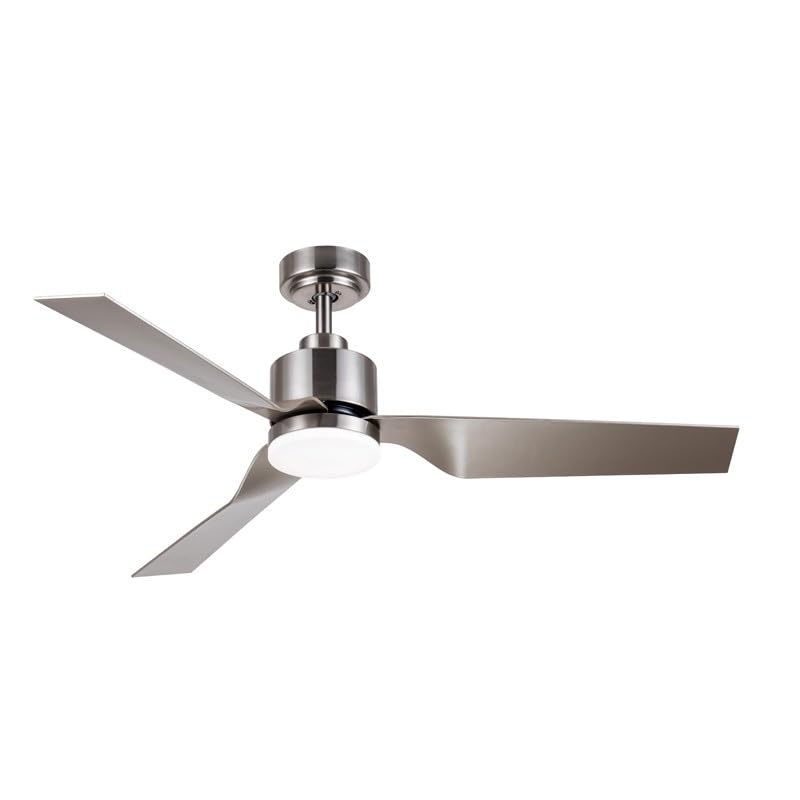
Foto 1.1: Ofeview of the CristalRecord EKOS LED Ceiling Fan.
2. Ozi nchekwa
Ịdọ aka ná ntị: To reduce the risk of fire, electric shock, or personal injury, always follow these safety guidelines:
- Gụọ ntuziaka niile nke ọma tupu echichi na iji.
- A ga-arụrịrị nrụnye site n'aka onye ọrụ ọkụ eletrik ruru eru dịka koodu eletriki mpaghara na nke obodo siri dị.
- Ensure the power supply is disconnected at the main circuit breaker before installation or servicing.
- The mounting structure must be capable of supporting the weight of the fan (refer to specifications for weight).
- Ejila waya mebiri emebi rụọ ọrụ fan ahụ ma ọ bụ ọ bụrụ na ọ naghị arụ ọrụ nke ọma.
- Keep hands, clothing, and other objects away from the fan blades when the fan is operating.
- Do not attempt to repair or modify the fan yourself. Contact qualified service personnel.
3. Ihe ngwugwu
Carefully unpack your ceiling fan and ensure all items are present. If any parts are missing or damaged, contact your retailer.
- Ceiling Fan Motor Housing with Integrated LED Light
- Fan Blades (3 units)
- Downrod and Canopy Assembly
- Arịọnụ mgbodo
- Njikwa anya na Wall Mount
- Ngwungwu ngwaike (skru, washers, akụ waya)
- Akwụkwọ ntuziaka onye ọrụ

Foto 3.1: nso nso view of the fan's motor housing and integrated LED light.
4. Ntọala na nwụnye
Mkpa: Before beginning installation, ensure the power is turned OFF at the circuit breaker. Consult a qualified electrician if you are unsure about any part of the installation process.
- Kwadebe Ebe Nkwanye: Ensure the ceiling joist or support structure is strong enough to hold the fan's weight and that there is adequate clearance for the blades.
- Wụnye ihe nkwado mgbago: Secure the mounting bracket to the ceiling outlet box using the provided screws. Ensure it is firmly attached.
- Kpọkọta Downrod: Feed the electrical wires from the fan motor through the downrod. Attach the downrod to the fan motor housing.
- Kpọgidere onye ofufe: Carefully lift the fan assembly and hang it onto the mounting bracket hook. This will allow you to make electrical connections hands-free.
- Mepụta njikọ eletrik: Connect the fan's wires to the household wiring according to the wiring diagram provided in the full instruction manual (typically black to black, white to white, and green/bare copper to ground). Use wire nuts to secure connections.
- Chekwaa onye ofufe: Once wiring is complete, carefully lift the fan off the hook and secure it to the mounting bracket with the screws provided.
- Tinye agụba Fan: Securely attach each fan blade to the motor housing using the screws provided. Ensure all blades are tightened evenly.
- Wụnye ngwa ọkụ: Connect the light kit wiring to the fan's light wiring. Secure the LED light module to the fan housing.
- Wụnye Canopy: Slide the canopy up to the ceiling and secure it to cover the mounting bracket and wiring.

Foto 4.1: Ọpụample of the CristalRecord EKOS LED Ceiling Fan installed in a modern living space.
5. Ntuziaka ọrụ
Your CristalRecord EKOS LED Ceiling Fan is operated via the included remote control. Ensure batteries are correctly installed in the remote.
Ọrụ njikwa anya:
- Bọtịnụ ngbanwu/ Gbanyụọ: Na-agbanye fan ahụ ma gbanye ma ọ bụ gbanyụọ ya.
- Bọtịnụ ọsọ Fan (1-5): Adjusts the fan speed from 1 (lowest) to 5 (highest).
- Light CCT Button: Cycles through the three color temperatures: 3000K (Warm White), 4000K (Neutral White), and 6000K (Cool White).
- Timer Button (1h/4h/8h): Sets the fan to turn off automatically after 1, 4, or 8 hours.
- Summer/Winter Mode Button: Changes the direction of blade rotation.
- Ụdị okpomọkụ (na-aga na elekere): Na-emepụta ikuku na-agbada ala, na-emepụta mmetụta jụrụ oyi.
- Ụdị oyi (na-aga elekere): Creates an upward airflow, recirculating warm air trapped near the ceiling.
- Ọrụ ebe nchekwa: The fan remembers the last light setting (CCT) and fan speed when turned off and on again.

Image 5.1: Detail of the integrated LED light module, capable of three color temperatures.
6. Nlekọta
Regular maintenance ensures optimal performance and extends the life of your ceiling fan.
- Nhicha: Jiri ihe dị nro na-efesa agụba fan na ụlọ moto mgbe niile, damp akwa . Ejila ihe nhicha ma ọ bụ ihe mgbaze, n'ihi na ndị a nwere ike imebi njedebe.
- Ike Agụba: Periodically check that all blade screws are tight. Over time, they may loosen due to vibration.
- Isi mmalite ọkụ: The integrated LED light source is designed for long life and is not user-replaceable. If the LED light fails, contact customer support.
- Batrị njikwa anya: Replace batteries in the remote control when its range decreases or it stops responding. Use the specified battery type.
Ịdọ aka ná ntị: Always turn off the power at the circuit breaker before cleaning or performing any maintenance on the fan.
7. Nchọpụta nsogbu
If you experience issues with your fan, refer to the following troubleshooting guide. If the problem persists, contact customer support.
| Nsogbu | Ihe nwere ike ime | Ngwọta |
|---|---|---|
| Onye ofufe anaghị ebido | No power supply; Loose wire connections; Remote control battery low/dead. | Check circuit breaker; Ensure all wires are securely connected (power off first); Replace remote control batteries. |
| Ìhè anaghị arụ ọrụ | No power to light; Loose wire connection; LED module failure. | Check power supply; Verify light kit wiring (power off first); Contact customer support if LED module is faulty. |
| Fans na-ama jijiji | Kposara agụba tọgbọrọ chakoo; Mpekere na-enweghị nha nha; Ihe nkwado mgbago rụrụ arụ. | Tighten all blade screws; Ensure blades are balanced (use balancing kit if necessary); Verify mounting bracket is secure. |
| Njikwa anya anaghị arụ ọrụ | Batrị nwụrụ anwụ; Ime obodo anaghị ejikọ; Ihe mgbochi dị n'etiti ime obodo na ihe nnata. | Replace batteries; Refer to remote pairing instructions (if applicable); Ensure clear line of sight. |
8. Nkọwapụta
| Njirimara | Nkọwa |
|---|---|
| Nọmba nlereanya | 85-636-18-281 |
| Ụdị | CristalRecord |
| Ụdị moto | DC Silent Motor |
| Ọnụọgụ agụba | 3 |
| Ọsọ ndị fan | 5 |
| Ụdị ọkụ | Igwe ọkụ agbakwunyere |
| Okpomọkụ agba (CCT) | 3000K (Ọkụ), 4000K (anọpụ iche), 6000K (Ọ dị mma) |
| Ọrụ ngụ oge | 1h, 4h, 8h |
| Ụdị arụ ọrụ | Summer (cooling), Winter (heat recirculation) |
| Ụdị njikwa | Njikwa anya |
| Isi Iyi Ike | Igwe ọkụ eletrik |
| Ụdị nkwụnye | Ugwu elu ụlọ |
| Mechaa | Satin |
| Ụdị ụlọ | Living Room (as per manufacturer suggestion) |

Image 8.1: Dimensional drawing showing key measurements of the fan (measurements in cm).
9. Akwụkwọ ikike na nkwado
Maka ozi akwụkwọ ikike, nkwado teknụzụ, ma ọ bụ ajụjụ ọrụ, biko kpọtụrụ onye na-ere ahịa gị ma ọ bụ onye nrụpụta ozugbo. Debe ihe akaebe nke ịzụrụ ihe maka akwụkwọ ikike.
Manufacturer: CRISTALRECORD
For further assistance, please visit the official CristalRecord websaịtị ma ọ bụ kpọtụrụ ngalaba ọrụ ndị ahịa ha.