
1. Ngwaahịa gafereview
The KUMIO ICM-1216 is a stainless steel countertop ice maker designed for convenient ice production. It features an LCD digital control panel for easy operation, producing bullet-shaped ice in two sizes (S/L) within minutes. With a 2.1L water tank and a self-cleaning function, it is suitable for various settings including home, parties, and outdoor activities.
Akụkụ ndị bụ isi:
- Ime Ice Ngwa Ngwa: Produces 9 bullet-shaped ice cubes in 6-8 minutes, up to 26.5 lbs per day.
- Ịrụ ọrụ dị mfe: LCD smart control panel with advanced infrared sensor technology.
- Ọrụ akpaaka: Stops ice production when basket is full, alerts for low water level.
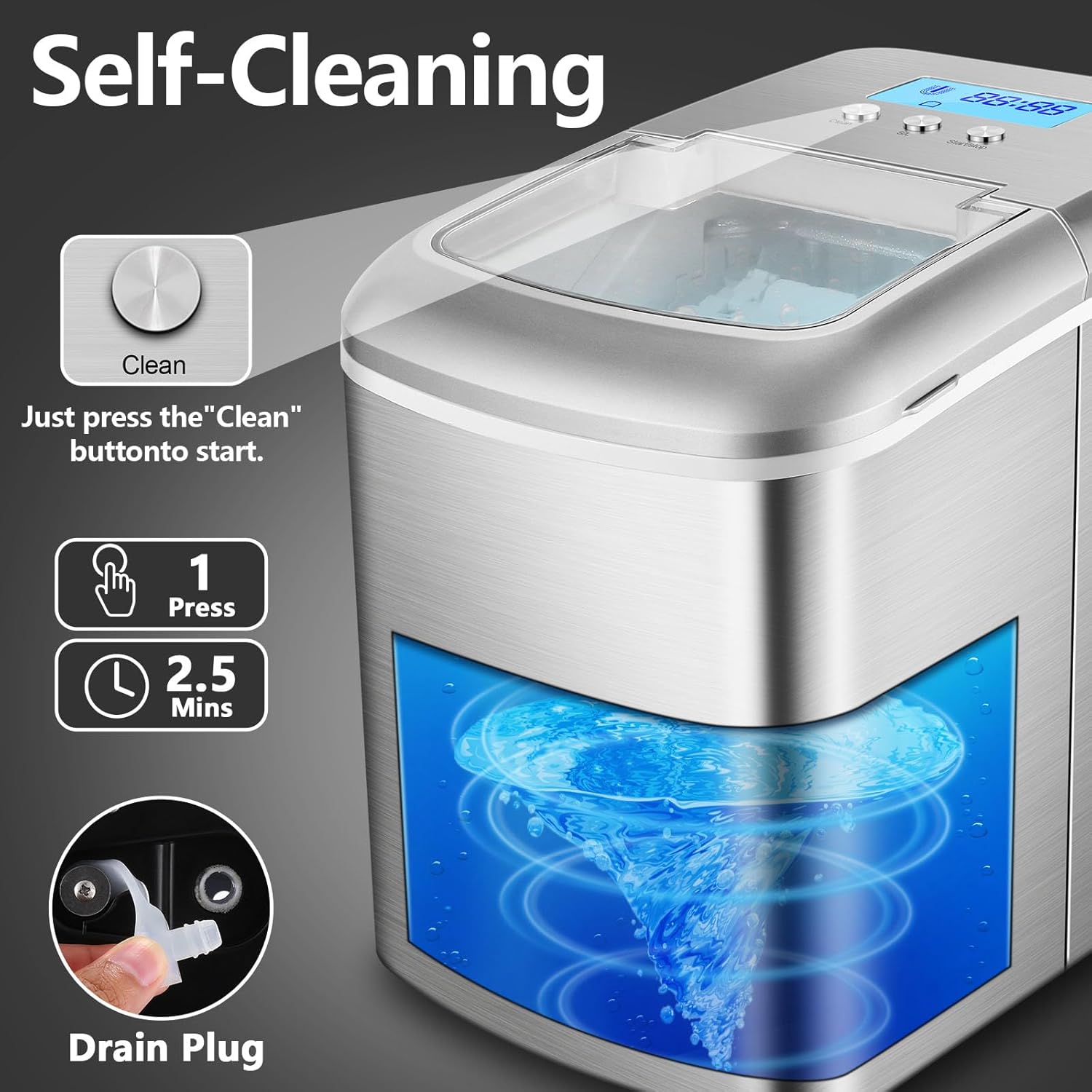
- Nhicha onwe: Integrated self-cleaning function for easy maintenance.
- Nchacha mmiri: Equipped with a water filtration system for clean ice.
- Nha Ice Abụọ: Selectable small (S) or large (L) bullet ice.
- Kọmpat & Enwere ike ibugharị: Designed for easy movement and fits most countertops.

2. Ntuziaka nchekwa
Biko gụọ ntuziaka niile nke ọma tupu i jiri ngwa ahụ iji hụ na ọ dị mma ịrụ ọrụ ma gbochie mmebi.
- Gbaa mbọ hụ na ejikọrọ ngwa ahụ na oghere ọkụ nwere volta dị mmatage (110-120V).
- Ejila ngwa, eriri ọkụ, ma ọ bụ nkwụnye na mmiri ma ọ bụ mmiri mmiri ndị ọzọ.
- Keep the appliance away from heat sources, direct sunlight, and corrosive gases.
- Do not operate the appliance with a damaged cord or plug. Contact qualified service personnel for repairs.
- Na-elekọta ụmụaka mgbe ngwa a na-eji.
- Jiri naanị mmiri a na-eri anụ na tank mmiri.
- Wepụ ihe mkpuchi ahụ tupu ị sachaa ya ma ọ bụ mgbe a naghị eji ya ruo ogologo oge.
- Ekpuchila oghere ikuku. Hụ na ikuku na-agagharị nke ọma gburugburu ngwaọrụ ahụ.
- Echekwala ihe mgbawa dị ka ite aerosol nwere ihe na-ere ọkụ n'ime ngwa a.
3. Ihe ngwugwu
Chọpụta na ihe niile dị na ngwugwu:
- KUMIO ICM-1216 Ice Maker Unit
- Ihe nkata ice
- Akara Ice
- Akwụkwọ ntuziaka (akwụkwọ a)
4. Nhazi
4.1 Nwepu
- Jiri nlezianya wepụ onye na-eme ice na nkwakọ ngwaahịa ya.
- Remove all packaging materials, tapes, and protective films.
- Inspect the appliance for any damage during transit. If damaged, do not operate and contact customer support.
4.2 Ntinye
- Debe ihe na-eme ice n'elu ebe dị larịị, kwụsiri ike, ma dịkwa larịị.
- Ensure there is at least 15 cm (6 inches) of space around the unit for proper ventilation.
- Zere idobe otu n'akụkụ ebe okpomọkụ (dịka, oven, radiators) ma ọ bụ na ìhè anyanwụ.
- Do not place the unit in an enclosed cabinet, as this can hinder ventilation and affect performance.
4.3 Nhicha mbụ
Before first use, it is recommended to clean the ice maker.
- Mepee mkpuchi ma wepụ nkata ice.
- Clean the interior of the water tank and the ice basket with a soft cloth and warm, soapy water. Rinse thoroughly.
- Jiri mgbasa ozi hichaa mpụtaamp akwa .
- Gbaa mbọ hụ na akụkụ niile akpọnwụwo tupu agbakọtakwa ya.
5. Ntuziaka ọrụ
5.1 Na-agbakwụnye mmiri
- Ensure the drain plug at the bottom is securely closed.
- Mepee mkpuchi elu nke ihe na-eme ice.
- Pour potable water into the water tank. Do not exceed the maximum water level mark.
- Mechie mkpuchi.
5.2 Selecting Ice Size
- Plug the ice maker into a power outlet. The LCD display will illuminate.
- Press the "S/L" button on the control panel to select your desired ice cube size: 'S' for small or 'L' for large. The selected size indicator will light up on the LCD.

5.3 Malite mmepụta ice
- After adding water and selecting the ice size, press the "Start/Stop" button to begin the ice-making cycle.
- The "Ice Making" indicator on the LCD will light up.
- The first batch of ice will be ready in approximately 6-8 minutes.
- The ice maker will continue to produce ice until the ice basket is full or the water level is low.


5.4 Monitoring and Indicators
- Mmiri mmiritage egosi: If the water level is too low, this indicator will flash, and the ice maker will pause operation. Refill the water tank to resume.
- Ihe ngosi zuru oke nke ice: When the ice basket is full, this indicator will light up, and the ice maker will stop producing ice. Remove ice from the basket to resume.
- Ihe ngosi nhicha: Lights up during the self-cleaning cycle.
6. Nlekọta
Nhicha na mmezi mgbe niile ga-eme ka ogologo ndụ na arụmọrụ kachasị mma nke onye na-emepụta ice gị.
6.1 Nhicha mgbe niile
- Kwụpụ ihe na-eme ice ahụ na ebe a na-ere ọkụ eletrik.
- Wepu nkata ice.
- Jiri akwa dị nro hichaa ime ime dampened with a mild detergent solution. Rinse with clean water.
- Jiri mgbasa ozi hichaa mpụtaamp akwa . Ejila ihe nchacha abrasive ma ọ bụ ihe mgbaze.
- Hụ na akụkụ niile kpọrọ nkụ kpamkpam tupu ị chịkọta ma chekwaa ha ọzọ.
6.2 Ọrụ nhicha onwe
Igwe ice ahụ nwere usoro nhicha onwe onye na-akpaghị aka:
- Gbaa mbọ hụ na tank mmiri jupụtara na mmiri dị ọcha.
- Press and hold the "Clean" button for a few seconds to activate the self-cleaning cycle. The "Cleaning" indicator will light up.
- The cycle typically lasts about 2.5 minutes, circulating water through the system.
- Once the cycle is complete, drain the water as described in section 6.3.
6.3 Mmiri Ịwụpụ Mmiri
To drain water from the tank:
- Place a container under the drain plug located at the bottom of the unit.
- Carefully remove the rubber drain plug.
- Hapụ mmiri niile ka ọ gbapụta kpamkpam.
- Dochie plọg mmiri ahụ nke ọma.
7. Nchọpụta nsogbu
If you encounter issues with your ice maker, refer to the following table for common problems and solutions.
| Nsogbu | Ihe nwere ike ime | Ngwọta |
|---|---|---|
| Ice maker not working | No power; Water shortage; Ice basket full | Check power connection; Add water; Remove ice from basket |
| Ice cubes are too small or melt quickly | Ambient temperature too high; Water temperature too high; Insufficient ventilation | Place in a cooler environment; Use colder water; Ensure proper ventilation around the unit |
| Mgbapu mmiri | Drain plug not secured; Unit not level | Ensure drain plug is tightly closed; Place unit on a level surface |
| "Mmiri Shortage" indicator on, but water is present | Water level sensor malfunction; Water below minimum level | Ensure water is above the minimum fill line; Contact customer support if issue persists |
| Mkpọtụ na-adịghị ahụkebe n'oge arụ ọrụ | Unit abụghị ọkwa; Okwu gbasara akụrụngwa | Ensure unit is on a level surface; Contact customer support if noise is excessive or unusual |
If the problem persists after attempting these solutions, please contact KUMIO customer support for assistance.
8. Nkọwapụta
Technical details for the KUMIO ICM-1216 Ice Maker:
| Njirimara | Nkọwapụta |
|---|---|
| Nọmba nlereanya | ICM-1216 |
| Akụkụ ngwaahịa | 37.2D x 24.8W x 31.5H centimeters (9.76 x 14.65 x 12.4 inches) |
| Ibu | 9 n'arọ (19.84 pound) |
| Ike (Tank mmiri) | 2.1 lita |
| Mmepụta ice kwa ụbọchị | Ihe dị ka 26.5 lbs (12 n'arọ) |
| Okirikiri Ime Ice | Nkeji 6-8 kwa otu (cube 9) |
| Voltage | 110-120 volts |
| Wattage | 120 watt |
| Igwe nju oyi | R600a |
| Ihe onwunwe | Igwe anaghị agba nchara |

9. Akwụkwọ ikike na nkwado
KUMIO products are manufactured to high-quality standards. For warranty information, technical support, or service inquiries, please refer to the warranty card included with your purchase or contact KUMIO customer service directly. Please have your model number (ICM-1216) and purchase date available when contacting support.