
Okwu mmalite
Thank you for choosing the Yenkee YMS 5030 Wireless Ergonomic Vertical Mouse. This manual provides detailed instructions for setting up, operating, and maintaining your new mouse. Designed for comfort and precision, this vertical mouse helps promote a natural wrist posture, reducing strain during extended use.
Biko gụọ akwụkwọ ntuziaka a nke ọma tupu i jiri ngwaahịa a iji hụ na ọ na-arụ ọrụ nke ọma ma na-adịte aka.
Ihe ngwugwu
Chọpụta na ihe niile dị na ngwugwu:
- 1 x Yenkee 1000/1600 DPI Wireless Ergonomic Vertical Mouse
- 1 x USB Nano nnata
- Akwụkwọ ntuziaka onye ọrụ 1 x (akwụkwọ a)
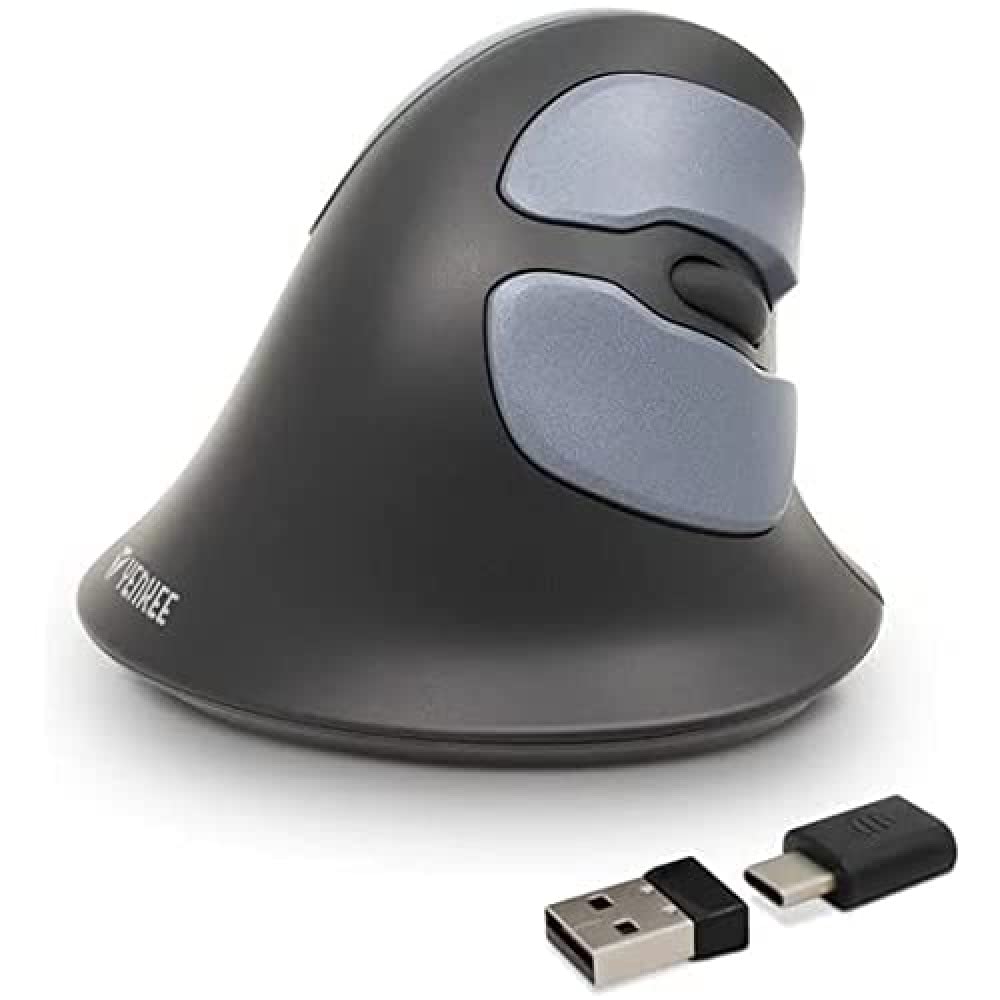
Image: Yenkee YMS 5030 Wireless Ergonomic Vertical Mouse with its USB nano receiver. The mouse is black, featuring a vertical design with multiple buttons.
Melite
- Wụnye batrị:
Locate the battery compartment on the underside of the mouse. Open the cover and insert the required batteries (not included), ensuring correct polarity (+/-). Close the battery compartment cover securely.
Foto: N'okpuru view of the Yenkee YMS 5030 mouse, highlighting the battery compartment and the on/off switch.
- Jikọọ ihe nnata USB Nano:
Plug the USB nano receiver into an available USB port on your computer. Your operating system should automatically detect and install the necessary drivers. This process may take a few moments.
- Ike na òké:
Slide the ON/OFF switch, located on the underside of the mouse, to the "ON" position. The mouse should now be active and ready for use.
Ntuziaka ọrụ
The Yenkee YMS 5030 mouse features 6 buttons and adjustable DPI settings for precise control.
- Bọtịnụ Pịa aka ekpe: Standard isi pịa ọrụ.
- Pịa aka nri bọtịnụ: Ọkọlọtọ nke abụọ pịa ọrụ.
- Mpempe akwụkwọ mpịakọta: Pịgharịa gaa na elu ma ọ bụ ala site na akwụkwọ na web ibe. Enwere ike pịa maka ịrụ ọrụ pịa etiti.
- Bọtịnụ n'ihu/Azu: N'akụkụ, bọtịnụ ndị a na-enye ohere maka ịnyagharịa ngwa ngwa na web ihe nchọgharị ma ọ bụ file ndị na-eme nchọpụta.
- Bọtịnụ mmezi DPI: Located near the scroll wheel, press this button to cycle between DPI settings (1000 DPI and 1600 DPI). Adjust the sensitivity to suit your preference and task.
Foto: N'elu-ala view of the Yenkee YMS 5030 mouse, indicating the positions of the left/right click, scroll wheel, forward/backward, and DPI adjustment buttons.
Ergonomic imewe
The vertical design of the YMS 5030 mouse positions your hand in a natural handshake posture, which can help alleviate wrist strain and discomfort often associated with traditional horizontal mice. This design is particularly beneficial for users seeking to reduce the risk of repetitive strain injuries like Carpal Tunnel Syndrome.
Nlekọta
- Nhicha: Jiri ákwà dị nro ma kpọọ nkụ hichaa elu òké ahụ. Maka unyi siri ike, jiri ntakịrị d hichaa elu òké ahụ.ampen akwa na mmiri. Zere iji kemịkalụ siri ike ma ọ bụ ihe nchacha.
- Ngbanwe batrị: When the mouse performance degrades or it stops responding, it's time to replace the batteries. Follow the "Install Batteries" steps in the Setup section. Dispose of old batteries responsibly according to local regulations.
- Nchekwa: When not in use for extended periods, turn off the mouse using the ON/OFF switch to conserve battery life. Store the mouse and receiver in a dry, cool place.
Nchọpụta nsogbu
| Nsogbu | Ihe nwere ike ime | Ngwọta |
|---|---|---|
| Òké anaghị aza. |
|
|
| Ntugharị cursor na-adịghị agbanwe agbanwe ma ọ bụ na-awụlikwa elu. |
|
|
| Ntọala DPI anaghị agbanwe. | DPI button not pressed correctly or mouse not powered on. | Ensure the mouse is on and press the DPI button firmly. Observe if cursor speed changes. |
Nkọwapụta
| Njirimara | Nkọwa |
|---|---|
| Ụdị | Yenkee |
| Nọmba nlereanya | YMS 5030 |
| Agba | Nwa |
| Teknụzụ Njikọta | Ikuku (Wi-Fi) |
| Teknụzụ nchọpụta ngagharị | Ngwa anya |
| Ntọala DPI | 1000 DPI / 1600 DPI |
| Ọnụọgụ bọtịnụ | 6 |
| Ogologo ọrụ | Ruo mita 10 |
| Isi Iyi Ike | Akwadoro batrị (Batiri anaghị etinye ya) |
| Ngwaike Platform | PC |
| Ndakọrịta sistemụ arụmọrụ | Windows 7, Windows 8, Windows Vista, Windows XP |
| Akụkụ ngwaahịa | 14.1 x 7.8 x 23 cm |
| Ibu Ibu | 125 g |
Akwụkwọ ikike na nkwado
Yenkee products are manufactured to high-quality standards. For information regarding warranty terms and conditions, please refer to the warranty card included with your purchase or visit the official Yenkee website. For technical support or service inquiries, please contact your local retailer or the Yenkee customer support team.