
1. Okwu mmalite
Thank you for choosing the YENKEE YMS 3030BK RGB Gaming Mouse Ultra Light Shotgun. This manual provides detailed instructions for setting up, operating, and maintaining your new gaming mouse. Please read this manual carefully before use to ensure optimal performance and longevity of your device.
The YENKEE YMS 3030BK RGB Gaming Mouse features an ergonomic design for comfortable use. Its unique ultra-light perforated construction promotes airflow, helping to keep your palm cool during extended use. Equipped with an accurate IC 6651 sensor, it offers precise tracking with a resolution of up to 6400 DPI, and includes customizable RGB backlighting.
2. Ihe ngwugwu
Biko lelee ngwungwu maka ihe ndị a:
- 1 x YENKEE YMS 3030BK RGB Gaming Mouse Ultra Light Shotgun
- Akwụkwọ ntuziaka (akwụkwọ a)
3. Ngwaahịa gafereview
3.1 Atụmatụ
- Unique ultra-light perforated construction for improved airflow
- Ergonomic design for comfortable grip and to prevent palm sweat
- Customizable RGB backlight
- Accurate IC 6651 sensor with up to 6400 DPI resolution
- Wired USB connectivity
3.2 Mouse Components
The YMS 3030BK mouse typically includes the following components:
- Pịa aka ekpe bọtịnụ
- Pịa aka nri bọtịnụ
- Scroll Wheel / Middle Click Button
- DPI Adjustment Button (usually located behind the scroll wheel)
- Forward/Backward Side Buttons (typically on the left side)
- Optical Sensor (on the underside)
- eriri USB
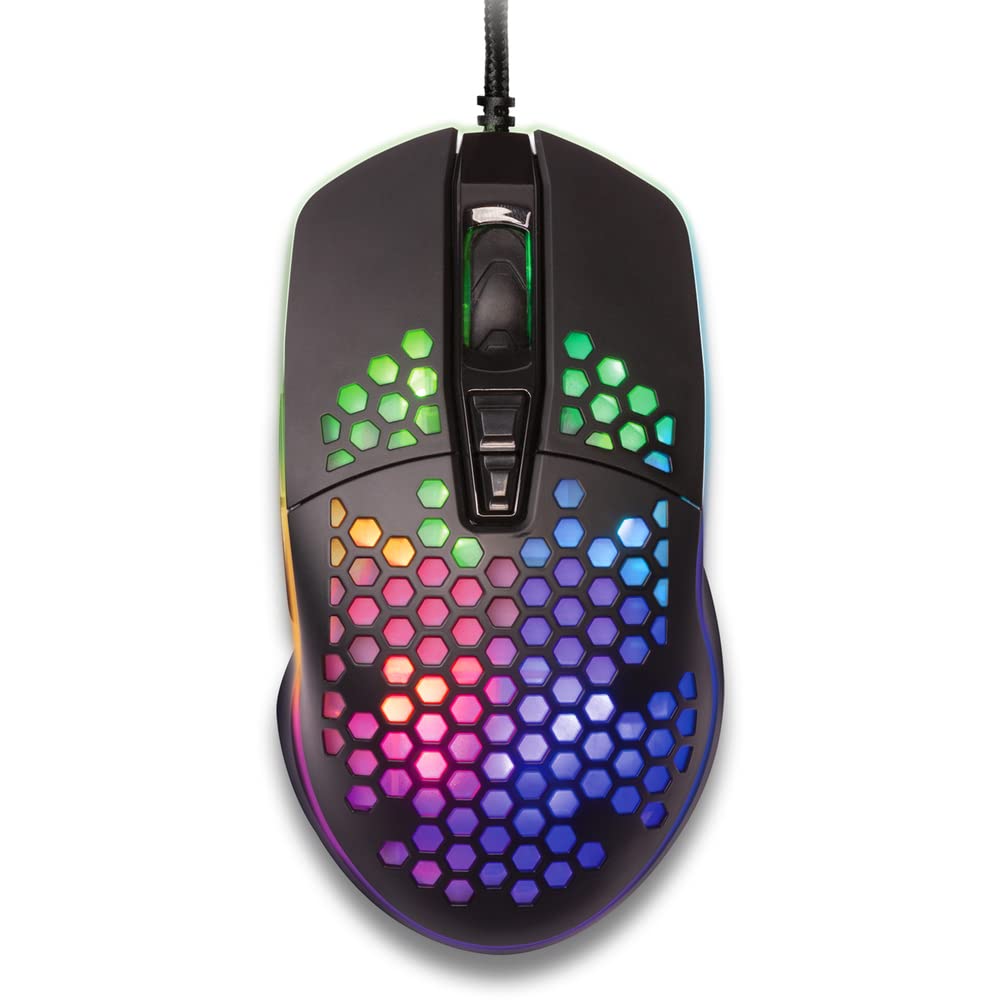
Ọgụgụ 1: N'elu-ala view of the YENKEE YMS 3030BK RGB Gaming Mouse, highlighting its ultra-light perforated design and ergonomic contours.
4. Nhazi
Follow these steps to set up your YENKEE YMS 3030BK gaming mouse:
- Jikọọ òké: Tinye eriri USB nke òké n'ọdụ ụgbọ mmiri dị na kọmputa gị.
- Nwụnye ọkwọ ụgbọala: Your operating system (Windows 7, 8, Vista, XP) should automatically detect and install the necessary drivers. No additional software installation is typically required for basic functionality.
- Ngwanrọ nhọrọ: For advanced customization of RGB lighting and button assignments, please visit the official YENKEE website to check for any dedicated software for the YMS 3030BK model.
5. Ntuziaka ọrụ
5.1 Basic Arụmọrụ
- Pịa aka ekpe: Ihe omume bụ isi, nhọrọ.
- Pịa aka nri: Ndepụta ihe dị n'ime ya, ihe omume nke abụọ.
- Mpempe akwụkwọ mpịakọta: Scroll up/down, middle click for specific functions (e.g., opening links in new tabs).
- Bọtịnụ akụkụ: Default functions are typically 'Forward' and 'Backward' in web ihe nchọgharị ma ọ bụ file explorers. These can often be customized via software.
5.2 DPI mmezi
The YMS 3030BK mouse features an IC 6651 sensor with a maximum resolution of 6400 DPI. You can adjust the DPI (Dots Per Inch) sensitivity on-the-fly using the dedicated DPI button, usually located behind the scroll wheel. Pressing this button will cycle through preset DPI levels, indicated by changes in the mouse's RGB lighting color or pattern. Refer to the optional software for precise DPI level configuration and customization.
Nhazi ọkụ 5.3 RGB
The RGB backlight of your mouse can be customized to match your preferences. While some mice offer onboard controls for basic lighting effects, full customization of colors, patterns, and brightness is typically achieved through the dedicated YENKEE software (if available). Please download and install the software from the official YENKEE website for advanced lighting options.
6. Nlekọta
Iji hụ na òké egwuregwu gị dị ogologo ma rụọ ọrụ nke ọma, soro ntuziaka mmezi ndị a:
- Nhicha: Use a soft, dry cloth to wipe the surface of the mouse. For perforated areas, a soft brush or compressed air can help remove dust. Avoid using harsh chemicals or abrasive materials.
- ihicha ihe mmetụta: Occasionally clean the optical sensor on the underside of the mouse with a cotton swab lightly dampened with isopropyl alcohol. Ensure it is completely dry before use.
- Nlekọta USB: Zenarị nrịgọ dị nkọ ma ọ bụ ịdọrọ eriri USB gabiga ókè iji gbochie mmebi.
- Nchekwa: Debe òké ahụ n'ebe dị ọcha ma kpọọ nkụ mgbe a naghị eji ya.
7. Nchọpụta nsogbu
If you encounter issues with your YENKEE YMS 3030BK mouse, refer to the table below for common problems and solutions:
| Nsogbu | Ihe nwere ike ime | Ngwọta |
|---|---|---|
| Òké anaghị aza | Njikọ USB rụrụ arụ, ọdụ ụgbọ USB adịghị mma, nsogbu ọkwọ ụgbọ ala. | Ensure USB cable is securely plugged in. Try a different USB port. Restart your computer. Check Device Manager for driver status. |
| Ntugharị cursor na-adịghị agbanwe agbanwe ma ọ bụ na-awụlikwa elu | Ihe mmetụta anya ruru unyi, elu mpempe òké na-adịghị mma. | Clean the optical sensor. Use a clean, uniform mouse pad. |
| Ndozi DPI anaghị arụ ọrụ | Esemokwu ngwanrọ, bọtịnụ adịghị arụ ọrụ. | Ensure no conflicting software is running. If using custom software, check its settings. |
| Ọkụ RGB anaghị arụ ọrụ ma ọ bụ rapara | Software issue, power issue. | Check the YENKEE software settings. Unplug and replug the mouse. Restart your computer. |
8. Nkọwapụta
| Njirimara | Nkọwa |
|---|---|
| Ụdị | YENKEE |
| Nọmba nlereanya | YMS 3030BK |
| Teknụzụ Njikọta | USB (ọkụ eletrik) |
| Teknụzụ nchọpụta ngagharị | Optical (IC 6651 Sensor) |
| Ọnụahịa kasị elu nke DPI | 6400 DPI |
| Atụmatụ pụrụ iche | Ergonomic Design, Lightweight, Perforated Construction, RGB Backlight |
| Agba | Nwa |
| Ibu Ibu | 4.2 ounces (ihe dị ka gram 119) |
| Akụkụ ngwaahịa (LxWxH) | 5.43 x 2.44 x 9.06 sentimita (ihe dịka 13.8 x 6.2 x 23 cm) |
| Ngwaike Platform | Ịgba egwu |
| Ndakọrịta sistemụ arụmọrụ | Windows 7, Windows 8, Windows Vista, Windows XP |
9. Akwụkwọ ikike na nkwado
Ozi akwụkwọ ikike: For detailed warranty terms and conditions, please refer to the warranty card included with your product or visit the official YENKEE website. Warranty periods may vary by region and retailer.
Nkwado ndị ahịa: If you require technical assistance or have questions regarding your YENKEE YMS 3030BK gaming mouse, please contact your retailer or visit the support section of the official YENKEE websaịtị maka ozi kọntaktị na FAQs.