
Ntuziaka nchekwa dị mkpa
Read all instructions carefully before using the appliance and keep them for future reference. Failure to follow these instructions may result in electric shock, fire, or injury.
- Anwala iji ọkụ ọkụ a meghere ụzọ n'ihi na nke a nwere ike ịkpata mmerụ ahụ na ike microwave.
- Edokwala ihe ọ bụla n'etiti ihu oven na ọnụ ụzọ ma ọ bụ kwe ka ala ma ọ bụ ihe fọdụrụ dị ọcha kwakọba n'elu ebe mkpuchi.
- Ejila oven rụọ ọrụ ma ọ bụrụ na ọ mebiri emebi. Ọ dị mkpa karịsịa na ọnụ ụzọ oven na-emechi nke ọma nakwa na ọ dịghị mmebi nke: (1) ọnụ ụzọ (ehulata), (2) hinges na latches (agbajikwa ma ọ bụ tọpụ), (3) ọnụ ụzọ na-ekpuchi elu.
- Onye ọ bụla ekwesịghị ịgbanwe ma ọ bụ rụzie oven ma ewezuga ndị ọrụ ruru eru nke ọma.
- Gbaa mbọ hụ na etinyere ngwaọrụ ahụ nke ọma.
- Ejila kemịkalụ ma ọ bụ vapors na-emebi emebi na ngwa a.
- Always use microwave-safe cookware. Metal containers are not suitable for microwave cooking.
- E kwesịghị ikpo ọkụ mmiri na nri ndị ọzọ n'ime akpa ejiri mechiri emechi ebe ọ bụ na ha nwere ike ịgbawa.
- Ezubere ngwa a maka iji naanị ụlọ.
Ngwaahịa gafereview
The Sharp YC-QG204AE-B is a 20-liter countertop microwave oven with an integrated grill function, offering 800W microwave power. It features a flatbed cooking type, LED cooking light, and touch controls for ease of use.
Ngwa
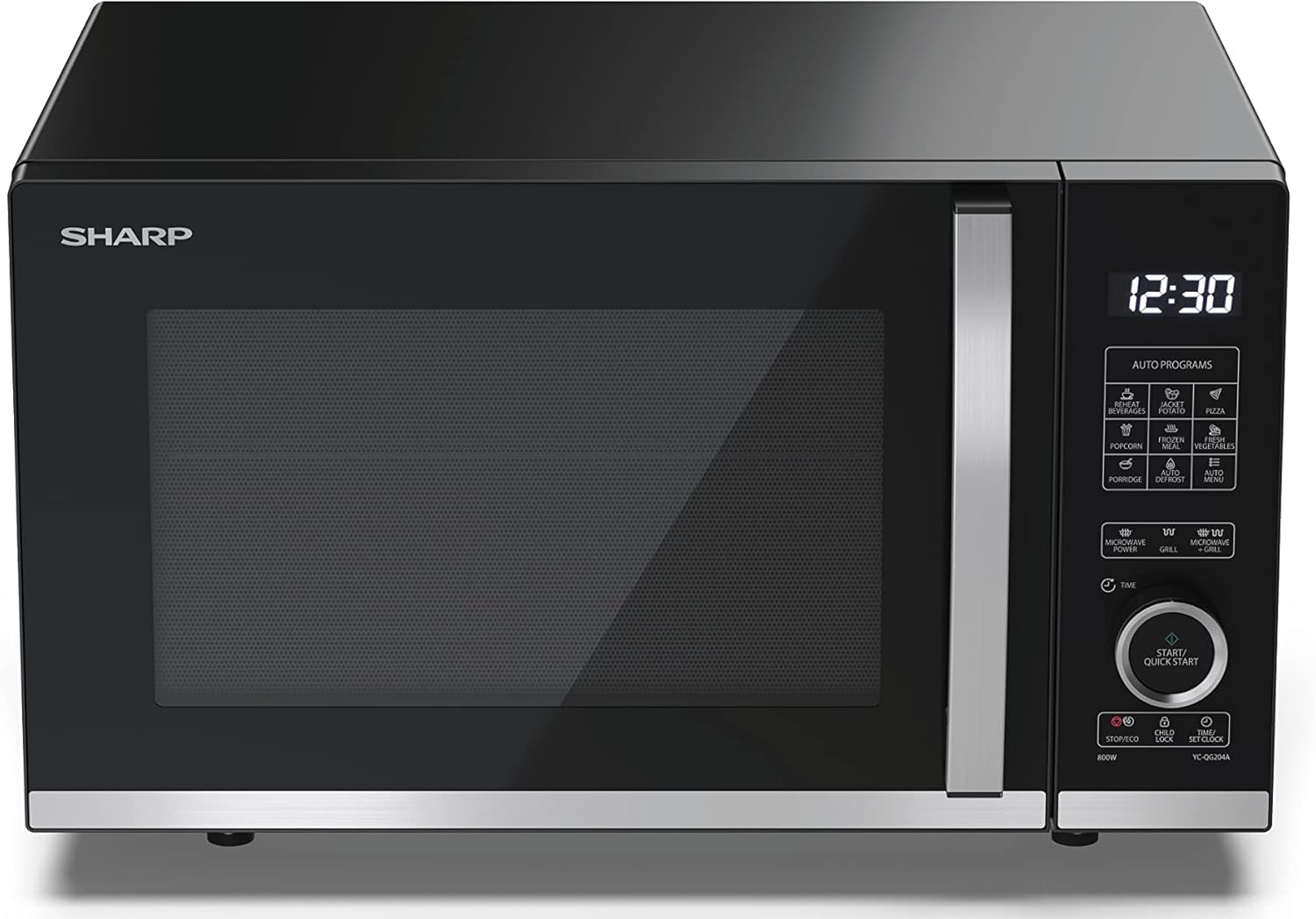
Foto 1: N'ihu view of the Sharp YC-QG204AE-B microwave oven, showcasing the black finish, glass door, and control panel on the right.

Foto 2: N'akuku view of the microwave, providing a clear look at the digital display and touch control panel with various function buttons.

Foto 3: Ime ụlọ view of the microwave oven, showing the flatbed cooking surface and the included grill rack.

Foto 4: Diagram illustrating the external dimensions of the microwave oven: 39.1 cm (depth) x 27.2 cm (height) x 45.7 cm (width).
Atụmatụ igodo
- Ike: 20 lita
- Ike Microwave: 800 Watt
- Ụdị nri: Flatbed (no turntable)
- Ọrụ grill Integrated grill for browning and crisping.
- Ụdị njikwa: Tactile (Touch Control)
- Ọkụ: LED cooking light
- Nchekwa: Ọrụ mkpọchi nwa
- arụmọrụ: ECO ọrụ
- Ngwa: Includes grill rack
Nwụnye na Nhazi
Iwepu ngwongwo
Carefully remove the microwave oven and all packing materials from the carton. Check the oven for any damage, such as dents or a misaligned door. Do not operate the oven if it is damaged. Retain the packaging for future transport or disposal.
Ndokwa
- Tinye oven n'elu ala kwụ ọtọ nke nwere ike ịkwado ịdị arọ ya na nri kacha sie ike nke a ga-esi na oven.
- Ensure adequate ventilation. Leave a minimum of 10 cm (4 inches) clearance at the rear, 20 cm (8 inches) at the top, and 5 cm (2 inches) on both sides.
- Do not block air vents. Blocking vents can damage the oven and lead to poor cooking results.
- Debe oven ahụ ka ọ ghara iru ebe okpomọkụ, uzuoku, ma ọ bụ mmiri mmiri na-agbapụta.
- Do not place the oven near a radio or TV, as it may cause interference.
Njikọ Ọdụdọ
- Gbaa mbọ hụ na voltage specified on the rating label matches your household power supply (230 Volts).
- Plug the oven into a properly installed and grounded wall outlet. Do not use an extension cord or adapter.
- The appliance must be grounded. In the event of an electrical short circuit, grounding reduces the risk of electric shock by providing an escape wire for the electric current.
Na-arụ ọrụ oven Microwave gị
Ogwe njikwa gafereview
The microwave features a digital display and a tactile control panel. The panel includes buttons for various functions such as microwave power levels, grill, combination cooking, auto programs, time setting, and start/quick start.
Ịtọ ntọala elekere
- Pịa bọtịnụ 'Elekere' otu ugboro.
- Use the dial or '+' / '-' buttons to set the hour.
- Press the 'Clock' button again.
- Use the dial or '+' / '-' buttons to set the minutes.
- Press the 'Clock' button one last time to confirm.
Isi nri Microwave
- Tinye nri n'ime ngwa ngwa ngwa ngwa n'ime oven.
- Mechie ọnụ ụzọ oven nke ọma.
- Press the 'Microwave Power' button repeatedly to select the desired power level (e.g., 800W for high).
- Use the dial or '+' / '-' buttons to set the cooking time.
- Press 'Start/Quick Start' to begin cooking.
Imi nri
- Place food on the grill rack provided, then place it inside the oven.
- Mechie ọnụ ụzọ oven nke ọma.
- Pịa bọtịnụ 'Grill'.
- Use the dial or '+' / '-' buttons to set the grilling time.
- Press 'Start/Quick Start' to begin grilling.
Ngwakọta nri (Microwave + Grill)
This function combines microwave and grill cooking for faster results and a crispy finish.
- Tinye nri n'ime akpa kwesịrị ekwesị n'elu ihe e ji esi nri.
- Mechie ọnụ ụzọ oven.
- Press the 'Combi' button to select the desired combination mode (e.g., C-1, C-2).
- Use the dial or '+' / '-' buttons to set the cooking time.
- Press 'Start/Quick Start' to begin.
Mmemme Nchekwa onwe
The oven includes several pre-set auto programs for common foods. Refer to the specific program list on your control panel for details on each program and recommended food types/weights.
- Tinye nri na oven.
- Press the 'Auto Programs' button or select the specific program button (e.g., 'Pizza', 'Popcorn').
- Adjust weight/quantity if prompted, using the dial or '+' / '-' buttons.
- Press 'Start/Quick Start' to begin.
Ọrụ mkpọchi nwa
To prevent unintended operation, activate the child lock.
- Iji mee ka: Press and hold the 'Stop/Eco' button for 3 seconds. A lock indicator will appear on the display.
- Iji gbanyụọ: Press and hold the 'Stop/Eco' button for 3 seconds again. The lock indicator will disappear.
Ọrụ ECO
The ECO function helps save energy by turning off the display when the oven is not in use for a certain period.
- Ka ịgbanwuo/gbanyụọ: Press the 'ECO' button. The display will indicate when ECO mode is active.
Nlekọta na nlekọta
Regular cleaning and proper maintenance will ensure the longevity and efficient operation of your microwave oven.
- Na-ehicha Mpụga: Jiri mgbasa ozi hichaa mpụtaamp akwa na ncha dị nro. Zere ndị na-ehicha ihe na-ekpo ọkụ.
- Ihicha ime ụlọ: Maka ihe ndị na-awụfu, jiri mgbasa ozi hichaa ya ozugboamp cloth. For stubborn food residue, place a bowl of water with lemon juice inside and microwave on high for 2-3 minutes to loosen the residue, then wipe clean.
- Akara ọnụ ụzọ: Keep the door seals and adjacent parts clean. Use a soft cloth and mild soap.
- Ogbe achịcha grill: The grill rack can be washed with warm soapy water.
- Mwepụ isi: To remove odors, combine a cup of water with several tablespoons of lemon juice in a microwave-safe bowl. Microwave on high for 5-7 minutes.
- Kwupuo oven mgbe niile tupu ihicha ya.
Nchọpụta nsogbu nsogbu
If you experience issues with your microwave oven, consult the table below for common problems and solutions.
| Nsogbu | Ihe nwere ike ime | Ngwọta |
|---|---|---|
| Igwe ọkụ anaghị ebido | Agbanyeghi eriri ike; A naghị emechi ọnụ ụzọ nke ọma; Fiusi fụrụ ma ọ bụ ihe mgbawa sekit kụdara; Agbanyere mkpọchi nwa. | Plug in power cord; Close door securely; Check fuse/reset circuit breaker; Deactivate child lock. |
| Nri abụghị kpo oku | Incorrect cooking time/power level; Door not closed properly; Microwave-safe cookware not used. | Adjust time/power; Close door securely; Use appropriate cookware. |
| Na-ekpo ọkụ n'ime oven | Metal or foil in oven; Food residue on interior walls. | Remove metal/foil; Clean oven interior thoroughly. |
| Mkpọtụ na-adịghị ahụkebe n'oge arụ ọrụ | Normal operation sound; Loose components. | Some operational noises are normal. If excessive, ensure no loose items are inside. If problem persists, contact service. |
Ọ bụrụ na nsogbu ahụ dịgidere mgbe ị nwara azịza ndị a, biko kpọtụrụ nkwado ndị ahịa.
Nkọwa nka nka
| Nkọwapụta | Uru |
|---|---|
| Ụdị | Nkọ |
| Nọmba nlereanya | YC-QG204AE-B |
| Agba | Nwa |
| Ike | 20 lita |
| Ike Microwave | 800 Watt |
| Voltage | 230 volts |
| Ihe onwunwe | Igwe anaghị agba nchara, Glass |
| Akụkụ ngwaahịa (L x W x H) | 39.1 x 45.7 x 27.2 cm |
| Ibu Ibu | 12.4 kilogram |
| Atụmatụ pụrụ iche | Flatbed cooking, LED lighting, Child control, ECO function, Grill included |
| Ụdị njikwa | Atụ aka |
| Ngwa gụnyere | YC-QC254AE-B (model variant), grill rack, manual, warranty card |
Akwụkwọ ikike na nkwado ndị ahịa
For detailed warranty information, please refer to the warranty card included with your product. The warranty period and terms may vary by region and retailer.
If you require technical assistance, have questions about operation, or need to report a fault, please contact Sharp customer support. Contact details can typically be found in your warranty documentation or on the official Sharp websaịtị maka mpaghara gị.
When contacting support, please have your model number (YC-QG204AE-B) and purchase date readily available.