
1. Introduction to the ESP32-WROVER-IE Module
The EBYTE ESP32-WROVER-IE is a versatile Wi-Fi module designed for a wide range of applications, including low-power sensor networks, wearable electronic devices, and demanding tasks such as speech encoding, audio streaming, and MP3 decoding. It integrates the powerful ESP32-D0WD-V3 chip, featuring an Xtensa dual-core 32-bit LX6 microprocessor.
This module offers robust connectivity with IEEE802.11b/g/n protocol support, operating in the 2.4~2.5GHz frequency band. It boasts a transmission distance of up to 400 meters and an antenna output power of 20dBm, ensuring broad wireless communication range. Its low sleep current, less than 5 µA, makes it highly suitable for battery-powered applications.

Figure 1: Physical dimensions of the ESP32-WROVER-IE module, showing its compact size of approximately 31.4mm by 18mm.
Akụkụ ndị bụ isi:
- Ngwọta mgbawa: ESP32-D0WD-V3 with Xtensa dual-core 32-bit LX6 microprocessor.
- Ebe nchekwa: 448 KB ROM, 520 KB SRAM, 16 KB RTC SRAM.
- Ugboro elekere: Supports up to 240 MHz.
- Ikuku Standard: IEEE802.11b/g/n (2.4~2.5GHz).
- Ngwa nzikọrịta ozi: UART I/O.
- Antenna: Ipex antenna for flexible integration.
- Oriri ike dị ala: Sleep current less than 5 µA, ideal for battery-powered devices.
- Njikọ dị elu: Excellent performance in wireless transmission distance and network connectivity.

Figure 2: Illustration highlighting the ultra-low power consumption capabilities of the ESP32 module, featuring an ultra-low power RF architecture and power-saving patents for extended battery life.
2. Nka na ụzụ nkọwa
The following table provides detailed technical specifications for the ESP32-WROVER-IE module.
| Nkọwapụta | Uru |
|---|---|
| Ụdị | EBYTE |
| Nọmba nlereanya | ESP32-ochie-IE |
| Teknụzụ Njikọta | Wi-Fi |
| Ikuku Communication Standard | 802.11b/g/n |
| Ọnụọgụ nhazi | 2 (Dual-core LX6) |
| Ugboro ugboro | 2.4 ~ 2.5GHz |
| Ogologo nnyefe | Ruo 400m |
| Ụdị antenna | Ipex |
| Interface | UART I/O |
| ROM | 448 KB |
| SRAM | 520 KB |
| RTC SRAM | 16 KB |
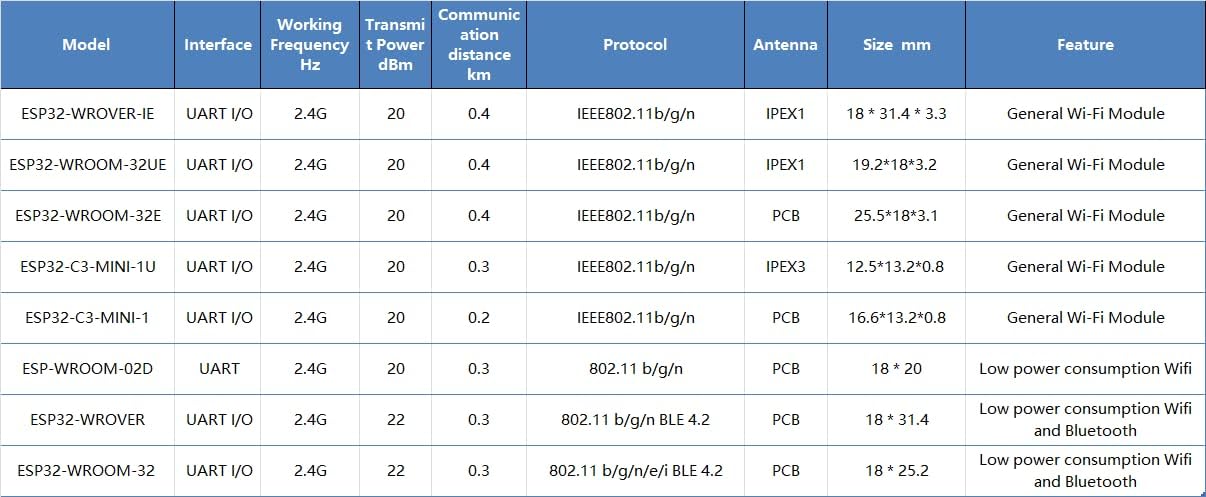
Figure 3: Detailed comparison table showing various EBYTE ESP32 modules, including their interfaces, frequencies, transmit power, communication distances, protocols, antenna types, sizes, and features.
3. Ntọala na Njikọta
The ESP32-WROVER-IE module is designed for integration into custom hardware or development boards. Proper setup is crucial for optimal performance.
3.1 Njikọ Hardware
- Ịnye ọkụ: Connect the module to a stable power supply within its specified voltage range. Refer to the datasheet for exact voltage chọrọ.
- UART interface: Connect the module's UART (Universal Asynchronous Receiver/Transmitter) pins (TX, RX, GND) to your host microcontroller or development board. Ensure correct voltage levels (e.g., 3.3V).
- Njikọ antenna: Attach a compatible Ipex antenna to the module's Ipex connector. Ensure the connection is secure to achieve the specified communication range.
- GPIO pin: Utilize the available General Purpose Input/Output (GPIO) pins for connecting sensors, actuators, or other peripherals as required by your application.
3.2 Nhazi ngwanrọ
- gburugburu mmepe: Install the ESP-IDF (Espressif IoT Development Framework) or a compatible Arduino IDE environment with ESP32 board support.
- Firmware Upload: Use the chosen development environment to compile and upload your application firmware to the ESP32-WROVER-IE module via the UART interface.
- Nnwale izizi: After uploading, perform basic tests to verify Wi-Fi connectivity and communication with your host system.
4. Ịrụ ọrụ Modulu ahụ
Once the ESP32-WROVER-IE module is integrated and programmed, its operation depends on the specific application firmware.
4.1 Njikọta Wi-Fi
- Ụdị ọdụ ọdụ: The module can connect to an existing Wi-Fi network (router) to access the internet or communicate with other devices on the local network.
- Ụdị ebe nnweta (AP): The module can create its own Wi-Fi network, allowing other devices to connect directly to it.
- Ụkpụrụ ejikọtara: The module can operate as both a station and an access point simultaneously.
4.2 Nkwukọrịta data
The module supports various communication protocols over Wi-Fi, including TCP/IP, UDP, HTTP, MQTT, and more, enabling data exchange with cloud services, local servers, or other IoT devices.

Ọgụgụ 4: Ọpụample of the ESP32 module's application in smart home environments, enabling wireless connectivity for various devices and systems.

Ọgụgụ 5: Ọpụample of the ESP32 module's application in industrial automation, contributing to reliable and efficient control systems.
5. Maintenance and Handling
To ensure the longevity and reliable operation of your ESP32-WROVER-IE module, follow these guidelines:
- Eletrik Static: Handle the module with care, preferably in an ESD-safe environment, to prevent damage from static discharge.
- Ọnọdụ gburugburu: Operate and store the module within its specified temperature and humidity ranges. Avoid extreme conditions.
- Nchedo anụ ahụ: Protect the module from physical impact, excessive bending, or pressure, especially on the antenna connector and pins.
- Nhicha: If necessary, clean the module gently with a dry, soft brush or compressed air. Avoid liquids or harsh chemicals.
- Mmelite femụwe: Regularly check for and apply firmware updates from Espressif or EBYTE to benefit from performance improvements, bug fixes, and security enhancements.
6. Nchọpụta nsogbu
If you encounter issues with your ESP32-WROVER-IE module, consider the following troubleshooting steps:
- Enweghị ike:
- Nyochaa ike ọkọnọ voltage na ikike ugbu a.
- Check all power connections for proper contact.
- Okwu njikọ Wi-Fi:
- Ensure the antenna is securely connected.
- Check Wi-Fi credentials (SSID, password) in your firmware.
- Verify that the Wi-Fi network is within range and operating on the 2.4GHz band.
- Confirm that the module's firmware includes Wi-Fi functionality and is correctly initialized.
- UART Communication Problems:
- Check TX/RX connections (ensure TX of one device connects to RX of the other).
- Verify baud rate settings match between the module and the host.
- Kwenye voltage levels are compatible (e.g., 3.3V).
- Modulu Anaghị aza:
- Try a hard reset by cycling the power.
- Re-upload the firmware to ensure it's not corrupted.
- Check for any short circuits or incorrect wiring on your PCB.
7. Akwụkwọ ikike na nkwado
For specific warranty information and technical support, please refer to the official EBYTE websaịtị ma ọ bụ kpọtụrụ ndị ahịa ha ozugbo. Debe akwụkwọ nnata ịzụrụ maka akwụkwọ ikike.
Onye nrụpụta: EBYTE
Ụdị: ESP32-ochie-IE