
1. Ngwaahịa gafereview
The Fitbit Versa 4 is a fitness smartwatch designed to help you track your health and fitness goals. It features integrated GPS, continuous heart rate monitoring, and a long battery life, compatible with both iOS and Android devices.

Foto nke 1.1: N'ihu view of the Fitbit Versa 4 Smartwatch, showing the display with current time and activity metrics.
Akụkụ ndị bụ isi:
- 6+ days battery life with rapid charging.
- Integrated GPS for tracking outdoor activities.
- Continuous heart rate monitoring with PurePulse 2.0.
- 40+ exercise modes and automatic activity tracking.
- Sleep tracking with personalized profile, stages, and score.
- Stress management tools and daily stress score.
- SpO2 (blood oxygen saturation) monitoring.
- Smart notifications for calls, texts, and app alerts.
- Google Maps for turn-by-turn navigation on your wrist.
- Google Wallet for contactless payments.
- Built-in microphone and speaker for Bluetooth calls.
- Water resistant up to 50 meters.
2. Nhazi
2.1 Kedu ihe dị na igbe ahụ
- Fitbit Versa 4 Smartwatch
- Classic bands (one small, one large)
- Ịchaji eriri

Foto nke 2.1: The Fitbit Versa 4 package contents, including the device, two band sizes, and the charging cable.
2.2 Ịchaji ngwaọrụ gị
- Connect the charging cable to a USB power source (e.g., computer USB port, USB wall adapter).
- Align the charger's pins with the corresponding contacts on the back of your Versa 4. The charger is magnetic and will snap into place.
- A battery icon will appear on the screen to indicate charging.
The Versa 4 supports rapid charging, providing approximately 24 hours of battery life with just 12 minutes of charging. A full charge typically takes about 2 hours.
2.3 Installing the Fitbit App and Pairing
- Download the Fitbit app from the Apple App Store (for iOS devices) or Google Play Store (for Android devices).
- Open the Fitbit app and follow the on-screen instructions to create an account or log in to an existing one.
- Kpatụ pro gịfile picture in the Fitbit app, then select 'Set Up a Device'. Choose Versa 4 from the list.
- Follow the app's instructions to pair your Versa 4 with your smartphone via Bluetooth. Ensure your phone's Bluetooth is enabled.
- The app will guide you through the remaining setup steps, including connecting to Wi-Fi (if applicable) and updating firmware.
The Fitbit Versa 4 is compatible with iOS 15 or higher and Android OS 9.0 or higher.
3. Operating Your Versa 4
3.1 Nsoro ụzọ
- Ihuenyo mmetụ aka: Swipe left, right, up, or down to navigate through menus, widgets, and notifications. Tap to select items.
- Button anụ ahụ: Press the button on the left side to return to the clock face or access the app menu.
- Ntọala Ndenye: Swipe down from the clock face to access quick settings like Do Not Disturb, Sleep Mode, and screen brightness.
- Amamọkwa: Swipe up from the clock face to view ọkwa ndị na-adịbeghị anya.
3.2 Nlekota Ahụike
The Versa 4 offers comprehensive fitness tracking capabilities:
- Ọnụọgụgụ obi na-aga n'ihu: Monitors your heart rate throughout the day and during workouts.
- GPS agbakwunyere: Tracks your pace and distance during outdoor activities without needing your phone.
- Active Zone Minutes: Earn credit for time spent in fat burn, cardio, or peak heart rate zones.
- 40+ Exercise Modes: Select specific modes for various activities like running, swimming, yoga, and more to get real-time stats.
- Daily Recovery Score: (Requires Fitbit Premium) Provides a personalized score indicating your body's readiness for exercise.
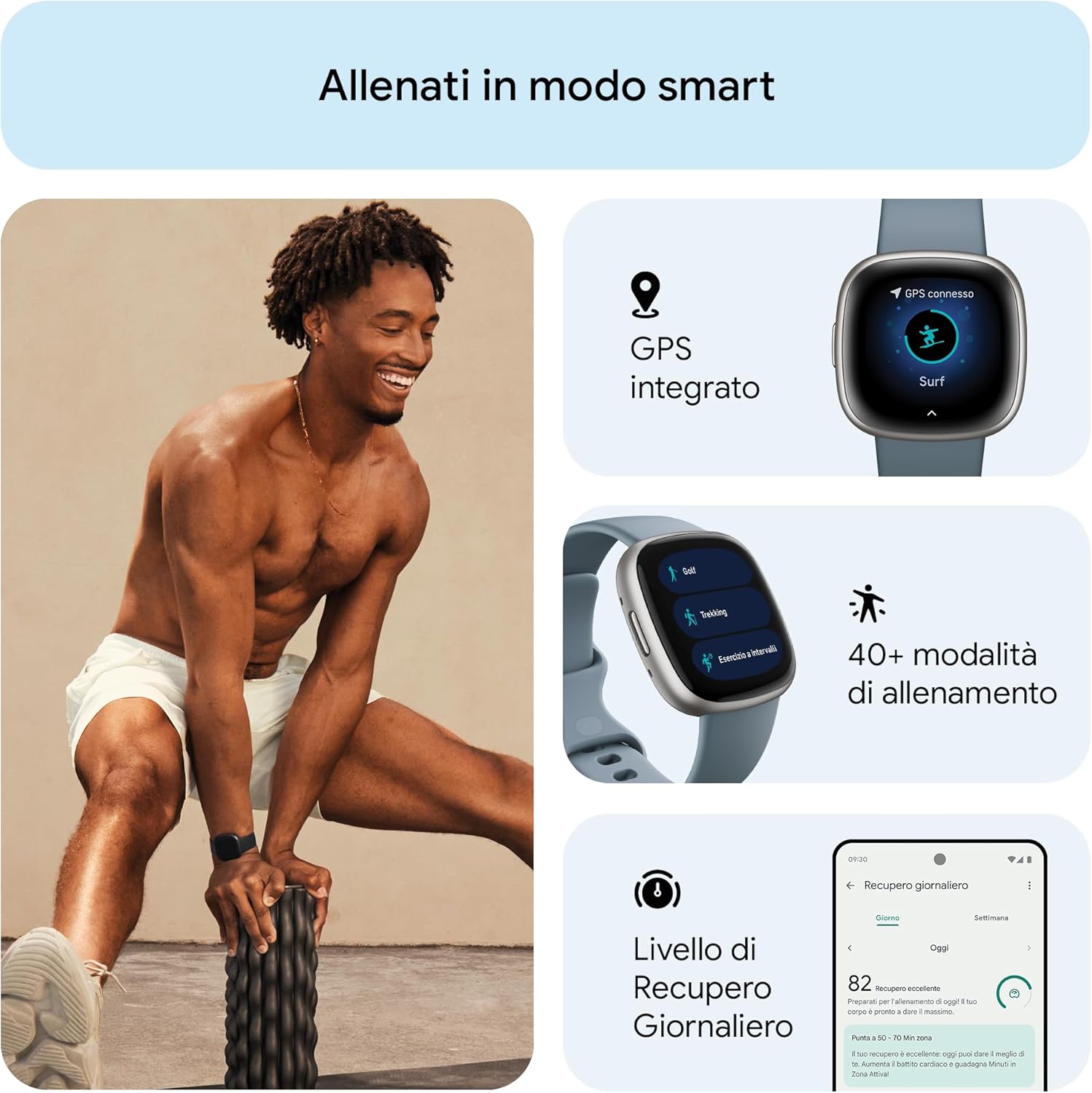
Foto nke 3.1: gafereview of fitness tracking features, including GPS, multiple workout modes, and daily recovery.
3.3 Health and Wellness Monitoring
Monitor various aspects of your health with the Versa 4:
- Nchicha ụra: Na-edekọ ụra gị stages (light, deep, REM), provides a sleep score, and offers a personalized sleep profile. Smart Wake gently wakes you during an optimal sleep stage.
- Njikwa nchekasị: Daily stress management score helps you understand your body's response to stress. Access guided breathing and mindfulness sessions.
- Nyochaa SpO2: Measures your blood oxygen saturation, typically overnight, to help identify potential changes in your well-being.
- Health Metrics Dashboard: Track trends in breathing rate, heart rate variability, skin temperature, and resting heart rate in the Fitbit app.
- Nyocha okirikiri nsọ nsọ: Log periods, record symptoms, and estimate fertile windows.

Foto nke 3.2: Sleep tracking features, including analysis, scoring, smart alarms, and sleep profiles.

Foto nke 3.3: Wellness tracking features, including continuous heart rate, heart rate variability, and SpO2 monitoring.
3.4 Smart Atụmatụ
The Versa 4 keeps you connected and convenient:
- Amamọkwa: Receive alerts for calls, text messages, calendar events, and apps like Gmail and WhatsApp directly on your wrist.
- Google Maps: Get turn-by-turn directions on your wrist when your phone is nearby.
- Akpa Google: Make contactless payments directly from your wrist using NFC.
- Enyemaka Olu: Use the integrated Alexa to get news, weather, set alarms, control smart home devices, and more.
- Oku Bluetooth: Use the built-in microphone and speaker to take calls hands-free, redirect to voicemail, and adjust volume.
- Chọta ekwentị m: If you misplace your phone, use this feature on your Versa 4 to make it ring and vibrate.
- Azịza ngwa ngwa: (Android only) Respond to messages with pre-set quick replies or voice dictation.

Foto nke 3.4: Smart features including Google Maps, notifications, and Google Wallet.
3.5 Ndụ batrị na Nchaji
The Versa 4 offers 6+ days of battery life, depending on usage. Features like always-on display and frequent GPS use will reduce battery life. For rapid charging, 12 minutes of charge provides approximately 24 hours of use.

Foto nke 3.5: Battery life and compatibility highlights of the Versa 4.
4. Nlekọta
4.1 Cleaning Your Versa 4
- Regularly clean your watch and band to prevent skin irritation and maintain device functionality.
- Wipe the device and band with a soft, lint-free cloth. If necessary, dampen akwa na mmiri.
- Do not use soaps, sanitizers, or abrasive cleaners, as these can damage the device or cause skin irritation.
- After cleaning or sweating, ensure the device and your wrist are completely dry before wearing.
4.2 Mmiri Nguzogide
The Fitbit Versa 4 is water resistant up to 50 meters (5 ATM). This means it is suitable for swimming and showering. However, it is not recommended for use in hot tubs, saunas, or steam rooms, as extreme temperatures can damage the device.
Nlekọta eriri 4.3
The Versa 4 comes with classic silicone bands. Ensure the band is not too tight or too loose for optimal heart rate tracking and comfort. If you use other band materials (e.g., vegan leather, Horween leather, sport bands), follow specific care instructions for those materials.
5. Nchọpụta nsogbu
5.1 Okwu nkịtị na Ngwọta
- Ngwaọrụ anaghị aza: If your Versa 4 is unresponsive, try restarting it. Hold the physical button for about 10 seconds until you see the Fitbit logo.
- Okwu mmekọrịta: Ensure your phone's Bluetooth is on and the Versa 4 is within range. Open the Fitbit app to initiate a sync. If syncing fails after the battery has been depleted, manually open the app to sync once the device is charged.
- Amamọkwa anaghị apụta: Check your phone's notification settings for the Fitbit app and ensure Bluetooth is connected. Verify that 'Do Not Disturb' or 'Sleep Mode' is not active on your Versa 4.
- Ọgụgụ obi na-ezighi ezi: Ensure the watch is worn snugly but comfortably on your wrist, about a finger's width above your wrist bone. Clean the sensor on the back of the device.
- Display Not Activating with Wrist Movement: Check the quick settings to ensure 'Screen Wake' is enabled. If the issue persists, a restart may resolve it.
5.2 Mmelite firmware
Periodically, Fitbit releases firmware updates to improve performance and add new features. Ensure your Versa 4 is charged and connected to Wi-Fi during updates. Follow the prompts in the Fitbit app to install any available updates.
6. Nkọwapụta
| Njirimara | Nkọwapụta |
|---|---|
| Nọmba nlereanya | FB523SRAG |
| Ngosipụta | 1.58 inches (336 x 336 pixels) |
| Njikọta | Bluetooth v5.0, BLE, GPS, GLONASS, NFC |
| Ihe mmetụta | 3-axis accelerometer, Optical heart rate sensor, SpO2 sensor, Altimeter, Ambient light sensor |
| Ụdị batrị | Lithium polymer |
| Ndụ batrị | 6+ days (typical usage) |
| Ọsọ ọsọ | 12 minutes for 24 hours of battery |
| Dimensions (Watch) | 40.5 x 40.5 x 11.2 mm |
| Weight (Watch) | 37.64 grams (approximate, without band) |
| Mmiri Nguzogide | 5 ATM (ruo mita 50) |
| Sistemụ nrụọrụ | Proprietary Fitbit OS |
| Ndakọrịta | iOS 15 ma ọ bụ karịa, Android OS 9.0 ma ọ bụ karịa |
| Ihe onwunwe | Aluminom casing |
7. Akwụkwọ ikike na nkwado
7.1 Ozi akwụkwọ ikike
For detailed warranty information, please refer to the warranty card included with your product or visit the official Fitbit websaịtị. Usoro na ọnọdụ akwụkwọ ikike nwere ike ịdị iche site na mpaghara na onye na-ere ahịa.
7.2 Nkwado ndị ahịa
If you encounter any issues or have questions not covered in this manual, please visit the official Fitbit support website or contact their customer service. You can usually find contact information on the Fitbit websaịtị ma ọ bụ na nkwakọ ngwaahịa gị.
8. Ozi nchekwa dị mkpa
Please read all safety instructions before using your Fitbit Versa 4 to avoid injury or damage to the device. Keep the device and accessories out of reach of small children. Consult a medical professional before starting any new exercise program or if you have any health concerns.
9. Video Resources
Ọ nweghị vidiyo ngwaahịa gọọmentị dị mkpa sitere na onye na-ere ahịa ahụghị na data enyere iji tinye n'akwụkwọ ntuziaka a.