
1. Okwu mmalite
Daalụ maka ịzụrụasing the Lenco SCD-341 Portable CD-Radio. This device combines a CD player, DAB+ and FM radio, and Bluetooth connectivity in a compact design. This manual provides essential information for safe and efficient use of your new audio system. Please read it thoroughly before operation and retain it for future reference.
2. Ozi nchekwa
- Ewepụla unit ahụ na mmiri ozuzo ma ọ bụ mmiri iji gbochie ọkụ ma ọ bụ ujo eletrik.
- Gbaa mbọ hụ na ikuku ikuku dị mma. Akwụsịla oghere ikuku.
- Jiri naanị ihe nkwụnye ọkụ ewepụtara na unit ahụ.
- Emeghela casing. Kpọtụrụ ndị ọrụ ruru eru ọrụ niile.
- Zere idobe nkeji n'akụkụ ebe okpomọkụ ma ọ bụ na ìhè anyanwụ.
- Debe unit ahụ pụọ na mpaghara magnetik siri ike.
3. Ihe ngwugwu
Biko lelee na ihe niile dị na ọ dịkwa mma:
- Lenco SCD-341 Portable CD-Radio Unit
- Ihe nkwụnye ọkụ
- Akwụkwọ ntuziaka (akwụkwọ a)
- Ntuziaka mmalite ngwa ngwa
4. Ngwaahịa gafereview
The Lenco SCD-341 features a user-friendly interface with clearly labeled buttons and an LCD display.

Foto 1: N'ihu view of the Lenco SCD-341, showing the main controls, LCD display, and stereo speakers.

Figure 2: Lenco SCD-341 with its integrated handle and telescopic antenna extended for radio reception.
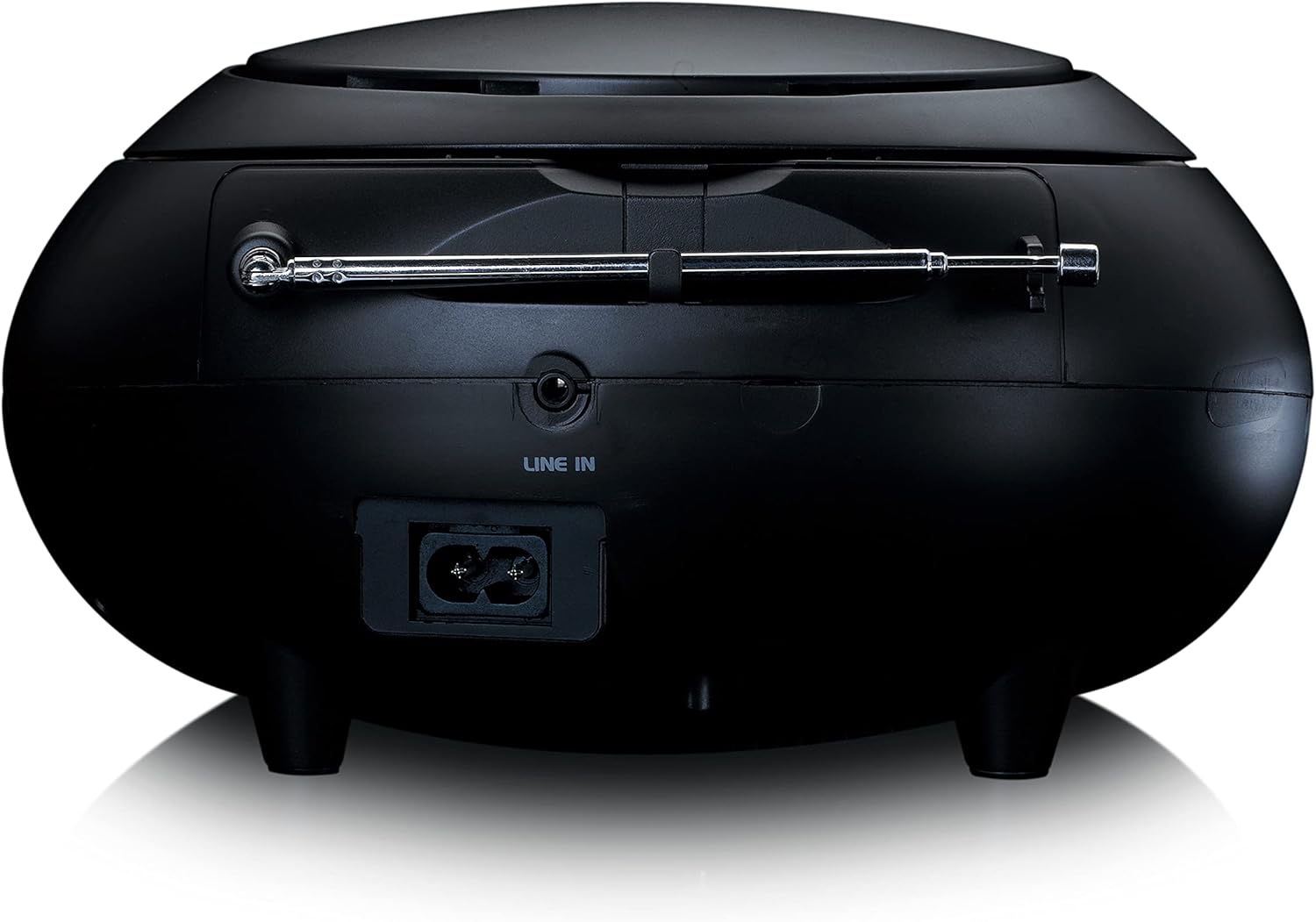
Ọgụgụ 3: N'azụ view of the Lenco SCD-341, highlighting the power input and LINE IN audio port.
5. Nhazi
5.1 Njikọ ike
The Lenco SCD-341 can be powered by the included AC adapter or by batteries.
- Ike AC: Connect the supplied power adapter to the AC IN socket on the rear of the unit (refer to Figure 3) and plug the other end into a standard wall outlet.
- Ike batrị: Open the battery compartment on the bottom of the unit. Insert the required number of C-type batteries (not included), ensuring correct polarity. Close the compartment securely.
5.2 Ntọala antenna
For optimal DAB+ and FM radio reception, fully extend the telescopic antenna located on the rear of the unit. Adjust its position for the best signal.
6. Ntuziaka ọrụ
6.1 Gbanyụọ ma ọ bụ gbanyụọ
Pịa IKE bọtịnụ iji gbanye ma ọ bụ gbanyụọ unit ahụ.
6.2 CD ịkpọghachi
- Pịa Isi mmalite button repeatedly until "CD" is displayed on the LCD screen.
- Mepee mkpuchi nke CD ahụ site n'iwelite ya nwayọ.
- Tinye CD nke nwere akụkụ akara chere ihu n'elu mkpịsị aka.
- Close the CD compartment lid. The unit will begin reading the CD.
- Jiri ihe KWURU/Kwụsịa, KWỤSỊ, WERE N'OGWU, na MAKA azụ azụ bọtịnụ iji jikwaa ịkpọghachi.

Foto 4: Top view of the Lenco SCD-341 with the CD compartment open, showing a CD being inserted.
6.3 Ọrụ redio DAB+
- Pịa Isi mmalite button repeatedly until "DAB" is displayed.
- The unit will automatically scan for available DAB+ stations. This may take a few moments.
- Ozugbo nyochachara, jiri ya TUNE +/- buttons to navigate through the available stations.
- Iji chekwaa ọdụ dị ka ihe edobere, pịa ma jide PRESET bọtịnụ, wee jiri TUNE +/- to select a preset number and press PRESET ọzọ iji gosi.
6.4 FM Redio arụ ọrụ
- Pịa Isi mmalite pịa bọtịnụ ugboro ugboro ruo mgbe "FM" ga-apụta.
- Pịa ma jide TUNE +/- buttons to automatically scan for the next available station. Briefly press to manually tune.
- Iji chekwaa ọdụ dị ka ihe edobere, pịa ma jide PRESET bọtịnụ, wee jiri TUNE +/- to select a preset number and press PRESET ọzọ iji gosi.
6.5 Njikọ Bluetooth
- Pịa Isi mmalite button repeatedly until "Bluetooth" is displayed. The unit will enter pairing mode, indicated by a flashing Bluetooth icon on the display.
- On your external device (smartphone, tablet), enable Bluetooth and search for available devices.
- Select "Lenco SCD-341" from the list of found devices.
- Once paired, the Bluetooth icon on the unit's display will stop flashing and remain solid. You can now play audio from your device through the Lenco SCD-341.
6.6 Njikwa olu
Jiri ihe Olu +/- buttons to adjust the audio output level.
7. Nlekọta
- Nhicha: Jiri akwa dị nro dị nro hichaa mpụta nke unit ahụ. Ejila ihe nchacha abrasive ma ọ bụ ihe mgbaze.
- Nlekọta oghere CD: Ọ bụrụ na nsogbu akpọghachi CD, jiri diski ihe nhicha anya CD dị maka azụmahịa.
- Nchekwa: When not in use for extended periods, disconnect the power adapter and remove batteries. Store the unit in a cool, dry place.
8. Nchọpụta nsogbu
| Nsogbu | Ihe nwere ike ime | Ngwọta |
|---|---|---|
| Enweghị ike | Power adapter not connected; batteries depleted or incorrectly inserted. | Check power adapter connection; replace batteries or ensure correct polarity. |
| Enweghị ụda | Volume too low; incorrect source selected; headphones connected. | Increase volume; select correct source (CD, DAB, FM, Bluetooth); disconnect headphones. |
| CD anaghị egwu | E tinyere CD na-ezighi ezi; CD ruru unyi ma ọ bụ kpụchaa; anaghị akwado usoro CD. | Reinsert CD correctly; clean or replace CD; ensure CD is a standard audio CD. |
| Nnabata redio adịghị mma | Antenna not extended or positioned poorly; strong interference. | Fully extend and adjust antenna; move unit away from other electronic devices. |
| Njikọ Bluetooth adaghị | Bluetooth not enabled on external device; device too far; unit not in pairing mode. | Ensure Bluetooth is on and discoverable; move device closer; select Bluetooth source on unit. |
9. Nkọwapụta
| Nọmba nlereanya | SCD-341 |
| Ụdị | Lenco |
| Akụkụ (L x W x H) | 21.5 x 21 x 11.5 cm |
| Ibu | 1.09 n'arọ |
| Isi Iyi Ike | AC (adapter included) / Battery-Powered |
| Nkà na ụzụ Tuner | DAB+, FM |
| Njikọta | Bluetooth |
| Ọnọdụ mmepụta ọdịyo | Stereo |
| Ụdị ngosi | LCD |
| Ike mmepụta | 3 watt RMS |

Figure 5: Dimensions of the Lenco SCD-341 unit.
10. Akwụkwọ ikike na nkwado
For warranty information and technical support, please refer to the warranty card included in your package or visit the official Lenco websaịtị.
Onye nrụpụta: Lenco GmbH
Mba onye si: Hong Kong
11. Official Product Videos
Watch this official video for a visual guide to the Lenco SCD-341.
Video 1: A 360-degree product view of the Lenco SCD-341, showcasing its design and features from all angles.