
Gofunly C3
Gofunly Kids Digital Camera C3 Instruction Manual
Model: C3 | Brand: Gofunly
Okwu mmalite
Thank you for choosing the Gofunly C3 Kids Digital Camera. This camera is designed to provide children aged 3-12 with a fun and engaging way to explore photography and videography. Featuring a 20MP dual lens, 1080P HD video recording, a 2.0-inch IPS screen, and a durable silicone case, it's perfect for capturing precious moments. Please read this manual carefully to ensure proper use and maintenance of your camera.
Ngwaahịa gafereview
Atụmatụ igodo
- 20MP Dual Lens: High-resolution front and rear cameras for photos and selfies.
- Vidiyo 1080P HD: Record clear and vibrant videos.
- Ihuenyo 2.0-inch IPS: Bright and clear display for viewfoto na vidiyo.
- 32GB Micro SD Card Included: Ample nchekwa maka puku kwuru puku foto na vidiyo.
- Multifunctional: Supports original photo capture, video recording, playback, time-lapse, 8x zoom, 28 cartoon photo frames, 6 photo filters, and 5 mirror effects.
- Egwuregwu arụnyere: Includes 3 classic puzzle games (Snake, Tetris, Sokoban) for entertainment.
- Nhazi na-adịgide adịgide: Cute, eco-friendly, soft silicone shockproof case for protection.
- Enwere ike ibugharị: Compact and lightweight, with two lanyards for easy carrying.
- Batrị enwere ike ịchaji: Built-in 1000mAh lithium battery for extended use.
Kedu ihe dị na Igbe ahụ
- 1 x Gofunly Kids Digital Camera (Green Dinosaur)
- 1 x 32GB Micro SD kaadị
- 1 x eriri USB
- 1 x Kaadị Reader
- 2 x Lanyards
- 1 x Tọgharia pin
- 1 x Akwụkwọ ntuziaka onye ọrụ

Image: The Gofunly C3 Kids Digital Camera, green dinosaur model, displayed with its accessories: a 32GB memory card and a USB card reader.

Image: A visual representation of all items included in the camera package: the green dinosaur camera, a 32GB SD card, a USB cable, a card reader, and two lanyards.
Melite
1. Ịchaji igwefoto
Before first use, fully charge the camera battery. Use the included USB cable to connect the camera to a computer's USB port or a standard USB wall adapter (not included).
- Ọkụ na-egosi nchaji ga-enwu n'oge ịchaji.
- The light will turn off or change color once charging is complete.
- Ụgwọ zuru ezu na-ewekarị awa 2-3.

Image: The side of the camera illustrating the USB port for charging and the slot for the 32GB SD card.
2. Ịtinye kaadị Micro SD
The camera requires a Micro SD card to save photos and videos. A 32GB card is included in the package.
- Chọta oghere kaadị Micro SD n'akụkụ igwefoto ahụ.
- Tinye kaadị Micro SD ahụ ka kọntaktị ọlaedo ahụ chee ihu ala, jiri nwayọ pịa ya ruo mgbe ọ kụrụ aka n'ebe ọ nọ.
- To remove the card, push it in again until it clicks, and it will spring out.
Ntuziaka ọrụ
Ọrụ ndị bụ isi
- Gbanyụọ/ Gbanyụọ: Press and hold the power button (usually marked with a circle and line) for a few seconds.
- Were foto: In photo mode, press the shutter button (usually a large button on top or side) to capture an image.
- Dekọọ vidiyo: Switch to video mode (if applicable, via a mode button), then press the shutter button to start/stop recording.
- Nkpọghachi: Press the playback button (often an arrow icon) to view saved photos and videos. Use the navigation buttons to browse.
- Ntugharị menu: Use the up/down/left/right buttons to navigate through menus and select options with the OK/shutter button.
Atụmatụ pụrụ iche
- Ụkpụrụ Selfie: The camera features a dual lens. Switch to selfie mode (check camera interface for icon) to use the front-facing camera.

Image: A child and an adult smiling while taking a selfie with the green dinosaur camera, highlighting its selfie capability.
- Ogologo oge: Set the camera to time-lapse mode (2s/5s/10s options) to capture a series of photos at set intervals, creating a time-lapse video.

Image: The camera screen showing a time-lapse sequence, alongside examples of photos captured with 2x, 4x, 6x, and 8x digital zoom.
- Mbugharị dijitalụ 8x: Use the zoom buttons (often up/down navigation) to digitally zoom in on your subject.

Image: A visual sequence demonstrating the camera's 8x digital zoom, showing how the image becomes progressively closer to the subject.
- Photo Frames & Filters: Enhance your photos with 28 cartoon photo frames, 6 photo filters, and 5 mirror effects. Access these options through the camera's menu.

Onyonyo: Ihe ngosi collageasing different photo frames and effects that can be applied to pictures taken with the camera, including various cartoon borders and mirror effects.

Image: A comprehensive display of the camera's creative options, including six distinct photo filters and a wide selection of 28 cartoon frames and fun stickers.
- Egwuregwu: The camera includes 3 classic puzzle games: Snake, Tetris, and Sokoban. Access them through the main menu for entertainment.

Image: The camera screen displaying one of the built-in puzzle games, with icons representing the three classic games: Snake, Tetris, and Sokoban.
Nlekọta
Nhicha
- Jiri akwa dị nro hichaa ahụ igwefoto.
- Maka unyi isi ike, ntakịrị dampen akwa na mmiri. Ejila kemịkalụ siri ike ma ọ bụ ihe mkpocha abrasive.
- Clean the lens gently with a microfiber cloth specifically designed for camera lenses.
Nlekọta batrị
- Zere ịchaji batrị ugboro ugboro.
- Charge the camera regularly, even if not in use, to maintain battery health.
- Do not expose the camera to extreme temperatures, as this can affect battery life.
Nchekwa
- Chekwaa igwefoto n'ebe dị jụụ, kpọrọ nkụ na-adịghị na ìhè anyanwụ kpọmkwem.
- When storing for extended periods, ensure the battery is partially charged (around 50%).
Nchọpụta nsogbu
| Nsogbu | Ihe nwere ike ime | Ngwọta |
|---|---|---|
| Camera won't turn on. | Batrị anwụọla ma ọ bụ dị ala. | Charge the camera for at least 30 minutes. |
| Enweghị ike ise foto/vidiyo. | No SD card inserted or card is full/corrupted. | Insert a Micro SD card. If already inserted, check if it's full and delete some files, or try formatting the card (this will erase all data). |
| Ihuenyo jụrụ oyi. | Nsogbu ngwanrọ. | Use the included reset pin to press the reset button (usually a small hole near the charging port). This will restart the camera without losing data. |
| Imagedị mma adịghị mma. | Dirty lens or low light conditions. | Clean the camera lens with a soft, clean cloth. Ensure adequate lighting when taking photos. |
| Enweghị ike jikọọ na kọmputa. | Faulty USB cable or driver issue. | Try a different USB cable or USB port on your computer. Ensure the camera is powered on when connecting. |
Nkọwapụta
| Njirimara | Nkọwa |
|---|---|
| Nlereanya | C3 |
| Ngosipụta ihuenyo | 2.0-inch IPS ihuenyo |
| Mkpebi foto | Ihe ruru 20MP |
| Mkpebi vidiyo | 1080P HD |
| Ike batrị | 1000mAh Lithium Polymer |
| Nchekwa | Supports Micro SD Card (32GB included) |
| Mbugharị anya | 8x (Digital) |
| Akụkụ ngwaahịa | 4.9 x 8.86 x 7.04 cm (1.93 x 3.49 x 2.77 inch) |
| Ibu | 105 grams (0.23 lbs) |
| Ihe onwunwe | Eco-friendly Soft Silicone Case |
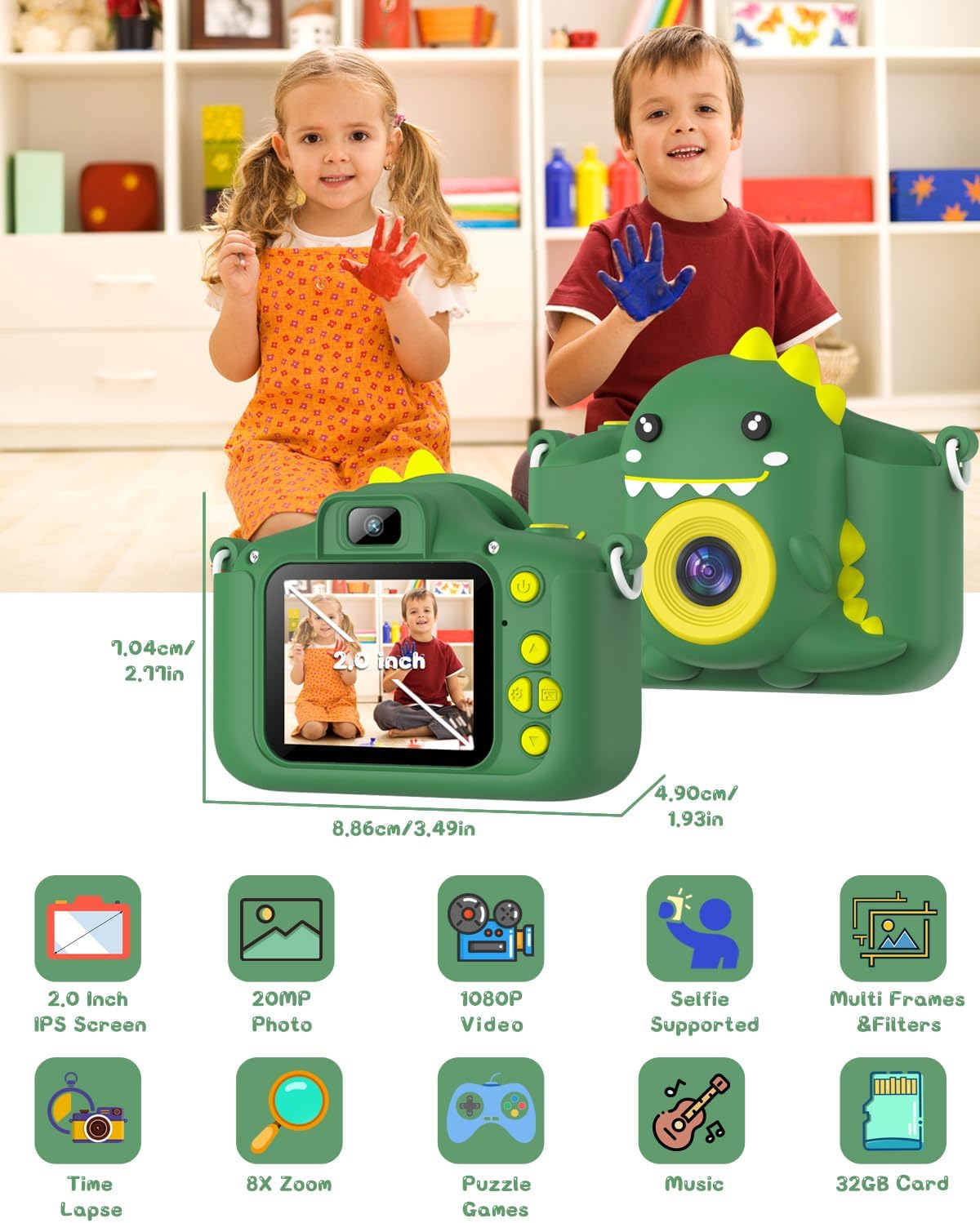
Image: The camera shown with its physical dimensions and a grid of icons highlighting its main features: 2.0-inch IPS screen, 20MP photo, 1080P video, selfie support, multiple frames and filters, time-lapse, 8x zoom, puzzle games, music playback, and included 32GB card.
Akwụkwọ ikike na nkwado
Gofunly provides customer support for its products. If you encounter any issues or have questions regarding your Gofunly C3 Kids Digital Camera, please refer to the contact information provided with your purchase or visit the official Gofunly store on Amazon:
A satisfactory solution will be offered in accordance with the warranty policy.
Ask a question about this manual
Ask about setup, troubleshooting, compatibility, parts, safety, or missing instructions. Manuals+ will review the question and use this page’s manual context to help answer it.