
Okwu mmalite
Daalụ maka ịzụrụasing the Max Power MPD15EQ Portable Rechargeable PA Speaker. This manual provides important information regarding the setup, operation, and maintenance of your speaker. Please read it thoroughly before using the product to ensure proper function and to maximize its lifespan.
Ntuziaka nchekwa
- Ewepụla unit ahụ na mmiri ozuzo ma ọ bụ mmiri iji gbochie ọkụ ma ọ bụ ihe egwu egwu.
- Do not open the speaker cabinet. There are no user-serviceable parts inside. Refer all servicing to qualified personnel.
- Gbaa mbọ hụ na ikuku ikuku dị mma. Akwụsịla oghere ikuku ikuku ọ bụla.
- Jiri naanị ihe nkwụnye ọkụ ewepụtara na unit ahụ.
- Keep the speaker away from heat sources, direct sunlight, and strong magnetic fields.
- Jiri akwa kpọrọ nkụ hichaa naanị.
Ihe ngwugwu
- Max Power MPD15EQ PA Speaker
- Igwe okwu Wired
- Njikwa anya
- Ihe nkwụnye ọkụ
- Akwụkwọ ntuziaka (akwụkwọ a)
Ngwaahịa gafereview
Familiarize yourself with the various parts of your MPD15EQ speaker.
Ogwe ihu
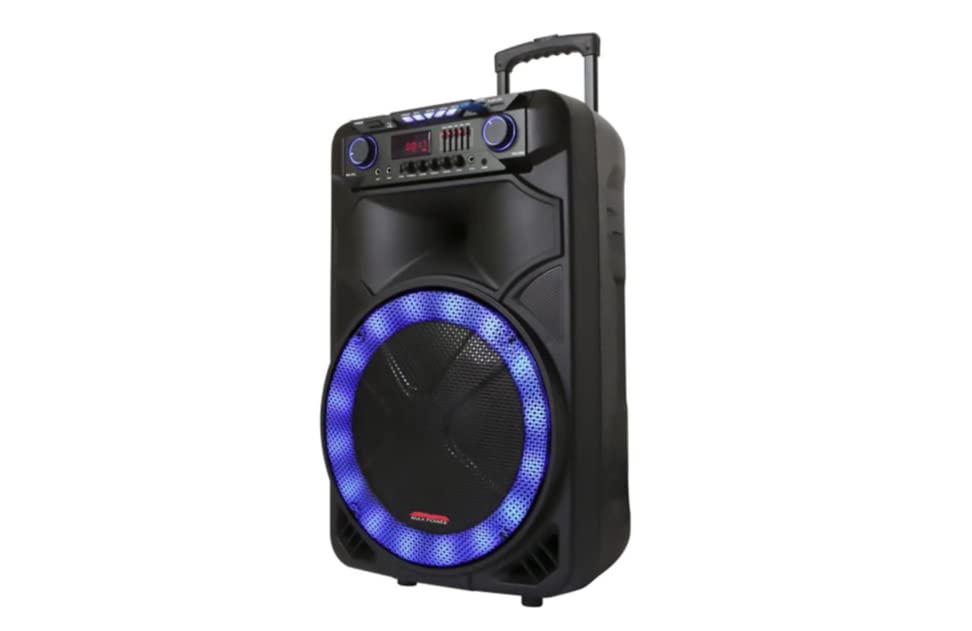
Nkọwa onyonyo: This image displays the front of the Max Power MPD15EQ speaker. It features a large 15-inch woofer at the bottom, a 5-inch horn tweeter above it, and a control panel with an LED display screen. The speaker grille covers the woofer and tweeter, and the overall design is robust and portable.
- 15" Woofer: Provides powerful bass frequencies.
- 5" Horn Tweeter: Delivers clear high frequencies.
- Ihuenyo ngosi LED: Na-egosi ụdị dị ugbu a, ozi egwu, na ntọala.
- Ogwe njikwa: Buttons and knobs for various functions (volume, EQ, mode, etc.).
- LED Light On/Off Switch: Controls the integrated LED lighting.
Ogwe azụ (Example - specific details not provided in source)
The rear panel typically includes input/output ports and the power connection.
- Ntinye ike: For connecting the power adapter to charge the battery or operate the unit.
- Ọdụ ụgbọ mmiri USB: Maka ịkpọ ụda sitere na draịvụ USB.
- Oghere kaadị SD: Maka ịkpọ ọdịyo sitere na kaadị SD.
- Ntinye igweokwu: Maka ijikọ igwe okwu ejiri waya.
- Ntinye inyeaka: For connecting external audio devices via a 3.5mm or RCA cable.
Melite
Ịchaji batrị
The MPD15EQ features a built-in rechargeable battery. Before first use, fully charge the speaker for approximately 6-8 hours.
- Connect the supplied power adapter to the speaker's power input port.
- Tinye nkwụnye ọkụ n'ime oghere mgbidi ọkọlọtọ.
- The LED display or an indicator light will show the charging status.
- Ozugbo chajịchara ya nke ọma, gbanyụọ ihe nkwụnye ọkụ ahụ.
Ike mbụ Gbanye
- Ensure the speaker is fully charged or connected to power.
- Locate the power switch (usually on the rear or control panel) and turn it to the "ON" position.
- The LED display will illuminate, indicating the speaker is ready for use.
Ntuziaka ọrụ
Njikọ Bluetooth
- Turn on the MPD15EQ speaker.
- Press the "MODE" button on the control panel until "BLUETOOTH" or "BT" appears on the LED display.
- Mee ka Bluetooth rụọ ọrụ na ekwentị gị, mbadamba gị, ma ọ bụ ngwaọrụ ọdịyo ọzọ.
- Chọọ maka available devices and select "MPD15EQ" from the list.
- Once paired, you will hear a confirmation sound, and you can now play audio wirelessly.
Iji igwe igwe ikuku
- Connect the supplied wired microphone to the "MIC IN" port on the speaker.
- Adjust the microphone volume knob (if available) on the control panel to your desired level.
- Kwuo okwu n'ime igwe okwu.
USB/SD Kaadị ịkpọghachi
- Insert a USB flash drive or SD card (pre-loaded with MP3 audio files) into the respective port.
- The speaker should automatically switch to USB/SD mode and begin playing. If not, press the "MODE" button.
- Use the playback controls (Play/Pause, Next, Previous) on the control panel or remote control.
5-Band Graphic EQ Adjustment
The MPD15EQ features a 5-band graphic equalizer to fine-tune your audio output.
- Locate the EQ sliders on the control panel.
- Each slider corresponds to a specific frequency band. Adjust them up or down to boost or cut those frequencies.
- Experiment with the settings to achieve your preferred sound profile.
Ọkụ ọkụ LED
The speaker includes integrated LED lights. Use the "LED Light On/Off Switch" to activate or deactivate them.
Ojiji njikwa anya
The included remote control allows for convenient operation from a distance. It typically includes buttons for power, mode selection, volume, track control, and EQ presets.
Nlekọta
Nhicha
- Gbanyụọ ma gbanyụọ speaker ahụ mgbe niile tupu ị hichaa ya.
- Jiri ákwà dị nro ma kpọọ nkụ hichaa elu mpụta ahụ.
- Do not use liquid cleaners, aerosols, or abrasive chemicals.
Nchekwa
- Chekwaa ọkà okwu n'ebe dị jụụ, kpọrọ nkụ na-adịghị na ìhè anyanwụ kpọmkwem na oke okpomọkụ.
- If storing for extended periods, charge the battery periodically (e.g., every 3 months) to maintain battery health.
Nchọpụta nsogbu
| Nsogbu | Ihe nwere ike ime | Ngwọta |
|---|---|---|
| Enweghị ike | Battery discharged; Power cable not connected; Power switch off. | Charge the battery; Check power cable connection; Turn power switch ON. |
| Enweghị ụda | Olu dị oke ala; Ụdị ntinye ezighi ezi; Ejikọtaghị ngwaọrụ (Bluetooth). | Increase master volume; Select correct input mode (Bluetooth, USB, AUX); Re-pair Bluetooth device. |
| Igwe okwu anaghị arụ ọrụ | Microphone not connected; Microphone volume low; Microphone switch off. | Ensure microphone is securely plugged in; Increase microphone volume; Check microphone's ON/OFF switch. |
| Njikọ Bluetooth anaghị akwụsi ike | Device too far; Interference; Low battery. | Move device closer to speaker; Avoid obstacles; Ensure speaker battery is charged. |
Nkọwapụta
- Woofer: Single 15"
- Tweeter: Single 5" Horn
- Nzaghachi ugboro ugboro: 40Hz-20KHz
- Mgbochi: 4 ohms
- Mmetụta: 93dB
- Akụkụ (W x D x H): 19" x 16.75" x 32"
- Arọ: Ihe dị ka 38 pound
- Batrị: Enwere ike ịgbanye n'ime ya
- Njikọta: Bluetooth, USB, SD Card, Microphone Input, Auxiliary Input
- EQ: 5 Band Eserese EQ
- Ngosipụta: Ihuenyo ngosi LED
- Ngwa gụnyere: Wired Microphone, Remote Control
Akwụkwọ ikike na nkwado
Max Power products are designed for reliability and performance. For warranty information or technical support, please refer to the warranty card included with your purchase or visit the official Max Power websaịtị. Debe ihe akaebe nke ịzụrụ maka akwụkwọ ikike.
Ozi mkpọtụrụ: Please refer to the packaging or official website for the most up-to-date contact details for customer service.
Vidiyo ngwaahịa ngwaahịa
No official product videos from the seller were available for embedding at this time. If available, they would appear here with detailed descriptions.