
1. Okwu mmalite
This manual provides essential information for the safe and efficient operation of your Dual DL-32HD-008 LED TV. Please read these instructions carefully before using the television and retain them for future reference. This 32-inch (81 cm) HD LED TV features a 1366 x 768 resolution, multiple connectivity options including HDMI and USB, and an integrated DVB-T/C/S2 tuner.

Image 1.1: The Dual DL-32HD-008 LED TV.
2. Ozi nchekwa
Na-agbaso usoro nchekwa nchekwa mgbe niile mgbe ị na-eji igwe onyonyo a iji belata ihe egwu nke ọkụ, ujo eletrik na mmerụ ahụ.
- Ewepụla TV na mmiri ozuzo ma ọ bụ mmiri.
- Emeghela TV casing; zigara ndị ọrụ ruru eru ọrụ niile.
- Gbaa mbọ hụ na ikuku ikuku dị na gburugburu TV.
- Debe TV ka ọ pụọ na ìhè anyanwụ kpọmkwem, ebe okpomọkụ na ebe magnetik siri ike.
- Kwụpụ TV n'oge oké ifufe ọkụ ma ọ bụ mgbe ejighi ya ogologo oge.
3. Ihe ngwugwu
Hụ na ihe niile dị n'ime igbe ahụ:
- Dual DL-32HD-008 LED TV
- Stand Feet (2 pieces)
- Njikwa anya
- Akwụkwọ ntuziaka (akwụkwọ a)
4. Nhazi
4.1. Guzosie nwụnye
To install the stand feet:
- Jiri nlezianya dobe TV ihu n'elu ala dị nro ma dịkwa larịị iji gbochie mmebi ihuenyo.
- Align each stand foot with the corresponding slots on the bottom of the TV.
- Chekwaa ụkwụ site na iji skru ndị enyere.

Image 4.1: TV with stand feet installed.
4.2. Mgbidi Mgbidi
The TV supports VESA 100 x 100 mm wall mounts. A wall mount kit is not supplied. Please consult a professional for wall mounting to ensure safety and proper installation.
4.3. Ijikọ Mpụga Devices
TV na-enye ọdụ ụgbọ mmiri dị iche iche maka ijikọ ngwaọrụ mpụga:
- ọdụ ụgbọ mmiri HDMI: Connect Blu-ray players, game consoles, or set-top boxes. This model includes 1 HDMI 1.4 port and 1 HDMI ARC port.
- USB 2.0 ọdụ ụgbọ mmiri: For media playback or PVR (Personal Video Recorder) functionality.
- Ntinye antenna: Connect your terrestrial, cable, or satellite antenna for DVB-T/C/S2 reception.
- CI+ oghere: Maka Modulu Nnweta Ọnọdụ (CAM) iji wepụ ọwa ezoro ezo.

Image 4.2: Rear panel with connectivity ports.
4.4. Power Connection and First-Time Setup
- Jikọọ eriri ọkụ na TV wee banye na mgbidi mgbidi.
- Pịa bọtịnụ ike na njikwa anya ma ọ bụ na TV.
- Follow the on-screen instructions for the initial setup, including language selection, channel scanning, and network configuration (if applicable).
5. .rụ ọrụ
5.1. Remote Control Overview
Familiarize yourself with the remote control buttons for optimal TV operation.

Foto nke 5.1: Njikwa Ime Obodo.
5.2. Ọrụ TV bụ isi
- Ike: Pịa IKE button to turn the TV on or off.
- Olu: Jiri ihe Vol +/- bọtịnụ iji dozie olu.
- Ọwa: Jiri ihe AK +/- bọtịnụ ịgbanwe ọwa.
- Ntinye: Pịa Ntinye button to select different input sources (HDMI, USB, TV).
- NchNhr: Pịa MENU button to access the main menu for settings adjustments.
5.3. Ọrụ Tuner
Your TV supports DVB-T (terrestrial), DVB-C (cable), and DVB-S2 (satellite) signal formats. After initial setup, channels will be scanned and stored. Use the EPG bọtịnụ ka view the Electronic Program Guide.
5.4. USB PVR Function
Connect a USB storage device to the USB 2.0 port to record TV programs. Refer to the on-screen menu for PVR setup and operation instructions.
6. Nlekọta
6.1. Na-ehicha ihuenyo
Jiri nwayọ hichaa ihuenyo ahụ site na iji akwa dị nro na-enweghị lint. Maka akara ndị isi ike, ntakịrị dampen akwa na mmiri ma ọ bụ pụrụ iche ihuenyo Cleaner. Efesala mmiri mmiri ozugbo na ihuenyo.
6.2. Ichacha Casing
Jiri akwa dị nro dị nro hichaa TV casing. Zere iji ihe nhicha ma ọ bụ ihe mgbaze.
7. Nchọpụta nsogbu
Ọ bụrụ na ị na-enwe nsogbu, rụtụ aka na nsogbu ndị a na-ahụkarị na ngwọta ndị a:
| Nsogbu | Ihe nwere ike ime | Ngwọta |
|---|---|---|
| Enweghị ike | Akwụsịla eriri ọkụ eletrik; enweghị ike site na mpụga. | Lelee njikọ eriri ike; jiri ngwaọrụ ọzọ nwale ụzọ. |
| Enweghị foto, mana ụda dị | Incorrect input source selected; faulty cable. | Pịa Ntinye to select correct source; check HDMI/AV cable connections. |
| Enweghị ụda, mana foto dị | Volume muted or too low; external audio system issue. | Kwụpụ olu ma ọ bụ mụbaa olu; lelee njikọ ọdịyo dị n'èzí. |
| Njikwa anya anaghị arụ ọrụ | Batrị agwụla ma ọ bụ tinye ya n'ụzọ na-ezighi ezi; ihe mgbochi. | Replace batteries (CR2032 type); ensure clear path to TV's IR sensor. |
| Àgwà foto na-adịghị mma | Mgbaàmà adịghị ike; ntọala foto na-ezighi ezi. | Check antenna connection; adjust picture settings in the menu. |
8. Nkọwapụta
Detailed technical specifications for the Dual DL-32HD-008 LED TV:
| Njirimara | Nkọwapụta |
|---|---|
| Aha Nlereanya | DL-32HD |
| Nha ihuenyo | 32 sentimita (81 cm) |
| Ngosipụta teknụzụ | Ikanam |
| Mkpebi | 720p (1366 x 768) |
| Ọnụego ume ọhụrụ | 60 Hz |
| Akụkụ akụkụ | 16:9 |
| Ọnụọgụ ọdịiche | 1200:1 |
| Icha ọkụ kacha | 180 Candelas per square meter |
| Oge nzaghachi | 8 millisekọnd |
| Viewna n'akuku | 178 ogo |
| Ọnọdụ mmepụta ọdịyo | Gburugburu |
| Nkọwa okwu | 2 x 8 Watts Speakers |
| Mgbakọta ọdụ ụgbọ mmiri HDMI | 2 (1x HDMI 1.4, 1x HDMI ARC) |
| Mgbakọta ọdụ ụgbọ mmiri USB | 2 (USB 2.0) |
| Ụdị Tuner | DVB-T, DVB-C, DVB-S2 |
| VESA Mount Standard | 100 x 100 mm |
| Oriri ike | 65 Watts (On), 0.5 Watts (Standby) |
| Ahịrị Voltage | 100-240 V AC 50-60 Hz |
| Akụkụ ihe (D x W x H) | 19P x 73.2W x 47.8H cm |
| Ibu Ihe (na-enweghị ihe nkwụnye) | 3.5 kilogram |
| Ibu ihe (ya na nkwụnye) | 4.5 kilogram |
| Ụdị batrị dịpụrụ adịpụ | CR2032 |
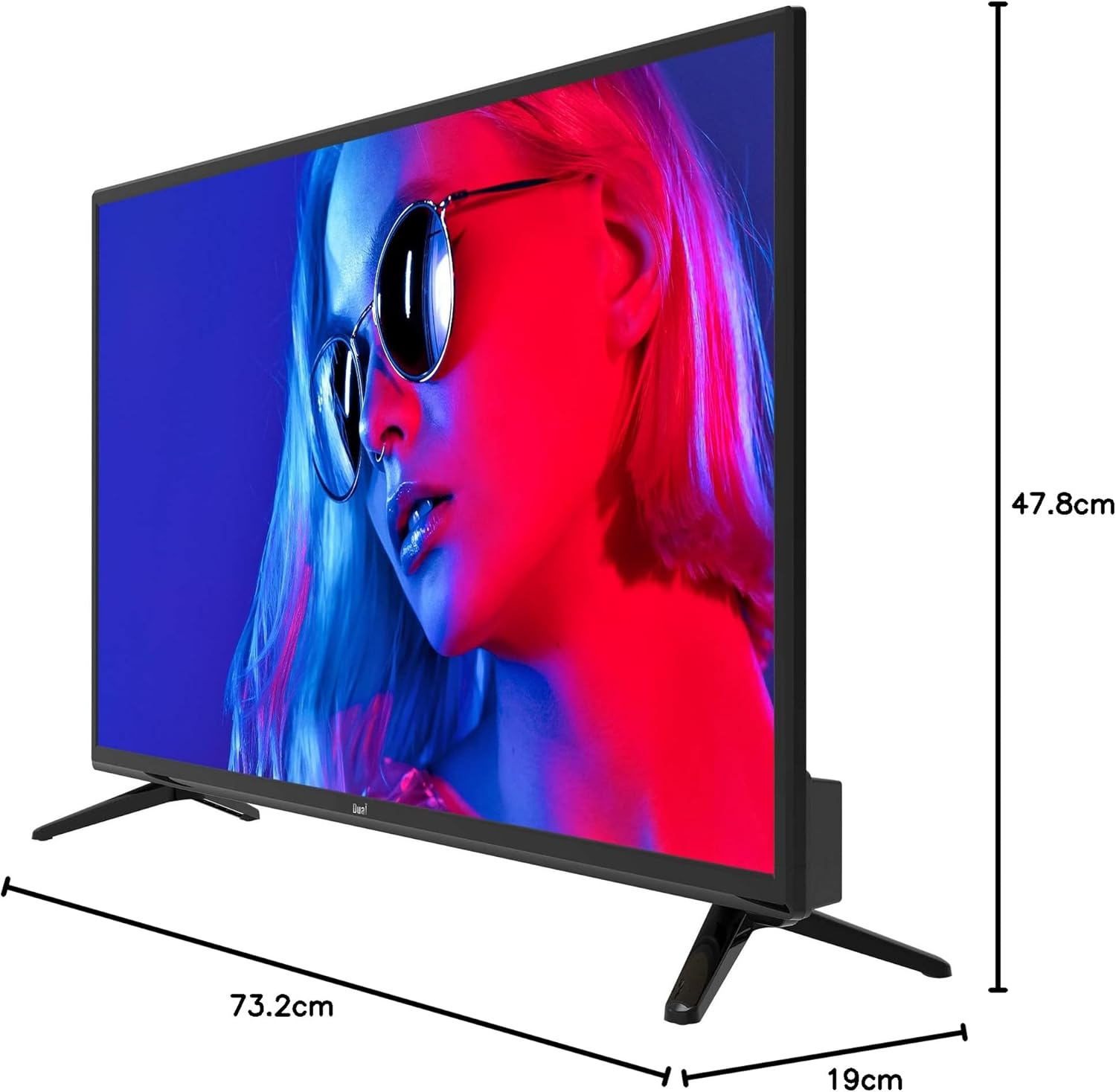
Image 8.1: TV dimensions.
8.1. Energy Label

Image 8.2: EU Energy Label. For more details, visit the official EPREL database: Ibe Ngwaahịa EPREL
9. Akwụkwọ ikike na nkwado
9.1. Akwụkwọ ikike Ozi
This product comes with a Limited Warranty. Please refer to the warranty card included in your package for specific terms and conditions.
9.2. Spare Parts and Software Updates
Information regarding the availability of spare parts and guaranteed software updates for this model is currently not available. Please contact your retailer or the manufacturer for further inquiries.
9.3. Nkwado ndị ahịa
For technical assistance or customer service, please contact your point of purchase or visit the official Dual websaịtị maka akụrụngwa nkwado.