
1. Okwu mmalite
Daalụ maka ịzụrụasing the Blaupunkt PB10DB Bluetooth Karaoke Speaker. This manual provides essential information for the safe and efficient operation of your device. Please read it thoroughly before use and keep it for future reference. The PB10DB is a portable party speaker designed for high-quality audio playback and karaoke, featuring Bluetooth connectivity, USB, and AUX inputs.
2. Ozi nchekwa
Iji hụ na ọrụ nchekwa na gbochie mmebi, biko debe ihe ndị a:
- Ewepụla ngwaọrụ ahụ na oke okpomọkụ, ìhè anyanwụ kpọmkwem, ma ọ bụ oke iru mmiri.
- Keep the speaker away from water and other liquids. The product is indicated as waterproof, but avoid submerging it.
- Do not attempt to disassemble or modify the speaker. Repairs should only be performed by qualified personnel.
- Jiri naanị ihe ndị e ji achaji eme ihe.
- Ensure proper ventilation around the speaker during use.
- Zere ige ntị nke ọma ruo ogologo oge iji gbochie mmebi ntị.
3. Ihe ngwugwu
Biko lelee ma ihe niile dị na ngwugwu ahụ:
- Blaupunkt PB10DB Bluetooth Karaoke Speaker
- Ihe nkwụnye ọkụ / eriri ọkụ
- Akwụkwọ ntuziaka (akwụkwọ a)
- Microphone (if included in your specific package)
4. Ngwaahịa gafereview
Familiarize yourself with the various parts of your Blaupunkt PB10DB speaker.
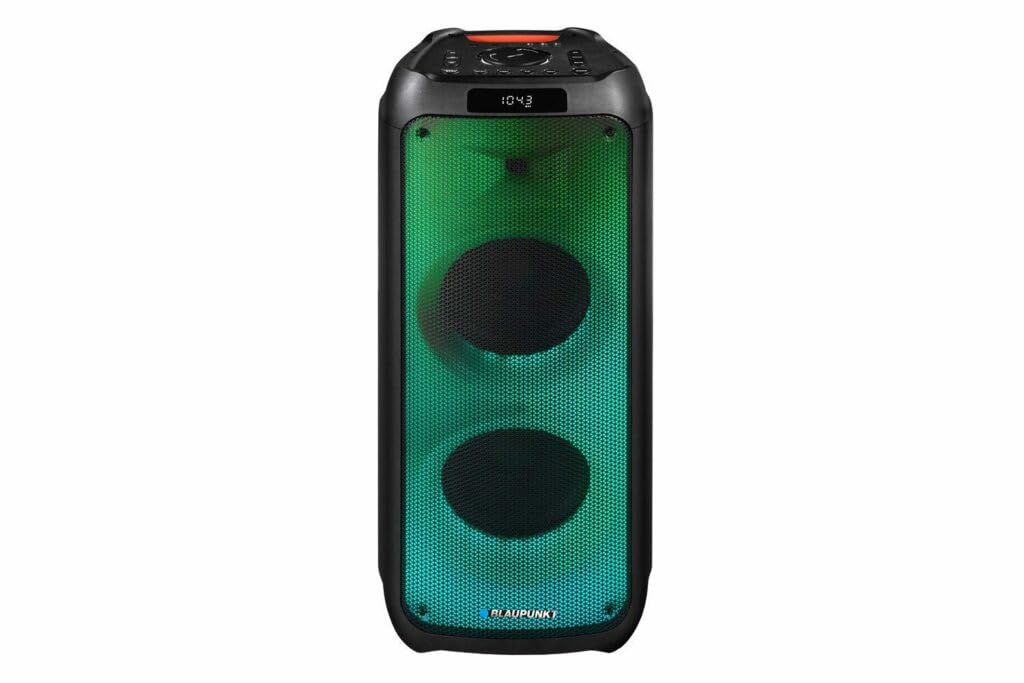
Foto 1: N'ihu view of the Blaupunkt PB10DB speaker, showcasing the dual speaker grilles and dynamic LED lighting. The top panel features a display and control buttons.

Foto 2: N'akuku view of the Blaupunkt PB10DB speaker, highlighting its portable design and the side profile.
Controls and Ports (Typical Layout)
- Bọtịnụ ike: Na-agbanyụ/gbanyụọ ọkà okwu.
- Bọtịnụ ụkpụrụ: Switches between Bluetooth, USB, AUX, and FM radio modes.
- Njikwa olu: Na-edozi olu ukwu.
- Bọtịnụ Kwụsị/Kwụsị: Na -ejikwa ọkpụkpọ mgbasa ozi.
- Bọtịnụ egwu gara aga/ na-esote: Na-agagharị n'ime egwu.
- Microphone Input (MIC IN): For connecting a wired microphone for karaoke.
- Ọdụ ụgbọ mmiri USB: Maka ịkpọ egwu site na draịvụ USB ma ọ bụ maka chaja ngwaọrụ mpụga.
- Ntinye AUX (3.5mm): For connecting external audio devices via an audio cable.
- Nchaji ọdụ ụgbọ mmiri: Maka ijikọ ihe nkwụnye ike iji chajịa ọkà okwu.
5. Nhazi
5.1 Ịchaji ọkà okwu
- Connect the provided power adapter to the charging port on the speaker.
- Tinye nkwụnye ọkụ n'ime oghere ọkụ kwesịrị ekwesị.
- Ọkụ ihe ngosi chaja ga-enwu (agba nwere ike ịdị iche) iji gosi na ọkà okwu na-acha chaja.
- Once fully charged, the indicator light may change color or turn off. Disconnect the charger.
A full charge typically takes several hours and provides approximately 8 hours of playback time.
5.2 Gbanyụọ/ gbanyụọ
- Iji gbanye: Press and hold the Power button for a few seconds until the display lights up and you hear an audible prompt.
- Iji gbanyụọ: Pịa ma jide bọtịnụ Ike ọzọ ruo sekọnd ole na ole ruo mgbe ngosipụta ahụ gbanyụrụ wee nụ ụda olu.
6. Ntuziaka ọrụ
6.1 Njikọ Bluetooth
- Ensure the speaker is powered on and in Bluetooth mode. If not, press the Mode button until "Bluetooth" or a similar indicator appears on the display. The speaker will enter pairing mode, indicated by a flashing Bluetooth icon or LED.
- Na ngwaọrụ mkpanaaka gị (smartphone, tabletị, wdg), gbanye Bluetooth wee chọọ ngwaọrụ dịnụ.
- Select "Blaupunkt PB10DB" from the list of found devices.
- Once paired, the speaker will emit an audible confirmation, and the Bluetooth indicator will stop flashing.
- Ị nwere ike ugbu a kpọọ ụda site na ngwaọrụ gị site na ọkà okwu.
Ọkà okwu ahụ ga-anwa ijikọghachi na ngwaọrụ ejikọtara ikpeazụ ozugbo mgbe agbanyere ya.
6.2 Ọrụ Karaoke
- Connect a wired microphone (not always included) to the MIC IN port on the speaker.
- Ensure the microphone is switched on (if it has a power switch).
- Play your desired karaoke track via Bluetooth, USB, or AUX.
- Adjust the microphone volume and echo effects (if available on the speaker) using the dedicated controls.
6.3 USB playback
- Fanye draịva USB nwere ọdịyo MP3 files n'ọdụ ụgbọ mmiri USB.
- Press the Mode button to switch to USB mode. The speaker will automatically begin playing music from the USB drive.
- Jiri bọtịnụ Play/Pause na Previous/Next Track iji chịkwaa ọkpụkpọ egwu.
Ntinye AUX 6.4
- Jikọọ otu njedebe nke eriri ọdịyo 3.5mm (anaghị etinye ya) na ọdụ ụgbọ mmiri AUX IN na ọkà okwu.
- Connect the other end of the cable to the headphone jack or audio output of your external audio device.
- Press the Mode button to switch to AUX mode.
- Jikwaa ọkpụkpọ egwu na olu site na ngwaọrụ ọdịyo mpụga gị.
7. Nlekọta
7.1 Nhicha
- Always power off the speaker and disconnect it from the power source before cleaning.
- Jiri akwa dị nro ma kpọọ nkụ hichaa mpụta nke ọkà okwu.
- Do not use abrasive cleaners, waxes, or solvents, as these may damage the finish.
7.2 Nchekwa
- Chekwaa ọkà okwu n'ebe dị jụụ, kpọrọ nkụ na-adịghị na ìhè anyanwụ kpọmkwem na oke okpomọkụ.
- If storing for an extended period, charge the battery periodically (e.g., every 3 months) to maintain battery health.
8. Nchọpụta nsogbu
| Nsogbu | Ihe nwere ike ime | Ngwọta |
|---|---|---|
| Ọkà okwu anaghị agba ọkụ. | Batrị agwụla. | Chajie ọkà okwu ahụ site na iji ihe nkwụnye ike enyere. |
| Enweghị ụda sitere na ọkà okwu. | Volume is too low or muted. Incorrect input mode. | Increase volume. Press the Mode button to select the correct input (Bluetooth, USB, AUX). |
| Njikọ Bluetooth ada ada. | Ọkà okwu adịghị na ọnọdụ njikọta. Ngwaọrụ tere aka. Ntinye aka. | Ensure speaker is in Bluetooth pairing mode. Move device closer to speaker. Turn off other Bluetooth devices. |
| Igwe okwu anaghị arụ ọrụ. | Microphone not connected properly or switched off. Microphone volume too low. | Check microphone connection. Ensure microphone is powered on. Adjust microphone volume. |
| USB playback not working. | A naghị edozi draịva USB nke ọma ma ọ bụ anaghị akwado ya file ụdị. | Ensure USB drive is formatted to FAT32 and contains MP3 fileNwaa draịvụ USB dị iche. |
9. Nkọwapụta
| Aha nlereanya: | PB10DB |
| Akara: | BLAUPUNKT |
| Teknụzụ Njikọta: | Enyemaka, Bluetooth, USB |
| Ike Nwepu Ọkà Okwu Kachasị: | 1000 Watt |
| Ụkpụrụ mmepụta ụda: | Stereo |
| Ụdị nkwụnye: | Ugwu okpokoro |
| Ihe: | Metal na Plastic |
| Ụdị ọkà okwu: | Tweeter |
| Njirimara Pụrụ Iche: | Egwu |
| Eji akwadoro: | For music player |
| Agba: | Acha anụnụ anụnụ |
| Ihe mgbochi mmiri: | Eziokwu |
| Usoro njikwa: | Metụ aka |
| Dayameta Tweeter: | 4 sentimita asatọ |
| Nkezi Ndụ batrị: | awa 8 |
| Ngwa dakọtara: | Laptọọpụ, Smartphone |
| Isi mmalite ike: | Akwanyere batrị |
| Ibu ihe: | 105 grams |
| Akụkụ ngwaahịa (L x W x H): | 24 x 69 x 2.5 cm |
10. Akwụkwọ ikike na nkwado
Blaupunkt products are designed and manufactured to the highest quality standards. For detailed warranty information, please refer to the warranty card included with your product or visit the official Blaupunkt websaịtị.
For technical support, troubleshooting assistance, or service inquiries, please contact Blaupunkt customer support through their official channels.
- Ndị ọchịchị Websaịtị: www.blaupunkt.com
- Ndị ọrụ nlekọta ndị ahịa: Refer to your regional Blaupunkt websaịtị maka nkọwa kọntaktị.