
1. Okwu mmalite
This manual provides essential information for the safe and efficient use of your Princess 357250 Smart Air Cooler Fan. Please read these instructions carefully before operating the appliance and retain them for future reference.

Figure 1: Princess 357250 Smart Air Cooler Fan in operation, illustrating air circulation.
The Princess 357250 is a versatile 3-in-1 appliance functioning as a fan, air cooler, and air freshener. It features a 3.5-liter water reservoir, three operating modes, and can be controlled via the HomeWizard Climate app, voice commands, or the included remote control.
2. Ntuziaka nchekwa dị mkpa
Na-agbaso usoro nchekwa nchekwa mgbe niile mgbe ị na-eji ngwa eletriki iji belata ihe egwu ọkụ, ujo eletrik na mmerụ ahụ nkeonwe.
- Gụọ ntuziaka niile tupu ojiji.
- Gbaa mbọ hụ na voltage gosiri na ngwa ngwa kwekọrọ na mains mpaghara gị voltage tupu ejikọta.
- Ejila ngwa, eriri, ma ọ bụ nkwụnye n'ime mmiri ma ọ bụ ihe mmiri ndị ọzọ.
- Nleba anya dị mkpa mgbe ụmụaka na-eji ngwa ọ bụla ma ọ bụ nso.
- Unplug from the outlet when not in use, before assembling or disassembling parts, and before cleaning.
- Ejila ngwa ọ bụla nwere eriri ma ọ bụ plọg mebiri emebi rụọ ọrụ, ma ọ bụ mgbe ngwa ahụ dara ma ọ bụ mebie n'ụzọ ọ bụla.
- Ejila n'èzí.
- Ekwela ka eriri ahụ kwụgidere na nsọtụ tebụl ma ọ bụ counter, ma ọ bụ metụ ebe dị ọkụ aka.
- Etinyela na ma ọ bụ nso gas na-ekpo ọkụ ma ọ bụ ọkụ eletrik, ma ọ bụ na oven ọkụ.
- Always place the appliance on a dry, stable, and level surface.
- Jiri naanị mgbakwunye ndị nrụpụta tụrụ aro ma ọ bụ rere ya.
- Akwụsịla oghere ikuku ikuku ọ bụla.
- Do not fill the water tank above the MAX level indicator.
- Gbaa mbọ hụ na tank mmiri ahụ nọ n'ọnọdụ nke ọma tupu ọ rụọ ọrụ.
3. Ngwa ngwaahịa
The Princess 357250 Smart Air Cooler Fan comes with the following components:
- Princess 357250 Smart Air Cooler Fan unit
- Njikwa anya
- 2 x CR2032 batteries (for remote control)
- Akwụkwọ ntuziaka
- Ice packs (typically 2, for enhanced cooling)

Figure 2: Included remote control for convenient operation.
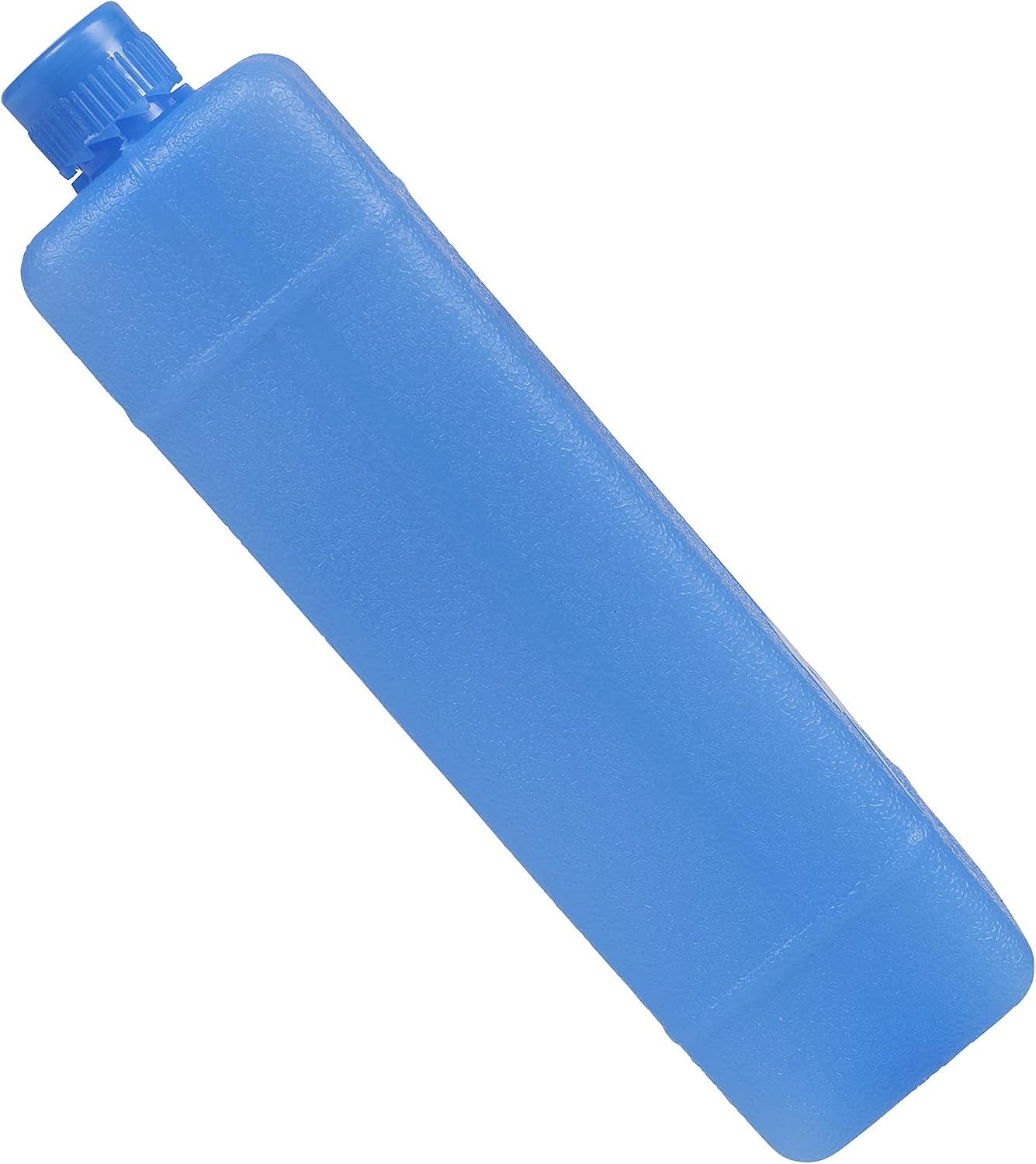
Ọgụgụ 3: Ọpụample of an ice pack used to enhance cooling performance.
4. Ntọlite na mbido ojiji
4.1 Nwepu
Carefully remove the air cooler from its packaging. Retain the packaging for future storage or transport. Check that all components listed in Section 3 are present and undamaged.
4.2 Ntinye
Place the air cooler on a firm, level surface. Ensure there is adequate space around the unit for proper air circulation. Do not place it directly against a wall or furniture that could obstruct the air intake or outlet.
4.3 Ijupụta Ebe Nchekwa Mmiri
- Dọpụta tank mmiri ahụ site n'azụ ala nke ngwaọrụ ahụ.
- Fill the water tank with clean, cool water. Do not exceed the 'MAX' fill line.
- For enhanced cooling, place the included ice packs in a freezer until frozen. Once frozen, add them to the water tank.
- Jiri nlezianya dọghachi tank mmiri ahụ n'ime ngwaọrụ ahụ ruo mgbe ọ pịrị aka n'ebe ọ dị.
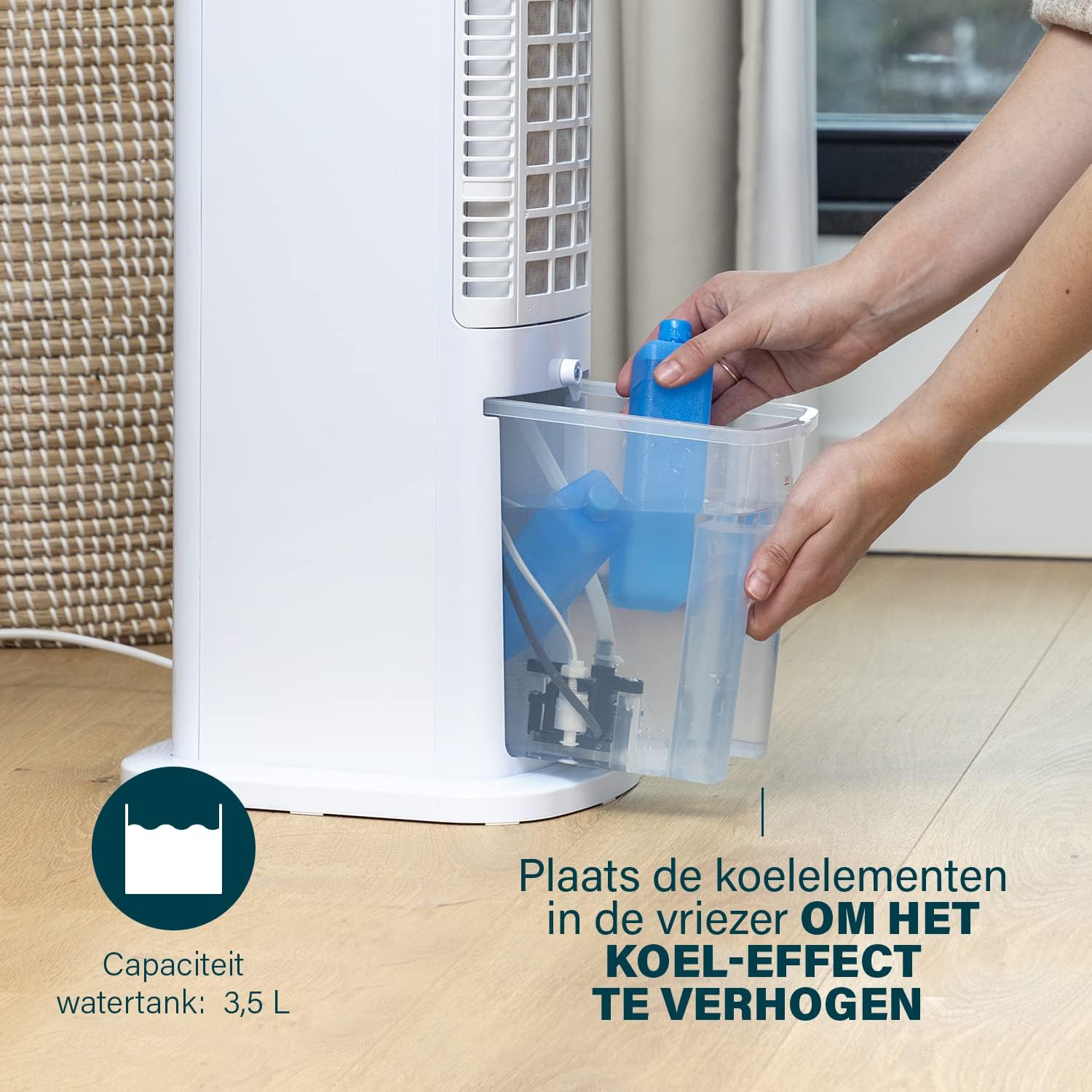
Figure 4: Adding ice packs to the water reservoir to increase cooling effect.
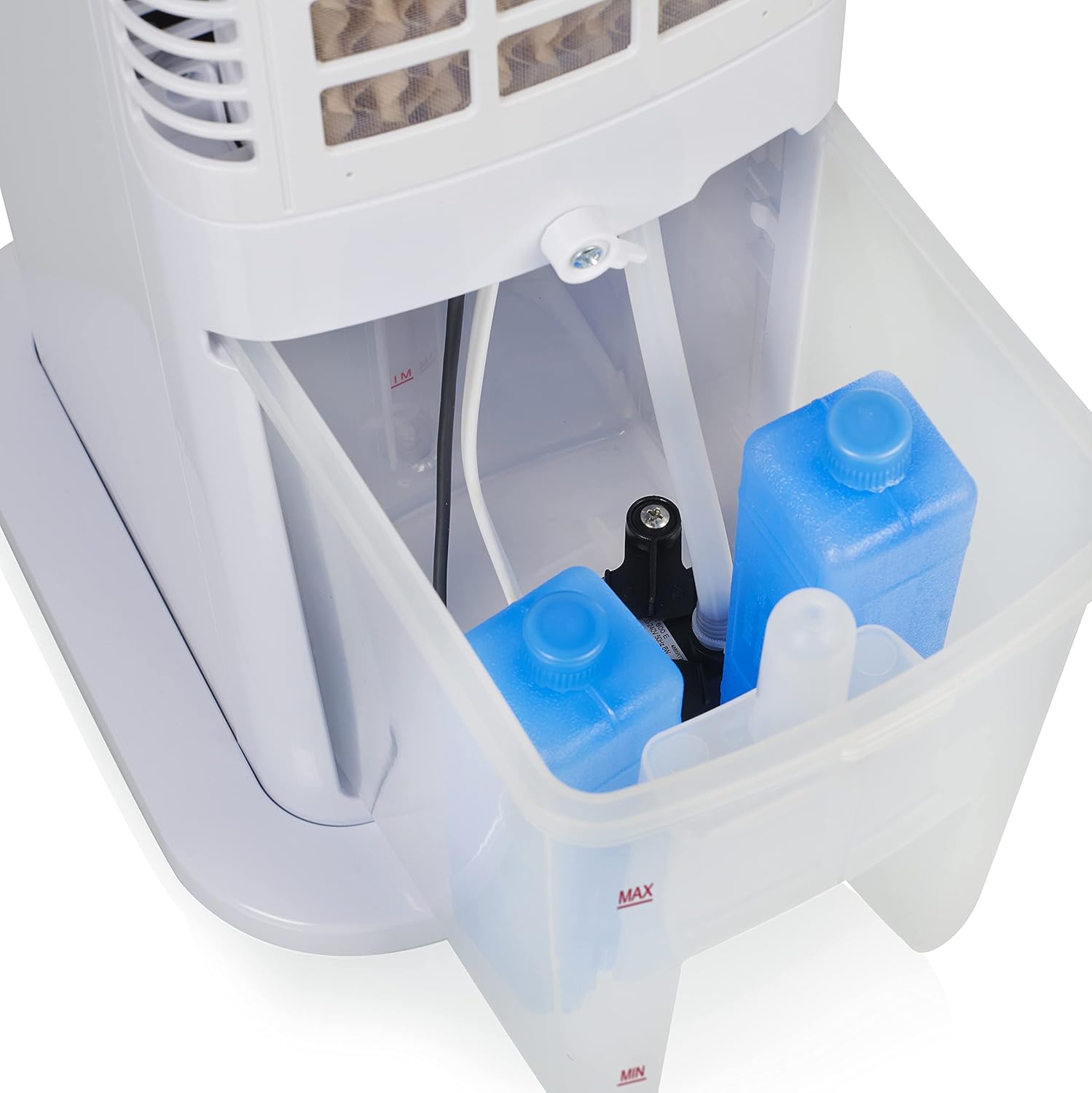
Figure 5: Water tank with ice packs, indicating fill levels.
4.4 Njikọ ike
Plug the power cord into a suitable electrical outlet (230V). The unit will enter standby mode.
5. Ntuziaka ọrụ
The Princess 357250 can be operated via its control panel, remote control, or the HomeWizard Climate app.
5.1 Ogwe njikwa gafereview
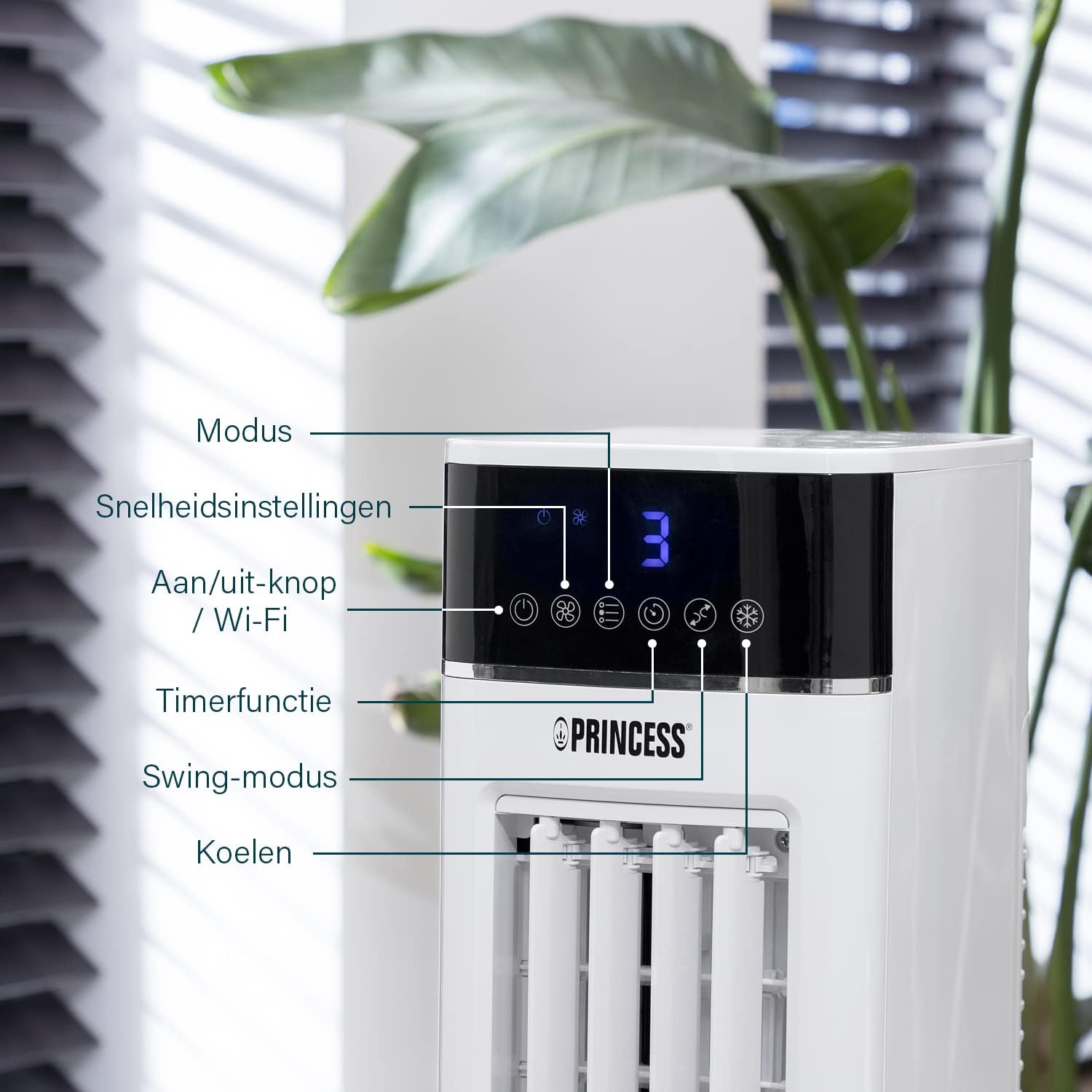
Figure 6: Control panel with various function buttons.
- Power Button (On/Off / Wi-Fi): Turns the unit on or off. Press and hold to activate Wi-Fi pairing mode.
- Bọtịnụ ọnọdụ: Cycles through operating modes (Normal, Natural, Sleep).
- Bọtịnụ ọsọ: Adjusts fan speed (Low, Medium, High).
- Bọtịnụ ngụ oge: Sets the operating timer.
- Igodo bọtịnụ: Activates or deactivates the oscillation function.
- Bọtịnụ dị mma: Activates or deactivates the evaporative cooling function (requires water in the tank).

Figure 7: Manual control via the top panel buttons.
5.2 Ụdị arụ ọrụ
- Ụdị nkịtị: Provides a constant airflow at the selected speed.
- Ụdị eke: Simulates natural breeze by varying fan speed intermittently.
- Ụdị ụra: Operates at a lower, quieter speed, gradually decreasing fan speed over time for undisturbed sleep.
5.3 Ọrụ Oscillation
Press the 'Swing' button to activate the oscillation function. The unit will rotate horizontally to distribute air across a wider area (Oscillation range: 50°). Press again to stop oscillation.
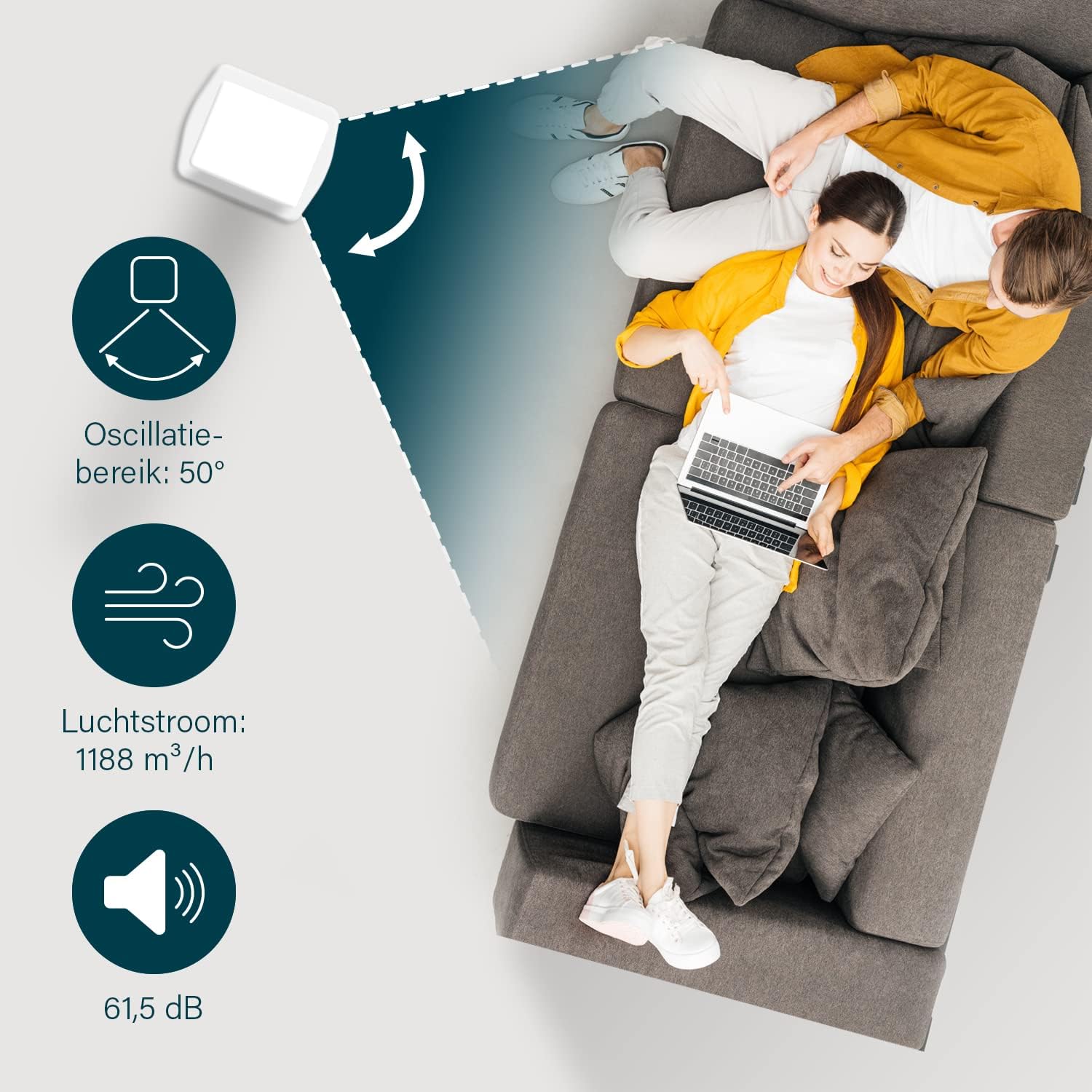
Figure 8: The oscillation function distributes cool air across a 50° range.
5.4 Evaporative Cooling Function
To activate the cooling function, ensure the water tank is filled. Press the 'Cool' button. The unit will use the water from the reservoir to cool the air through evaporation. This function works best in dry climates.

Figure 9: Innovative cooling technology utilizes a membrane system to cool air particles.
5.5 Smart Control (HomeWizard Climate App & Voice Control)
The Princess 357250 can be controlled remotely via the HomeWizard Climate app or voice commands (compatible with Siri and Google Assistant).
- Download the HomeWizard Climate app from your device's app store.
- Follow the in-app instructions to pair your air cooler with your Wi-Fi network. This typically involves pressing and holding the Power/Wi-Fi button on the unit until the Wi-Fi indicator blinks.
- Once paired, you can control all functions of the air cooler from your smartphone or tablet.
- For voice control, link your HomeWizard Climate account with your preferred voice assistant (Siri or Google Assistant) through their respective apps.

Figure 10: Control your air cooler using the HomeWizard Climate app and voice assistants.
6. Nlekọta na nhicha
Regular cleaning ensures optimal performance and extends the lifespan of your air cooler.
6.1 Nhicha izugbe
- Kwupu ngwa ngwa mgbe niile tupu ihicha ya.
- Jiri nwayọ hichaa elu mpụta, damp akwa . Ejila ihe nchacha abrasive ma ọ bụ ihe mgbaze.
- Ensure no water enters the control panel or other electrical parts.
6.2 Ichacha tankị mmiri
The water tank should be cleaned regularly, especially if using the cooling function frequently, to prevent mold and bacteria growth.
- Wepụ ihe mkpuchi ikuku ahụ.
- Wepu tank mmiri na nkeji.
- Wụpụ mmiri ọ bụla fọdụrụ.
- Clean the inside of the tank with a mild detergent and warm water. Use a soft brush if necessary to remove any residue.
- Jiri mmiri dị ọcha sachaa nke ọma.
- Allow the tank to air dry completely before reinserting it into the unit.
6.3 Cooling Pad Cleaning/Replacement
The cooling pad (evaporative filter) may accumulate dust and mineral deposits over time. Refer to the diagram for its location.

Figure 11: The cooling pad, which should be cleaned periodically.
- Wepụ ihe mkpuchi ikuku ahụ.
- Carefully remove the back panel to access the cooling pad.
- Gently remove the cooling pad.
- Rinse the cooling pad under running water to remove dust and deposits. For stubborn deposits, soak in a mild descaling solution (e.g., vinegar and water) for 30 minutes, then rinse thoroughly.
- Allow the cooling pad to dry completely before reinserting.
- Replace the cooling pad if it is damaged or heavily soiled and cannot be cleaned effectively.
7. Nchọpụta nsogbu
Ọ bụrụ na ị na-enwe nsogbu na igwe nju oyi gị, rụtụ aka na tebụl na-esonụ maka nsogbu na ngwọta nkịtị.
| Nsogbu | Ihe nwere ike ime | Ngwọta |
|---|---|---|
| Unit anaghị agbanwuo. | Enweghị ọkụ. | Lelee ma ọ bụrụ na etinyere eriri ọkụ na ebe nchekwa na-arụ ọrụ. |
| No cool air/weak cooling effect. | Tank mmiri tọgbọ chakoo ma ọ bụ dị ala. Cooling function not activated. Cooling pad is dirty. | Jupụta tank mmiri ahụ. Press the 'Cool' button. Clean or replace the cooling pad (see Section 6.3). |
| Isi na-adịghị mma sitere na otu ahụ. | Stagnant water or dirty water tank/cooling pad. | Clean the water tank and cooling pad thoroughly (see Section 6.2 & 6.3). Use fresh water. |
| Njikwa anya anaghị arụ ọrụ. | Batrị anwụọla ma ọ bụ tinye na ezighi ezi. | Replace the CR2032 batteries. Ensure they are inserted with correct polarity. |
| Njikwa ngwa anaghị arụ ọrụ. | Wi-Fi connection issue. App not paired correctly. | Check your Wi-Fi network. Re-pair the device with the HomeWizard Climate app (see Section 5.5). |
Ọ bụrụ na nsogbu ahụ dịgidere mgbe ịnwale azịza ndị a, biko kpọtụrụ nkwado ndị ahịa.
8. Nka na ụzụ nkọwa
| Njirimara | Nkọwa |
|---|---|
| Nọmba nlereanya | 01.357250.01.001 |
| Ụdị | Princess |
| Ụdị | Smart Air Cooler Fan (3-in-1: fan, air freshener, air cooler) |
| Ihe onwunwe | Acrylonitrile Butadiene Styrene (ABS) |
| Agba | Ọcha |
| Ụdị nkwụnye | Ntighari |
| Ụdị njikwa | Remote control, Control Panel, HomeWizard Climate App, Voice Control (Siri, Google Assistant) |
| Ike nchekwa mmiri | 3.5 lita |
| Ụdị arụ ọrụ | Nkịtị, eke, ụra |
| Ọnụọgụ nke Ọsọ ọsọ | 3 |
| Oscillation nso | ogo 50 |
| Wattage | 70 Watt |
| Voltage | 230 volts |
| Ọkwa mkpọtụ | 61.5 decibel |
| Ibu Ibu | 4 kilogram |
| Akụkụ (D x W x H) | 28D x 22W x 76H centimita |
| Spare Parts Availability (EU) | Afọ 2 |

Figure 12: Dimensions and key specifications of the air cooler.
9. Akwụkwọ ikike na nkwado
9.1 Ozi akwụkwọ ikike
This Princess 357250 Smart Air Cooler Fan comes with a Akwụkwọ ikike onye nrụpụta afọ 2 from the date of purchase. This warranty covers manufacturing defects and material faults under normal use conditions. It does not cover damage resulting from misuse, neglect, accident, alteration, or unauthorized repair.
Biko dowe ihe akaebe nke ịzụrụ ihe maka akwụkwọ ikike.
9.2 Nkwado ndị ahịa
For technical assistance, warranty claims, or questions regarding your Princess 357250 Smart Air Cooler Fan, please contact your retailer or visit the official Princess websaịtị maka nkwado nkọwa kọntaktị.
Ị nwekwara ike na-ezo aka na product page on Amazon.nl maka ozi ndị ọzọ na akụrụngwa.