
Coby CPA545BK
Coby Blaze Light-Up Bluetooth Speaker (Model CPA545BK) Instruction Manual
Your guide to setting up and operating your Coby Blaze speaker.
1. Ngwaahịa gafereview
The Coby Blaze Light-Up Bluetooth Speaker is a portable wireless audio device designed for immersive sound and dynamic visual effects. It features Bluetooth 5.0 connectivity, multiple input options, and integrated LED lighting.
Akụkụ ndị bụ isi:
- Light-Up Wireless Speaker: Enjoy crystal-clear, immersive audio with Bluetooth 5.0 connectivity and vivid surround sound.
- Multiple Listening & Input Options: Supports Bluetooth, USB, aux, and TF card inputs for versatile audio playback.
- High-Quality LED Light Modes: Features 3 brilliant LED light modes that sync with your music to enhance any atmosphere.
- Built-in Microphone Input: Allows for hands-free calling and transforms the speaker into a portable karaoke player.
- Enwere ike ibugharị: Lightweight with a convenient carrying handle for easy transport.
- Batrị enwere ike ịchaji: Equipped with a lithium-ion battery providing up to 7 hours of playtime.
- Igwe Redio: Integrated FM radio for listening to your favorite stations.
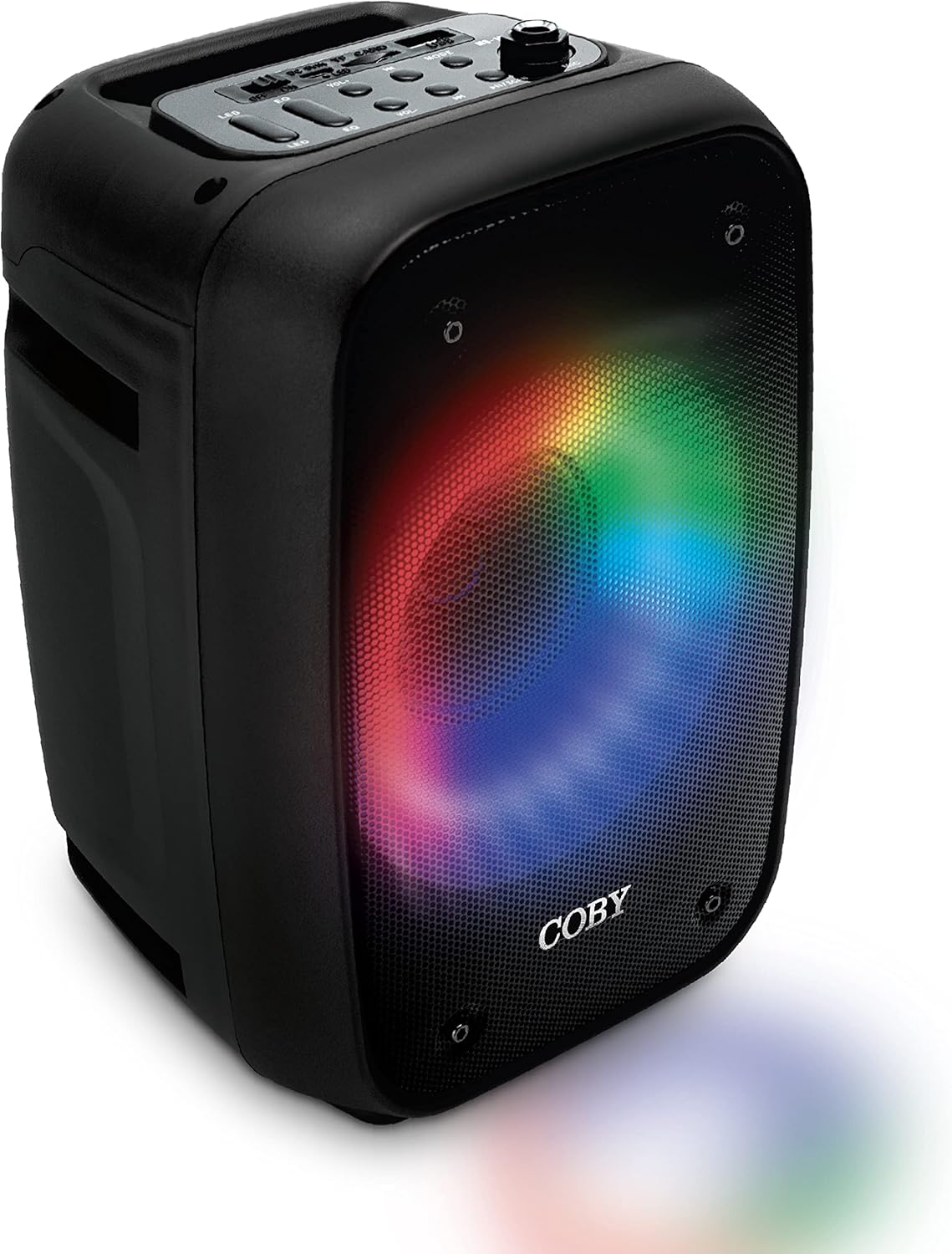
The image above displays the Coby Blaze speaker from an angled perspective, highlighting its black casing and the dynamic, multi-colored LED lights emanating from its front speaker grille. The lights create a circular pattern, adding to the device's aesthetic appeal.
2. Ntuziaka Nhazi
2.1 Ịkwapụ ihe na ụgwọ mbụ
- Jiri nlezianya wepụ ọkà okwu na ngwa niile na nkwakọ ngwaahịa.
- Before first use, fully charge the speaker using the provided Micro USB cable. Connect the Micro USB end to the speaker's charging port and the USB-A end to a compatible USB power adapter (not included). The charging LED indicator will illuminate during charging.
2.2 Identifying Controls and Ports
Familiarize yourself with the speaker's control panel and various input/output ports.

This image provides a clear, labeled diagram of the Coby Blaze speaker's top panel, showing buttons for power, equalizer, volume, previous/next track, speaker modes, play/pause/scan, and light modes. It also indicates the Micro USB port, USB port, TF card slot, and Mic port on the side.
- Gbanyụọ/gbanyụọ Located on the top panel.
- Micro USB Port: Maka ịchaji ọkà okwu.
- Ịchaji LED: Na-egosi ọkwa nchaji.
- Oghere TF Kaadị: For playing music directly from a TF card.
- Ọdụ ụgbọ mmiri USB: For playing music directly from a USB drive.
- Port igwe okwu: 6.35mm input for a microphone.
- Light Modes Button: Cycles through different LED light patterns.
- Bọtịnụ nhazi (EQ): Adjusts sound profiles.
- Njikwa olu: Rotary knob to adjust overall volume.
- Previous/Next Song Buttons: For track navigation.
- Speaker Modes Button: Na-agbagharị site na ụdị ntinye (Bluetooth, FM, USB, TF, AUX).
- Play/Pause/Scan Button: Controls playback and FM radio scanning.
3. Ntuziaka ọrụ
3.1 Gbanyụọ/ gbanyụọ
To power on the speaker, slide the ON/OFF switch to the "ON" position. To power off, slide it to the "OFF" position.
3.2 Njikọ Bluetooth
- Ensure the speaker is powered on and in Bluetooth mode (indicated by "BLUE" on the display). If not, press the "Speaker Modes" button to cycle to Bluetooth mode.
- Na ekwentị mkpanaaka gị (ama, mbadamba, laptọọpụ), mee ka Bluetooth rụọ ọrụ ma chọọ ngwaọrụ dị.
- Select "Coby Blaze" from the list of devices. Once paired, the speaker will emit an audible confirmation.
- You can now play audio from your device through the Coby Blaze speaker.
3.3 Using Other Input Modes
- Kaadị USB/TF: Insert a USB drive or TF card into the respective port. The speaker will automatically switch to the corresponding mode and begin playing audio files.
- Ntinye AUX: Connect an audio device using a 3.5mm AUX cable (not included) to the AUX port. Press the "Speaker Modes" button to select AUX mode.
- Igwe Redio: Press the "Speaker Modes" button to select FM radio mode. Press and hold the "Play/Pause/Scan" button to automatically scan and save available FM stations. Use the "Previous/Next Song" buttons to navigate through saved stations.
3.4 Adjusting Volume and Playback
- Olu: Rotate the "Volume" knob on the top panel to increase or decrease the sound level.
- Nkpọghachi: Use the "Play/Pause/Scan" button to play or pause audio. Use the "Previous/Next Song" buttons to skip tracks.
Ụdị ọkụ ọkụ 3.5 LED
Press the "Light Modes" button to cycle through the 3 available LED light patterns. These lights add a dynamic visual element to your audio experience.

This image shows the Coby Blaze speaker with its front grille illuminated by a warm orange LED light, demonstrating one of its customizable light modes.
3.6 Ọrụ Karaoke
Connect a compatible microphone (not included) to the "Mic Port" on the side of the speaker. Adjust the microphone volume using the dedicated control on the speaker's panel (if available, otherwise use the main volume). You can sing along to your music playing through any input mode.

The image features the Coby Blaze speaker with a microphone connected, ready for karaoke. The speaker's front grille is illuminated with colorful LED lights, suggesting a lively atmosphere.
4. Nlekọta
- Nhicha: Jiri akwa dị nro dị nro hichaa mpụta nke ọkà okwu. Ejila ihe na-ehicha mmiri mmiri ma ọ bụ ihe abrasive.
- Nchekwa: Chekwaa ọkà okwu n'ebe dị jụụ, kpọrọ nkụ pụọ na ìhè anyanwụ kpọmkwem na oke okpomọkụ mgbe ọ naghị eji ya ogologo oge.
- Nlekọta batrị: Ka ịgbatị ndụ batrị ogologo, zere ịchaji batrị ugboro ugboro. Tinyegharịa igwe okwu mgbe niile, ọbụlagodi ma ọ bụrụ na ị naghị eji ya eme ihe mgbe niile.
- Mkpughe mmiri: Igwe okwu a anaghị amị mmiri. Zere ka mmiri ma ọ bụ oke iru mmiri ghara iru ya.
5. Nchọpụta nsogbu
| Nsogbu | Ngwọta enwere ike |
|---|---|
| Ọkà okwu anaghị agba ọkụ. | Gbaa mbọ hụ na agbagoro batrị. Jikọọ igwe okwu na isi iyi ọkụ site na iji eriri USB Micro. |
| Enweghị ike ijikọ site na Bluetooth. |
|
| Enweghị ụda ma ọ bụ obere olu. |
|
| Nnabata redio FM adịghị mma. | Adjust the speaker's position or location to improve signal reception. Ensure the antenna is fully extended (if applicable). |
6. Nkọwapụta ngwaahịa
| Njirimara | Nkọwa |
|---|---|
| Ụdị | Coby |
| Aha Nlereanya | Ọkà okwu Bluetooth |
| Nọmba Nlereanya ihe | CPA545BK |
| Teknụzụ Njikọta | Bluetooth |
| Teknụzụ nzikọrịta ozi ikuku | Bluetooth |
| Ụdị Ọkà Okwu | Gburugburu ụda |
| Njirimara Pụrụ Iche | Enwere ike ibugharị |
| Eji akwadoro maka ngwaahịa | Egwu |
| Ngwa dakọtara | Smartphone, Microphone |
| Dayameta nke subwoofer | 4 sentimita asatọ |
| Nhazi ọwa ụda gburugburu | 5 |
| Agba | Nwa |
| Ngwa gụnyere | USB, FM, TF, MIC INPUT |
| Akụkụ ngwaahịa | 7.75"D x 11"W x 8.25"H |
| Ibu Ibu | 1.06 Kilogram (2.33 pound) |
| Enweghị mmiri | Ụgha |
| Ọnụọgụ nke ihe | 1 |
| Usoro njikwa | Metụ aka |
| Isi Iyi Ike | Akwanyere batrị |
| Ọnụọgụ nke batrị | 1 batrị lithium ion chọrọ. (gụnyere) |
| Oge Nchaji | Awa 7 (maka ụgwọ zuru oke) |
| Ihe onwunwe | Plastic |
| Onye nrụpụta | Ụlọ ọrụ Summit Electronics, LLC |
| UPC | 810071490736 |
7. Akwụkwọ ikike na nkwado
The Coby Blaze Light-Up Bluetooth Speaker comes with a Akwụkwọ ikike nwere oke. For specific details regarding warranty coverage, duration, and how to claim support, please refer to the warranty card included in your product packaging or visit the official Coby websaịtị.
For further assistance, technical support, or inquiries, please contact Coby customer service through their official channels.
Ask a question about this manual
Ask about setup, troubleshooting, compatibility, parts, safety, or missing instructions. Manuals+ will review the question and use this page’s manual context to help answer it.