
1. Okwu mmalite
This manual provides essential instructions for the proper use and maintenance of your LOTUS Smartwatch Model 50003/A. Please read this guide thoroughly before using your smartwatch to ensure optimal performance and longevity.
The LOTUS Smartwatch 50003/A features an intuitive interface and elegant design, offering a variety of smart functions. It is equipped with Bluetooth connectivity, allowing seamless synchronization with your mobile devices. This synchronization enables features such as call and message notifications, music control, and other practical functions for daily life.
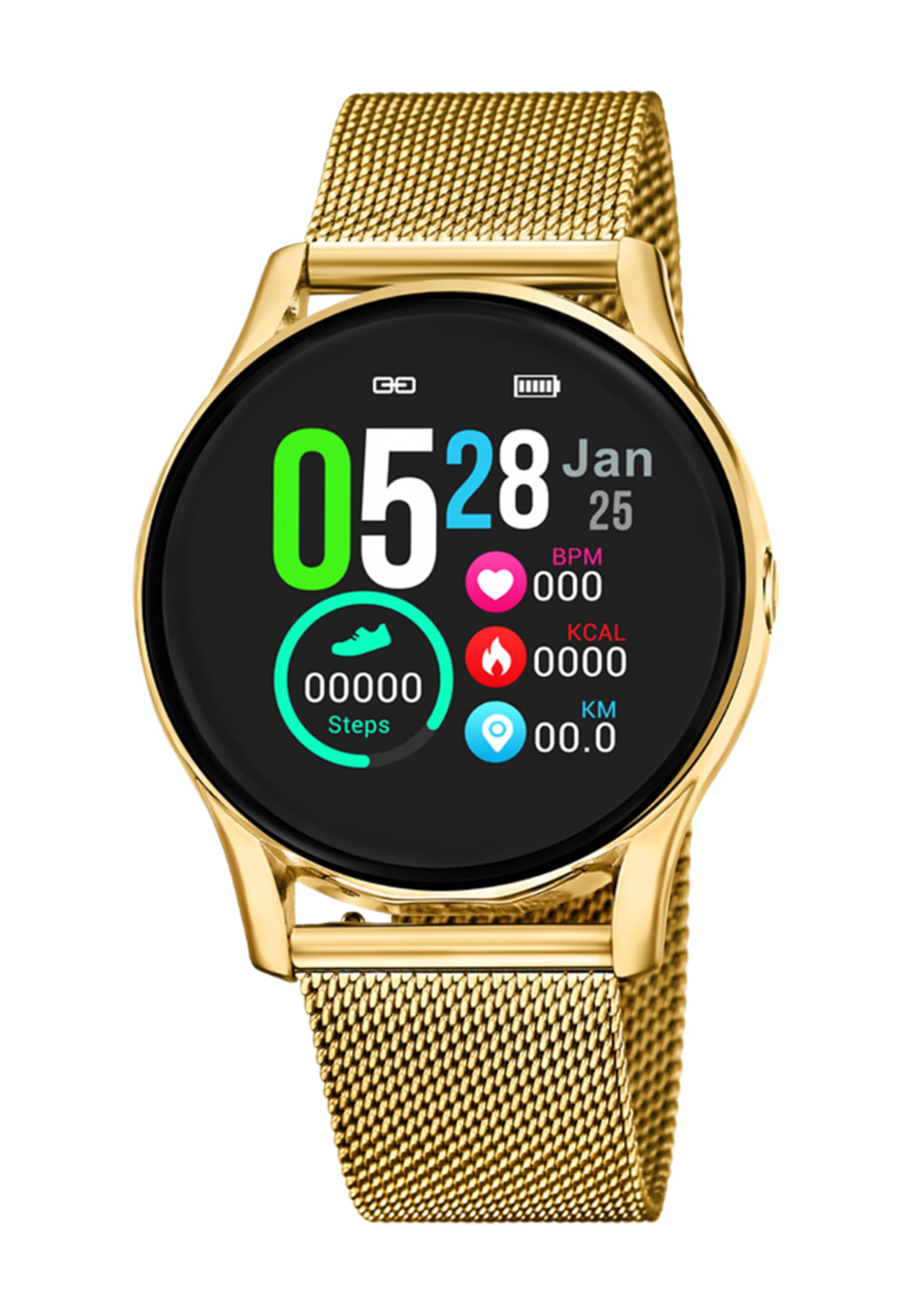
Foto 1.1: N'ihu view of the LOTUS Smartwatch 50003/A.
2. Ihe ngwugwu
Please check the package contents upon unboxing. The standard package for the LOTUS Smartwatch 50003/A should include:
- LOTUS Smartwatch 50003/A
- Ịchaji eriri
- Akwụkwọ ntuziaka (akwụkwọ a)
3. Ntuziaka Nhazi
3.1. Ịchaji smartwatch
Before initial use, fully charge your smartwatch.
- Jikọọ eriri chaja ahụ na ọdụ chaja dị n'azụ elekere smart ahụ.
- Tinye nsọtụ nke ọzọ nke eriri chaja ahụ n'ime ihe nkwụnye ike USB (anaghị etinye ya) ma ọ bụ ọdụ USB nke kọmputa.
- The watch display will indicate charging status. Allow approximately 2-3 hours for a full charge.
3.2. Installing the Companion App
To unlock all features and synchronize your smartwatch with your smartphone, you need to install the official LOTUS Connected app.
- Scan the QR code provided in the watch packaging or search for "LOTUS Connected" in your smartphone's app store (Google Play Store for Android, Apple App Store for iOS).
- Budata ma wụnye ngwa ahụ.
- Soro ntuziaka na ihuenyo ka ịmepụta akaụntụ ma ọ bụ banye.

Image 3.2: Synchronizing the smartwatch with the companion app on a smartphone.
3.3. Ijikọ na ekwentị mkpanaaka gị
Ensure Bluetooth is enabled on your smartphone and the smartwatch is charged.
- Open the LOTUS Connected app on your smartphone.
- Follow the app's instructions to add a new device.
- The app will search for available smartwatches. Select "LOTUS 50003/A" from the list.
- Confirm the pairing request on both your smartphone and smartwatch if prompted.
- Ozugbo ejikọtara elekere ahụ, oge na data ga-ejikọta na ekwentị gị.
4. Ntuziaka ọrụ
4.1. Nsoro ụzọ
- Ihuenyo mmetụ aka: Mịgharịa aka ekpe/aka nri, elu/ala iji lelee menu na atụmatụ dị iche iche. Pịa iji họrọ.
- Bọtịnụ akụkụ: The smartwatch may have one or more physical buttons. Typically, one button serves as a power on/off, back, or home button. Refer to the on-screen prompts for specific button functions.

Foto 4.1: Ọpụample of a smartwatch display showing activity data.
4.2. Atụmatụ igodo
- Amamọkwa: Receive alerts for incoming calls, messages, and app notifications directly on your wrist. Manage notification settings via the LOTUS Connected app.
- Njikwa egwu: Control music playback on your connected smartphone (play, pause, skip tracks, adjust volume).
- Ndepụta mmemme: Monitor steps, distance, calories burned, and sleep patterns. View detailed statistics in the companion app.
- Nguzogide mmiri: The smartwatch is water resistant. Avoid prolonged submersion or use in hot water/steam. Refer to specifications for exact water resistance rating.
5. Nlekọta
5.1. Nhicha elekere smart gị
- Jiri ákwà dị nro, nke na-enweghị ihe e ji ehicha ákwà hichaa ihuenyo elekere na ahụ ya.
- Maka unyi isi ike, ntakịrị dampen akwa na mmiri. Zere kemịkalụ siri ike ma ọ bụ ihe na-emebi emebi.
- Gbaa mbọ hụ na kọntaktsị chajị dị ọcha na akpọnwụwo tupu chajịa.
5.2. Nlekọta batrị
- Charge the smartwatch regularly. Avoid letting the battery completely drain for extended periods.
- Do not expose the smartwatch to extreme temperatures, as this can affect battery life and performance.
- If the watch will not be used for a long time, charge it to about 50% before storing.
6. Nchọpụta nsogbu
6.1. Okwu nkịtị na Ngwọta
- Lelee anaghị agbanye: Hụ na elekere ahụ chajịchara nke ọma. Jikọọ ya na chaja ma chere nkeji ole na ole tupu ị nwaa ịgbanwuo ya.
- Enweghị ike ijikọ na smartphone:
- Gbaa mbọ hụ na agbanyere Bluetooth na ekwentị gị.
- Make sure the smartwatch is within range of your phone.
- Malitegharịa ekwentị gị na smartwatch.
- Gbalịa iwepụ ma jikọta ngwaọrụ ahụ ọzọ site na ngwa ahụ.
- Anataghị ọkwa:
- Check notification settings in the LOTUS Connected app.
- Ensure the app has necessary permissions on your smartphone.
- Verify that the smartwatch is properly connected via Bluetooth.
- Ndụ batrị dị mkpụmkpụ:
- Belata nchapụta ihuenyo.
- Disable unnecessary notifications or features.
- Ensure the watch is fully charged before use.
6.2. Ntọgharị ụlọ nrụpụta
If issues persist, a factory reset may resolve them. This will erase all data on the smartwatch and restore it to its original settings.
- Navigate to the "Settings" menu on your smartwatch.
- Look for an option like "System," "Reset," or "Factory Reset."
- Kwenye nrụgharị ahụ mgbe kpaliri ya.
- After resetting, you will need to re-pair the smartwatch with your phone and set it up again.
7. Nkọwapụta
| Njirimara | Nkọwa |
|---|---|
| Ụdị | LOTUS |
| Nọmba nlereanya | 50003/A |
| Agba | Nwa |
| Ndakọrịta sistemụ arụmọrụ | Android, iOS |
| Nha ihuenyo | 39.65 millimeters |
| Atụmatụ pụrụ iche | Mmiri na-eguzogide |
| Ngwa dakọtara | Ekwentị mkpanaaka |
| Ngwakọta batrị | Lithium metal |
| Nnweta akụkụ mapụtara | Afọ 5 |
8. Akwụkwọ ikike na nkwado
Your LOTUS Smartwatch 50003/A comes with a manufacturer's warranty. Please refer to the warranty card included in your product packaging for specific terms and conditions.
Akụkụ mapụtara maka ihe nlereanya a dị ruo afọ 5 site na ụbọchị ịzụrụ.
For technical support, service, or warranty claims, please contact LOTUS customer service through their official websaịtị ma ọ bụ ozi kọntaktị enyere na akwụkwọ ikike gị.