
FAMOO S17
FAMOO Wireless Earbuds User Manual
Ụdị: S17
Okwu mmalite
Thank you for choosing FAMOO Wireless Earbuds. These Bluetooth 5.1 headphones are designed to provide a high-fidelity stereo audio experience with extended playtime, robust waterproofing, and intuitive touch controls. This manual will guide you through the setup, operation, and maintenance of your new earbuds.
Kedu ihe dị na Igbe ahụ
- FAMOO Wireless Earbuds (Left and Right)
- Nchaji case
- USB Type-C Nchaji USB
- Ọtụtụ nha nke ntị (S, M, L)
- Replacement Earhooks

Image: The FAMOO Wireless Earbuds securely placed within their charging case, showcasing the compact design and the LED battery display on the front of the case.
Ngwaahịa gafereview
Ụda stereo nwere ntụkwasị obi dị elu
Equipped with a built-in 10mm graphene audio driver and pure copper coil, these earbuds deliver powerful bass with a 43% boost, ensuring HiFi sound quality and enhanced music details.

Foto: Ihe gbawara view diagram illustrating the 10mm graphene audio driver and pure copper coil components responsible for the high-fidelity sound.
Extended Playtime & LED Power Display
Enjoy up to 6 hours of usage time on a single charge, extended to a total of 48 hours with the 800mAh charging case. The case features a Type-C interface for fast charging. A unique LED power display on the charging case indicates the battery levels of both the case and the earbuds.

Image: A visual representation of the earbud's 6-hour single charge battery life and the charging case extending it to 48 hours, highlighting the Type-C fast charging port.

Image: A close-up of the charging case's LED display, clearly showing the battery percentage for the case and individual battery indicators for each earbud.
Melite
1. Ịchaji ihe ntị na akpa
Before first use, fully charge the earbuds and the charging case. Place the earbuds into the charging case. Connect the provided USB Type-C cable to the charging port on the case and plug the other end into a compatible USB power source. The LED display will show the charging progress.
2. One-step Auto Pairing
The earbuds feature one-step auto pairing for convenience. Simply open the charging case, and the wireless headphones will automatically connect to the last paired device within a few seconds. For initial pairing or connecting to a new device:
- Hụ na earphones dị n'ime akpa chaja ma mepee akpa ahụ.
- Na ngwaọrụ gị (smartphone, mbadamba, wdg), gbanye Bluetooth.
- Look for "S17" in the list of available Bluetooth devices and select it to pair.
- Once paired, the earbuds will automatically connect to this device when removed from the case.

Image: A smartphone screen displaying the Bluetooth settings, with "S17" listed as a connected device, illustrating the one-step auto pairing process.

Image: A diagram illustrating the flexibility of using the earbuds in either single (mono) or dual (binaural) mode, allowing for individual or shared listening experiences.
Ntuziaka ọrụ
Njikwa Smart Touch
The earbuds feature intelligent touch controls for various functions. There are no physical buttons; simply tap the surface of the earbud to perform actions.
- Gwuo/kwụsịtụ: Otu mgbata
- Abụ na-esote: Double tap (Right earbud)
- Abụ gara aga: Double tap (Left earbud)
- Azịza/Kwụsị Oku: Otu mgbata
- Jụ oku: Pịa ogologo (sekọnd ise)
- Olu elu: Pịa ugboro atọ (Nkuaka aka nri)
- Olu ala: Pịa ugboro atọ (Nkuaka aka ekpe)
- Mee ka Onye Enyemaka Olu (Siri) rụọ ọrụ: Pịa ogologo (sekọnd ise)
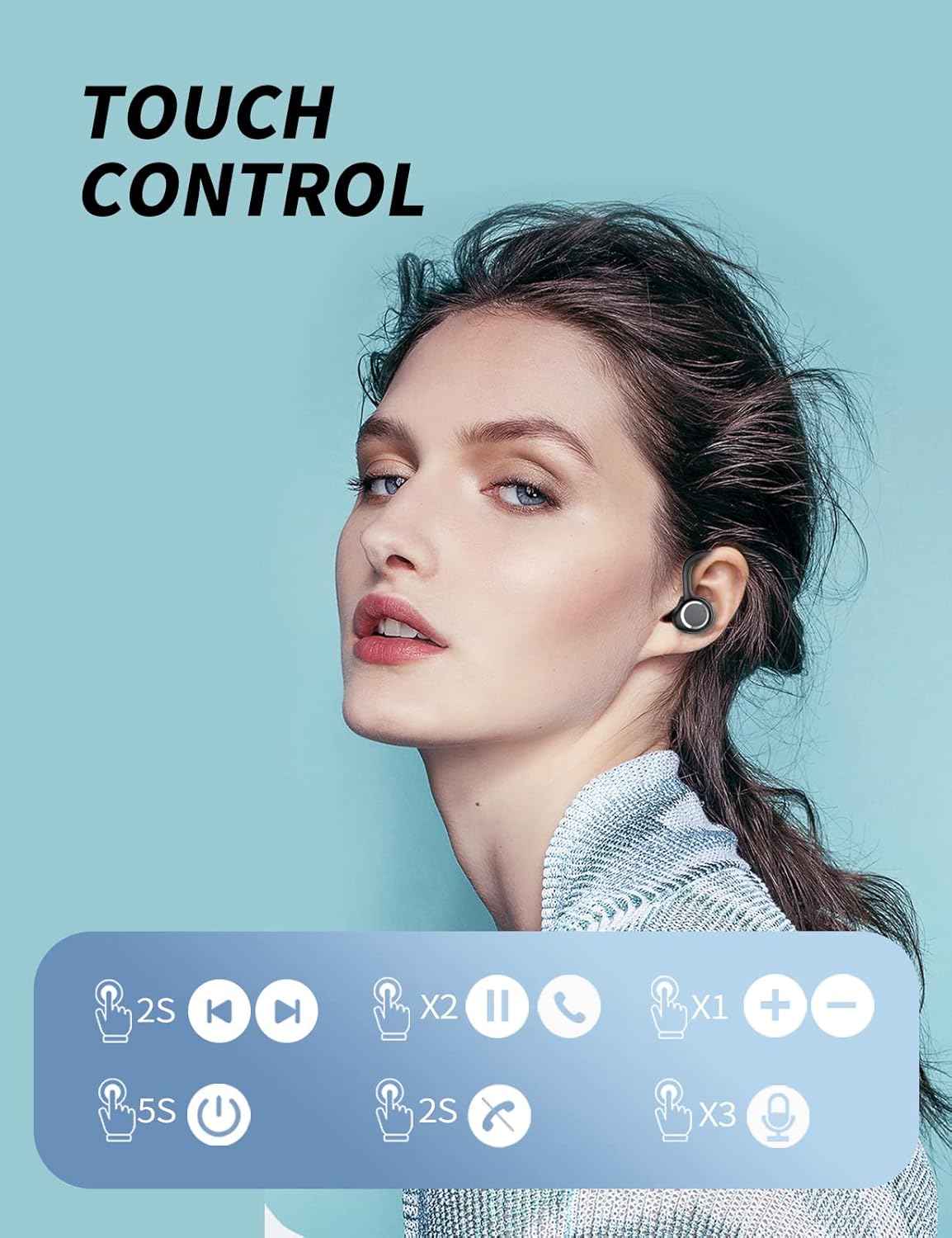
Image: A visual guide detailing the various touch control gestures on the earbuds for functions like playing music, managing calls, and adjusting volume.
Ụdị ejiji
The earbuds are ergonomically designed for comfort and stability, especially during sports. They come with detachable earhooks and multiple ear tip sizes to ensure a secure fit.

Image: A demonstration of the detachable earhook feature, showing how the earbuds can be worn with or without the earhooks for different activities and preferences.

Image: A comprehensive visual showing various wearing styles and included accessories like replacement ear tips and earhooks, emphasizing comfort and adaptability.
Video ngosi ngwaahịa
Watch this video for a detailed demonstration of the FAMOO Wireless Earbuds, including setup, features, and usage tips.
Video: An official product video from the seller demonstrating the features and functionality of the FAMOO Wireless Earbuds, including pairing, charging, and touch controls.
Nlekọta
IPX7 Ngosi mkpuchi mmiri
The earbuds are equipped with an IPX7 waterproof rating, meaning they can resist daily splashes of water, sweat, and rain. This makes them ideal for sports and travel. However, they are not designed for swimming or prolonged submersion. Ensure the earbuds are dry before placing them back into the charging case to prevent damage.

Image: A woman running, illustrating the earbuds' suitability for sports and their IPX7 waterproof rating, which protects against sweat and rain.
Nchọpụta nsogbu
- Igwe ntị anaghị ejikọta: Ensure both earbuds are charged. Place them back in the case, close it, then open it again. Check your device's Bluetooth settings and try re-pairing.
- Naanị otu earbud na-arụ ọrụ: Place both earbuds back in the charging case. Ensure they are properly seated and charging. Take them out simultaneously to allow them to connect to each other before connecting to your device.
- Olu dị ala ma ọ bụ ogo ụda adịghị mma: Ensure the earbuds are fully charged. Adjust the volume on both your device and using the earbud touch controls. Try different sizes of ear tips to ensure a snug fit for optimal sound isolation.
- Nchaji anaghị akwụ ụgwọ: Ensure the USB Type-C cable is securely connected to both the case and the power source. Try a different charging cable or power adapter.
Nkọwapụta
| Njirimara | Nkọwa |
|---|---|
| Aha Nlereanya | S17 |
| Teknụzụ Njikọta | Ikuku (Bluetooth 5.1) |
| Ọkwọ ụgbọ ala | 10mm Graphene Audio Driver |
| Oge egwuregwu (Earbuds) | Ruo awa 6 (ụgwọ otu) |
| ngụkọta oge egwuregwu (ya na ikpe) | Ruo awa iri abụọ |
| Nchaji Interface | USB Type-C (Fast Charging) |
| Mmiri Nguzogide | IPX7 enweghị mmiri |
| Usoro njikwa | Njikwa aka |
| Njikwa mkpọtụ | Sound Isolation, CVC 8.0 |
| Ntinye ntị | Na Ntị |
| Ụdị Ihe | Na Ntị |
Akwụkwọ ikike na nkwado
FAMOO products are manufactured to the highest quality standards. For warranty information, technical support, or any inquiries regarding your FAMOO Wireless Earbuds, please refer to the contact information provided on the product packaging or visit the official FAMOO websaịtị. Biko dowe ihe akaebe nke ịzụrụ ihe maka akwụkwọ ikike.
Ask a question about this manual
Ask about setup, troubleshooting, compatibility, parts, safety, or missing instructions. Manuals+ will review the question and use this page’s manual context to help answer it.