
1. Okwu mmalite
This manual provides detailed instructions for the operation and maintenance of your Jectse Bluetooth Speaker Alarm Clock. Please read this manual thoroughly before using the product to ensure proper function and longevity.
The Jectse Bluetooth Speaker Alarm Clock is a multi-functional device featuring a digital clock, dual alarm capabilities, an LED mirror display, FM radio, and Bluetooth connectivity for audio playback. It also supports music playback via a memory card.
2. Ngwaahịa gafereview
2.1. Atụmatụ igodo
- Njikọ Bluetooth 5.0: Wirelessly stream audio from compatible devices.
- Elekere abụọ oti mkpu: Tọọ mkpu abụọ nọọrọ onwe ha maka oge teta dị iche iche.
- LED Mirror Display: Clear digital time display that also functions as a mirror.
- Igwe Redio: Digitally tuned FM radio (87.5MHz-108MHz) for news, music, and weather.
- Ịkpọghachi kaadị ebe nchekwa: Supports music playback from a memory card (up to 32GB, not included).
- Batrị enwere ike ịchaji n'ime ya: 1600mAh lithium battery for portable use.
- Nhazi kọmpat: Product dimensions are approximately 116 x 51 x 33mm (4.6 x 2 x 1.3 inches).
2.2. Ihe ngwugwu
- 1 x Jectse Alarm Clock Speaker
- 1 x Micro USB eriri USB
- Akwụkwọ ntuziaka onye ọrụ 1 x (akwụkwọ a)
2.3. Ihe osise
Rụtụ aka na foto dị n'okpuru maka njedebeview of the device's components and controls.
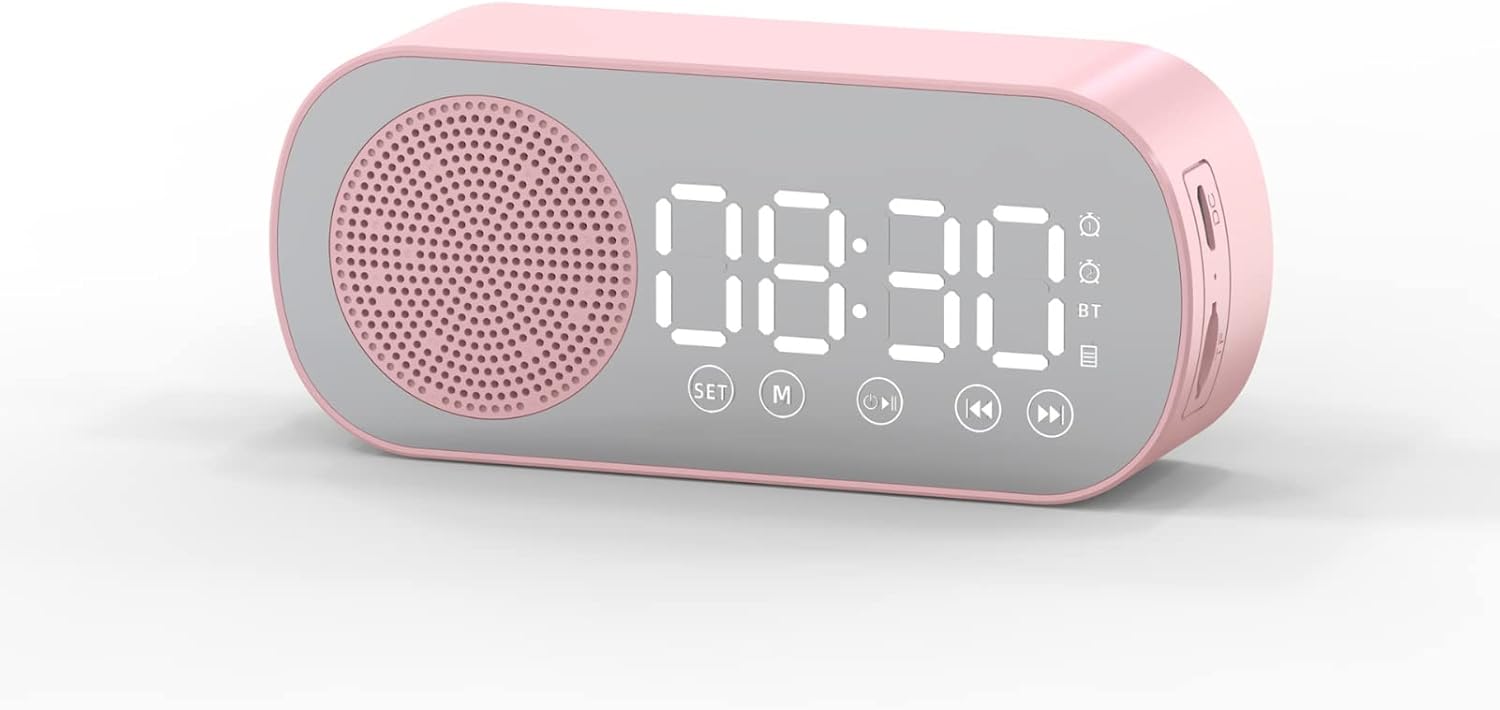
Foto 1: N'ihu view of the Jectse Bluetooth Speaker Alarm Clock, showing the speaker grille, LED display, and control buttons (SET, M, Play/Pause, Previous, Next).

Foto 2: Akụkụ view of the alarm clock with dimensions: 116mm (4.6in) length, 51mm (2in) height, and 33mm (1.3in) depth.
3. Nhazi
3.1. Nchaji mbụ
Before first use, fully charge the device. Connect the provided Micro USB charging cable to the charging port on the side of the alarm clock and the other end to a standard USB power adapter (not included).

Foto 3: The alarm clock and its Micro USB charging cable.
The battery indicator on the LED display will show charging status. A full charge typically takes a few hours.
4. Ntuziaka ọrụ
4.1. Gbanyụọ / gbanyụọ
Pịa ma jide Power/Mode (M) bọtịnụ ka ịgbanwuo ma ọ bụ gbanyụọ ngwaọrụ.
4.2. Isetịpụ Oge
- Na ọnọdụ elekere, pịa ma jide SET button until the hour digits begin to flash.
- Jiri ihe Previous (◀◀) na Next (▶▶) bọtịnụ iji dozie elekere.
- Pịa SET button again to switch to minute adjustment. Use the Previous (◀◀) na Next (▶▶) bọtịnụ iji dozie nkeji.
- Pịa SET button a third time to confirm and exit time setting mode.
4.3. Setting Alarms (Dual Alarm Function)
The device supports two independent alarms. Follow these steps for each alarm:

Foto 4: The alarm clock illustrating the dual alarm feature with two distinct alarm settings.
- In clock mode, short press the SET button once to enter Alarm 1 setting mode. The alarm icon and hour digits will flash.
- Jiri ihe Previous (◀◀) na Next (▶▶) bọtịnụ iji dozie elekere.
- Pịa SET again to adjust minutes. Use Previous (◀◀) na Next (▶▶) imeghari.
- Pịa SET a third time to select the alarm sound (e.g., buzzer, FM radio). Use Previous (◀◀) na Next (▶▶) ka okirikiri site nhọrọ.
- Pịa SET a fourth time to confirm Alarm 1 settings.
- To set Alarm 2, repeat steps 1-5, but short press the SET button twice to enter Alarm 2 setting mode.
- Iji mee ka/gbanyụọ mkpu, pịa obere oge SET button until the desired alarm icon flashes, then press the Play/Pause (▶▌▌) bọtịnụ iji gbanye ma ọ bụ gbanyụọ ya.
Note: The alarm volume is independent of the main speaker volume and may be fixed or adjustable within the alarm settings. If the alarm sound is too loud, check if there's an option to adjust it during the alarm setup process.
4.4. Ọnọdụ Bluetooth
- Pịa Power/Mode (M) button repeatedly until "BT" appears on the display, indicating Bluetooth mode.
- On your mobile device, enable Bluetooth and search for "Jectse Speaker" or a similar device name.
- Họrọ ngwaọrụ ị ga-ejikọ. Ụda nkwenye ga-egosi njikọ na-aga nke ọma.
- You can now play audio from your device through the speaker. Use the Play/Pause (▶▌▌), Previous (◀◀), na Next (▶▶) bọtịnụ iji jikwaa ịkpọghachi.
4.5. Ọnọdụ redio FM

Foto 5: The alarm clock functioning as an FM radio on a bedside table.
- Pịa Power/Mode (M) bọtịnụ ugboro ugboro ruo mgbe "FM" pụtara na ngosi.
- Pịa Play/Pause (▶▌▌) bọtịnụ ka inyocha na-akpaghị aka ma chekwaa ọdụ FM dị.
- Jiri ihe Previous (◀◀) na Next (▶▶) bọtịnụ ka ịgbanwee n'etiti ọdụ ndị echekwara.
- For better reception, ensure the device is not obstructed and try repositioning it.
4.6. Mkpọghachi Kaadị Ebe Nchekwa
Insert a memory card (Micro SD card, up to 32GB, not included) into the designated slot on the device. The device will automatically switch to memory card mode and begin playing audio files. Jiri ihe Play/Pause (▶▌▌), Previous (◀◀), na Next (▶▶) bọtịnụ iji jikwaa ịkpọghachi.
4.7. Mgbanwe olu
In any audio playback mode (Bluetooth, FM, Memory Card), press and hold the Previous (◀◀) button to decrease volume or the Next (▶▶) bọtịnụ ka iwelie olu.
4.8. LED Mirror Display

Foto 6: The alarm clock's LED display also functions as a mirror.
The front panel of the device features an LED display that shows the time and other information. When not actively displaying information, the surface can be used as a mirror.

Foto 7: The LED display showing multiple functions and indicators, including time, battery level, and Bluetooth status.
5. Nlekọta
- Nhicha: Jiri akwa dị nro dị nro hichaa ngwaọrụ ahụ. Ejila ihe nchacha abrasive ma ọ bụ ihe mgbaze.
- Nchekwa: Chekwaa ngwaọrụ ahụ n'ebe dị jụụ, kpọrọ nkụ na-adịghị na ìhè anyanwụ kpọmkwem na oke okpomọkụ.
- Nlekọta batrị: Ka ịgbatị ndụ batrị ogologo, zere ịchaji batrị ugboro ugboro. Na-anya ngwaọrụ mgbe niile, ọbụlagodi na ọ naghị eji ya ogologo oge.
- Mkpughe mmiri: Ngwaọrụ a anaghị amị mmiri. Zere ka mmiri ghara iru gị ala ma ọ bụ oke iru mmiri.
6. Nchọpụta nsogbu
| Nsogbu | Ihe nwere ike ime | Ngwọta |
|---|---|---|
| Ngwaọrụ anaghị agbanwu ọkụ. | Batrị dị ala. | Jiri eriri USB chajie ngwaọrụ ahụ. |
| Enweghị ike ijikọ site na Bluetooth. | Bluetooth not enabled on device or phone; device not in pairing mode. | Ensure the alarm clock is in Bluetooth mode ("BT" displayed) and your phone's Bluetooth is on and searching. Move devices closer. |
| Nnabata redio FM adịghị mma. | Mgbaàmà adịghị ike; nnyonye anya. | Reposition the device. Avoid placing near other electronic devices that may cause interference. |
| Alarm is too loud/quiet. | Alarm volume not adjusted during setup. | Re-enter alarm setting mode and check if there is an option to adjust alarm volume. Some models may have a fixed alarm volume. |
| Ngosipụta siri ike ịgụ. | Lighting conditions; display brightness setting. | Adjust ambient lighting. Check if there is a display brightness setting (refer to specific model instructions if available, not detailed in general description). |
7. Nkọwapụta
| Njirimara | Nkọwa |
|---|---|
| Nlereanya | Jectsesb81t679n01182 |
| Ihe onwunwe | ABS (Acrylonitrile Butadiene Styrene) |
| Nha ngwaahịa | Ihe ruru. 116 x 51 x 33mm (4.6 x 2 x 1.3 inch) |
| Ụdị batrị | Lithium Battery (Built-in) |
| Ike batrị | 1600mAh |
| Ụdị Bluetooth | 5.0 |
| Kpọọ Moddị | Bluetooth, Memory Card (Max 32G, not included) |
| Ụdị elekere | Digital Clock, Dual Alarm Clock, FM Radio |
| Frequency FM Igwefoto | 87.5MHz-108MHz |
| Teknụzụ Njikọta | Bluetooth, USB |
| Ibu Ibu | 5.3 ounces |
8. Akwụkwọ ikike na nkwado
Maka ozi gbasara akwụkwọ ikike na nkwado ndị ahịa, biko lee akwụkwọ enyere n'oge ịzụrụ ihe ma ọ bụ kpọtụrụ onye na-ere ahịa gị. Debe risit ịzụrụ ihe gị dị ka ihe akaebe nke ịzụrụ ihe.