
1. Okwu mmalite
The Elcometer 311 FNF Model T is an advanced automotive refinish paint meter designed for fast and accurate measurement of paint thickness on both steel and aluminum substrates. This robust device provides reliable readings in both mils and microns, making it an essential tool for automotive professionals and enthusiasts. Its ergonomic design, durable construction, and wireless connectivity enhance user experience and data management.
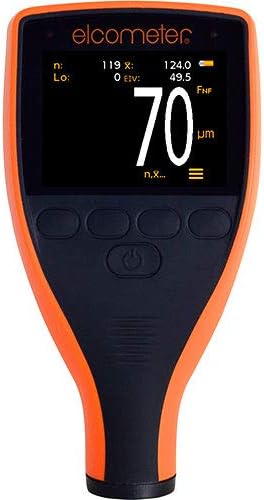
This image shows the Elcometer 311 FNF Model T paint meter from the front. The device has an orange and black casing with a digital display showing a measurement of 70 micrometers. Below the screen are several control buttons.
Akụkụ ndị bụ isi:
- Fast Reading Rate: Achieves 60+ readings per minute, significantly reducing inspection times.
- Dual Unit Measurement: Easily switch between mils and microns with a push of a button.
- Nhazi siri ike: Dust and waterproof equivalent to IP64, suitable for various environmental conditions.
- Durable Display: Scratch, solvent, and water-resistant color display for enhanced protection.
- Nkasi obi ergonomic: Designed for maximum comfort during extended use.
- Automatic Display Rotation: Ensures readability on horizontal and vertical surfaces.
- Ihe mmetụta ọkụ Ambient: Adjusts display brightness for optimal visibility in any lighting.
- Njikọ Bluetooth: Wirelessly connect to inspection apps or ElcoMaster for seamless reporting.
2. Nhazi
2.1 Nwepu
Carefully remove the Elcometer 311 FNF Model T from its packaging. Inspect the device for any signs of damage. Retain the packaging for future storage or transport.
2.2 Ntinye batrị
The Elcometer 311 requires 2 AA batteries, which are included. To install:
- Chọta mkpuchi nke batrị n'azụ ngwaọrụ.
- Dụgharịa ma ọ bụ kpọchie mkpuchi ka imepee.
- Tinye batrị AA atọ ahụ, hụ na polarity ziri ezi (+/-) dịka egosiri n'ime ngalaba ahụ.
- Dochie mkpuchi nke batrị batrị nke ọma.
2.3 Ike mbido
Press and hold the power button (usually located centrally below the screen) until the display illuminates. The device will perform a brief self-test before entering measurement mode.
2.4 Njikọ Bluetooth
The Elcometer 311 features Bluetooth connectivity for data transfer to compatible inspection apps or ElcoMaster software. To connect:
- Gbaa mbọ hụ na agbanyere Bluetooth na ama ma ọ bụ mbadamba gị.
- Open the ElcoMaster app or your preferred inspection application.
- Follow the app's instructions to search for and pair with the Elcometer 311. The meter's Bluetooth indicator will typically illuminate when connected.

This diagram shows the Elcometer 311 paint meter on the left, with a measurement of 120 micrometers. To its right, a smartphone is displayed, also showing a measurement of 120.0 micrometers, demonstrating the meter's Bluetooth connectivity and data transfer capability to a mobile device.
3. Ntuziaka ọrụ
3.1 Inyocha ihe
To obtain an accurate paint thickness reading:
- Jide n'aka na mita ahụ na-agba ọkụ.
- Place the probe of the Elcometer 311 firmly and flatly onto the painted surface you wish to measure.
- Hold the meter steady. The reading will appear almost instantly on the display.
- Lift the meter from the surface to prepare for the next reading. The fast reading rate allows for quick successive measurements.


Left: A hand is shown holding the Elcometer 311 paint meter against the silver painted surface of a car, near the headlight. The meter's display shows a reading of 5.5, indicating a paint thickness measurement. Right: This image features a hand holding the Elcometer 311 paint meter against a dark, possibly black, painted surface. The meter's screen clearly shows a reading of 4.5 mils, indicating the paint thickness.
3.2 Changing Measurement Units (Mils/Microns)
The Elcometer 311 allows you to switch between mils and microns. Refer to your device's specific button layout for the 'Units' or 'Mode' button. Typically, a short press of this button will toggle between the two measurement units.
3.3 Ịghọta Ọgụgụ
The display will show the measured paint thickness. The unit (mils or µm/microns) will be indicated next to the numerical value. The automatic rotating display ensures the reading is always upright, regardless of the meter's orientation. The ambient light sensor adjusts screen brightness for optimal visibility.
The device is designed to operate reliably in both wet and dry conditions due to its IP64 dust and waterproof rating.
4. Nlekọta
4.1 Nhicha
The Elcometer 311 features a scratch, solvent, and water-resistant display. To clean the device:
- Jiri nwayọ hichaa mpụta, damp akwa .
- For stubborn marks, use a mild, non-abrasive cleaning solution.
- Avoid using harsh chemicals or abrasive materials that could damage the casing ma ọ bụ ngosipụta.
- Ensure the probe tip is clean and free of debris for accurate measurements.
4.2 nnọchi batrị
When the battery indicator on the display shows low power, replace the AA batteries as described in Section 2.2. Always use fresh, high-quality batteries.
4.3 Nchekwa
Store the Elcometer 311 in a cool, dry place away from direct sunlight and extreme temperatures. If storing for extended periods, it is recommended to remove the batteries to prevent leakage.
5. Nchọpụta nsogbu
This section addresses common issues you might encounter with your Elcometer 311.
| Nsogbu | Ihe nwere ike ime | Ngwọta |
|---|---|---|
| Mita ahụ anaghị agba ọkụ. | Batrị nwụrụ anwụ ma ọ bụ arụnyere na ezighi ezi. | Dochie batrị, hụ na ọ dị mma iji ya. |
| Ọgụgụ na-ezighi ezi. | Dirty probe tip; incorrect calibration; surface irregularities. | Clean probe tip; perform calibration (refer to full manual for calibration steps); ensure surface is clean and flat. |
| Nsogbu njikọ Bluetooth. | Bluetooth not enabled on device/phone; meter out of range; app issues. | Ensure Bluetooth is on for both devices; move meter closer to phone/tablet; restart app or meter. |
| Ngosipụta adịchaghị njọ ma ọ bụ enweghị ọgụgụ. | Low battery; extreme lighting conditions. | Replace batteries; allow ambient light sensor to adjust, or move to a more suitable lighting environment. |
6. Nkọwapụta
Detailed specifications for the Elcometer 311 FNF Model T:
| Nkọwapụta | Nkọwa |
|---|---|
| Onye nrụpụta | Igwe elekere |
| Ụdị | Igwe elekere |
| Ibu Ibu | 5.5 ounce (156 grams) |
| Akụkụ ngwaahịa | 5.55 x 2.87 x 1.46 sentimita (14.1 x 7.3 x 3.7 cm) |
| Nọmba Nlereanya ihe | 311 |
| Nọmba nke onye nrụpụta | A311CFNFTI |
| Batrị | 2 AA batrị achọrọ (gụnyere) |
| Atụmatụ pụrụ iche | Waterproof (IP64 equivalent) |
| Ụbọchị mbụ dị | Septemba 7, 2015 |
7. Akwụkwọ ikike na nkwado
7.1 Ozi akwụkwọ ikike
Specific warranty terms for the Elcometer 311 FNF Model T are typically provided with the product at the time of purchase or can be found on the official Elcometer website. Please refer to your product documentation or visit the manufacturer's website for detailed warranty coverage and registration information.
7.2 Nkwado ndị ahịa
For technical assistance, troubleshooting beyond this manual, or service inquiries, please contact Elcometer customer support directly. You can find contact information and additional resources on the official Elcometer websaịtị:
You may also visit the Elcometer store on Amazon for product information and related accessories: Elcometer Amazon Store