
Okwu mmalite
This manual provides detailed instructions for the VEDINDUST HDMI ARC Digital to Analog Audio Converter. This device is designed to extract audio from an HDMI ARC-enabled television and convert digital audio signals (Toslink/Coaxial) into analog L/R stereo or 3.5mm jack outputs. It supports various audio formats and offers multiple input options for versatile connectivity.
Please read this manual carefully before using the product to ensure proper operation and to maximize its performance.
Ihe ngwugwu
Biko chọpụta na ihe niile dị na ngwugwu:
- 1x VEDINDUST HDMI ARC Digital to Analog Audio Converter
- 1 x eriri USB
- 1 x HDMI USB
- 1x Akwụkwọ ntuziaka onye ọrụ

Ngwaahịa gafereview
The VEDINDUST HDMI ARC Digital to Analog Audio Converter is a compact device designed to manage various audio signals. It features multiple input and output ports for flexible audio routing.
Nhazi ngwaọrụ
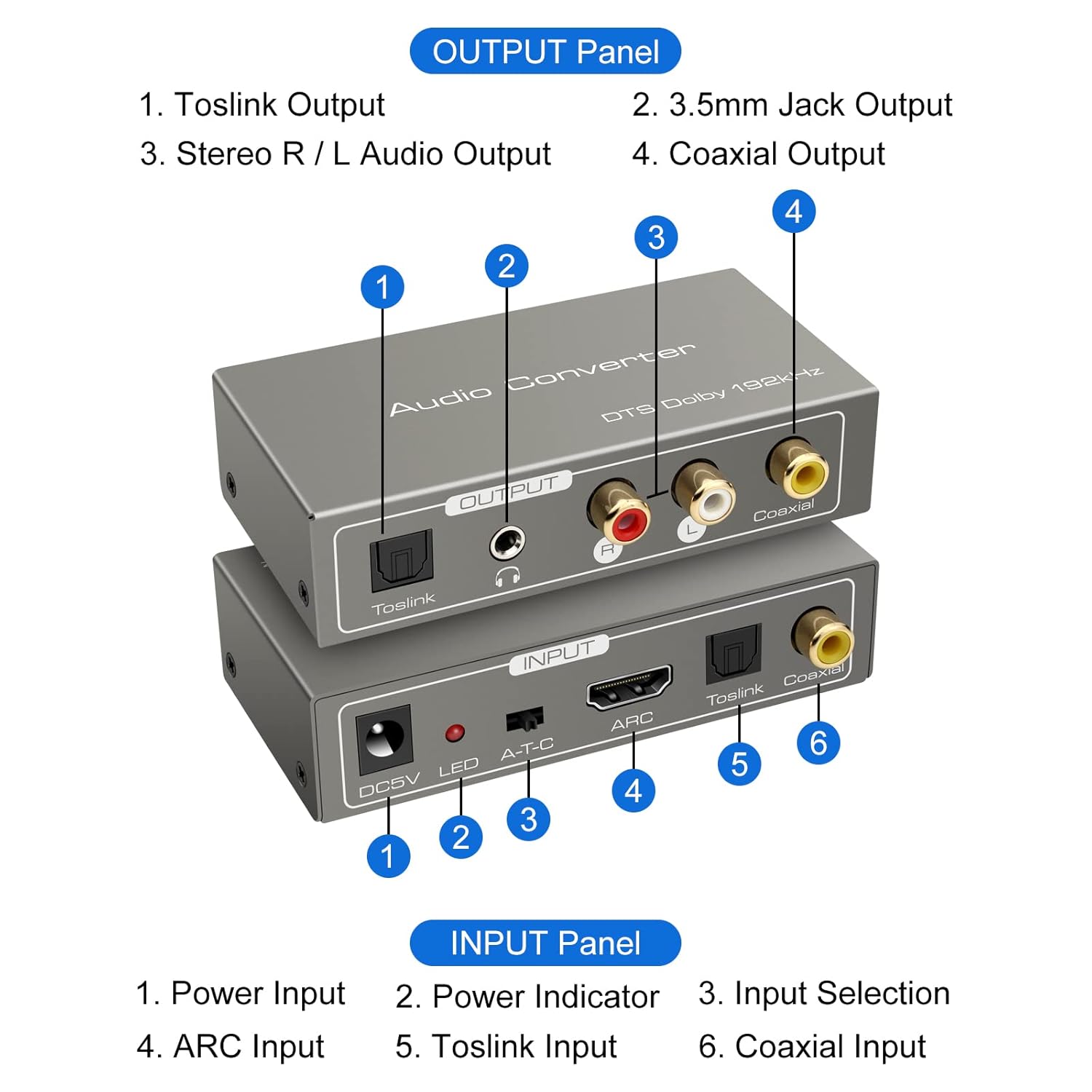
Ogwe ntinye:
- DC5V Power Input: Connect the provided USB power cable here.
- Ihe ngosi LED: Na-enwu mgbe ngwaọrụ ahụ gbanyere ọkụ.
- A-T-C Input Selection Switch: Used to select the audio input mode (A for ARC, T for Toslink, C for Coaxial).
- Ntinye ARC: Connect an HDMI cable from an ARC-compatible TV's HDMI ARC port.
- Ntinye Toslink: Connect an optical fiber cable from your audio source.
- Ntinye Coaxial: Connect a coaxial cable from your audio source.
Output Panel:
- Mmepụta Toslink: Connect to an optical input on an ampigwe ọkụ ma ọ bụ sistemụ ụda.
- 3.5mm Jack Output: Connect to headphones or an auxiliary input on an audio device.
- Stereo R/L Audio Output: Connect RCA cables to the L/R analog inputs of an amplifier ma ọ bụ ọkà okwu.
- Mmepụta Coaxial: Connect to a coaxial input on an ampigwe ọkụ ma ọ bụ sistemụ ụda.
Ntuziaka nhazi
Follow these steps to correctly set up your VEDINDUST audio converter:
1. Njikọ ike
- Connect the provided USB power cable to the DC5V input port on the converter.
- Plug the other end of the USB power cable into a 5V USB power adapter (not included) or a USB port on your TV/device.
- Ensure the LED indicator on the converter illuminates, indicating it is powered on.
2. Njikọ Ntinye Audio
Choose one of the following input methods based on your audio source:

ARC Input Mode:
- Connect an HDMI cable from your ARC-compatible television's HDMI ARC output port to the ARC input port on the converter.
- Ensure your television's HDMI port supports ARC functionality.
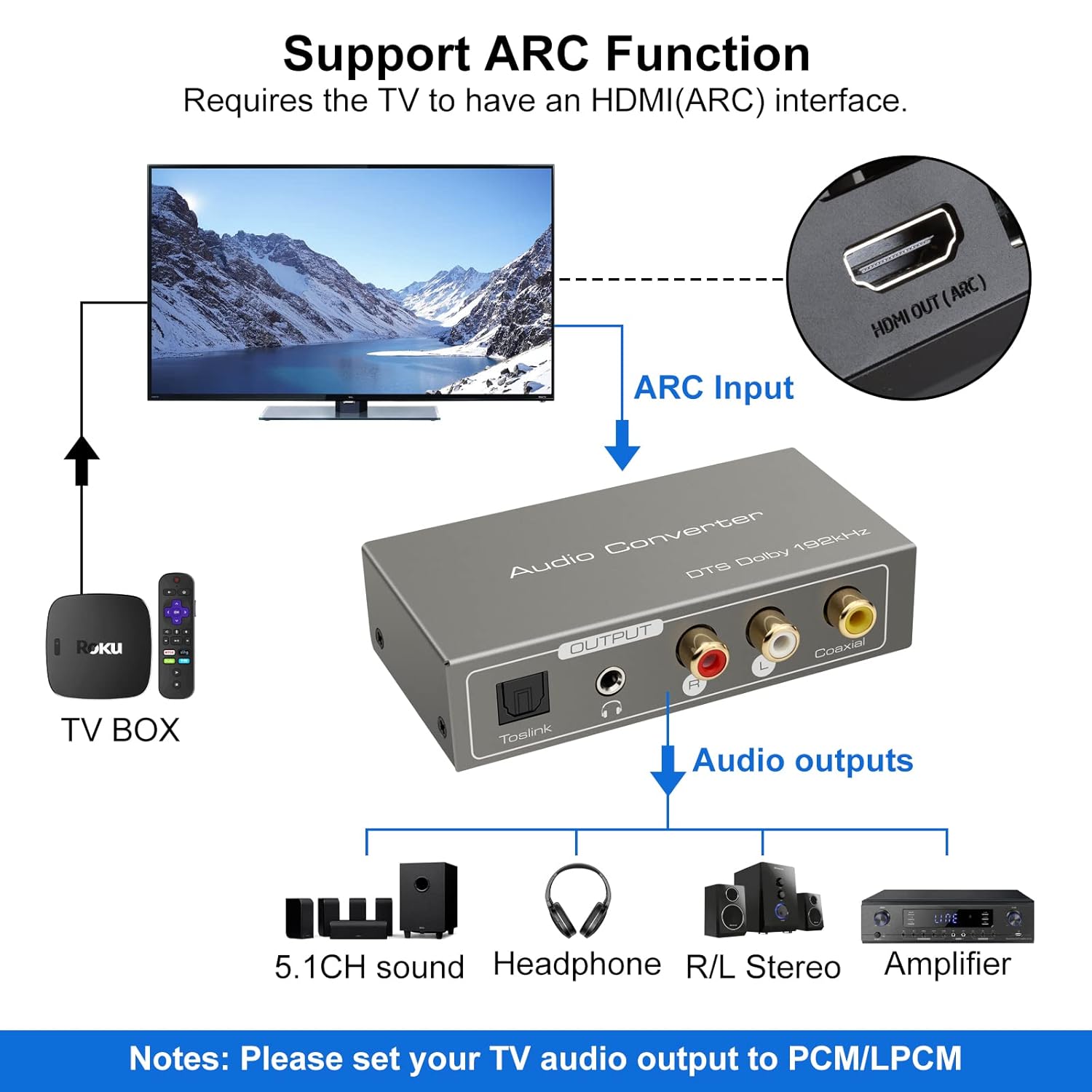

TOSLink Input Mode:
- Connect an optical fiber cable from your audio source (e.g., game console, Blu-ray player) to the Toslink input port on the converter.
Coaxial Input Mode:
- Connect a coaxial cable from your audio source to the Coaxial input port on the converter.
3. Njikọ Mbupụ Ọdịyo
Connect the converter's output ports to your desired audio receiving devices:
- For Digital Audio: Connect an optical fiber cable to the Toslink Output or a coaxial cable to the Coaxial Output, then connect to your amplifier, soundbar, or home cinema system.
- For Analog Audio: Connect RCA L/R cables to the Stereo R/L Audio Output, or a 3.5mm audio cable to the 3.5mm Jack Output. Connect these to your amplifier, speakers, or headphones.
Ntuziaka ọrụ
1. Input Mode Selection
Use the A-T-C switch on the input panel to select the active audio input:
- Tọọ mgbanwe ahụ na 'A' for HDMI ARC input.
- Tọọ mgbanwe ahụ na 'T' for TOSLink optical input.
- Tọọ mgbanwe ahụ na 'C' for Coaxial input.

2. Audio Format Configuration
For optimal performance and to ensure audio output, especially when using the R/L or 3.5mm jack outputs, it is crucial to configure the audio format on your source device (e.g., TV, game console).
- Ihe dị mkpa: If you experience no sound output, set the audio format of your signal source (e.g., TV audio settings) to PCM or LPCM.
- The converter supports DTS / DSD / LPCM formats for Toslink/Coaxial output. However, for R/L or 3.5mm jack outputs, only LPCM/PCM audio format input is supported.
Nchọpụta nsogbu
If you encounter issues while using the VEDINDUST HDMI ARC Digital to Analog Audio Converter, please refer to the following common problems and solutions:
-
Enweghị mpụta ụda:
- Ensure the converter is properly powered via the DC5V input and the LED indicator is on.
- Verify that the A-T-C input selection switch is set to the correct input mode (A for ARC, T for Toslink, C for Coaxial).
- Check the audio settings on your source device (TV, game console, etc.). The audio output format must be set to PCM or LPCM, especially for analog (RCA L/R or 3.5mm) outputs.
- Confirm that all audio cables (HDMI, optical, coaxial, RCA, 3.5mm) are securely connected to both the converter and your audio devices.
- Test with different audio cables if possible, to rule out faulty cables.
-
ARC Function Not Working:
- Ensure your television's HDMI port specifically supports Audio Return Channel (ARC). Not all HDMI ports are ARC-enabled.
- Check your TV's audio settings to ensure ARC is enabled and configured correctly.
- Try restarting both your TV and the converter.
-
Ogo ọdịyo adịghị mma:
- Ensure all connections are tight and free from interference.
- Verify that the audio format from your source is compatible with the converter's outputs (LPCM/PCM for analog outputs).
- Avoid using excessively long or low-quality cables, which can degrade signal integrity.
Nkọwa nka nka
| Akụkụ ngwaahịa (L x W x H) | 9.8 x 5 x 0.1 cm |
| Ibu | 250 grams |
| Onye nrụpụta | VEDINDUST |
| Nọmba nlereanya | 20220119 |
| Mba onye si | China |
| Agba | Agba ntụ |
| Ụdị njikọ | HDMI, 3.5mm Jack, Toslink, Coaxial |
| Ngwa dakọtara | Game Console, Blu-ray Player, Television, DVD Player, Satellite Receiver, Apple TV, HDTV, Soundbar, Amplifier, Speakers, Home Cinema System, AV Ampna -emegharị ihe |
| Ụdị USB | HDMI, Optical, Coaxial, Auxiliary |
| Ọnụọgụ nke ọdụ ụgbọ mmiri | 5 |
| UPC | 798610310694 |
| Akwadoro Sampling Frequencies | 32 KHz, 44.1 KHz, 48 KHz, 96 KHz, 192 KHz (24-bit) |
| Supported Audio Formats (Digital Output) | DTS, Dolby-AC3, DSD, LPCM |
| Supported Audio Formats (Analog Output) | LPCM, PCM |
Nlekọta na nlekọta
To ensure the longevity and optimal performance of your VEDINDUST audio converter, please follow these care guidelines:
- Nhicha: Use a soft, dry cloth to clean the device. Do not use liquid cleaners or aerosol sprays, as they may damage the unit.
- Nchekwa: Chekwaa ngwaọrụ ahụ n'ebe dị jụụ, kpọrọ nkụ na-adịghị na ìhè anyanwụ kpọmkwem na oke okpomọkụ.
- Ijikwa: Zere idobe ma ọ bụ idobe ngwaọrụ ahụ na mmetụta siri ike.
- gburugburu: Keep the device away from water, moisture, and high humidity environments.
Akwụkwọ ikike na nkwado ndị ahịa
For warranty information or if you require further assistance with your VEDINDUST HDMI ARC Digital to Analog Audio Converter, please contact VEDINDUST customer support through the retailer where you purchased the product or refer to the contact information provided with your purchase documentation.
Biko dowe akwụkwọ ikike ịzụrụ ihe ọ bụla.