
TOUCARE T9S
TOUCARE T9S Motorcycle Bluetooth Intercom User Manual
Model: T9S | Brand: TOUCARE
Okwu mmalite
The TOUCARE T9S is a high-performance Bluetooth intercom system designed for motorcycle riders. It enables clear communication between up to four riders, offers music sharing, and integrates with your mobile phone for calls and GPS navigation. With advanced noise cancellation and a robust waterproof design, the T9S ensures a reliable and enjoyable riding experience in various conditions.
Atụmatụ igodo
- 1200M Maximum Distance: Equipped with Bluetooth 5.0 for high compatibility and stability, allowing group communication within a 1200m intercom range.
- Support 4-Riders Intercom: Full-duplex communication for up to 4 riders simultaneously. Universal pairing function ensures compatibility with most Bluetooth headsets and mobile phones.
- Ịkekọrịta egwu: Share music with another rider, enjoy Hi-Fi stereo music, FM radio, or GPS voice guidance.
- Noise Reduction and IP67 Waterproof: DSP and CVC advanced noise reduction technology for clear communication up to 120km/h. IP67 waterproof rating for all-weather use.
- Ultra-Long Standby Battery: 800mAh rechargeable battery provides up to a week of standby time and 15 hours of working time.

Image: The T9S system supports communication for up to four riders over a distance of 1200 meters.

Image: CVC & DSP Noise Cancellation Technology ensures clear and smooth communication even at high speeds.

Image: The IP67 waterproof rating makes the T9S suitable for use in all weather conditions, including water sports.

Image: The T9S offers extended endurance times for talking, music playback, and standby, supporting long-distance travel.
Ihe ngwugwu
Each TOUCARE T9S package includes the following components:
- 1 x Bluetooth Intercom Unit
- 1 x Hi-Fi Speaker Set
- Igwe okwu Boom 1 x
- Igwe okwu bọtịnụ 1 x
- 1 x eriri USB
- 1 x Nkwụnye Aka
- 1 x clamp Efere
- 1 x Allen Wrench

Image: All components included in the TOUCARE T9S package, ensuring you have everything needed for installation and use.
Ngwaahịa gafereview na bọtịnụ Ọrụ
Familiarize yourself with the buttons and indicators on your T9S intercom unit:
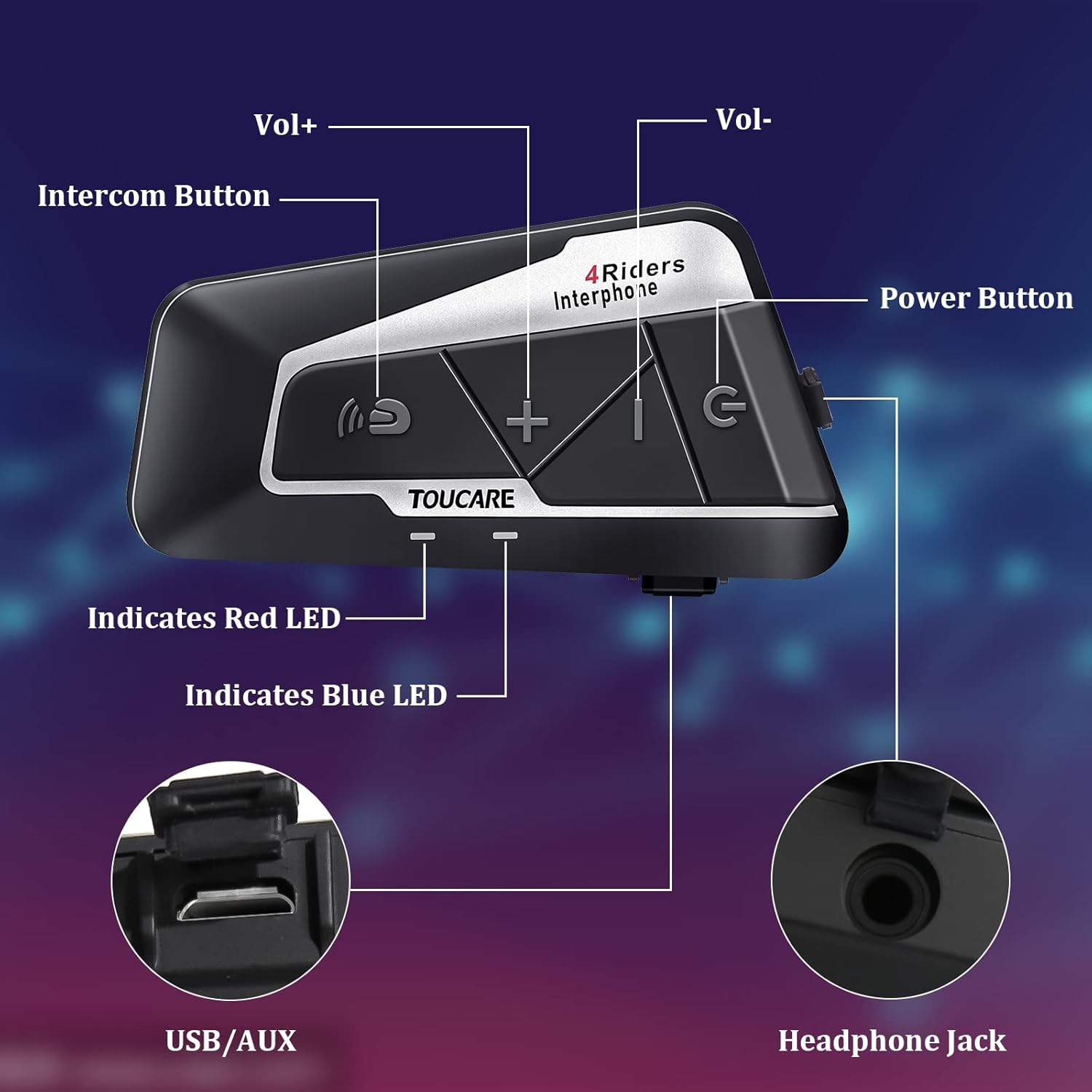
Image: Detailed diagram of the T9S unit, highlighting the location and labels of each button and port.
Power On/Off Button (G)
- Gbanyụọ/ Gbanyụọ: Pịa ma jide ka ịgbanwuo ma ọ bụ gbanyụọ ngwaọrụ.
- Paired Mobile Phone: Short press to connect/disconnect with a paired mobile phone.
- Nkwanye ike: Short press to hear battery level prompt.
- Hang up Bluetooth Intercom: Short press during an intercom call to end it.
- Kpọọ egwu/kwụsịtụ: Obere pịa ka ịkpọọ ma ọ bụ kwụsịtụ egwu.
- Call Answering/Third Party Answer/End/Reject: Manage phone calls.
Bluetooth Intercom Button (Intercom Icon)
- Mpịakọta +: Obere pịa ka iwelie olu.
- Abụ ikpeazụ: Pịa ogologo oge iji gaa na egwu gara aga.
- FM Turn Up: Short press during FM mode to tune up.
- FM Turn On/Off: Long press to turn FM radio on or off.
- Mgbanwe ọnụọgụgụ ikpeazụ: Double press to redial the last dialed number.
Volume - Button (-)
- Mpịakọta -: Obere pịa ka ibelata olu.
- Abụ na-esote: Pịa ogologo ka ịga na egwu na-esote.
- FM Turn Down: Short press during FM mode to tune down.
- FM Turn On/Off: Long press to turn FM radio on or off.
- Dpị olu: Double press to activate voice dialing (if supported by your phone).

Image: The T9S features ultra-large buttons, designed for easy operation even while wearing gloves.
Ntuziaka nwụnye
Uzo nwụnye nke edobere
Follow these steps to securely install the T9S intercom unit on your helmet:
- Locate and Clean: Identify a suitable flat area on the left side of your helmet for mounting. Ensure the surface is clean and dry.
- Prepare Adhesive: Peel off the protective film from the 3M adhesive on the back of the mounting bracket.
- Tinye nrụgide: Firmly press the mounting bracket onto the chosen location on your helmet. Apply consistent pressure for several seconds to ensure a strong bond.
- Ngalaba echekwara: Slide the T9S intercom unit onto the mounted bracket until it clicks securely into place.
- Install Speakers and Microphone: Route the speaker and microphone wires inside the helmet lining. Position the speakers inside the ear pockets and the microphone near your mouth for optimal audio.
Ntuziaka ọrụ
Ejikọ ekwentị mkpanaaka
- Ensure the T9S is powered off.
- Press and hold the Power On/Off button until the LED indicator flashes red and blue alternately, indicating pairing mode.
- On your mobile phone, enable Bluetooth and search for new devices. Select "TOUCARE T9S" from the list.
- Once paired, the LED will flash blue slowly.
Initiating Intercom Communication
- Ensure all T9S units are powered on and within range.
- To initiate a group intercom, short press the Bluetooth Intercom Button on your unit. The units will attempt to connect.
- To end an intercom call, short press the Power On/Off button.
Egwu Egwu
- Gwuo/kwụsịtụ: Mkpirisi pịa bọtịnụ Gbanyụọ/ Gbanyụọ.
- Abụ na-esote: Pịa bọtịnụ olu ogologo.
- Abụ gara aga: Long press the Bluetooth Intercom button.
- Ndozi olu: Short press Volume + or Volume - buttons.
Redio FM
- Gbanwuo/ Gbanyụọ: Long press either the Bluetooth Intercom button or the Volume - button.
- Tinyegharịa: Short press the Bluetooth Intercom button.
- Dezie: Obere pịa bọtịnụ olu - bọtịnụ.
Na-aza/Na-akwụsị Oku
- Oku azaa: Short press the Power On/Off button when a call comes in.
- Oku ngwụcha: Short press the Power On/Off button during a call.
- Jụ oku: Long press the Power On/Off button when a call comes in.
- Dpị olu: Double press the Volume - button (requires phone support).
- Mgbanwe ọnụọgụgụ ikpeazụ: Double press the Bluetooth Intercom button.
Nkọwa nka nka
| Njirimara | Nkọwapụta |
|---|---|
| Ụdị Bluetooth | 5.0 |
| Bluetooth Profiles Akwadoro | HSP, HFP, A2DP, AVRCP, AGHSP |
| Oge ọrụ | awa 15 |
| Oge Njikere | awa 350 |
| Oge Nchaji | awa 3 |
| Ụdị batrị | Rechargeable Lithium Battery, 800mAh, 3.7V |
| Akụkụ | 89 x 46 x 30 mm |
| Ibu | 85g |
| Njikwa mkpọtụ | Active Noise Cancellation (DSP & CVC) |
| Ọkwa Nguzogide mmiri | IP67 |
| Teknụzụ Njikọta | Ikuku |
| Ihe onwunwe | Rubber |
| Ụdị njikwa | Voice Control (via phone), Button Control |
Nlekọta
To ensure the longevity and optimal performance of your TOUCARE T9S intercom, follow these maintenance guidelines:
- Nhicha: Jiri nwayọ hichaa otu ahụ, damp akwa . Ejila kemịkalụ siri ike, ihe mgbaze, ma ọ bụ ncha siri ike.
- Nchekwa: Debe ngwaọrụ ahụ n'ebe dị jụụ ma kpọọ nkụ, ebe anwụ na-anaghị apụta kpọmkwem, okpomọkụ na oke okpomọkụ mgbe a naghị eji ya.
- Nlekọta batrị: For long-term storage, charge the battery to about 50% every three months to prevent deep discharge and extend battery life.
- Mkpughe mmiri: Although IP67 rated, avoid prolonged submersion. Ensure charging port is dry before charging.
- Njikwa USB: Handle cables and connectors gently to prevent damage.
Nchọpụta nsogbu
If you encounter issues with your T9S intercom, try the following solutions:
Enweghị ike
- Lelee batrị: Ensure the unit is fully charged. Connect it to a power source and check if the charging indicator lights up.
- Tọgharia: If unresponsive, try holding the Power On/Off button for an extended period (e.g., 10-15 seconds) to force a reset.
Cannot Pair with Mobile Phone/Other Intercoms
- Mmakọ Mmakọ: Ensure the T9S is in pairing mode (LED flashing red and blue alternately).
- Device Visibility: Make sure Bluetooth is enabled on your phone/other intercoms and they are discoverable.
- Hichapụ akụkọ ihe jikọrọ ọnụ: On your phone, forget the T9S device and try pairing again. For intercoms, consult the manual for clearing pairing history if available.
- Ogologo: Ensure devices are within close proximity (e.g., 1 meter) during pairing.
Poor Audio Quality/No Sound
- Olu: Check if the volume is turned up on both the T9S and the connected device (phone/intercom).
- Ọnọdụ igwe okwu: Ensure the microphone is correctly positioned near your mouth and not obstructed.
- Njikọ Ọkà Okwu: Verify that the speakers are securely plugged into the headphone jack.
- Ntinye aka: Wepụ ebe ndị nwere ike itinye aka na electromagnetic.
- Firmware: Lelee onye nrụpụta websaịtị maka mmelite firmware ọ bụla dịnụ nke nwere ike ime ka arụmọrụ ọdịyo ka mma.
Akwụkwọ ikike na nkwado
For warranty information, technical support, or service inquiries, please refer to the warranty card included with your product or visit the official TOUCARE websaịtị. Debe nnata nzụta gị dị ka ihe akaebe nke ịzụrụ maka nkwupụta ikike.
For further assistance, you may also contact TOUCARE customer service through the contact information provided on their official channels.
Ask a question about this manual
Ask about setup, troubleshooting, compatibility, parts, safety, or missing instructions. Manuals+ will review the question and use this page’s manual context to help answer it.