
Dalton 10kVA
Dalton 10 kVA Uninterruptible Power Supply (UPS) Unit
Akwụkwọ ntuziaka onye ọrụ
1. Okwu mmalite
Thank you for choosing the Dalton 10 kVA Uninterruptible Power Supply (UPS) unit. This manual provides essential information for the safe and efficient operation of your UPS. Please read this manual thoroughly before installation and operation, and keep it for future reference.
This UPS is designed to provide reliable power protection for critical equipment, safeguarding against power outages, surges, and fluctuations. Its advanced technology ensures stable and clean power delivery, extending the lifespan of your connected devices.
2. Ozi nchekwa
Always observe the following safety precautions to prevent injury or damage to the UPS and connected equipment:
- Emeghela UPS casing. Enweghị akụkụ ọrụ ọ bụla dị n'ime ya. Nye ndị ọrụ ruru eru ọrụ niile.
- Ensure the UPS is connected to a grounded power outlet.
- Do not block ventilation openings. Adequate airflow is crucial for proper cooling.
- Zere itinye UPS n'ebe nwere oke uzuzu, iru mmiri, ma ọ bụ oke okpomọkụ.
- Disconnect the UPS from the AC power source before performing any maintenance or moving the unit.
- Batteries can present a risk of electrical shock and high short-circuit current. Observe proper precautions when working with batteries.
3. Ihe ngwugwu
Carefully unpack the UPS and check if all items are present and undamaged. If any items are missing or damaged, contact your dealer immediately.
- Dalton 10 kVA UPS Unit
- Akwụkwọ ntuziaka (akwụkwọ a)
- Ntinye eriri ọkụ
- Output Power Cables (quantity may vary)
- USB Communication Cable (for monitoring software)
- Software CD (if applicable)
4. Ngwaahịa gafereview
The Dalton 10 kVA UPS is a robust power protection solution. Below is an overview of its typical components and features.
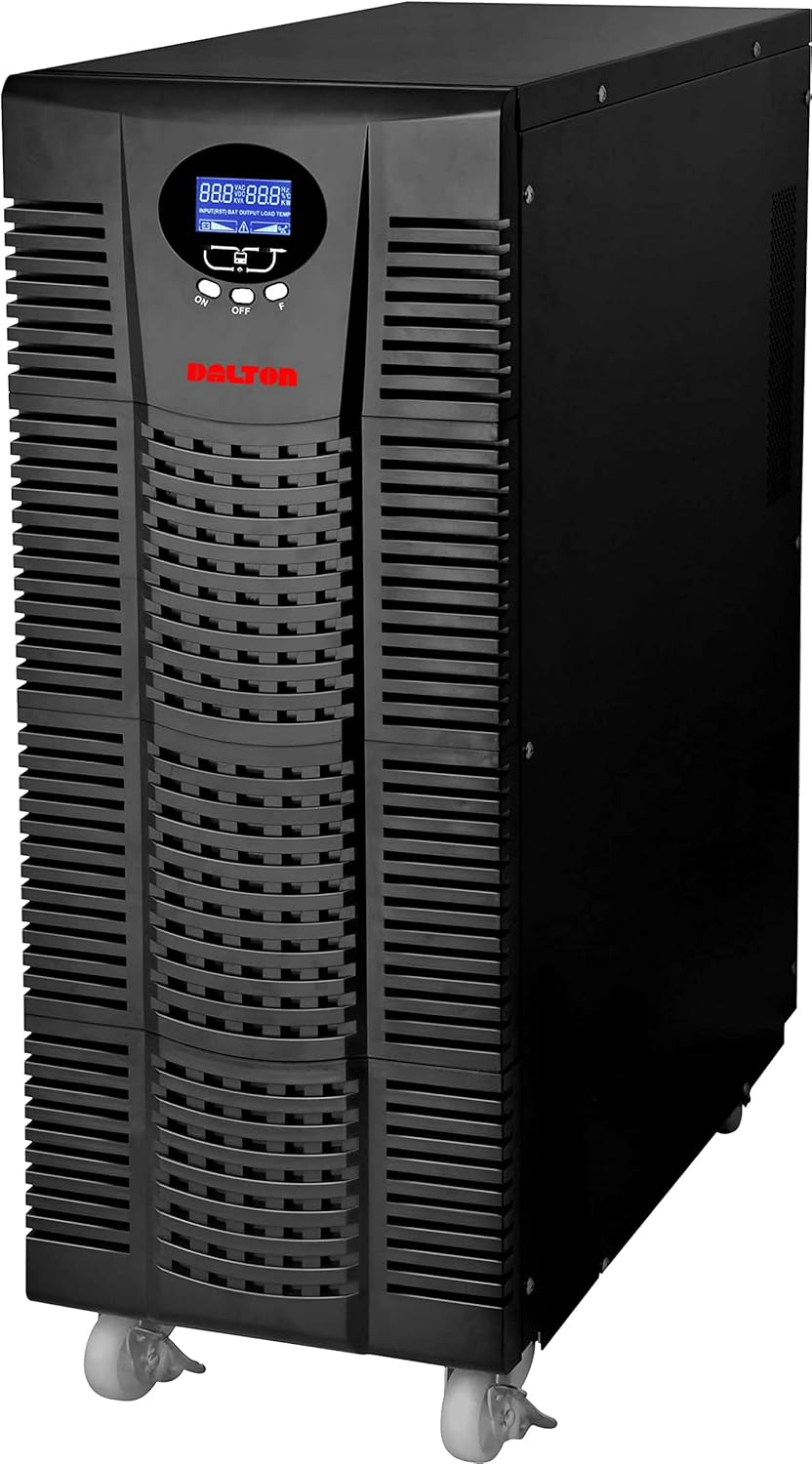
Foto 4.1: N'ihu view of the Dalton 10 kVA UPS unit. This image displays the tall, black tower design of the UPS, featuring a prominent vented front panel for airflow and integrated wheels at the base for easy mobility. The control panel and display are visible towards the top of the unit.
4.1 Ogwe ihu
- Ngosipụta LCD: Shows real-time status, input/output voltage, battery level, load percentage, and error codes.
- bọtịnụ njikwa: Used to navigate menus, acknowledge alarms, and perform system tests.
- Bọtịnụ ike: Turns the UPS on or off.
4.2 Ogwe azụ
- Ntinye ike njikọ: For connecting the UPS to the main AC power source.
- Nkwekọrịta mmepụta: For connecting protected equipment.
- Communication Ports (USB/RS232): For connecting to a computer for monitoring and management.
- External Battery Connector (if applicable): For connecting optional external battery packs.
- Circuit emebi: Provides overload protection.
5. Ntọala na nwụnye
Follow these steps for proper installation of your UPS unit:
- Nkwanye:
- Place the UPS in a clean, dry, and well-ventilated area.
- Ensure sufficient clearance around the unit for proper airflow.
- Avoid direct sunlight, heat sources, and excessive moisture.
- Ịchaji batrị mbụ:
- Jikọọ UPS na oghere ọkụ AC gbadoro ụkwụ.
- Allow the UPS to charge for at least 8 hours before connecting any equipment to ensure full battery capacity. The display will indicate charging status.
- Ngwa njikọ:
- With the UPS turned off and fully charged, connect your critical equipment (computers, servers, networking devices) to the UPS output receptacles.
- Do not connect laser printers or other high-surge current devices to the battery-backed outlets, as this may overload the UPS.
- Na-agbanye ike:
- Press and hold the power button on the front panel until you hear a beep and the display illuminates.
- The UPS will perform a self-test and then enter normal operating mode.
6. Ntuziaka ọrụ
6.1 Ọrụ nkịtị
Once powered on, the UPS continuously monitors the incoming AC power. In normal mode, it provides clean and stable power to connected devices.
6.2 Ụdị batrị
If the utility power fails or fluctuates outside acceptable limits, the UPS will automatically switch to battery mode, providing power from its internal batteries. An audible alarm will sound, and the LCD display will indicate "Battery Mode".
- During battery mode, save your work and shut down connected equipment gracefully to prevent data loss.
- The duration of battery backup depends on the load connected and the battery charge level.
6.3 Powering Off the UPS
To turn off the UPS and disconnect power to connected devices:
- Shut down all connected equipment.
- Press and hold the power button on the UPS until it powers off.
- Disconnect the UPS from the AC power outlet.
7. Nlekọta
7.1 Nlekọta batrị
- Regularly charge the batteries by keeping the UPS connected to AC power.
- Perform a battery self-test periodically (refer to your UPS display menu for this option) to check battery health.
- Batteries have a limited lifespan (typically 3-5 years). Contact service for battery replacement when performance degrades.
7.2 Nhicha
- Clean the exterior of the UPS with a soft, dry cloth.
- Ejila ihe nhicha mmiri ma ọ bụ ikuku ikuku.
- Gbaa mbọ hụ na oghere ikuku adịghị na uzuzu na irighiri ihe.
8. Nchọpụta nsogbu
This section provides solutions to common issues you might encounter with your UPS.
| Nsogbu | Ihe nwere ike ime | Ngwọta |
|---|---|---|
| UPS anaghị agba ọkụ. | No AC input power; Low battery; UPS fault. | Check power cord connection and wall outlet. Allow UPS to charge for several hours. Contact service if problem persists. |
| UPS beeps continuously in normal mode. | Overload; Battery fault. | Reduce connected load. Perform battery self-test. |
| Short backup time. | Overload; Old battery; Insufficient charging. | Reduce load. Replace battery. Ensure UPS is fully charged. |
For issues not listed here, or if solutions do not resolve the problem, please contact Dalton customer support.
9. Nkọwapụta
| Njirimara | Nkọwa |
|---|---|
| Ụdị | Dalton |
| Nlereanya | 10 kVA UPS |
| Ike kacha | 10,000 Watt |
| Ike mmepụta | 10,000 Watt |
| Oke ugboro ugboro | 50/60 Hz (± 3 Hz) |
| Ụdị njikọ | IEC 320, Battery |
| Agba | Nwa |
| Ihe onwunwe | Ọla |
| ASIN | B09NC2FXNC |
| Ụbọchị mbụ dị | Disemba 9, 2021 |
10. Akwụkwọ ikike na nkwado
Dalton provides comprehensive support for its products. As authorized distributors in the Arab Republic of Egypt, we maintain an authorized service center for all Dalton UPS units.
- For technical assistance, troubleshooting, or warranty claims, please contact our authorized service center.
- Ensure you have your product model and ASIN (B09NC2FXNC) ready when contacting support.
- Unauthorized repairs or modifications will void the product warranty.
For more information, please visit the official Dalton websaịtị ma ọ bụ kpọtụrụ onye nkesa mpaghara gị.
Ask a question about this manual
Ask about setup, troubleshooting, compatibility, parts, safety, or missing instructions. Manuals+ will review the question and use this page’s manual context to help answer it.